
WINDOWS CMAKE 多个目录,多个源文件
项目结构
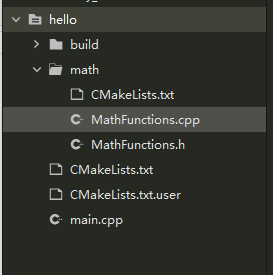
对于这种情况,需要分别在项目根目录 hello和 math 目录里各编写一个 CMakeLists.txt 文件。为了方便,我们可以先将 math 目录里的文件编译成静态库再由 main 函数调用。
根目录的CMakeLists.txt
cmake_minimum_required (VERSION 3.13)
project(Hello)
set(module_name "hello")

# 查找指定目录下的所有源文件,然后将结果存进指定变量名
aux_source_directory(. SRC_LIST)

include_directories("${PROJECT_SOURCE_DIR}/math")

# 添加 math 子目录
add_subdirectory(math)

add_executable(${module_name} ${SRC_LIST})

target_link_libraries(${module_name} MathFunctions)
math目录的CMakeLists.txt
# 查找指定目录下的所有源文件,然后将结果存进指定变量名
aux_source_directory(. MATH_SRC_LIST)

set(module_name "MathFunctions")

# 生成链接库
add_library(${module_name} ${MATH_SRC_LIST})
main.cpp
#include <iostream>
#include "math/MathFunctions.h"
using namespace std;

int main(void)
{
    std::cout<<"hello!"<<std::endl;
    MathFunctions math;
    std::cout<<math.addValue(1, 2)<<std::endl;
    return 0;
}

 浙公网安备 33010602011771号