
java常用API
1.Math类
常用方法如下
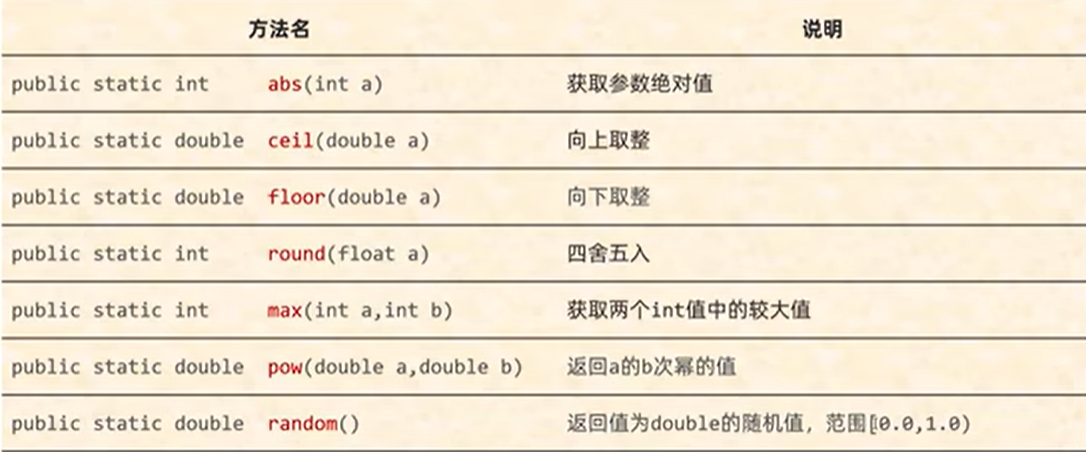
public class TestDemo {
    public static void main(String args[]) {
        System.out.println(Math.abs(-88));
        //System.out.println(Math.absExact(-2147483648));//会检测是否越界
        System.out.println(Math.ceil(-12.54));//-12.0 向上取整
        System.out.println(Math.round(12.54));//13.0 四舍五入
        System.out.println(Math.floor(12.54));//12.0 向下取整
        System.out.println(Math.max(20,30));//30 取较大值
        System.out.println(Math.min(20.5,20.3));//20.3 取较小值
        System.out.println(Math.pow(2,3));//8 2的3次方
        System.out.println(Math.pow(4,0.5));//2.0 4的平方根
        System.out.println(Math.sqrt(4));//2.0 4的平方根
        System.out.println(Math.random());//0.0~1.0之间的随机数 左闭右开不包含1
        System.out.println(Math.floor(Math.random()*100)+1);//1.0~100.0之间的随机数
    }
}
2.System工具类
计算机中的时间原点 1970年1月1日 08:00:00(东八区)
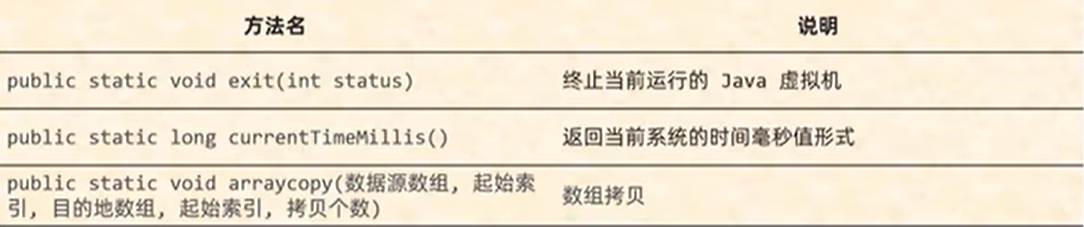
方法3注意事项:
1.如果数据源数组和目的地数组都是基本数据类型,那么两者的类型必须保持一致,否则会报错
2.在拷贝的时候需要考虑数组的长度,如果超出范围也会报错
3.如果数据源数组和目的地数组都是引用数据类型,那么子类类型可以赋值给父类类型
public class TestDemo {
    public static void main(String args[]) {
        //方法的形参(状态码)
        //0:表示当前虚拟机是正常停止
        //非0:表示当前虚拟机异常停止
        //System.exit(0);//虚拟机停止,下方不会继续走(需要把程序停止的时候用

        long l = System.currentTimeMillis();//获取当前系统时间的毫秒值
        System.out.println(l);

        int arr1[]={1,2,3,4,5,6,7,8,9,10};
        int[] arr2=new int[10];
        System.arraycopy(arr1,0,arr2,0,5);//只复制了前五个
        for(int i=0;i<arr2.length;i++){
            System.out.println(arr2[i]);
        }
    }
}
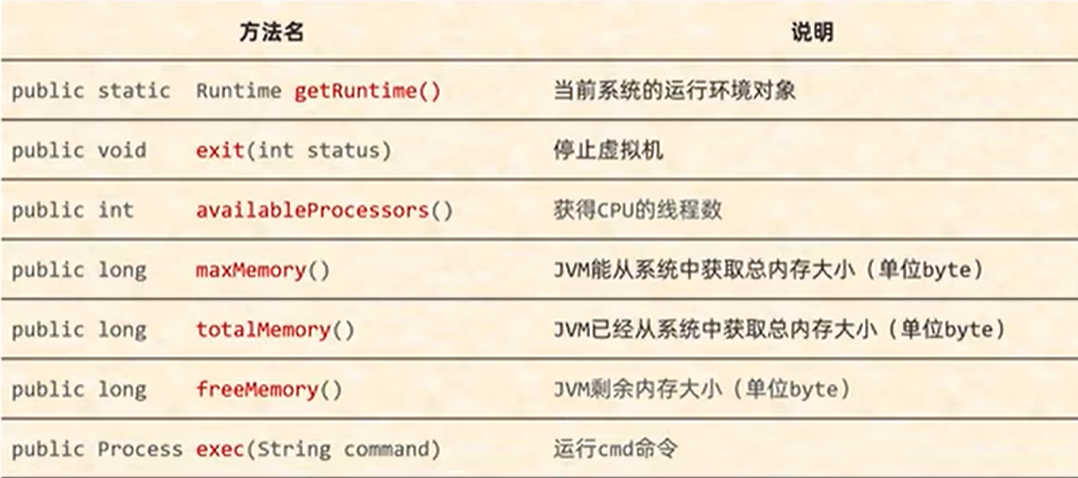
3.Runtime表示当前虚拟机的运行环境
4.Object 是java中的顶级父类,所有的类都直接或间接的继承于Object类(Object类中的方法可以被所有子类访问)
方法名 public Object() 空参构造
顶级父类中只有无参构造方法
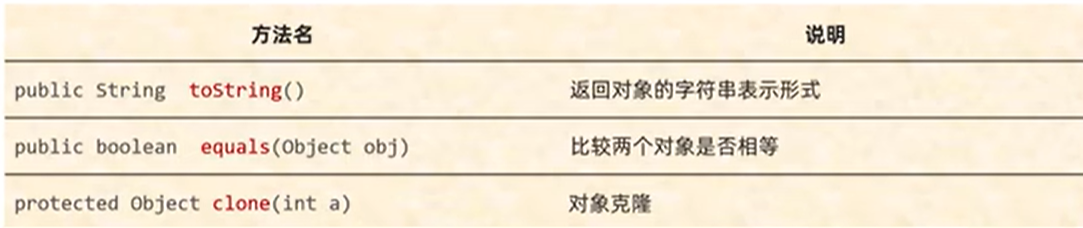
- toString方法的结论:如果打印一个对象想要看到属性值的话,重写toString方法就可以了。在重写的方法中,把对象的属性值进行拼接。
String s = "abc";
StringBuilder sb = new StringBuilder("abc");
System.out.println(s.equals(sb))//false
//因为equals方法是被s调用的,而s是字符串,所以equals要看String类中的
//字符串中的equals方法先判断参数是否为字符串,如果是字符串再比较内部的属性,如果不是字符串直接返回false

System.out.println(sb.equals(s));//false
//因为equals方法时被sb调用的,而sb是StringBuilder,所以这里的equals要看StringBuilder中的
//在StringBuilder中没有重写equals方法,使用的是object中的,而object中默认使用==号比较两个对象的地址值,而这里的s和sb记录的地址值不同,所以结果为false
- clone把A对象的属性值圈圈拷贝给B对象,也叫对象拷贝,对象复制
User u2 = (User) u1.clone()
//方法在底层会帮我们创建一个对象,并把原对象中的数据拷贝过去
浅克隆:不管对象内部的属性是基本数据类型还是引用数据类型,都完全拷贝过来。
深克隆:基本数据类型拷贝过来,字符串复用,引用数据类型会创建新的
Object中的克隆是浅克隆。可以在类中重写克隆方法,实现深克隆/使用第三方工具类
Objects的成员方法:
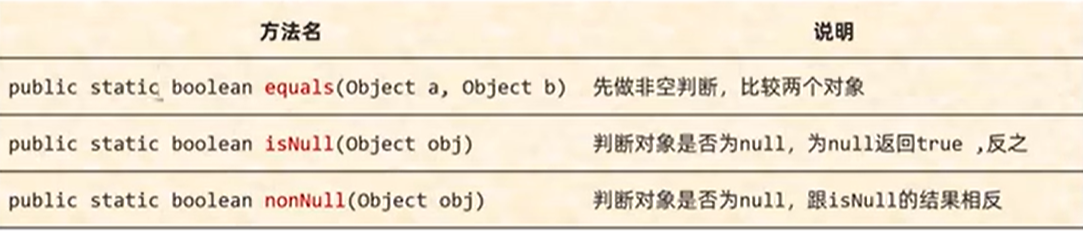
Student s1 = null;
Student s2 = new Student("zhangsan",23);
boolean result = Objects.equals(s1,s2);
System.out.println(result);//false
//方法的底层会判断是s1是否为null,如果是直接返回false
//如果s1不是null,那么就利用s1再次调用equals方法
//此时s1是Student类型,所以最终还是会调用Student中的equals方法。
//如果没有重写,比较地址值。如果重写了,比较属性值
5.BigInteger基本使用和原理解析: 对象一旦创建,内部记录的值不能发生改变

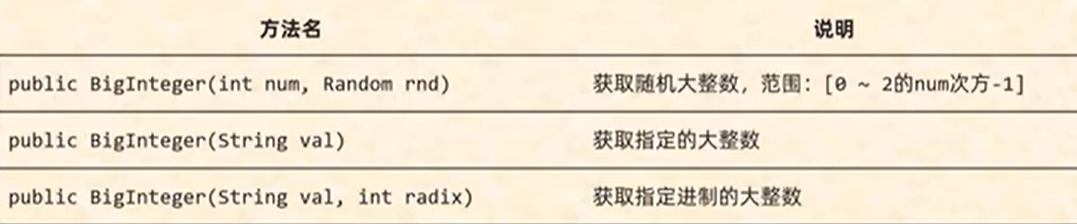

public class Java01 {
    public static void main(String[] args) {
        //1.获取一个随机的大整数
        Random r = new Random();
        BigInteger bd1 = new BigInteger(4,r);//0~2^4-1
        System.out.println(bd1);
        //2.获取一个指定的大整数
        BigInteger bd2 = new BigInteger("9999999999");
        System.out.println(bd2);
        //3.大整数的加减乘除
        System.out.println(bd1.add(bd2));//加法
        System.out.println(bd1.subtract(bd2));//减法
        System.out.println(bd1.multiply(bd2));//乘法
        System.out.println(bd1.divide(bd2));//除法
        //4.获取指定进制的大整数
        BigInteger bd3 = new BigInteger("10000",2);//2进制的123
        System.out.println(bd3);
        //5.静态方法获取BigInteger的对象,内部有优化
        BigInteger bd5 = BigInteger.valueOf(100);
        System.out.println(bd5.add(bd5));
    }
}
注意:
1.如果BigInteger表示的数字没有超出long的范围,可以用静态方法获取。
2.如果BigInteger表示的超出long的范围,可以用构造方法获取。
3.对象一旦创建,BigInteger内部记录的值不能发生改变
4.只要进行计算都会产生一个新的BigInteger对象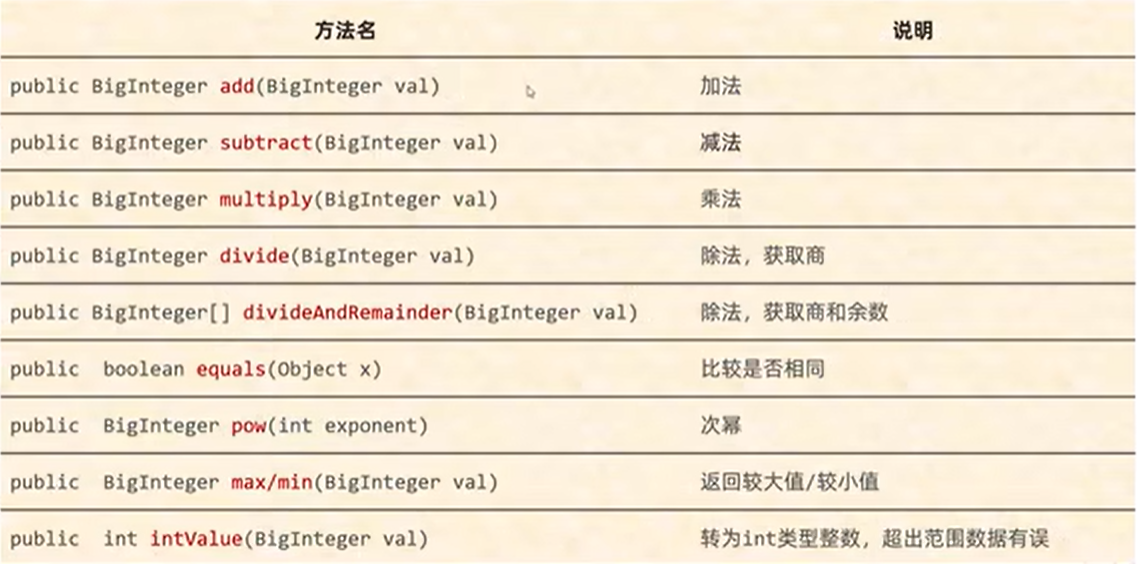
6.BigDecima
作用:表示较大的小数和解决小数运算精度失真问题
public class Java01 {
    public static void main(String[] args) {
        //1.通过传递double类型跨小数来创建对象
        BigDecimal bd1 = new BigDecimal("1.23");
        BigDecimal bd2 = new BigDecimal("0.09");
        System.out.println(bd1);
        System.out.println(bd2);

        //2.通过传递字符串表示的小数来创建对象
        BigDecimal bd3 = bd1.add(bd2);
        System.out.println(bd3);

        //3.通过静态方法获取对象
        BigDecimal bd4=BigDecimal.valueOf(10);
        System.out.println(bd4);
        //如果要表示的数字不大没有超出double的取值范围使用静态方法,否则建议使用构造方法
        //如果传递的是0-19之间的整数,包含0包含10,那么方法会返回已经创建好的对象不会重新new
    }
}
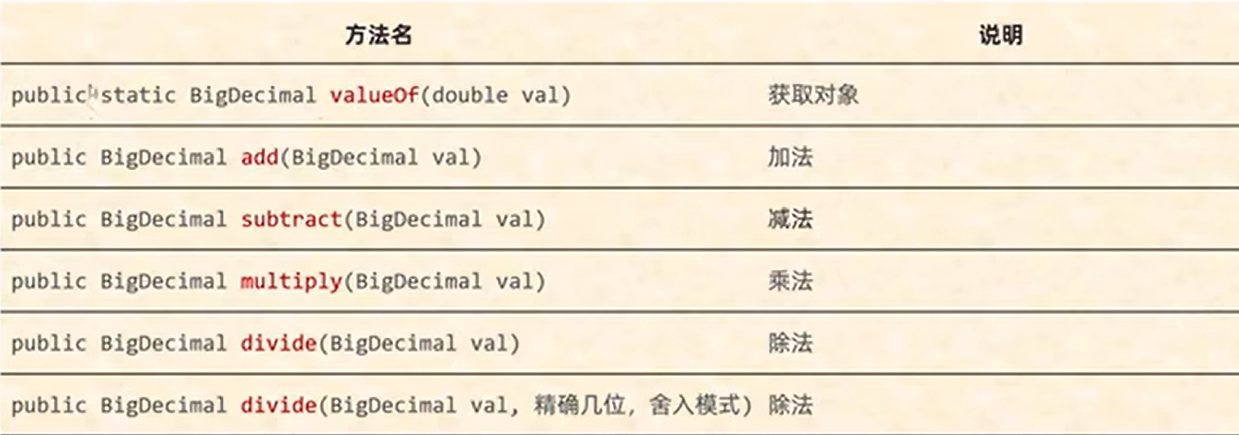
舍入模式:
UP:远离零方向舍入的舍入模式
DOWN:向零方向舍入的舍入模式
CEILING:向正无限大方向舍入的舍入模式
FLOOR:向负无限大方向舍入的舍入模式
RoundingMode.HALF_UP 四舍五入
7.正则表达式:
作用:(1)校验字符串是否满足规则(2)在一段文本中查找满足规则的内容
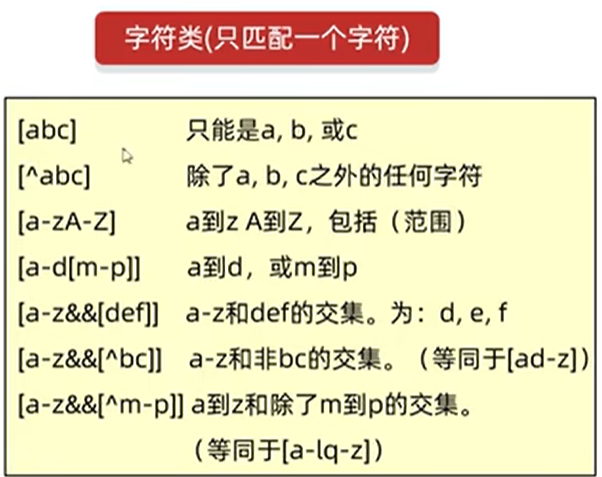
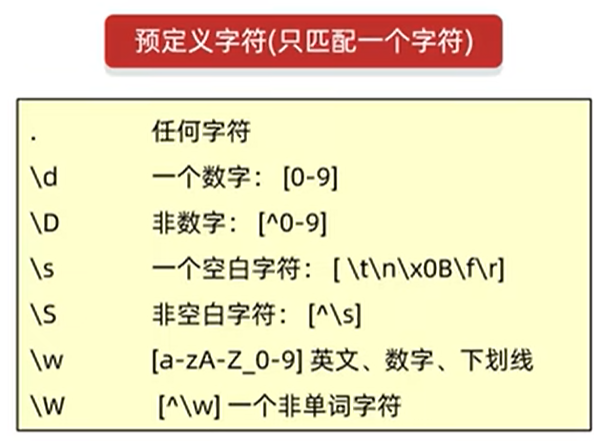
转义字符\ 改变后面那个字符的含义
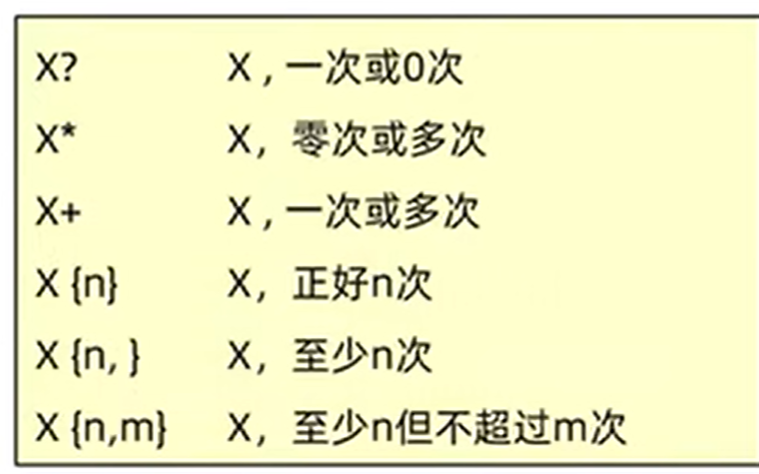
数量词:
本地爬虫:
public class Demo {
    public static void main(String []args){
        /*如有以下文本,按照要求爬取数据
        Java自从95年问世以来,经历了很多版本,目前企业中用的最多的是Java8和Java11,
        因为这两个是长期支持版本,下一个长期支持版本是Java17,相信在未来不久Java17也会逐渐登上历史舞台
        要求:找出里面所有的JavaXX
            */
        String str="Java自从95年问世以来,经历了很多版本,目前企业中用的最多的是Java8和Java11," +
                "因为这两个是长期支持版本,下一个长期支持版本是Java17,相信在未来不久Java17也会逐渐登上历史舞台";
        //Pattern表示正则表达式
        //Matcher:文本匹配器,作用按照正则表达式的规则去读取字符串,从头开始读取
        //在大串中去找符合匹配规则的子串
        Pattern p = Pattern.compile("Java\\d{0,2}");
        Matcher m = p.matcher(str);

        //利用循环获取
        while(m.find()){
            String s = m.group();
            System.out.println(s);
        }
    }

    private static void method1(String str){
        Pattern p = Pattern.compile("Java\\d{0,2}");
        Matcher m = p.matcher(str);

        boolean b = m.find();
        String s1=m.group();
        System.out.println(s1);
    }
}
捕获分组:后续还要继续使用本组的数据
正则内部使用:\\组号 正则外部使用:$组号
public class Demo {
    public static void main(String []args){

      String str="我要学学编编编编程程程程程程";
      //需求:把重复的内容 替换为单个的
        String res=str.replaceAll("(.)\\1+","$1");
        System.out.println(res);//我要学编程
    }
}
非捕获分组:分组之后不需要再使用本组数据,仅仅把数据括起来,不占组号
(?:正则) 获取所有
(?=正则)获取前面部分
(?!正则)获取不是指定内容的前面部分
8.JDK7-Date时间
- 时间:以前使用格林威治时间(Greenwich Mean Time)简称GMT
现在:原子钟利用铯原子的振动频率计算出来的时间作为世界时间UTC
中国时间=世界标准时间+8h
- Date时间类:是一个JDK写好的Javabean类,用来描述时间,精确到毫秒。
利用空参构造创建的对象,默认表示系统当前时间。利用有参构造创建的对象,表示指定的时间
public class Demo {
    public static void main(String []args){
        //1.创建对象表示一个时间
        Date d1 = new Date();
        //创建对象表示一个指定的时间
        Date d2=new Date(0L);
        System.out.println(d2);
        //setTime修改时间 1000毫秒=1秒
        d2.setTime(1000L);
        System.out.println(d2);
        //getTime获取当前时间的毫秒值
        long time = d2.getTime();
        System.out.println(time);
    }
}
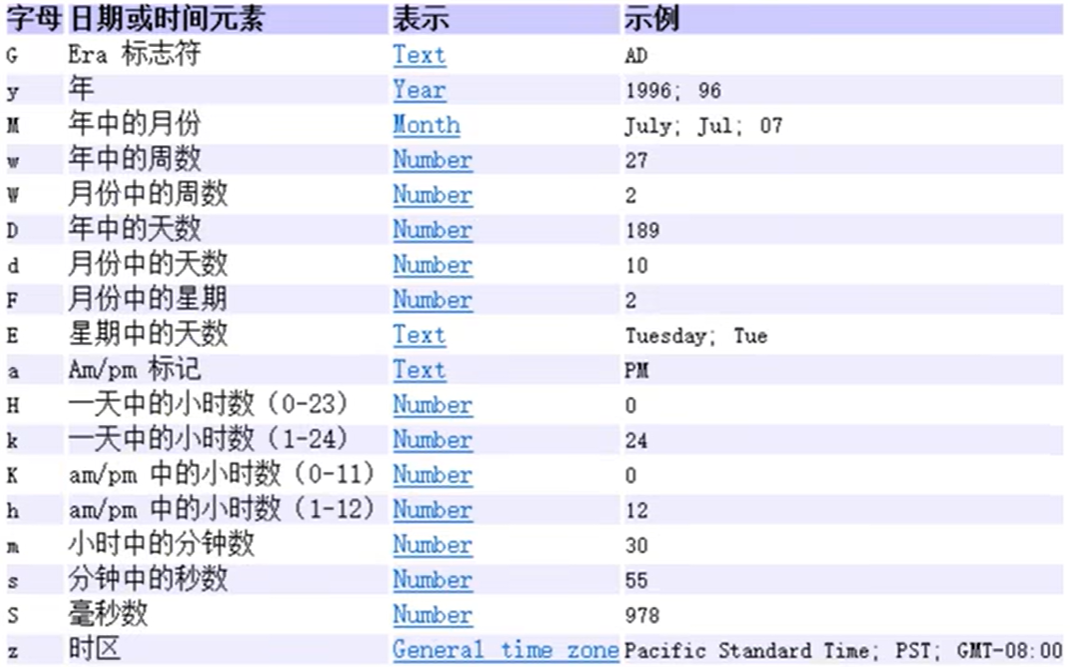
- SimpleDateFormat类作用
格式化:把时间变成我们喜欢的格式
解析:把字符串表示的时间变成Date对象


模式定义:
public class Demo {
    public static void main(String []args){
        //1.利用空参构造创建SimpleDateFormat对象,默认格式
        SimpleDateFormat sdf1 = new SimpleDateFormat();
        Date d1 = new Date(0L);
        String str1=sdf1.format(d1);
        System.out.println(str1);//1970/1/1 08:00
        //2.利用带参构造创建SimpleDateFormat对象,指定格式
        SimpleDateFormat sdf2 = new SimpleDateFormat("yyyy年MM月dd日 HH:mm:ss");
        String str2=sdf2.format(d1);
        System.out.println(str2);//1970年01月01日 08:00:00
    }
}
9.Calendar:代表当前系统时间的日历对象,可以单独修改、获取时间中的年月日
注意:Calendar是一个抽象类,不能直接创建对象。
获取Calendar日历类对象的方法:public static Calendar getInstance()获取当前时间的日历对象
常用方法:
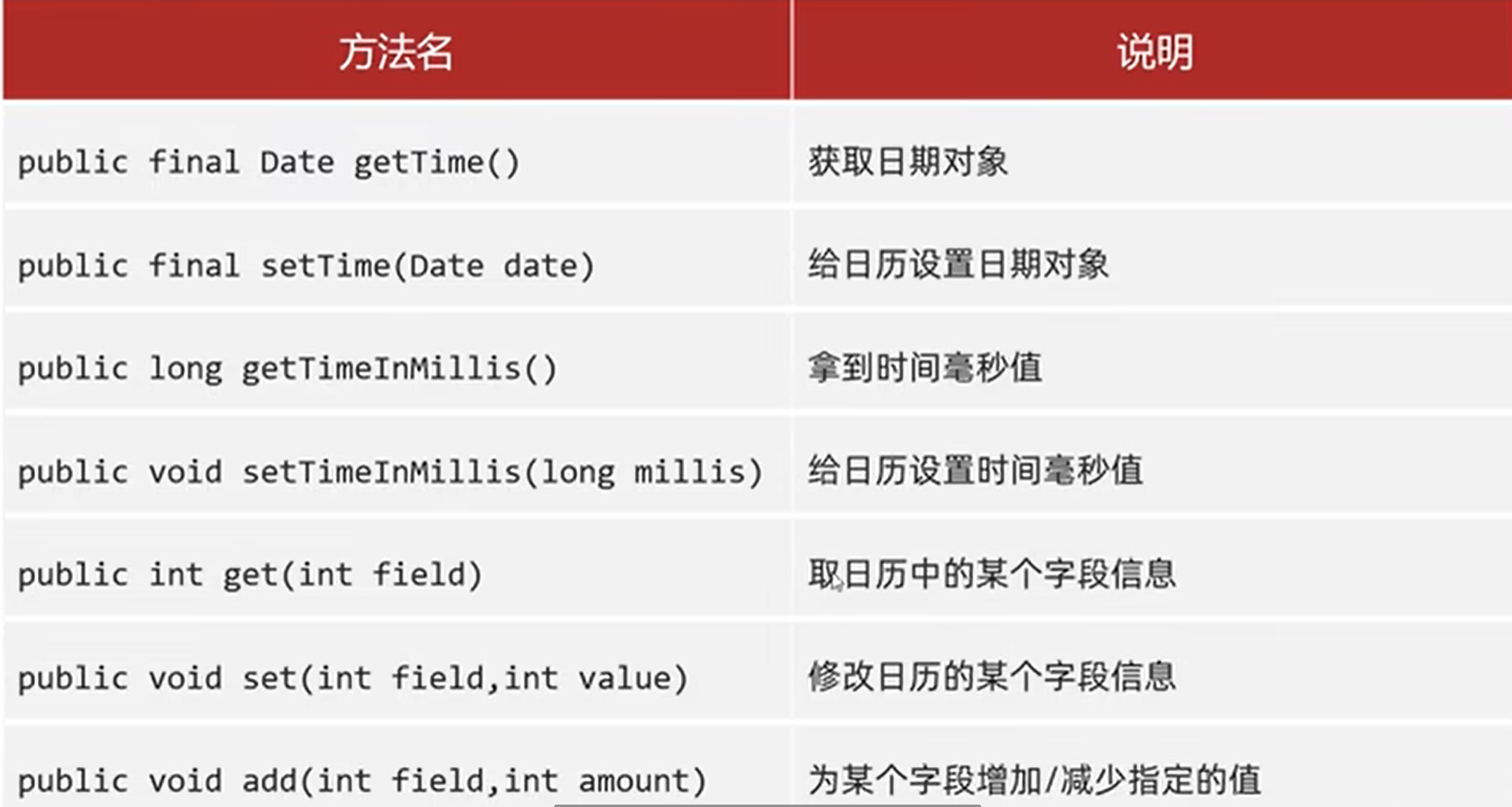
public class Demo {
    public static void main(String []args){
        /*获取日历对象
        *细节:Calendar是一个抽象类,不能直接new,而是通过一个静态方法获取到了子类对象
        *底层原理:会根据系统的不同时区来获取不同的日历对象。会把时间中的0:纪元,1:年,2:月,日,时,分,秒,星期,等等的都放到一个数组当中
        * 细节2:
        * 月份范围0~11,如果取出来是0,那么实际上是1月;星期:在外国星期日是一周中的第一天 1星期日 2星期一...
        * */
        Calendar c = Calendar.getInstance();

        //2.修改下日历代表的时间
        Date d = new Date(0L);
        c.setTime(d);
        System.out.println(c);

        //修改日历
        c.set(Calendar.YEAR, 2000);
        c.set(Calendar.MONTH, 11);

        //为某个字段增加/减少指定的值
        c.add(Calendar.MONTH, 2);

        //取日期中的某个字段信息
        int year=c.get(Calendar.YEAR);
        int month=c.get(Calendar.MONTH)+1;
        int day=c.get(Calendar.DAY_OF_MONTH);
        //int Week=c.get(Calendar.DAY_OF_WEEK);
        System.out.println(year+"-"+month+"-"+day);
    }
}
10.JDK8时间类
Date类:ZoneId:时区;Instant:时间戳;ZoneDateTime:带时区的时间
日期格式化类SimpleDateFormat:DateTimeFormatter用于时间的格式化和解析
Calendar日历类:LocalDate:年、月、日;LocalTime:时、分、秒;LocalDateTime:年月日时分秒
工具类:Duration:时间间隔(秒、纳秒);Period:时间间隔(年、月、日);ChronoUnit:时间间隔(所有单位)
//ZoneId
public class Demo {
    public static void main(String []args){
       //1.获取所有的时区名称
        Set<String>zoneIds= ZoneId.getAvailableZoneIds();
        System.out.println(zoneIds.size());
        System.out.println(zoneIds);

        //2.获取当前系统的默认时区
        ZoneId zoneId = ZoneId.systemDefault();
        System.out.println(zoneId);
        //3.获取指定的时区
        ZoneId zoneId1=ZoneId.of("Asia/Pontianak");
        System.out.println(zoneId1);
    }
}
//Instant
public class Demo {
    public static void main(String []args){
       //1.获取当前的Instant对象(标准时间(
        Instant now = Instant.now();
        System.out.println(now);
        //2.根据(秒/毫秒/纳秒)获取Instant对象
        Instant instant1=Instant.ofEpochMilli(0L);
        System.out.println(instant1);//1970-01-01T00:00:00Z

        Instant instant2=Instant.ofEpochSecond(1L);
        System.out.println(instant2);//1970-01-01T00:00:01Z

        Instant instant3=Instant.ofEpochSecond(1L,1000000000L);
        System.out.println(instant3);//1970-01-01T00:00:02Z

        //3.指定时区
        ZonedDateTime time =Instant.now().atZone(ZoneId.of("Asia/Shanghai"));
        System.out.println(time);

        //4.isXxx判断
        Instant instant4=Instant.ofEpochMilli(0L);
        Instant instant5=Instant.ofEpochMilli(1000L);

        boolean res=instant4.isBefore(instant5);
        System.out.println(res);//true instant4参数在5前面

        //5.Instant minusXxx(long millisToSubtract)减少时间系列的方法
        Instant instant6 = Instant.ofEpochMilli(3000L);
        System.out.println(instant6);
        Instant instant7 = instant6.minusSeconds(1);
        System.out.println(instant7);
    }
}
11.包装类 基本数据类型对应的引用类型
byte-Byte, short-Short, char-Character, int-Integer, long-Long, float-Float, double- Double, boolean- Boolean
JDK5以后对包装类新增了自动装箱、自动拆箱的特性(即基本数据类型和对象之间的转换)
public class Demo {
    public static void main(String []args){
       //1.利用构造方法获取Integer的对象(JDK5以前的方式)
        Integer i1 = new Integer(1);
        Integer i2 = new Integer("1");
        System.out.println(i1);
        System.out.println(i2);
        //2.利用静态方法获取Integer的对象
        Integer i3=Integer.valueOf(123);
        System.out.println(i3);

        //3.这两种方法获取对象的区别
        //因为在实际开发中-128~127之间的数据使用率高
        //如果每次使用new对象太浪费内存了
        //所以提前把该范围内的每一个数据都创建好对象
        //如果用到 不会创建新的而是返回已经创建好的对象
        Integer i6 = Integer.valueOf(127);
        Integer i7 = Integer.valueOf(127);
        System.out.println(i6==i7);//true

        Integer i8 = Integer.valueOf(128);
        Integer i9 = Integer.valueOf(128);
        System.out.println(i8==i9);//false

        //因为使用new关键字创建,每次都是创建了一个新的对象,因此下面的两个对象地址值不一样
        Integer i10 = new Integer(127);
        Integer i11 = new Integer(127);
        System.out.println(i10==i11);//false

        Integer i12 = new Integer(128);
        Integer i13 = new Integer(128);
        System.out.println(i12==i13);//false
    }
}
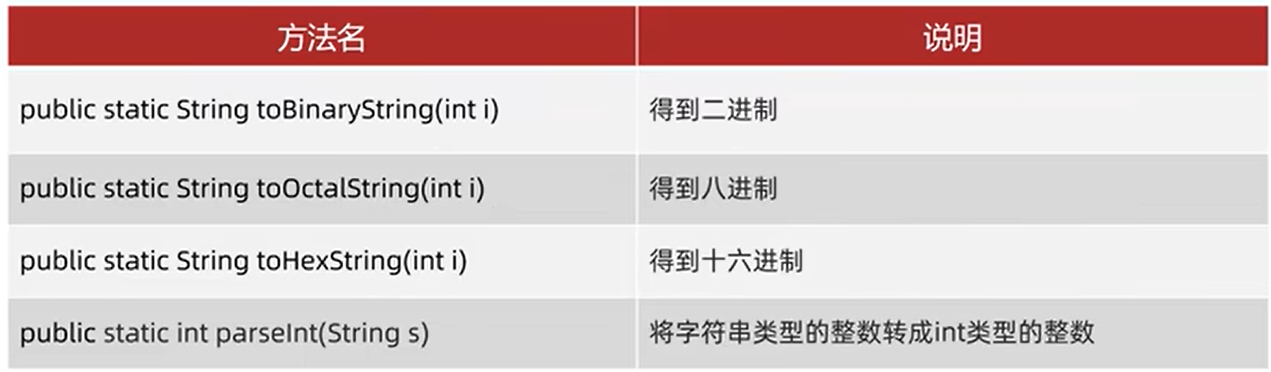
- Integer成员方法

 浙公网安备 33010602011771号