python日志篇-基础版
对常用python日志语法做记录,方便以后重复使用
日志等级:
DEBUG(调试)<INFO(一般信息输出)<WARNING(警告信息)<ERRO(程序报错信息)<CRITICAL(程序崩溃信息)
print内容记录到文件:
#!/usr/bin/env python
# -*- coding: utf-8 -*-
##______________________命令行执行test.py文件并写入执行结果到abc.log文件_____________________
# -*- coding: UTF-8 -*-
for i in range(1,21):
    print("the number is {}".format(i))

'''
在cmd中运行
python test.py>adc.log
'''


##————————————————————————直接运行就可以记录打印内容————————————————————————————————
#!/usr/bin/env python
# -*- coding: utf-8 -*-
import sys
origin = sys.stdout#标准输出文件
#打开文件并执行控制台
f = open('file.txt', 'w')
sys.stdout = f
print ('开始记录打印内容')
a=555
print('a=',a)
print ('Start of progeeeeeeeeeeeeeeeeeeeram')
# 你的程序放到这里,过程中所有print到屏幕的内容都同时保存在file.txt里面了。
print ('End of program')
sys.stdout = origin
f.close()


#——————————————————print_wire.py模块——————直接执行或通过导入模块名执行即可————————————————————————————————
#!/usr/bin/env python
# encoding: utf-8
import sys
import time

class Logger(object):
    def __init__(self, filename="Default.log"):
        self.terminal = sys.stdout
        self.log = open(filename, "a")#a表示追加,w覆盖写入

    def write(self, message):
        self.terminal.write(message)
        if '下载进度' not in message:#过滤下载进度的日志
            #a=str(time.strftime('%Y-%m-%d %H:%M:%S',time.localtime(time.time())))
            self.log.write(message)

    def flush(self):
        pass

now = time.strftime("%Y-%m-%d", time.localtime())#获取当前日期
sys.stdout = Logger('123456.txt')#存放文件名


if __name__ == '__main__':
    __console__=sys.stdout
    print('---------start---------')
    print('1234567890123456789')
    print('---------stop---------')
    sys.stdout=__console__
    time.sleep(10)


'''
如果在其他模块需要记录print内容,只需import rint_wire即可
'''
python logging日志封装:
#!/usr/bin/env python
# -*- coding: utf-8 -*-
# @Author: zhangjun
# @Date  : 2018/7/26 9:20
# @Desc  : Description

import logging
import logging.handlers
import os
import time

class logs(object):
    def __init__(self):
        self.logger = logging.getLogger("")
        ## 设置输出的等级
        LEVELS = {'NOSET': logging.NOTSET,
                  'DEBUG': logging.DEBUG,
                  'INFO': logging.INFO,
                  'WARNING': logging.WARNING,
                  'ERROR': logging.ERROR,
                  'CRITICAL': logging.CRITICAL}
        ##_________________________同时打印控制台并写入文件____________________________________
        ## 创建文件目录
        logs_dir="logs2"
        if os.path.exists(logs_dir) and os.path.isdir(logs_dir):
            pass
        else:
            os.mkdir(logs_dir)
        ## 修改log保存位置
        timestamp=time.strftime("%Y-%m-%d",time.localtime())
        logfilename='%s.txt' % timestamp
        logfilepath=os.path.join(logs_dir,logfilename)
        rotatingFileHandler = logging.handlers.RotatingFileHandler(filename =logfilepath,
                                                                   maxBytes = 1024 * 1024 * 50,
                                                                   backupCount = 5)
        ## 设置输出格式
        formatter = logging.Formatter('[%(asctime)s] [%(levelname)s] %(message)s', '%Y-%m-%d %H:%M:%S')
        rotatingFileHandler.setFormatter(formatter)
        ## 控制台句柄
        console = logging.StreamHandler()
        console.setLevel(logging.NOTSET)
        console.setFormatter(formatter)
        ## 添加内容到日志句柄中
        self.logger.addHandler(rotatingFileHandler)
        self.logger.addHandler(console)
        self.logger.setLevel(logging.NOTSET)

        ##___________________________只打印控制台不写入文件____________________________________________
        # logging.basicConfig(level=logging.DEBUG,
        #             format='%(asctime)s - %(filename)s[line:%(lineno)d] - %(levelname)s: %(message)s')


        #__________________________只写入文件不打印控制台______________________________________________
        # ## 创建文件目录
        # logs_dir="logs2"
        # if os.path.exists(logs_dir) and os.path.isdir(logs_dir):
        #     pass
        # else:
        #     os.mkdir(logs_dir)
        # ## 修改log保存位置
        # timestamp=time.strftime("%Y-%m-%d",time.localtime())
        # logfilename='%s.txt' % timestamp
        # logfilepath=os.path.join(logs_dir,logfilename)
        # rotatingFileHandler = logging.handlers.RotatingFileHandler(filename =logfilepath, maxBytes = 1024 * 1024 * 50,backupCount = 5)
        # ## 设置输出格式
        # formatter = logging.Formatter('[%(asctime)s] [%(levelname)s] %(message)s', '%Y-%m-%d %H:%M:%S')
        # rotatingFileHandler.setFormatter(formatter)
        # ## 添加内容到日志句柄中
        # self.logger.addHandler(rotatingFileHandler)
        # self.logger.setLevel(logging.NOTSET)


    def info(self, message):
        self.logger.info(message)

    def debug(self, message):
        self.logger.debug(message)

    def warning(self, message):
        self.logger.warning(message)

    def error(self, message):
        self.logger.error(message)


if __name__ == '__main__':
    logger = logging.getLogger(__name__)
    logger=logs()
    logger.info("this is info")
    logger.debug("this is debug")
    logger.error("this is error")
    #logger.warning("this is warning")


# #在其他模块调用日志
# import logging
# logger = logging.getLogger(__name__)
# import 日志的模块
# if __name__ == '__main__':
#     logger=日志模块.logs()
#     logger.info("this is info")
#     logger.debug("this is debug")
#     logger.error("this is error")
#     logger.warning("this is warning")
第三方loguru模块处理日志:
如果想更简洁,可用loguru库,python3安装:pip3 install loguru。
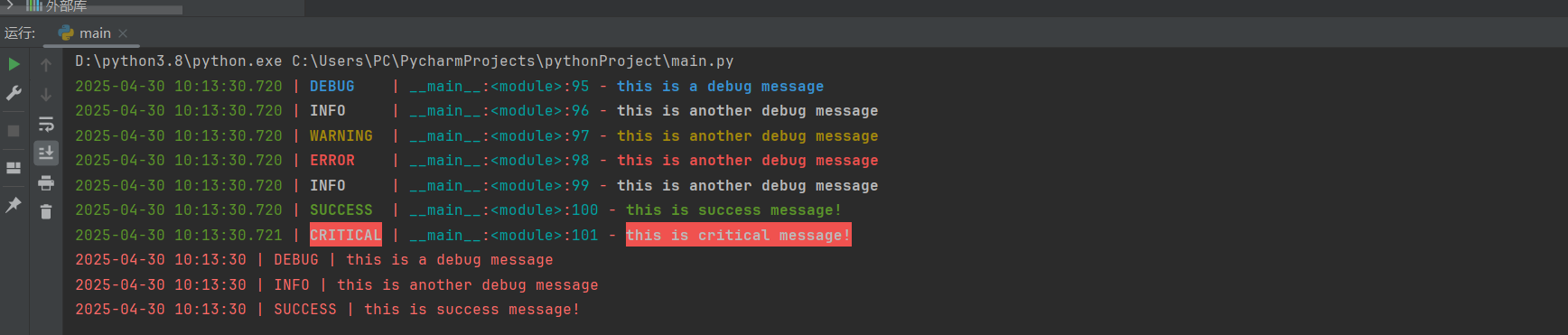
loguru默认的输出格式是上面的内容,有时间、级别、模块名、行号以及日志信息,不需要手动创建 logger,直接使用即可,另外其输出还是彩色的,看起来会更加友好。
from loguru import logger

##########################默认格式###################################
logger.debug('this is a debug message')
logger.info('this is another debug message')
logger.warning('this is another debug message')
logger.error('this is another debug message')
logger.info('this is another debug message')
logger.success('this is success message!')
logger.critical('this is critical message!')


#########################自定义格式##################################
import sys
logger.remove()  # 移除默认的日志处理器
logger.add(sys.stderr, format="{time:YYYY-MM-DD HH:mm:ss} | {level} | {message}")

# 测试日志
logger.debug('this is a debug message')
logger.info('this is another debug message')
logger.success('this is success message!')
执行结果如下:
日志写入文件及设置
#!/usr/bin/env python
# -*- coding: utf-8 -*-

from loguru import logger

#______________________________日志写入文件为json格式_________________________________
logger.add("json.log",serialize=True,encoding="utf-8")
logger.debug('this is a debug message')
logger.info('this is a info message123456')


#_____________________________日志写入文件普通模式____________________________________
logger.add('my_log.log')
logger.debug('this is a debug')
logger.debug('this is a info')
logger.error('this is another error message')


#_________________________________日志绕接__________________________________________
logger.add('my_log1.log',rotation="500MB") #自动循环过大的文件
logger.add('my_log2.log',rotation="12:00") #每天中午创建新文件
logger.add('my_log3.log',rotation="1 week") #一旦文件太旧进行循环
logger.add('my_log4.log',rotation="10 days") #定期清理
logger.add('my_log4.log',compression="zip") #压缩节省空间
运行之后会发现目录下 my_log.log 出现了刚刚控制台输出的 DEBUG 信息
其他写法:
######################################配置抽离,更适合实际场景(不封装)###############################
#!/usr/bin/env python
import sys,time
from loguru import logger
folder_ = "./log/"
prefix_ = "polaris-"
rotation_ = "10 MB"
retention_ = "30 days"
encoding_ = "utf-8"
backtrace_ = True
diagnose_ = True

# 格式里面添加了process和thread记录,方便查看多进程和线程程序
format_ = '<green>{time:YYYY-MM-DD HH:mm:ss.SSS}</green> | <level>{level: <8}</level> ' \
            '| <magenta>{process}</magenta>:<yellow>{thread}</yellow> ' \
            '| <cyan>{name}</cyan>:<cyan>{function}</cyan>:<yellow>{line}</yellow> - <level>{message}</level>'

# 这里面采用了层次式的日志记录方式,就是低级日志文件会记录比他高的所有级别日志,这样可以做到低等级日志最丰富,高级别日志更少更关键
# debug
logger.add(folder_ + prefix_ + "debug.log", level="DEBUG", backtrace=backtrace_, diagnose=diagnose_,
            format=format_, colorize=False,
            rotation=rotation_, retention=retention_, encoding=encoding_,
            filter=lambda record: record["level"].no == logger.level("DEBUG").no)
# info
logger.add(folder_ + prefix_ + "info.log", level="INFO", backtrace=backtrace_, diagnose=diagnose_,
            format=format_, colorize=False,
            rotation=rotation_, retention=retention_, encoding=encoding_,
            filter=lambda record: record["level"].no == logger.level("INFO").no)
# warning
logger.add(folder_ + prefix_ + "warning.log", level="WARNING", backtrace=backtrace_, diagnose=diagnose_,
            format=format_, colorize=False,
            rotation=rotation_, retention=retention_, encoding=encoding_,
            filter=lambda record: record["level"].no >= logger.level("WARNING").no)
# error
logger.add(folder_ + prefix_ + "error.log", level="ERROR", backtrace=backtrace_, diagnose=diagnose_,
            format=format_, colorize=False,
            rotation=rotation_, retention=retention_, encoding=encoding_,
            filter=lambda record: record["level"].no >= logger.level("ERROR").no)
# critical
logger.add(folder_ + prefix_ + "critical.log", level="CRITICAL", backtrace=backtrace_, diagnose=diagnose_,
            format=format_, colorize=False,
            rotation=rotation_, retention=retention_, encoding=encoding_,
            filter=lambda record: record["level"].no >= logger.level("CRITICAL").no)

logger.add(sys.stderr, level="CRITICAL", backtrace=backtrace_, diagnose=diagnose_,
            format=format_, colorize=True,
            filter=lambda record: record["level"].no >= logger.level("CRITICAL").no)


if __name__ == '__main__':
    logger.debug("This is a debug message")
    time.sleep(1)
    logger.info("This is an info message")

###在其他模块调用
import 日志模块
日志模块.logger.info("This is an info message")


######################################配置抽离并封装起来######################################
# !/usr/bin/env python
# -*- coding: utf-8 -*
import sys
from loguru import logger

class logs(object):
    folder_ = "./log/"
    prefix_ = "polaris-"
    rotation_ = "10 MB"
    retention_ = "30 days"
    encoding_ = "utf-8"
    backtrace_ = False
    diagnose_ = False
    format_ = '<green>{time:YYYY-MM-DD HH:mm:ss.SSS}</green> | <level>{level: <8}</level> ' \
              '| <magenta>{process}</magenta>:<yellow>{thread}</yellow> ' \
              '| <cyan>{name}</cyan>:<cyan>{function}</cyan>:<yellow>{line}</yellow> - <level>{message}</level>'
    def debug(self, debug):
        logger.add(self.folder_ + self.prefix_ + "debug.log", level="DEBUG", backtrace=self.backtrace_,
                   diagnose=self.diagnose_,
                   format=self.format_, colorize=False,
                   rotation=self.rotation_, retention=self.retention_, encoding=self.encoding_,
                   filter=lambda record: record["level"].no == logger.level("DEBUG").no)
        logger.debug(debug)
    def info(self, info):
        logger.add(self.folder_ + self.prefix_ + "info.log", level="INFO", backtrace=self.backtrace_,
                   diagnose=self.diagnose_,
                   format=self.format_, colorize=False,
                   rotation=self.rotation_, retention=self.retention_, encoding=self.encoding_,
                   filter=lambda record: record["level"].no == logger.level("INFO").no)
        logger.info(info)
    def error(self, error):
        logger.add(self.folder_ + self.prefix_ + "error.log", level="ERROR", backtrace=self.backtrace_,
                   diagnose=self.diagnose_,
                   format=self.format_, colorize=False,
                   rotation=self.rotation_, retention=self.retention_, encoding=self.encoding_,
                   filter=lambda record: record["level"].no == logger.level("ERROR").no)
        logger.error(error)

if __name__ == '__main__':
    log = logs()
    log.debug("这是debug信息")
    log.info("这是info信息")
    log.error("这是error信息")

# 在其他模块调用
import 日志所在模块
log = 日志所在模块.logs()
log.debug("这是debug信息")
log.info("这是info信息")


############################################设置不同级别的日志并输出到文件#######################################
from loguru import logger
##设置不同级别的日志输出文件(rotation:超过xx就新生成文件, filter:当日志级别是 "DEBUG" 时,才会被写入到指定的日志文件)
logger.add("debug.log", level="DEBUG", rotation="10 MB", filter=lambda record: record["level"].name == "DEBUG")
logger.add("info.log", level="INFO", rotation="10 MB", filter=lambda record: record["level"].name == "INFO")
logger.add("warning.log", level="WARNING", rotation="10 MB", filter=lambda record: record["level"].name == "WARNING")
logger.add("error.log", level="ERROR", rotation="10 MB", filter=lambda record: record["level"].name == "ERROR")
logger.add("critical.log", level="CRITICAL", rotation="10 MB", filter=lambda record: record["level"].name == "CRITICAL")

##输出不同级别的日志消息
logger.debug("This is a debug message")
logger.info("This is an info message")
logger.warning("This is a warning message")
logger.error("This is an error message")
logger.critical("This is a critical message")
相关连接:
https://mp.weixin.qq.com/s?__biz=MzkxNDI3NjcwMw==&mid=2247493818&idx=1&sn=1b913b843f60b522041dcd0807f2ba2f .....................loguru一行代码搞定Python日志
https://blog.csdn.net/cui_yonghua/article/details/107498535 ........................................................................................................................loguru详细用法(好处:不用学代码直接调用即可)
日志服务相关连接(详情在数据分类):
https://c4ys.com/archives/552 ....................................................................python+logstash+elasticsearch+Kibana日志方案
https://www.cnblogs.com/xuzhongtao/p/12466351.html ..............................Kibana搭建
https://www.jianshu.com/p/9d2316693a1e ................................................kibana查询基础使用


 浙公网安备 33010602011771号