一、什么是广告系统

  • 图示
    在这里插入图片描述
  • 包括以下模块
    在这里插入图片描述
  • 用到的知识点
    在这里插入图片描述

二、广告系统实现了什么功能

在这里插入图片描述

  • 包含的子系统
    在这里插入图片描述
  • 广告投放系统 -> 广告数据是由广告主或代理商投放
    广告检索系统 -> 媒体方对广告系统发起请求,广告系统能够检索符合要求的广告数据,这就是广告检索系统的核心功能
    曝光监测系统 -> 监测广告数据的曝光记录
    报表系统 -> 构建广告数据报表,比如广告 A 在地域 B 中一共曝光了多少次,主要是 OLAP 的过程
    扣费系统 -> 广告的每一次曝光都是需要扣费的,CPM按次数收费,CPC按点击量收费,CPT按时间收费

三、广告系统架构

在这里插入图片描述
目录结果

  • 广告数据索引由两部分组成:全量索引、增量索引。

开发所用的技术

1.项目构建和项目管理工具:Maven
maven 3.4+,spring boot 2.0.2+,spring cloud Finchley.RELEASE+,


四、广告系统骨架开发和通用模块开发

https://blog.csdn.net/weixin_38004638/article/details/90719726

4.1 Eureka服务注册与服务发现 - 构建 ad-eureka

Eureka 的介绍
核心功能
ServiceRegistry(服务注册)
ServiceDiscovery(服务发现)

基本架构
Eureka 由三个角色组成:
EurekaServer(这一章实现的功能),提供服务注册与发现
ServiceProvider,服务提供方,将自身服务注册到 EurekaServer 上,从而让EurekaServer 持有服务的元信息,让其他的服务消费方能够找到当前服务
ServiceConsumer,服务消费方,从 EurekaServer 上获取注册服务列表,从而能够消费服务
ServiceProvider/Consumer 相对于 Server,都叫做 Eureka Client

Eureka 的基本架构如下图所示

Eureka Server 的高可用
问题说明:单节点的 Eureka Server 虽然能够实现基础功能,但是存在单点故障的问题,不能实现高可用。因为 EurekaServer 中存储了整个系统中所有的微服务的元数据信息,单节点一旦挂了,所有的服务信息都会丢失,造成整个 系统的瘫痪。
解决办法:搭建 EurekaServer 集群,让各个 Server 节点之间互相注册,从而实现微服务元数据的复制/备份,即使单个节点失效,其他的 Server 节点仍可以继续提供服务

EurekaServer 集群架构如下图所示

application.yml 

spring:
  application:
    name: ad-eureka
server:
  port: 8000
eureka:
  instance:
    hostname: localhost
  client:
    #表示表示是否从EurekaServer获取注册信息,默认为true。单节点不需要同步其他的EurekaServer节点的数据
    fetch-registry: false
    #表示是否将自己注册在EurekaServer上,默认为true。由于当前应用就是EurekaServer,所以置为false
    register-with-eureka: false
    service-url:
      defaultZone: http://${eureka.instance.hostname}:${server.port}/eureka/

构造应用的 pom.xml 文件及注释信息

<name>ad-eureka</name>
<description>Spring Cloud Eureka</description>
<!-- eureka server: 提供服务发现与服务注册 -->
<dependencies>
    <dependency>
        <groupId>org.springframework.cloud</groupId>
        <artifactId>spring-cloud-starter-netflix-eureka-server</artifactId>
    </dependency>
</dependencies>
<!--
    SpringBoot的Maven插件, 能够以Maven的方式为应用提供SpringBoot的支持,可以将
    SpringBoot应用打包为可执行的jar或war文件, 然后以通常的方式运行SpringBoot应用
 -->
<build>
    <plugins>
        <plugin>
            <groupId>org.springframework.boot</groupId>
            <artifactId>spring-boot-maven-plugin</artifactId>
        </plugin>
    </plugins>
</build>


启动EurekaApplication

@EnableEurekaServer
@SpringBootApplication
public class EurekaApplication {
    public static void main(String[] args) {
        SpringApplication.run(EurekaApplication.class, args);
    }
}


4.2 Zuul网关 - 构建ad-gateway

Zuul 的介绍
在介绍 Zuul 可以提供的功能之前,请大家先考虑一个问题:
微服务系统中往往包含很多个功能不同的子系统或微服务,那么,外部应用怎 样去访问各种各样的微服务呢?这也是 Zuul 所要解决的一个主要问题。

在微服务架构中,后端服务往往不直接开放给调用端,而是通过一个服务网关 根据请求的 url,路由到相应的服务,即实现请求转发,效果如下图所示。 

Zuul 提供了服务网关的功能,可以实现负载均衡、反向代理、动态路由、请求转发等功能。Zuul 大部分功能都是通过过滤器实现的,Zuul 中定义了四种标准的过滤器类型,同时,还支持自定义过滤器(课程中实现了两个自定义过滤 器,用来记录访问延迟)。这些过滤器的类型也对应于请求的典型生命周期, 如下图所示。
pre:在请求被路由之前调用
route:在路由请求时被调用
post:在 route 和 error 过滤器之后被调用
error:处理请求时发生错误时被调用 


 构造应用的 pom.xml 文件及注释信息

<name>ad-gateway</name>
<description>ad-gateway</description>
<dependencies>
    <!--
        Eureka 客户端, 客户端向 Eureka Server 注册的时候会提供一系列的元数据信息, 例如: 主机, 端口, 健康检查url等
        Eureka Server 接受每个客户端发送的心跳信息, 如果在某个配置的超时时间内未接收到心跳信息, 实例会被从注册列表中移除
    -->
    <dependency>
        <groupId>org.springframework.cloud</groupId>
        <artifactId>spring-cloud-starter-netflix-eureka-client</artifactId>
    </dependency>
    <!-- 服务网关 -->
    <dependency>
        <groupId>org.springframework.cloud</groupId>
        <artifactId>spring-cloud-starter-netflix-zuul</artifactId>
    </dependency>
</dependencies>
<!--
    SpringBoot的Maven插件, 能够以Maven的方式为应用提供SpringBoot的支持,可以将
    SpringBoot应用打包为可执行的jar或war文件, 然后以通常的方式运行SpringBoot应用
 -->
<build>
    <plugins>
        <plugin>
            <groupId>org.springframework.boot</groupId>
            <artifactId>spring-boot-maven-plugin</artifactId>
        </plugin>
    </plugins>
</build>

 application.yml

server:
  port: 9000
spring:
  application:
    name: ad-gateway
eureka:
  client:
    service-url:
      defaultZone: http://localhost:8000/eureka/
      #defaultZone: http://server1:8000/eureka/
---
zuul:
  prefix: /imooc
  routes:
    sponsor:
      path: /ad-sponsor/**
      serviceId: eureka-client-ad-sponsor
      strip-prefix: false
    search:
      path: /ad-search/**
      serviceId: eureka-client-ad-search
      strip-prefix: false

 pre过滤器记录开始时间,post过滤器计算执行时间

@Slf4j
@Component
public class PreRequestFilter extends ZuulFilter {
    //过滤器类型
    public String filterType() {return FilterConstants.PRE_TYPE;}
    //过滤器执行顺序,数字越小级别越高
    public int filterOrder() {return 0;}
    //是否需要执行过滤器
    public boolean shouldFilter() {return true;}
    //过滤器执行逻辑:计算执行时间,pre过滤器记录开始时间
    public Object run() throws ZuulException {
    //请求上下文,将当前请求时间传递给另一个过滤器
        RequestContext ctx = RequestContext.getCurrentContext();
        ctx.set("startTime", System.currentTimeMillis());
    return null;
    }
}
@Slf4j
@Component
public class AccessLogFilter extends ZuulFilter {
    public String filterType() {    return FilterConstants.POST_TYPE;}
    //最后执行
    public int filterOrder() {    return FilterConstants.SEND_RESPONSE_FILTER_ORDER - 1;}
    public boolean shouldFilter() {    return true;}
    public Object run() throws ZuulException {
        RequestContext context = RequestContext.getCurrentContext();
        //获取请求uri
        HttpServletRequest request = context.getRequest();
        String uri = request.getRequestURI();
        //计算执行时间
        Long startTime = (Long) context.get("startTime");
        long duration = System.currentTimeMillis() - startTime;
        log.info("uri: " + uri + ", duration: " + duration / 100 + "ms");
        return null;
    }
}

启动ZuulGatewayApplication

@EnableZuulProxy
@SpringCloudApplication
public class ZuulGatewayApplication {
    public static void main(String[] args) {
        SpringApplication.run(ZuulGatewayApplication.class, args);
    }
}


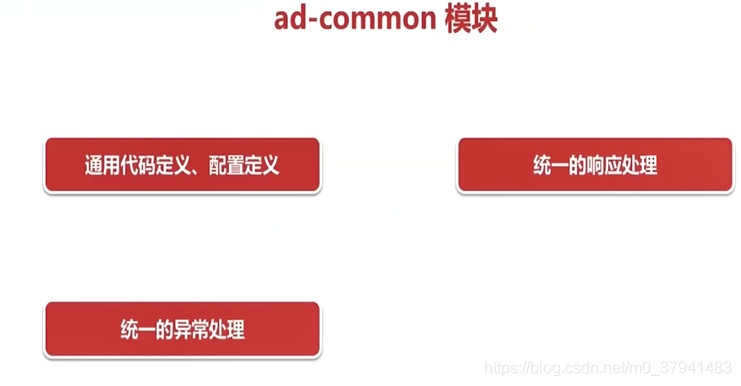
4.3 Common通用配置模块 - ad-common

通用的代码、配置不应该散落在各个业务模块中,不利于维护与更新
在这里插入图片描述

一个大的系统,响应对象需要统一外层格式
在这里插入图片描述

各种业务设计与实现,可能会抛出各种各样的异常,异常信息的收集也应该做到统一
在这里插入图片描述


//对响应统一拦截,实现统一返回格式
@RestControllerAdvice
public class CommonResponseDataAdvice implements ResponseBodyAdvice<Object> {
    //根据条件判断是否拦截
    @SuppressWarnings("all")//忽略可能产生空指针异常的warning
    public boolean supports(MethodParameter methodParameter,Class<? extends HttpMessageConverter<?>> aClass) {
        //判断类是否被注解声明
        if (methodParameter.getDeclaringClass().isAnnotationPresent(IgnoreResponseAdvice.class)) {
            return false;
        }
        //判断方法方法是否被注解声明
        if (methodParameter.getMethod().isAnnotationPresent(IgnoreResponseAdvice.class)) {
            return false;
        }return true;
    }
    //写入相应前执行
    @Nullable
    @SuppressWarnings("all")
    public Object beforeBodyWrite(@Nullable Object o,MethodParameter methodParameter,MediaType mediaType,Class<? extends HttpMessageConverter<?>> aClass,ServerHttpRequest serverHttpRequest,ServerHttpResponse serverHttpResponse){        CommonResponse<Object> response = new CommonResponse<>(0, "");
        if (o == null) {return response;
        } else if (o instanceof CommonResponse) {response = (CommonResponse<Object>) o;
        } else {response.setData(o);
        }
        return response;
    }
//定义统一异常处理类,通过GlobalExceptionAdvice实现处理
public class AdException extends Exception {
    public AdException(String message) {        super(message);    }
}
//处理AdException捕获的异常
@RestControllerAdvice
public class GlobalExceptionAdvice {
    @ExceptionHandler(value = AdException.class)
    public CommonResponse<String> handlerAdException(HttpServletRequest req,AdException ex) {
        CommonResponse<String> response = new CommonResponse<>(-1, "business error");
        response.setData(ex.getMessage());
        return response;
    }
}
//统一配置,http消息转换器:将java实体对象转换成http数据输出流
@Configuration
public class WebConfiguration implements WebMvcConfigurer {
    public void configureMessageConverters(List<HttpMessageConverter<?>> converters) {
        converters.clear();
        converters.add(new MappingJackson2HttpMessageConverter());
    }
}


五、springboot分析


六、广告投放系统设计实现

https://blog.csdn.net/weixin_38004638/article/details/90719774

6.1概念

在这里插入图片描述

用户账户 -> 最高层级,用于定义广告主或代理商,只有有了用户才会有接下来的数据投放
推广计划 -> 一类品牌或产品广告投放的规划,自身并不定义太多关于广告自身的信息,它会将信息打包下放到推广单元层级
推广单元 -> 一个确定的广告投放策略,描述了投放广告的规则信息
推广单元维度限制(关键字、兴趣、地域) -> 广告投放会有一些限制条件,例如只投放到北京、上海地区,对一些关键字进行投放等等
广告创意 -> 展示给用户看到的数据,可以是图片、文本或者一段视频

在这里插入图片描述

6.2配置文件

构造广告投放系统sponsor应用的 pom.xml 文件

<dependencies>
    <!-- 引入 Web 功能 -->
    <dependency>
        <groupId>org.springframework.boot</groupId>
        <artifactId>spring-boot-starter-web</artifactId>
    </dependency>
    <!--
        Eureka 客户端, 客户端向 Eureka Server 注册的时候会提供一系列的元数据信息, 例如: 主机, 端口, 健康检查url等
        Eureka Server 接受每个客户端发送的心跳信息, 如果在某个配置的超时时间内未接收到心跳信息, 实例会被从注册列表中移除
    -->
    <dependency>
        <groupId>org.springframework.cloud</groupId>
        <artifactId>spring-cloud-starter-netflix-eureka-client</artifactId>
    </dependency>
    <!-- 引入 Feign, 可以以声明的方式调用微服务 -->
    <dependency>
        <groupId>org.springframework.cloud</groupId>
        <artifactId>spring-cloud-starter-openfeign</artifactId>
    </dependency>
    <!-- 引入服务容错 Hystrix 的依赖 -->
    <dependency>
        <groupId>org.springframework.cloud</groupId>
        <artifactId>spring-cloud-starter-netflix-hystrix</artifactId>
    </dependency>
    <!-- 引入服务消费者 Ribbon 的依赖 -->
    <dependency>
        <groupId>org.springframework.cloud</groupId>
        <artifactId>spring-cloud-starter-netflix-ribbon</artifactId>
    </dependency>
    <!-- Java Persistence API, ORM 规范 -->
    <dependency>
        <groupId>org.springframework.boot</groupId>
        <artifactId>spring-boot-starter-data-jpa</artifactId>
    </dependency>
    <!-- 数据库连接 -->
    <dependency>
        <groupId>org.springframework.boot</groupId>
        <artifactId>spring-boot-starter-jdbc</artifactId>
    </dependency>
    <!-- MySQL 驱动, 注意, 这个需要与 MySQL 版本对应 -->
    <dependency>
        <groupId>mysql</groupId>
        <artifactId>mysql-connector-java</artifactId>
        <version>8.0.12</version>
        <scope>runtime</scope>
    </dependency>
    <!-- 通用模块 -->
    <dependency>
        <groupId>com.imooc.ad</groupId>
        <artifactId>ad-common</artifactId>
        <version>1.0-SNAPSHOT</version>
    </dependency>
    <!-- apache 提供的一些工具类 -->
    <dependency>
        <groupId>commons-codec</groupId>
        <artifactId>commons-codec</artifactId>
        <version>1.9</version>
    </dependency>
    <dependency>
        <groupId>org.springframework.boot</groupId>
        <artifactId>spring-boot-autoconfigure</artifactId>
        <version>2.1.3.RELEASE</version>
    </dependency>
    <dependency>
        <groupId>org.springframework.cloud</groupId>
        <artifactId>spring-cloud-netflix-eureka-client</artifactId>
        <version>RELEASE</version>
        <scope>compile</scope>
    </dependency>
    <dependency>
        <groupId>org.springframework.cloud</groupId>
        <artifactId>spring-cloud-commons</artifactId>
        <version>RELEASE</version>
        <scope>compile</scope>
    </dependency>
    <dependency>
        <groupId>org.springframework.cloud</groupId>
        <artifactId>spring-cloud-netflix-eureka-client</artifactId>
        <scope>compile</scope>
    </dependency>
</dependencies>
<!--
    SpringBoot的Maven插件, 能够以Maven的方式为应用提供SpringBoot的支持,可以将
    SpringBoot应用打包为可执行的jar或war文件, 然后以通常的方式运行SpringBoot应用
 -->
<build>
    <plugins>
        <plugin>
            <groupId>org.springframework.boot</groupId>
            <artifactId>spring-boot-maven-plugin</artifactId>
        </plugin>
    </plugins>
</build>

应用配置 application.yml

server:
  port: 7000
  servlet:
    context-path: /ad-sponsor
spring:
  application:
    name: eureka-client-ad-sponsor
  jpa:
    show-sql: true
    #加载hibernate时是否自动创建更新表结构
    hibernate:
      ddl-auto: none
    properties:
      #sql语句格式化
      hibernate.format_sql: true
    #懒加载
    open-in-view: false
  datasource:
    url: jdbc:mysql://127.0.0.1:3306/advertisement?autoReconnect=true
    username: root
    password: 123456
    tomcat:
      max-active: 4
      min-idle: 2
      initial-size: 2
eureka:
  client:
    service-url:
      defaultZone: http://localhost:8000/eureka/
      #defaultZone: http://server1:8000/eureka/


6.3 数据库设计

根据表结构创建各个表的entity实体类,创建状态枚举CommonStatus、创意类型枚举CreativeType、创意子类型枚举CreativeMetrialType

广告投放系统的核心功能,是对广告数据(各个表)进行增删改查,即能够让用户(广告主/代理商)对数据进行查看、上传、修改与删除
在这里插入图片描述在这里插入图片描述
在这里插入图片描述


6.4 Dao层

对每个表的dao层操作接口,都继承JpaRepository,实现基本存取,再根据需求添加CURD方法

public interface AdUserRepository extends JpaRepository<AdUser, Long> {
    //根据用户名查找用户记录
    AdUser findByUsername(String username);
}


6.5 Service层

给每个模块创建vo类,需要提供给广告投放系统的数据作为请求,需要返回的数据作为响应。

@Data
@NoArgsConstructor
@AllArgsConstructor
public class CreateUserRequest {
    private String username;
    public boolean validate() {
        return !StringUtils.isEmpty(username);
    }
}
@Data
@NoArgsConstructor
@AllArgsConstructor
public class CreateUserResponse {
    private Long userId;
    private String username;
    private String token;
    private Date createTime;
    private Date updateTime;
}

在service类中添加每个模块的新建方法,传入请求,判断请求是否合法,使用Repository的save方法将请求参数保存在新建实体,最后将实体参数作为响应进行返回。

@Slf4j
@Service
public class UserServiceImpl implements IUserService {
    private final AdUserRepository userRepository;
    @Autowired
    public UserServiceImpl(AdUserRepository userRepository) {this.userRepository = userRepository;}

    @Override
    @Transactional
    public CreateUserResponse createUser(CreateUserRequest request) throws AdException {
        //判断用户名是否为空
        if (!request.validate()) {throw new AdException(Constants.ErrorMsg.REQUEST_PARAM_ERROR);}
        //判断用户名是否重复
        AdUser oldUser = userRepository.findByUsername(request.getUsername());
        if (oldUser != null) {throw new AdException(Constants.ErrorMsg.SAME_NAME_ERROR);}
        //根据用户名,自定义生成token方法,创建新用户
        AdUser newUser = userRepository
               .save(new AdUser(request.getUsername(),CommonUtils.md5(request.getUsername())));
        //返回响应
        return new CreateUserResponse(newUser.getId(), newUser.getUsername(), newUser.getToken(),
                newUser.getCreateTime(), newUser.getUpdateTime()
        );
    }
}


6.6 controller层

//用户Controller,前缀是/ad-sponsor
@Slf4j
@RestController
public class UserOPController {
    //构造器注入
    private final IUserService userService;
    @Autowired
    public UserOPController(IUserService userService) {  this.userService = userService;    }
    //创建用户
    @PostMapping("/create/user")
    public CreateUserResponse createUser(@RequestBody CreateUserRequest request) throws AdException {
        log.info("ad-sponsor: createUser -> {}", JSON.toJSONString(request));
        return userService.createUser(request);
    }
}


七、广告检索系统 - 微服务调用

在Eureka学习中,学习了服务的注册,现在使用Ribbon实现服务的远程调用

//广告检索系统启动类
//引入 Feign, 可以以声明的方式调用微服务
@EnableFeignClients
@EnableEurekaClient
//引入断路器
@EnableHystrix
@EnableCircuitBreaker
//微服务发现
@EnableDiscoveryClient
//Hystrix监控
@EnableHystrixDashboard
@SpringBootApplication
public class SearchApplication {
    //启动类
    public static void main(String[] args) {    SpringApplication.run(SearchApplication.class, args);    }
    //通过Ribbon调用广告投放系统,需要定义一个rest客户端
    @Bean
    @LoadBalanced//负载均衡实现轮询
    RestTemplate restTemplate() {   return new RestTemplate();    }
}

创建一个client,作为客户端远程调用其他微服务,实现微服务之间的调用

实 现 服 务 之 间 的 调 用有两种方法
Ribbon 方式调用
Rib b o n 是 一 个 客 户 端 负 载 均 衡 器 , 可 以 很 好 的 控 制 H T T P 和 T C P 客 户 端 的行 为
SearchController.java 中通过 RestTemplate 调用服务接口,与常见的RestTemplate 不同的是,调用使用的不再是 ip+ port,而是服务名。这是通过注册中心(EurekaServer)实现的。

Feign 方式调用
F eig n 可 以 实 现 声 明 式 的 W e b 服 务 客 户 端
通过 @FeignClient 指定调用的服务名称
在接口上声明 @RequestMapping 指明调用服务的地址与请求类型
通过在 @FeignClient 中配置 fallback 指定熔断
实现接口:SponsorClient.java,熔断:SponsorClientHystrix.java

/**
 * 调用检索系统的时候,通过调用投放系统访问广告计划
 */
@Slf4j
@RestController
public class SearchController {
    private final RestTemplate restTemplate;
    private final SponsorClient sponsorClient;
    @Autowired
    public SearchController(RestTemplate restTemplate,SponsorClient sponsorClient){
        this.restTemplate = restTemplate;  this.sponsorClient = sponsorClient;
    }
    /**
     * 使用Feign调用微服务获取AdPlan
     */
    @IgnoreResponseAdvice//不使用统一响应的返回结果
    @PostMapping("/getAdPlans")
    public CommonResponse<List<AdPlan>> getAdPlans(@RequestBody AdPlanGetRequest request){
        log.info("ad-search: getAdPlansByFeign -> {}", JSON.toJSONString(request));
        return sponsorClient.getAdPlans(request);
    }
    /**
     * 使用Ribbon调用微服务获取AdPlan
     */
    @SuppressWarnings("all")//忽略警告
    @IgnoreResponseAdvice//不使用统一响应的返回结果
    @PostMapping("/getAdPlansByRibbon")
    public CommonResponse<List<AdPlan>> getAdPlansByRibbon(@RequestBody AdPlanGetRequest request){
        log.info("ad-search: getAdPlansByRibbon -> {}", JSON.toJSONString(request));
        return restTemplate.postForEntity(
                "http://eureka-client-ad-sponsor/ad-sponsor/get/adPlan",request,CommonResponse.class
        ).getBody();
    }
}
/**
 * 使用Feign, 以声明的方式调用微服务,一旦发生错误,服务降级fallback返回SponsorClientHystrix
 */
@FeignClient(value = "eureka-client-ad-sponsor", fallback = SponsorClientHystrix.class)
public interface SponsorClient {
    @RequestMapping(value = "/ad-sponsor/get/adPlan", method = RequestMethod.POST)
    CommonResponse<List<AdPlan>> getAdPlans(@RequestBody AdPlanGetRequest request);
}
/**
 * 断路器Hystrix,防止因为要调用的服务下线,重复调用报错,而导致雪崩
 */
@Component
public class SponsorClientHystrix implements SponsorClient {
    public CommonResponse<List<AdPlan>> getAdPlans(AdPlanGetRequest request) {
        //返回空的CommonResponse,以及错误消息
        return new CommonResponse<>(-1, "eureka-client-ad-sponsor error");
    }
}


八、广告检索系统的设计与实现

https://blog.csdn.net/weixin_38004638/article/details/90719812

https://blog.csdn.net/weixin_38004638/article/details/90719859

https://blog.csdn.net/weixin_38004638/article/details/91974842

8.1 广告数据索引设计与维护

设 计 索 引 的 目 的 就 是 为 了 加 快 检 索 的 速 度 , 将 原 始 数 据 抽 象 , 规 划 出 合 理 的 字 段 , 在 内 存 中 构 建 广 告 数 据 索 引 。 记 住 , 并 不 是 所 有 的 数 据 都 需 要 放 在 索 引 里 。

正向索引

通 过 一 个 键 找 到 一 个 对 象 , 且 这 种 关 系 是 确 定 的 , 即 唯 一 键 对 应 到 唯 一 的 对 象 
在这里插入图片描述


倒排索引

通 过 内 容 去 确 定 包 含 关 系 的 对 象 
在这里插入图片描述
在这里插入图片描述


维护:全量索引和增量索引

保 证 检 索 服 务 中 的 索 引 是 完 整 的
在这里插入图片描述
在这里插入图片描述

每个表根据需要显示的字段创建一个表索引对象

/**
 * 广告单元关键字索引对象
 */
@Data
@NoArgsConstructor
@AllArgsConstructor
public class UnitKeywordObject {
    private Long unitId;
    private String keyword;
}
/**
 * AdPlan索引对象,只添加需要检索的字段
 */
@Data
@NoArgsConstructor
@AllArgsConstructor
public class AdPlanObject {
    private Long planId;
    private Long userId;
    private Integer planStatus;
    private Date startDate;
    private Date endDate;
    //更新变化的字段
    public void update(AdPlanObject newObject) {
        if (null != newObject.getPlanId()) {this.planId = newObject.getPlanId();}
        if (null != newObject.getUserId()) {this.userId = newObject.getUserId();}
        if (null != newObject.getPlanStatus()) {this.planStatus = newObject.getPlanStatus();}
        if (null != newObject.getStartDate()) {this.startDate = newObject.getStartDate();}
        if (null != newObject.getEndDate()) {this.endDate = newObject.getEndDate();}
    }
}

索引服务接口

//索引CRUD方法
public interface IndexAware<K, V> {
    V get(K key);
    void add(K key, V value);
    void update(K key, V value);
    void delete(K key, V value);
}

每个表的索引服务实现CRUD接口中的方法

/**
 * 广告单元关键字索引CRUD
 */
@Slf4j
@Component
public class UnitKeywordIndex implements IndexAware<String, Set<Long>> {
    //关键字key到所有关联的广告单元的倒排索引
    private static Map<String, Set<Long>> keywordUnitMap;
    //广告单元ID到关键字key正向索引
    private static Map<Long, Set<String>> unitKeywordMap;
    static {keywordUnitMap = new ConcurrentHashMap<>();unitKeywordMap = new ConcurrentHashMap<>();}

    @Override
    public Set<Long> get(String key) {
        if (StringUtils.isEmpty(key)) {    return Collections.emptySet();}
        Set<Long> result = keywordUnitMap.get(key);
        if (result == null) {    return Collections.emptySet();}
        return result;
    }

    @Override
    public void add(String key, Set<Long> value) {
        log.info("UnitKeywordIndex, before add: {}", unitKeywordMap);
        //当keywordUnitMap中不存在这个关键字key,则new一个广告单元集合ConcurrentSkipListSet
        Set<Long> unitIdSet = CommonUtils.getorCreate(key, keywordUnitMap, ConcurrentSkipListSet::new);
        unitIdSet.addAll(value);//将单元id添加到集合中
        //遍历广告单元ID,当unitKeywordMap中不存在这个unitId,则new一个关键字集合ConcurrentSkipListSet
        for (Long unitId : value) {
            Set<String> keywordSet = CommonUtils.getorCreate(unitId, unitKeywordMap, ConcurrentSkipListSet::new);
            keywordSet.add(key);//将关键字添加到集合中
        }
        log.info("UnitKeywordIndex, after add: {}", unitKeywordMap);
    }

    //更新需要对两个索引操作,成本高禁止该操作,可以删除后新增
    @Override
    public void update(String key, Set<Long> value) {log.error("keyword index can not support update");}

    @Override
    public void delete(String key, Set<Long> value) {
        log.info("UnitKeywordIndex, before delete: {}", unitKeywordMap);
        //可能只是删除unitIds中部分广告单元的关键字
        Set<Long> unitIds = CommonUtils.getorCreate(key, keywordUnitMap, ConcurrentSkipListSet::new);
        unitIds.removeAll(value);
        for (Long unitId : value) {
            Set<String> keywordSet = CommonUtils.getorCreate(unitId, unitKeywordMap, ConcurrentSkipListSet::new);
            keywordSet.remove(key);
        }
        log.info("UnitKeywordIndex, after delete: {}", unitKeywordMap);
    }

    //判断某一个广告单元是否包含该关键字
    public boolean match(Long unitId, List<String> keywords) {
        //unitKeywordMap中存在该unitId,且关键字key不为空
        if (unitKeywordMap.containsKey(unitId) && CollectionUtils.isNotEmpty(unitKeywordMap.get(unitId))) {
            //根据unitId获取到关键字集合
            Set<String> unitKeywords = unitKeywordMap.get(unitId);
            //判断需要匹配的关键字,是否包含在在获取到的关键字集合中
            return CollectionUtils.isSubCollection(keywords, unitKeywords);
        }
        return false;
    }
}
/**
 * 实现AdPlan索引的CRUD
 */
@Slf4j
@Component
public class AdPlanIndex implements IndexAware<Long, AdPlanObject> {
    //使用map存放索引
    private static Map<Long, AdPlanObject> objectMap;
    //使用线程安全的ConcurrentHashMap
    static {objectMap = new ConcurrentHashMap<>();}

    @Override
    public AdPlanObject get(Long key) {return objectMap.get(key);}

    @Override
    public void add(Long key, AdPlanObject value) {
        log.info("before add: {}", objectMap);
        objectMap.put(key, value);
        log.info("after add: {}", objectMap);
    }

    @Override
    public void update(Long key, AdPlanObject value) {
        log.info("before update: {}", objectMap);
        AdPlanObject oldObject = objectMap.get(key);
        //不存在则直接新增
        if (null == oldObject) {objectMap.put(key, value);
        } else {oldObject.update(value);}
        log.info("after update: {}", objectMap);
    }

    @Override
    public void delete(Long key, AdPlanObject value) {
        log.info("before delete: {}", objectMap);
        objectMap.remove(key);
        log.info("after delete: {}", objectMap);
    }
}
/**
 *  索引服务缓存服务
 *  ApplicationContextAware:应用程序上下文,得到spring容器中初始化的组件
 *  PriorityOrdered:优先级排序,优先初始化已排序的应用程序
 *  使用:注入DataTable类,调用DataTable.of(UnitKeywordIndex.class);
 */
@Component
public class DataTable implements ApplicationContextAware, PriorityOrdered {
    private static ApplicationContext applicationContext;
    
    //保存所有Index索引
    public static final Map<Class, Object> dataTableMap = new ConcurrentHashMap<>();
    @Override
    public void setApplicationContext(ApplicationContext applicationContext) throws BeansException {
        DataTable.applicationContext = applicationContext;
    }

    //定义最高优先级,优先初始化
    @Override
    public int getOrder() {
        return PriorityOrdered.HIGHEST_PRECEDENCE;
    }

    //根据索引class类型获取索引服务类
    @SuppressWarnings("all")
    public static <T> T of(Class<T> classs) {
        T instance = (T) dataTableMap.get(classs);
        if (null != instance) {return instance;}
        //存放索引的dataTableMap为空,通过bean(classs)获取索引bean
        dataTableMap.put(classs, bean(classs));
        return (T) dataTableMap.get(classs);
    }

    //根据beanName获取spring容器中的bean
    @SuppressWarnings("all")
    private static <T> T bean(String beanName) {return (T) applicationContext.getBean(beanName);}

    //根据class类型获取spring容器中的bean
    @SuppressWarnings("all")
    private static <T> T bean(Class classs) {return (T) applicationContext.getBean(classs);}
}


8.2  加载全量索引

8.2.1 在ad-common服务中定义索引导出数据的统一地址和表字段

/** 
 * 将mysql表数据导出到指定目录下文件
 */
public class DConstant {
    // 数据文件存储目录/Users/zhanghu05/imooc/mysql_data/
    public static final String DATA_ROOT_DIR = "/cyy/software/IDEA/workspace/imooc-ad/mysql_data/";
    // 各个表数据的存储文件名
    public static final String AD_PLAN = "ad_plan.data";
    public static final String AD_UNIT = "ad_unit.data";
    public static final String AD_CREATIVE = "ad_creative.data";
    public static final String AD_CREATIVE_UNIT = "ad_creative_unit.data";
    public static final String AD_UNIT_IT = "ad_unit_it.data";
    public static final String AD_UNIT_DISTRICT = "ad_unit_district.data";
    public static final String AD_UNIT_KEYWORD = "ad_unit_keyword.data";
}
/**
 *  定义每个表中所需的索引字段
 */
@Data
@NoArgsConstructor
@AllArgsConstructor
public class AdPlanTable {
    private Long id;
    private Long userId;
    private Integer planStatus;
    private Date startDate;
    private Date endDate;
}


AdPlan -> AdPlanTable -> AdPlanIndex -> AdPlanObject

表中数据 -> 导出数据-> 读取数据文件,调用索引的CRUD方法 -> 构造索引服务中表对应索引对象(全量索引)

8.2.2 在投放系统ad-sponsor中的test目录中定义DumpDataService,依赖于投放系统中对数据库各表的操作类Repository,实现 "表中数据 -> 导出数据" 的数据导出服务


/**
 * 数据导出服务,实现全量索引的启动类
 */
@SpringBootApplication
public class DumpApplication {
    public static void main(String[] args) {
        SpringApplication.run(DumpApplication.class, args);
    }
}
@Slf4j
@RunWith(SpringRunner.class)
@SpringBootTest(classes = {DumpApplication.class},webEnvironment = SpringBootTest.WebEnvironment.NONE)
public class DumpDataService {
    @Autowired
    private AdPlanRepository planRepository;

    //测试用例,将表数据导出到指定目录
    @Test
    public void dumpAdTableData(){
        dumpAdPlanTable(String.format("%s%s", DConstant.DATA_ROOT_DIR,DConstant.AD_PLAN));
    }

    //将AdPlan表字段导出为Json结构
    private void dumpAdPlanTable(String fileName){

        //查找出AdPlan表中的有效数据
        List<AdPlan> adPlans = planRepository.findAllByPlanStatus(CommonStatus.VALID.getStatus());
        if(CollectionUtils.isEmpty(adPlans)){
            return;
        }

        //AdPlan->AdPlanTable:将表中每条数据,根据在ad-common/dump/table中定义的所需表结构,进行填充
        List<AdPlanTable> planTables = new ArrayList<>();
        adPlans.forEach(p -> planTables.add(
                new AdPlanTable(p.getId(),p.getUserId(),p.getPlanStatus(),p.getStartDate(),p.getEndDate())
        ));

        //获取文件路径并写入
        Path path = Paths.get(fileName);
        try(BufferedWriter writer = Files.newBufferedWriter(path)) {
            for (AdPlanTable planTable : planTables){
                writer.write(JSON.toJSONString(planTable));//转JSON格式
                writer.newLine();//换行
            }
            writer.close();
        } catch (IOException e) {
            log.error("dumpAdPlanTable error!");
        }
    }
} 

AdPlan -> AdPlanTable -> AdPlanIndex -> AdPlanObject

表中数据 -> 导出数据-> 读取数据文件,调用索引的CRUD方法 -> 构造索引服务中表对应索引对象(全量索引)

8.2.3 在ad-search中定义IndexFileLoader,实现“读取数据文件,调用索引的CRUD方法”的全量索引加载

@Component
@DependsOn("dataTable")//AdLevelDataHandler -> DataTable
public class IndexFileLoader {

    //读取导出的数据文件,每行数据为JSON格式
    private List<String> loadDumpData(String fileName) {

        try (BufferedReader br = Files.newBufferedReader(Paths.get(fileName))) {
            return br.lines().collect(Collectors.toList());
        } catch (IOException ex) {
            throw new RuntimeException(ex.getMessage());
        }
    }

    //检索系统启动即刻加载全量索引
    @PostConstruct
    public void init() {

        //将数据文件中JSON格式反序列化为对应对象,加载第二层级AdPlan全量索引
        List<String> adPlanStrings = loadDumpData(
                String.format("%s%s", DConstant.DATA_ROOT_DIR, DConstant.AD_PLAN)
        );
        adPlanStrings.forEach(p ->
                AdLevelDataHandler.handleLevel2(JSON.parseObject(p, AdPlanTable.class), OpType.ADD));

        //加载第三层级AdUnit全量索引
        List<String> adUnitStrings = loadDumpData(
                String.format("%s%s", DConstant.DATA_ROOT_DIR, DConstant.AD_UNIT)
        );
        adUnitStrings.forEach(u ->
                AdLevelDataHandler.handleLevel3(JSON.parseObject(u, AdUnitTable.class), OpType.ADD));

        //加载第四层级AdUnitDistrict全量索引
        List<String> adUnitDistrictStrings = loadDumpData(
                String.format("%s%s", DConstant.DATA_ROOT_DIR, DConstant.AD_UNIT_DISTRICT)
        );
        adUnitDistrictStrings.forEach(d ->
                AdLevelDataHandler.handleLevel4(JSON.parseObject(d, AdUnitDistrictTable.class), OpType.ADD));
}


8.2.4 在ad-search中定义AdLevelDataHandler,实现 "构造索引服务中表对应索引对象(全量/增量索引)" 的索引操作处理类

//对增量索引的操作,即对mysql中表的CRUD,全量索引视为是增量索引的 "添加"
public enum OpType {
    ADD,UPDATE,DELETE,OTHER;
}
//字符串之间通过连字符-拼接(省-市)
public static String stringConcat(String... args) {
    StringBuilder result = new StringBuilder();
    for (String arg : args) {
        result.append(arg);
        result.append("-");
    }
    //删除末尾最后一个连字符
    result.deleteCharAt(result.length() - 1);
    return result.toString();
}
/**
 * 1. 索引之间存在着层级的划分, 也就是依赖关系的划分
 * 2. 加载全量索引其实是增量索引 "添加" 的一种特殊实现
 */
@Slf4j
public class AdLevelDataHandler {

    //监听binlog对增量索引CRUD,以及加载全量索引
    //根据类型type,使用IndexAware中CRUD方法,构造索引对象
    private static <K, V> void handleBinlogEvent(IndexAware<K, V> index, K key, V value, OpType type) {
        switch (type) {
            case ADD: index.add(key, value); break;
            case UPDATE: index.update(key, value); break;
            case DELETE: index.delete(key, value); break;
            default: break;
        }
    }

    //加载第二层级全量索引,计划表AdPlanTable -> AdPlanObject
    public static void handleLevel2(AdPlanTable planTable, OpType type) {

        AdPlanObject planObject = new AdPlanObject(planTable.getId(), planTable.getUserId(), 
                   planTable.getPlanStatus(),planTable.getStartDate(), planTable.getEndDate());
        //构造AdPlanObject索引对象
        handleBinlogEvent(DataTable.of(AdPlanIndex.class), planObject.getPlanId(), planObject, type);
    }

    //加载第三层级全量索引,依赖于第二层级AdPlanTable,广告单元表AdUnitTable -> AdPlanObject
    public static void handleLevel3(AdUnitTable unitTable, OpType type) {

        //判断依赖的上层索引对象是否存在
        AdPlanObject adPlanObject = DataTable.of(AdPlanIndex.class).get(unitTable.getPlanId());
        if (adPlanObject == null) {
            log.error("handleLevel3 found AdPlanObject error: {}", unitTable.getPlanId());
            return;
        }

        AdUnitObject unitObject = new AdUnitObject(unitTable.getUnitId(), unitTable.getUnitStatus(), 
                                      unitTable.getPositionType(),unitTable.getPlanId(), adPlanObject);
        //构造AdUnitObject索引对象
        handleBinlogEvent(DataTable.of(AdUnitIndex.class), unitTable.getUnitId(), unitObject, type);
    }

    //加载第四层级全量索引,依赖于第三层级广告单元,广告单元地域表AdUnitDistrictTable -> UnitDistrictIndex中districtUnitMap
    public static void handleLevel4(AdUnitDistrictTable unitDistrictTable, OpType type) {

        //不支持更新
        if (type == OpType.UPDATE) {
            log.error("district index can not support update");
            return;
        }

        //判断依赖的上层索引对象是否存在
        AdUnitObject unitObject = DataTable.of(AdUnitIndex.class).get(unitDistrictTable.getUnitId());
        if (unitObject == null) {
            log.error("AdUnitDistrictTable index error: {}", unitDistrictTable.getUnitId());
            return;
        }

        //将省市用连字符连接
        String key = CommonUtils.stringConcat(unitDistrictTable.getProvince(), unitDistrictTable.getCity());
        //UnitDistrictIndex中districtUnitMap中对应的value单元ID是set类型,将unitDistrictTable获取的单个ID存入set
        Set<Long> value = new HashSet<>(Collections.singleton(unitDistrictTable.getUnitId()));
        handleBinlogEvent(DataTable.of(UnitDistrictIndex.class), key, value, type);
    }
}


8.3 监听Binlog构造增量数据


8.3.1 Mysql-Binlog

在这里插入图片描述

什么是 Binlog
Binlog 是 MySQLServer 维护的一种二进制日志,主要是用来记录对 MySQL 数据更新或潜在发生更新的 SQL 语句,并以
"事务"的形式保存在磁盘中(文件)

主要用途
1. 复制:MySQL 的 Master-Slave 协议,让 Slave 可以通过监听 Binlog 实现数据复制,达到数据一致的目的
2. 数据恢复:通过 mysqlbinlog 工具恢复数据
3. 增量备份

相关变量

-- Binlog 开关变量show variables like 'log_bin';
-- Binlog 日志的格式show variables like 'binlog_format';


在这里插入图片描述

支持的格式
ROW

仅保存记录被修改细节,不记录 SQL 语句上下文相关信息:能非常清晰的记录下每行数据的修改细节,不需要记录上下文相
关信息,因此不会发生某些特定情况下的 procedure、function、及 trigger 的调用触发无法被正确复制的问题,任何情况
都可以被复制,且能加快从库重放日志的效率,保证从库数据的一致性。
STATEMENT
每一条会修改数据的 SQL 都会记录在 Binlog 中:只需要记录执行语句的细节和上下文环境,避免了记录每一行的变化,在
一些修改记录较多的情况下相比 ROW 类型能大大减少 Binlog 日志量,节约 IO,提高性能;还可以用于实时的还原;同时
主从版本可以不一样,从服务器版本可以比主服务器版本高。
MIXED
以上两种类型的混合使用。经过前面的对比,可以发现 ROW 类型和 STATEMENT 类型各有优势,如能根据 SQL 语句取舍
可能会有更好地性能和效果;MIXED 便是以上两种类型的结合。


常用操作命令


Binlog 的 Event 类型
MySQLBinlogEvent 类型有很多种(MySQL 官方定义了 36 种),例如:XID、TABLE_MAP、QUERY 等等。但是,我们
需要了解的(也是最常用的)类型不是很多。


说明
对于 MySQLBinlog,我们可以不用过分追究 Binlog 里面到底包含了些什么,对于应用的话,我们最重要要搞清楚:

Binlog 的Event:每个 Event 包含 header 和 data 两个部分;header 提供了 Event 的创建时间,哪个服务器等信息,data 部分提供的是针对该 Event 的具体信息,如具体数据的修改。我们对 Binlog 的解析,即为对 Event 的解析。
Binlog 的 EventType (需要注意,不同版本的 MySQL,EventType 可能会不同)
Binlog 中并不会打印数据表的列名


8.3.2 加载模板文件并进行解析

开启MySQL的binlog日志,确保Binlog 开关是ON状态,日志的格式是ROW

在my.inf主配置文件中[mysqld]标签后面,添加log-bin=mysql-bin  server-id=1 binlog-format=ROW,在服务中重启MYSQL服务生效

在ad-search中新建测试类BinlogServiceTest,测试开源工具mysql-binlog-connector-java

//监听Binlog,监听 MySQL 数据表状态的变化,并解析成想要的格式(Java 对象)
public class BinlogServiceTest {
//    Write---------------
//    WriteRowsEventData{tableId=85, includedColumns={0, 1, 2}, rows=[
//    [10, 10, 宝马]
   public static void main(String[] args) throws Exception {

        BinaryLogClient client = new BinaryLogClient("127.0.0.1",3306,"root","123456");
        //开始监听读取binlog的位置,否则从最新位置开始
        //client.setBinlogFilename("binlog.000037");
        //client.setBinlogPosition();

        //监听变化
        client.registerEventListener(event -> {
            EventData data = event.getData();
            if (data instanceof UpdateRowsEventData) {
                System.out.println("Update--------------");
                System.out.println(data.toString());
            } else if (data instanceof WriteRowsEventData) {
                System.out.println("Write---------------");
                System.out.println(data.toString());
            } else if (data instanceof DeleteRowsEventData) {
                System.out.println("Delete--------------");
                System.out.println(data.toString());
            }
        });
        //连接数据库
        client.connect();
    }
}

在resources新建template.json文件,定义监听的数据库、数据表

{
  "database":"advertisement",
  "tableList":[
    {
      "tableName":"ad_plan",
      "level":2,
      "insert":[
        {"column":"id"},
        {"column":"user_id"},
        {"column":"plan_status"},
        {"column":"start_date"},
        {"column":"end_date"}
      ],
      "update":[
        {"column":"id"},
        {"column":"user_id"},
        {"column":"plan_status"},
        {"column":"start_date"},
        {"column":"end_date"}
      ],
      "delete":[
        {"column":"id"}
      ]
    },
    {
      "tableName":"ad_unit",
      "level":3,
      "insert":[
        {"column":"id"},
        {"column":"unit_status"},
        {"column":"position_type"},
        {"column":"plan_id"}
      ],
      "update":[
        {"column":"id"},
        {"column":"unit_status"},
        {"column":"position_type"},
        {"column":"plan_id"}
      ],
      "delete":[
        {"column":"id"}
      ]
    },
    {
      "tableName":"ad_unit_district",
      "level":4,
      "insert":[
        {"column":"unit_id"},
        {"column":"province"},
        {"column":"city"}
      ],
      "update":[
      ],
      "delete":[
        {"column":"unit_id"},
        {"column":"province"},
        {"column":"city"}
      ]
    }
  ]
}


对应json文件中的各个表、数据库,在mysql/dto新建Template、JsonTable、TableTemplate

//监听template.json文件中的模板
@Data
@NoArgsConstructor
@AllArgsConstructor
public class Template {
    private String database;
    private List<JsonTable> tableList;
}
//监听template.json文件中的各个表
@Data
@NoArgsConstructor
@AllArgsConstructor
public class JsonTable {
    private String tableName;
    private Integer level;

    private List<Column> insert;
    private List<Column> update;
    private List<Column> delete;

    @Data
    @NoArgsConstructor
    @AllArgsConstructor
    public static class Column {
        private String column;
    }
}
//方便读取表信息,实现索引到字段名映射
@Data
@NoArgsConstructor
@AllArgsConstructor
public class TableTemplate {
    private String tableName;
    private String level;
    //操作类型和字段map
    private Map<OpType, List<String>> opTypeFieldSetMap = new HashMap<>();
    //根据字段索引得到字段名
    private Map<Integer, String> posMap = new HashMap<>();
}

对resources中模板文件template.json进行解析

实现Template(database/tableList) , JsonTable(表名/层级/操作/字段)

-> TableTemplate(表名/层级/<操作-字段>opTypeFieldSetMap)

-> ParseTemplate(database/<表名-属性>tableTemplateMap ) -> TemplateHolder(加载文件,调用解析,索引关联)

业务难点-填充opTypeFieldSetMap:遍历操作类型对应的列,并调用getAndCreateIfNeed方法,按OpType取出opTypeFieldSetMap,不存在则新建

@Data
public class ParseTemplate {
    private String database;
    //各个表名及对应属性(层级/操作/字段)
    private Map<String, TableTemplate> tableTemplateMap = new HashMap<>();

    public static ParseTemplate parse(Template _template) {
        ParseTemplate template = new ParseTemplate();
        //获取数据库
        template.setDatabase(_template.getDatabase());

        //遍历各个表,Template:tableList -> JsonTable:table
        for (JsonTable table : _template.getTableList()) {
            String name = table.getTableName();
            Integer level = table.getLevel();

            //JsonTable数据封装到TableTemplate,JsonTable -> TableTemplate
            TableTemplate tableTemplate = new TableTemplate();
            tableTemplate.setTableName(name);
            tableTemplate.setLevel(level.toString());

            //填充当前类的tableTemplateMap <表名,对应属性>
            template.tableTemplateMap.put(name, tableTemplate);

            //新建TableTemplate的opTypeFieldSetMap,用于填充<操作类型,对应字段>
            Map<OpType, List<String>> opTypeFieldSetMap = tableTemplate.getOpTypeFieldSetMap();

            //遍历操作类型对应的列,并调用getAndCreateIfNeed方法填充opTypeFieldSetMap
            for (JsonTable.Column column : table.getInsert()) {
                getAndCreateIfNeed(OpType.ADD, opTypeFieldSetMap, ArrayList::new).add(column.getColumn());
            }
            for (JsonTable.Column column : table.getUpdate()) {
                getAndCreateIfNeed(OpType.UPDATE, opTypeFieldSetMap, ArrayList::new).add(column.getColumn());
            }
            for (JsonTable.Column column : table.getDelete()) {
                getAndCreateIfNeed(OpType.DELETE, opTypeFieldSetMap, ArrayList::new).add(column.getColumn());
            }
        }
        return template;
    }

    //map中按key操作类型OpType取值,取出操作属性opTypeFieldSetMap,不存在则new一个map并存入key并返回
    private static <T, R> R getAndCreateIfNeed(T key, Map<T, R> map, Supplier<R> factory) {
        return map.computeIfAbsent(key, k -> factory.get());
    }
}


查询列索引ordinal_position和列名column_name关系

select table_schema, table_name, column_name, ordinal_position from information_schema.columns  where table_schema = advertisement and table_name = 'ad_unit_keyword';

BinlogServiceTest中对应表写入数据,打印信息:(ordinal_position -1 = includedColumns)

WriteRowsEventData{tableId=40, includedColumns={0, 1, 2}, rows=[[1, 1, 1]


TemplateHolder加载配置文件template.json(loadJson),对应模板Template & JsonTable

-> 根据模板获取表信息TableTemplate  -> 调用ParseTemplate进行解析

-> 实现列索引到列名映射loadMeta

/**
 * 加载配置文件并解析,实现列索引到列名映射
 */
@Slf4j
@Component
public class TemplateHolder {
    //sql语句查询列索引和列名关系
    private String SQL_SCHEMA = "select table_schema, table_name, " +
            "column_name, ordinal_position from information_schema.columns " +
            "where table_schema = ? and table_name = ?";

    private ParseTemplate template;
    private final JdbcTemplate jdbcTemplate;
    @Autowired
    public TemplateHolder(JdbcTemplate jdbcTemplate) {this.jdbcTemplate = jdbcTemplate;}

    //加载到SpringIOC容器时立即执行
    @PostConstruct
    private void init() {loadJson("template.json");}

    //对外实现方法,根据表名获取表属性TableTemplate
    public TableTemplate getTable(String tableName) {return template.getTableTemplateMap().get(tableName);}

    //加载配置文件
    private void loadJson(String path) {
        //根据路径,获取当前线程的输入流
        ClassLoader cl = Thread.currentThread().getContextClassLoader();
        InputStream inStream = cl.getResourceAsStream(path);
        try {
            //将模板文件中json信息,进行反序列化
            Template template = JSON.parseObject(inStream, Charset.defaultCharset(), Template.class);
            //解析模板文件
            this.template = ParseTemplate.parse(template);
            //列索引和列名映射
            loadMeta();
        } catch (IOException ex) {
            //模板文件template.json不存在
            log.error(ex.getMessage());
            throw new RuntimeException("fail to parse json file");
        }
    }

    //实现每张表的列索引到列名的映射
    private void loadMeta() {
        //获取所有的tableTemplateMap对象
        Set<Map.Entry<String, TableTemplate>> entrys = template.getTableTemplateMap().entrySet();
        //遍历包含了tableTemplateMap对象的集合
        for (Map.Entry<String, TableTemplate> entry : entrys) {
            //获取tableTemplateMap的value值,即每张表的属性TableTemplate
            TableTemplate table = entry.getValue();
            //获取每种操作类型对应的列
            List<String> insertFields = table.getOpTypeFieldSetMap().get(OpType.ADD);
            List<String> updateFields = table.getOpTypeFieldSetMap().get(OpType.UPDATE);
            List<String> deleteFields = table.getOpTypeFieldSetMap().get(OpType.DELETE);
            
            //查询列索引和列名关系
            jdbcTemplate.query(SQL_SCHEMA,new Object[]{template.getDatabase(), table.getTableName()}, (rs, i) -> {
                //获取列索引和列名
                int pos = rs.getInt("ORDINAL_POSITION");
                String colName = rs.getString("COLUMN_NAME");
                //判断该字段colName是否存在,且是否包含在对应操作类型的opTypeFieldSetMap中
                if ((insertFields != null && insertFields.contains(colName))
                        || (updateFields != null && updateFields.contains(colName))
                        || (deleteFields != null && deleteFields.contains(colName))) {
                    //TableTemplate中字段索引-1和字段名关系
                    table.getPosMap().put(pos - 1, colName);
                }
                return null;
            });
        }
    }
}


8.3.3 Binlog监听与解析


Binlog变化 -> 统一处理对象BinlogRowData -> 增量数据对象MySqlRowData ->

投递 ( 增量数据处理器IncrementListener实现转化并投递 -> IndexSender实现层级增量数据投递)

1、根据Binlog对象,构造解析数据BinlogRowData

实现Binlog变化 -> 统一处理对象BinlogRowData

BinlogServiceTest中registerEventListener,Event(事件)中包含:EventHeader(增删改操作类型)、EventData(变化数据)

BinlogServiceTest监听Binlog,将变化的日志信息,解析成Java对象BinlogRowData

@Data
public class BinlogRowData {
    private TableTemplate table;
    //操作类型
    private EventType eventType;
    //List内是map<操作表名,更新数据>格式
    private List<Map<String, String>> after;
    //更新操作才有,其他操作为空
    private List<Map<String, String>> before;
}

 监听器接口Ilistener

public interface Ilistener {
    //不同的表对应不同更新方法,注册不同的监听器
    void register();
    //根据传入的Binlog数据进行增量索引更新
    void onEvent(BinlogRowData eventData);
}

 AggregationListener继承监听器接口,实现增量索引的更新

@Slf4j
@Component
public class AggregationListener implements BinaryLogClient.EventListener {
    private String dbName;
    private String tableName;

    //不同表对应的不同操作方法
    private Map<String, Ilistener> listenerMap = new HashMap<>();

    private final TemplateHolder templateHolder;
    @Autowired
    public AggregationListener(TemplateHolder templateHolder) {
        this.templateHolder = templateHolder;
    }

    //数据库名+表名作为标识的Key
    private String genKey(String dbName, String tableName) {
        return dbName + ":" + tableName;
    }

    //注册监听器
    public void register(String _dbName, String _tableName, Ilistener ilistener) {
        log.info("register : {}-{}", _dbName, _tableName);
        this.listenerMap.put(genKey(_dbName, _tableName), ilistener);
    }

    //将Event解析成BinlogRowData,然后传递给Ilistener
    @Override
    public void onEvent(Event event) {

        //获取Event中EventHeader操作类型,只处理其他增删改操作
        EventType type = event.getHeader().getEventType();
        log.debug("event type: {}", type);
        if (type == EventType.TABLE_MAP) {
            TableMapEventData data = event.getData();
            this.tableName = data.getTable();
            this.dbName = data.getDatabase();
            return;
        }
        if (type != EventType.EXT_UPDATE_ROWS
                && type != EventType.EXT_WRITE_ROWS
                && type != EventType.EXT_DELETE_ROWS) {
            return;
        }

        // 表名和库名是否已经完成填充
        if (StringUtils.isEmpty(dbName) || StringUtils.isEmpty(tableName)) {
            log.error("no meta data event");
            return;
        }

        // 找出对应表的监听器,不是template.json中对应变化则跳过
        String key = genKey(this.dbName, this.tableName);
        Ilistener listener = this.listenerMap.get(key);
        if (null == listener) {
            log.debug("not in template,skip {}", key);
            return;
        }

        //处理Binlog
        log.info("trigger event: {}", type.name());
        try {
            //Event -> BinlogRowData
            BinlogRowData rowData = buildRowData(event.getData());
            if (rowData == null) {
                return;
            }
            rowData.setEventType(type);
            //增量索引更新
            listener.onEvent(rowData);
        } catch (Exception ex) {
            ex.printStackTrace();
            log.error(ex.getMessage());
        } finally {
            this.dbName = "";
            this.tableName = "";
        }
    }

    //增删操作:before为空,after为新数据。改操作:before为旧数据,after为新数据
    private List<Serializable[]> getAfterValues(EventData eventData) {
        //写入操作,WriteRowsEventData{tableId=85, includedColumns={0, 1, 2}, rows=[[1, 1, 1]]}
        if (eventData instanceof WriteRowsEventData) {
            return ((WriteRowsEventData) eventData).getRows();
        }
        //更新操作,UpdateRowsEventData{rows=[{before=[1, 1, 1], after=[1, 1, 2]}]}
        //rows为map类型,key是旧数据,value为新数据
        if (eventData instanceof UpdateRowsEventData) {
            return ((UpdateRowsEventData) eventData).getRows()
                  .stream().map(Map.Entry::getValue).collect(Collectors.toList());
        }
        //删除操作,DeleteRowsEventData{tableId=85, includedColumns={0, 1, 2}, rows=[[1, 1, 2]]}
        if (eventData instanceof DeleteRowsEventData) {
            return ((DeleteRowsEventData) eventData).getRows();
        }
        //其他类型操作则返回空
        return Collections.emptyList();
    }

    //Event -> BinlogRowData
    private BinlogRowData buildRowData(EventData eventData) {
        TableTemplate table = templateHolder.getTable(tableName);
        if (null == table) {
            log.warn("table {} not found", tableName);
            return null;
        }
        //用于填充BinlogRowData中after更新后数据,List内是map<操作表名,更新数据>格式
        List<Map<String, String>> afterMapList = new ArrayList<>();

        //遍历操作后的rows内数据,UpdateRowsEventData{rows=[{before=[1, 1, 1], after=[1, 1, 2]}]}
        for (Serializable[] rows : getAfterValues(eventData)) {
            Map<String, String> afterMap = new HashMap<>();
            //rows列表List内每一列row
            int colLen = rows.length;
            for (int ix = 0; ix < colLen; ++ix) {
                // 取出当前位置对应的列名,列索引->列名映射
                String colName = table.getPosMap().get(ix);
                // 如果没有则说明不关心这个列,不在template定义内
                if (null == colName) {
                    log.debug("not in template,ignore position: {}", ix);
                    continue;
                }
                String colValue = rows[ix].toString();
                afterMap.put(colName, colValue);
            }
            afterMapList.add(afterMap);
        }

        //填充BinlogRowData
        BinlogRowData rowData = new BinlogRowData();
        rowData.setAfter(afterMapList);
        rowData.setTable(table);
        return rowData;
    }
}


2、根据BinlogRowData对象,构造解析增量数据的MySqlRowData

@Data
@NoArgsConstructor
@AllArgsConstructor
public class MySqlRowData {
    //表名
    private String tableName;
    //层级
    private String level;
    //对应BinlogRowData中操作类型EventType
    private OpType opType;
    //对应BinlogRowData中变化数据after,List内是map<操作表名,更新数据>格式
    private List<Map<String, String>> fieldValueMap = new ArrayList<>();
}

BinlogRowData中操作类型EventType -> OpType 

public static OpType to(EventType eventType) {
    switch (eventType) {
        case EXT_WRITE_ROWS:return ADD;
        case EXT_UPDATE_ROWS:return UPDATE;
        case EXT_DELETE_ROWS:return DELETE;
        default:return OTHER;
    }
}

定义数据库、表以及表需要解析的各个列 

public class Constant {
    private static final String DB_NAME = "imooc_ad_data";

    public static class AD_PLAN_TABLE_INFO {
        public static final String TABLE_NAME = "ad_plan";
        public static final String COLUMN_ID = "id";
        public static final String COLUMN_USER_ID = "user_id";
        public static final String COLUMN_PLAN_STATUS = "plan_status";
        public static final String COLUMN_START_DATE = "start_date";
        public static final String COLUMN_END_DATE = "end_date";
    }

    //......各个表

    //key为表名,value为数据库名
    public static Map<String, String> table2Db;
    static {
        table2Db = new HashMap<>();
        table2Db.put(AD_PLAN_TABLE_INFO.TABLE_NAME, DB_NAME);
        table2Db.put(AD_CREATIVE_TABLE_INFO.TABLE_NAME, DB_NAME);
        table2Db.put(AD_UNIT_TABLE_INFO.TABLE_NAME, DB_NAME);
        table2Db.put(AD_CREATIVE_UNIT_TABLE_INFO.TABLE_NAME, DB_NAME);
        table2Db.put(AD_UNIT_DISTRICT_TABLE_INFO.TABLE_NAME, DB_NAME);
        table2Db.put(AD_UNIT_IT_TABLE_INFO.TABLE_NAME, DB_NAME);
        table2Db.put(AD_UNIT_KEYWORD_TABLE_INFO.TABLE_NAME, DB_NAME);
    }
}


3、注册增量数据处理器IncrementListener,实现BinlogRowData转化为MySqlRowData,并投递出去

实现 统一处理对象BinlogRowData -> 增量数据对象MySqlRowData

@Slf4j
@Component
public class IncrementListener implements Ilistener {

    //投递到kafka
    @Resource(name = "kafkaSender")
    private ISender sender;

    private final AggregationListener aggregationListener;
    @Autowired
    public IncrementListener(AggregationListener aggregationListener) {
        this.aggregationListener = aggregationListener;
    }

    //IncrementListener实例化后,就给各个表注册处理器
    @Override
    @PostConstruct
    public void register() {
        log.info("IncrementListener register db and table info");
        //key为表名,value为数据库名
        Constant.table2Db.forEach((k, v) -> aggregationListener.register(v, k, this));
    }

    //BinlogRowData -> MySqlRowData -> 投递
    @Override
    public void onEvent(BinlogRowData eventData) {
        //获取BinlogRowData
        TableTemplate table = eventData.getTable();
        EventType eventType = eventData.getEventType();

        // 包装成最后需要投递的数据
        MySqlRowData rowData = new MySqlRowData();

        //填充MySqlRowData
        rowData.setTableName(table.getTableName());
        rowData.setLevel(eventData.getTable().getLevel());
        //EventType -> OpType
        OpType opType = OpType.to(eventType);
        rowData.setOpType(opType);

        //获取模板中该操作对应的字段列表
        List<String> fieldList = table.getOpTypeFieldSetMap().get(opType);
        if (null == fieldList) {
            log.warn("{} not support for {},it not in template", opType, table.getTableName());
            return;
        }

        //获取发生变化的列以及列值,解析填充到MySqlRowData
        for (Map<String, String> afterMap : eventData.getAfter()) {
            //rows=[{before=[1, 1, 1], after=[1, 1, 2]}]
            Map<String, String> _afterMap = new HashMap<>();
            for (Map.Entry<String, String> entry : afterMap.entrySet()) {
                String colName = entry.getKey();
                String colValue = entry.getValue();
                _afterMap.put(colName, colValue);
            }
            rowData.getFieldValueMap().add(_afterMap);
        }
        sender.sender(rowData);
    }
}


4、设置连接mysql的配置信息,实现对Binlog监听的开启关闭

将BinlogServiceTest中指定的配置,写入application.yml

adconf:
  mysql:
    host: 127.0.0.1
    port: 3306
    username: root
    password: 123456
    binlogName: binlog.000038
    position: 60451
  kafka:
    topic: ad-search-mysql-data

对应配置文件新建BinlogConfig文件

@Component
@ConfigurationProperties(prefix = "adconf.mysql")
@Data
@NoArgsConstructor
@AllArgsConstructor
public class BinlogConfig {
    private String host;
    private Integer port;
    private String username;
    private String password;
    //监听读取binlog的文件名
    private String binlogName;
    //指定位置
    private Long position;
}

新建连接启动类BinlogClient,与mysql连接,实现监听Binlog的启动、关闭

@Slf4j
@Component
public class BinlogClient {
    private BinaryLogClient client;

    //注入配置信息、Binlog监听器
    private final BinlogConfig config;
    private final AggregationListener listener;
    @Autowired
    public BinlogClient(BinlogConfig config, AggregationListener listener) {
        this.config = config;
        this.listener = listener;
    }

    //连接数据库
    public void connect() {
        new Thread(() -> {
            //配置信息
            client = new BinaryLogClient(
                    config.getHost(), config.getPort(), config.getUsername(), config.getPassword()
            );
            //未指定监听文件,则默认从当前文件开始
            if (!StringUtils.isEmpty(config.getBinlogName()) && !config.getPosition().equals(-1L)) {
                client.setBinlogFilename(config.getBinlogName());
                client.setBinlogPosition(config.getPosition());
            }
            //注册监听器
            client.registerEventListener(listener);
            //连接mysql
            try {
                log.info("connecting to mysql start");
                client.connect();
                log.info("connecting to mysql done");
            } catch (IOException ex) {
                ex.printStackTrace();
            }
        }).start();
    }

    //关闭连接
    public void close() {
        try {
            client.disconnect();
        } catch (IOException ex) {
            ex.printStackTrace();
        }
    }
}

新建个启动时自动运行的程序BinlogRunner,用于启动BinlogClient

@Slf4j
@Component
public class BinlogRunner implements CommandLineRunner {
    private final BinlogClient client;
    @Autowired
    public BinlogRunner(BinlogClient client) {this.client = client;}

    @Override
    public void run(String... strings) throws Exception {
        //应用程序启动时,即开启监听
        log.info("Coming in BinlogRunner...");
        client.connect();
    }
}


8.3.4 Binlog增量数据的投递


(Binlog变化 -> 统一处理对象BinlogRowData -> 增量数据对象MySqlRowData ->)投递 ->

增量数据处理器IncrementListener实现转化并投递 -> IndexSender实现层级增量数据投递

1、准备

对adPlan插入数据,Binlog打印信息如下:

Write---------------
    WriteRowsEventData{tableId=70, includedColumns={0, 1, 2, 3, 4, 5, 6, 7}, rows=[
    [12, 10, plan, 1, Tue Jan 01 08:00:00 CST 2019, Tue Jan 01 08:00:00 CST 2019, Tue Jan 01 08:00:00 CST 2019, Tue Jan 01 08:00:00 CST 2019]
]}

mysql:2019-01-01 00:00:00 -> Binlog:Tue Jan 01 08:00:00 CST 2019 

实现对日期的解析,CST自动加8h,解析时减去

public static Date parseStringDate(String dateString) {
    try {
        DateFormat dateFormat = new SimpleDateFormat("EEE MMM dd HH:mm:ss zzz yyyy", Locale.US);
        return DateUtils.addHours(dateFormat.parse(dateString), -8);
    } catch (ParseException ex) {
        log.error("parseStringDate error: {}", dateString);
        return null;
    }
}

数据层级

@Getter
public enum DataLevel {
    LEVEL2("2", "level 2"),
    LEVEL3("3", "level 3"),
    LEVEL4("4", "level 4");
    private String level;
    private String desc;
    DataLevel(String level, String desc) {this.level = level;this.desc = desc;}
}


2、将Binlog每一层级增量数据进行投递

这是检索系统中的核心用途:数据库表字段发生变更,对应的增量索引对象属性同样需要修改
第二层级增量索引的投递: IndexSender.Level2RowData
第三层级增量索引的投递: IndexSender.Level3RowData
第四层级增量索引的投递:IndexSender.Level4RowData

@Slf4j
@Component("indexSender")
public class IndexSender implements ISender {

    @Override
    public void sender(MySqlRowData rowData) {
        //将MySqlRowData中level与创建的数据层级枚举对比,投递对应层级
        String level = rowData.getLevel();
        if (DataLevel.LEVEL2.getLevel().equals(level)) {Level2RowData(rowData);
        } else if (DataLevel.LEVEL3.getLevel().equals(level)) {Level3RowData(rowData);
        } else if (DataLevel.LEVEL4.getLevel().equals(level)) {Level4RowData(rowData);
        } else {log.error("MysqlRowData ERROR: {},not in level", JSON.toJSONString(rowData));}
    }

    //第二层级增量数据投递
    private void Level2RowData(MySqlRowData rowData) {

        //构建AdPlan增量索引
        if (rowData.getTableName().equals(Constant.AD_PLAN_TABLE_INFO.TABLE_NAME)) {

            List<AdPlanTable> planTables = new ArrayList<>();

            //对rows每一行数据遍历
            for (Map<String, String> fieldValueMap : rowData.getFieldValueMap()) {

                AdPlanTable planTable = new AdPlanTable();

                //key对应列名,value对应列值,遍历每一列
                fieldValueMap.forEach((k, v) -> {
                    switch (k) {
                        case Constant.AD_PLAN_TABLE_INFO.COLUMN_ID:
                            planTable.setId(Long.valueOf(v));
                            break;
                        case Constant.AD_PLAN_TABLE_INFO.COLUMN_USER_ID:
                            planTable.setUserId(Long.valueOf(v));
                            break;
                        case Constant.AD_PLAN_TABLE_INFO.COLUMN_PLAN_STATUS:
                            planTable.setPlanStatus(Integer.valueOf(v));
                            break;
                        case Constant.AD_PLAN_TABLE_INFO.COLUMN_START_DATE:
                            planTable.setStartDate(
                                    CommonUtils.parseStringDate(v)
                            );
                            break;
                        case Constant.AD_PLAN_TABLE_INFO.COLUMN_END_DATE:
                            //对Binlog日期的解析,字符串类型转换成Date类型
                            planTable.setEndDate(CommonUtils.parseStringDate(v));
                            break;
                    }
                });
                planTables.add(planTable);
            }
            planTables.forEach(p -> AdLevelDataHandler.handleLevel2(p, rowData.getOpType()));
        }

        //构建AdCreative增量索引
        else if (rowData.getTableName().equals(Constant.AD_CREATIVE_TABLE_INFO.TABLE_NAME)) {
            List<AdCreativeTable> creativeTables = new ArrayList<>();

            //对rows每一行数据遍历
            for (Map<String, String> fieldValeMap : rowData.getFieldValueMap()) {

                AdCreativeTable creativeTable = new AdCreativeTable();

                //key对应列名,value对应列值,遍历每一列
                fieldValeMap.forEach((k, v) -> {
                    switch (k) {
                        case Constant.AD_CREATIVE_TABLE_INFO.COLUMN_ID:
                            creativeTable.setAdId(Long.valueOf(v));
                            break;
                        case Constant.AD_CREATIVE_TABLE_INFO.COLUMN_TYPE:
                            creativeTable.setType(Integer.valueOf(v));
                            break;
                        case Constant.AD_CREATIVE_TABLE_INFO.COLUMN_MATERIAL_TYPE:
                            creativeTable.setMaterialType(Integer.valueOf(v));
                            break;
                        case Constant.AD_CREATIVE_TABLE_INFO.COLUMN_HEIGHT:
                            creativeTable.setHeight(Integer.valueOf(v));
                            break;
                        case Constant.AD_CREATIVE_TABLE_INFO.COLUMN_WIDTH:
                            creativeTable.setWidth(Integer.valueOf(v));
                            break;
                        case Constant.AD_CREATIVE_TABLE_INFO.COLUMN_AUDIT_STATUS:
                            creativeTable.setAuditStatus(Integer.valueOf(v));
                            break;
                        case Constant.AD_CREATIVE_TABLE_INFO.COLUMN_URL:
                            creativeTable.setAdUrl(v);
                            break;
                    }
                });
                creativeTables.add(creativeTable);
            }
            creativeTables.forEach(c -> AdLevelDataHandler.handleLevel2(c, rowData.getOpType()));
        }
    }

    //第三层级
    private void Level3RowData(MySqlRowData rowData) {

        //构建AdUnit索引
        
        //构建AdCreativeUnit索引
        
    }

    //第四层级
    private void Level4RowData(MySqlRowData rowData) {

            //构建AdUnitDistrict索引
            
            //构建AdUnitIt索引
            
            //构建AdUnitKeyword索引
    }
}


3、将增量数据投递到其他的子系统(kafka)

为了更通用的处理,将 Binlog 增量数据投递到 Kafka,其他 “有兴趣的子系统” 可以监听对应的 topic,获取数据
投递给数据分析子系统:对广告主的广告数据变更行为进行建模分析
投递给日志系统:用于打印记录广告主数据变更历史,用于将来的数据核对

@Component("kafkaSender")
public class KafkaSender implements ISender {
    //定义在配置文件中,方便修改,topic: ad-search-mysql-data
    @Value("${adconf.kafka.topic}")
    private String topic;

    private final KafkaTemplate<String, String> kafkaTemplate;
    @Autowired
    public KafkaSender(KafkaTemplate<String, String> kafkaTemplate) { this.kafkaTemplate = kafkaTemplate; }

    @Override
    public void sender(MySqlRowData rowData) {
        //将rowData序列化为字符串,send发送到kafka消息队列topic
        kafkaTemplate.send(topic, JSON.toJSONString(rowData));
    }

    //kafka监听器
    @KafkaListener(topics = {"ad-search-mysql-data"}, groupId = "ad-search")
    public void processMysqlRowData(ConsumerRecord<?, ?> record) {
        Optional<?> kafkaMessage = Optional.ofNullable(record.value());
        if (kafkaMessage.isPresent()) {
            Object message = kafkaMessage.get();
            //反序列化
            MySqlRowData rowData = JSON.parseObject(message.toString(), MySqlRowData.class);
            System.out.println("kafka processMysqlRowData: " + JSON.toJSONString(rowData));
        }
    }
}


8.4 广告检索服务

媒体方发起广告请求,检索服务检索广告数据(条件匹配过程),返回响应

媒体方的请求包含的三个要素
媒体方的请求标识 mediaId
请求基本信息 RequestInfo: requestId,adSlots, App,Geo,Device
匹配信息 FeatureInfo:KeywordFeature, DistrictFeature,ItFeature, FeatureRelation


8.4.1 媒体方请求对象的定义

定义检索服务中媒体方发起的请求对象

@Data
@NoArgsConstructor
@AllArgsConstructor
public class SearchRequest {
    // 媒体方的请求标识
    private String mediaId;
    // 请求基本信息(广告位信息AdSlot、终端信息App、设备信息Device、地域信息Geo)
    private RequestInfo requestInfo;
    // 匹配信息(关键字、兴趣、地域)
    private FeatureInfo featureInfo;

    /**
     * 请求信息
     */
    @Data
    @NoArgsConstructor
    @AllArgsConstructor
    public static class RequestInfo {
        //唯一请求ID
        private String requestId;
        //基本请求信息
        private List<AdSlot> adSlots;
        private App app;
        private Geo geo;
        private Device device;
    }
    /**
     * 匹配信息
     */
    @Data
    @NoArgsConstructor
    @AllArgsConstructor
    public static class FeatureInfo {
        //根据关键字、地域、兴趣筛选推广单元
        private KeywordFeature keywordFeature;
        private DistrictFeature districtFeature;
        private ItFeature itFeature;
        //默认全部匹配
        private FeatureRelation relation = FeatureRelation.AND;
    }
}

广告位信息AdSlot

@Data
@NoArgsConstructor
@AllArgsConstructor
public class AdSlot {
    // 广告位编码
    private String adSlotCode;
    // 广告位置类型
    private Integer positionType;
    // 宽和高
    private Integer width;
    private Integer height;
    // 广告物料类型: 图片, 视频
    private List<Integer> type;
    // 最低出价
    private Integer minCpm;
}

应用终端信息App

@Data
@NoArgsConstructor
@AllArgsConstructor
public class App {
    // 应用编码
    private String appCode;
    // 应用名称
    private String appName;
    // 应用包名
    private String packageName;
    // 请求页面 activity名称
    private String activityName;
}

设备信息Device

@Data
@NoArgsConstructor
@AllArgsConstructor
public class Device {
    // 设备 id
    private String deviceCode;
    // mac地址
    private String mac;
    // 设备ip
    private String ip;
    // 机型编码
    private String model;
    // 分辨率尺寸
    private String displaySize;
    // 屏幕尺寸
    private String screenSize;
    // 设备序列号
    private String serialName;
}

地域信息Geo

@Data
@NoArgsConstructor
@AllArgsConstructor
public class Geo {
    //纬度
    private Float latitude;
    //经度
    private Float longitude;
    //所在城市
    private String city;
    private String province;
}


8.4.2 检索服务响应对象的定义

检索服务中检索系统,根据媒体请求,返回响应

定义响应对象格式

匹配信息 FeatureInfo:KeywordFeature, DistrictFeature,ItFeature, FeatureRelation

@Data
@NoArgsConstructor
@AllArgsConstructor
public class SearchResponse {
    public Map<String, List<Creative>> adSlot2Ads = new HashMap<>();
    /**
     * 返回创意信息
     */
    @Data
    @NoArgsConstructor
    @AllArgsConstructor
    public static class Creative {
        private Long adId;
        private String adUrl;
        private Integer width;
        private Integer height;
        private Integer type;
        private Integer materialType;
        // 展示监测 url:监测上架需要展示的广告
        private List<String> showMonitorUrl = Arrays.asList("www.imooc.com", "www.imooc.com");
        // 点击监测 url:监测需要点击的广告,类似手机开屏广告
        private List<String> clickMonitorUrl = Arrays.asList("www.imooc.com", "www.imooc.com");
    }

    //广告创意索引对象CreativeObject -> 响应返回创意信息Creative
    public static Creative convert(CreativeObject object) {
        Creative creative = new Creative();
        creative.setAdId(object.getAdId());
        creative.setAdUrl(object.getAdUrl());
        creative.setWidth(object.getWidth());
        creative.setHeight(object.getHeight());
        creative.setType(object.getType());
        creative.setMaterialType(object.getMaterialType());
        return creative;
    }
}

广告二次筛选:地域DistrictFeature

@Data
@NoArgsConstructor
@AllArgsConstructor
public class DistrictFeature {
    private List<ProvinceAndCity> districts;
    @Data
    @NoArgsConstructor
    @AllArgsConstructor
    public static class ProvinceAndCity {
        private String province;
        private String city;
    }
}

广告二次筛选:兴趣ItFeature

@Data
@NoArgsConstructor
@AllArgsConstructor
public class ItFeature {
    private List<String> its;
}

广告二次筛选:关键字KeywordFeature

@Data
@NoArgsConstructor
@AllArgsConstructor
public class KeywordFeature {
    private List<String> keywords;
}

广告筛选关系:全部匹配and,部分匹配or

public enum FeatureRelation {
    OR,AND
}

广告单元对象的位置类型字段信息

public class AdUnitConstants {
    public static class POSITION_TYPE {
        //开屏(打卡应用)
        public static final int KAIPING = 1;
        //贴片(视频播放前)
        public static final int TIEPIAN = 2;
        //中贴(视频播放中间)
        public static final int TIEPIAN_MIDDLE = 4;
        //暂停贴(暂停时广告)
        public static final int TIEPIAN_PAUSE = 8;
        //后贴(视频播放完)
        public static final int TIEPIAN_POST = 16;
    }
}

在AdUnit索引对象AdUnitObject中添加isAdSlotTypeOK方法,判断检索请求对象adSlotType 和 广告单元索引AdUnit ,两者的positionType是否匹配

public static boolean isAdSlotTypeOK(int adSlotType, int positionType) {
    switch (adSlotType) {
        case AdUnitConstants.POSITION_TYPE.KAIPING:return isKaiPing(positionType);
        case AdUnitConstants.POSITION_TYPE.TIEPIAN:return isTiePian(positionType);
        case AdUnitConstants.POSITION_TYPE.TIEPIAN_MIDDLE:return isTiePianMiddle(positionType);
        case AdUnitConstants.POSITION_TYPE.TIEPIAN_PAUSE:return isTiePianPause(positionType);
        case AdUnitConstants.POSITION_TYPE.TIEPIAN_POST:return isTiePianPost(positionType);
        default:return false;
    }
}

/**
 * 判断广告位置信息positionType是否匹配预定类型
 */
private static boolean isKaiPing(int positionType) {
    return (positionType & AdUnitConstants.POSITION_TYPE.KAIPING) > 0;
}
private static boolean isTiePian(int positionType) {
    return (positionType & AdUnitConstants.POSITION_TYPE.TIEPIAN) > 0;
}
private static boolean isTiePianMiddle(int positionType) {
    return (positionType & AdUnitConstants.POSITION_TYPE.TIEPIAN_MIDDLE) > 0;
}
private static boolean isTiePianPause(int positionType) {
    return (positionType & AdUnitConstants.POSITION_TYPE.TIEPIAN_PAUSE) > 0;
}
private static boolean isTiePianPost(int positionType) {
    return (positionType & AdUnitConstants.POSITION_TYPE.TIEPIAN_POST) > 0;
}

在AdUnitIndex中匹配推广单元中位置信息positionType

private static Map<Long, AdUnitObject> objectMap;
static {objectMap = new ConcurrentHashMap<>();}
//匹配推广单元中位置信息positionType
public Set<Long> match(Integer positionType) {
    Set<Long> adUnitIds = new HashSet<>();
    //遍历所有索引对象,添加匹配positionType成功的推广单元
    objectMap.forEach((k, v) -> {
        if (AdUnitObject.isAdSlotTypeOK(positionType, v.getPositionType())) {
            adUnitIds.add(k);
        }
    });return adUnitIds;
}


8.4.3 构造检索服务的响应对象

获取响应接口

public interface ISearch {
    //获取广告创意数据
    SearchResponse fetchAds(SearchRequest request);
}

检索服务的匹配过程
核心的思想是循环遍历媒体方请求的广告位,将匹配范围由大变小,越是能过滤更多的推广单元的条件匹配,越是先执行。对 于每一个广告位,匹配过程如下:
构造检索服务的响应对象,根据广告位置类型实现对推广单元的预筛选,根据匹配信息实现对推广单元的再筛选

通过推广单元获取关联的创意实现,填充检索服务响应对象

@Slf4j
@Service
public class SearchImpl implements ISearch {

    public SearchResponse fallback(SearchRequest request, Throwable e) {
        return null;
    }

    @Override
    @HystrixCommand(fallbackMethod = "fallback")
    public SearchResponse fetchAds(SearchRequest request) {

        // 请求的广告位信息
        List<AdSlot> adSlots = request.getRequestInfo().getAdSlots();

        // 响应对象Feature
        KeywordFeature keywordFeature = request.getFeatureInfo().getKeywordFeature();
        DistrictFeature districtFeature = request.getFeatureInfo().getDistrictFeature();
        ItFeature itFeature = request.getFeatureInfo().getItFeature();

        FeatureRelation relation = request.getFeatureInfo().getRelation();

        // 构造响应对象
        SearchResponse response = new SearchResponse();
        Map<String, List<SearchResponse.Creative>> adSlot2Ads = response.getAdSlot2Ads();

        //遍历AdSlot
        for (AdSlot adSlot : adSlots) {
            Set<Long> targetUnitIdSet;

            //根据广告位置类型一次筛选,获取初始推广单元AdUnit
            Set<Long> adUnitIdSet = DataTable.of(AdUnitIndex.class).match(adSlot.getPositionType());

            //根据(地域/兴趣/关键字)特征信息进行and/or二次筛选
            if (relation == FeatureRelation.AND) {
                filterKeywordFeature(adUnitIdSet, keywordFeature);
                filterDistrictFeature(adUnitIdSet, districtFeature);
                filterItTagFeature(adUnitIdSet, itFeature);
                targetUnitIdSet = adUnitIdSet;
            } else {
                targetUnitIdSet = getORRelationUnitIds(adUnitIdSet, keywordFeature, districtFeature, itFeature);
            }

            //根据广告单元ID集合获取广告单元索引对象
            List<AdUnitObject> unitObjects = DataTable.of(AdUnitIndex.class).fetch(targetUnitIdSet);
            //判断广告单元状态,筛选无效的广告单元
            filterAdUnitAndPlanStatus(unitObjects, CommonStatus.VALID);

            //根据广告单元ID集合获取创意ID集合
            List<Long> adIds = DataTable.of(CreativeUnitIndex.class).selectAds(unitObjects);
            //根据创意ID集合获取创意对象集合
            List<CreativeObject> creatives = DataTable.of(CreativeIndex.class).fetch(adIds);

            //根据广告位信息AdSlot 实现对创意对象的过滤
            filterCreativeByAdSlot(creatives, adSlot.getWidth(), adSlot.getHeight(), adSlot.getType());

            adSlot2Ads.put(adSlot.getAdSlotCode(), buildCreativeResponse(creatives));
        }
        log.info("fetchAds: {}-{}", JSON.toJSONString(request), JSON.toJSONString(response));
        return response;
    }

    /**
     * 广告筛选关系为部分匹配
     */
    private Set<Long> getORRelationUnitIds(Set<Long> adUnitIdSet, KeywordFeature keywordFeature,
                                           DistrictFeature districtFeature, ItFeature itFeature) {
        //判空
        if (CollectionUtils.isEmpty(adUnitIdSet)) { return Collections.emptySet(); }

        //将广告单元集合保存三个副本
        Set<Long> keywordUnitIdSet = new HashSet<>(adUnitIdSet);
        Set<Long> districtUnitIdSet = new HashSet<>(adUnitIdSet);
        Set<Long> itUnitIdSet = new HashSet<>(adUnitIdSet);

        //三个副本按照每个条件进行一次过滤
        filterKeywordFeature(keywordUnitIdSet, keywordFeature);
        filterDistrictFeature(districtUnitIdSet, districtFeature);
        filterItTagFeature(itUnitIdSet, itFeature);

        //返回三次过滤结果的并集合
        return new HashSet<>(
                CollectionUtils.union(
                        CollectionUtils.union(keywordUnitIdSet, districtUnitIdSet), itUnitIdSet
                )
        );
    }

    /**
     * 根据关键字二次筛选广告单元
     */
    private void filterKeywordFeature(Collection<Long> adUnitIds, KeywordFeature keywordFeature) {
        //判空
        if (CollectionUtils.isEmpty(adUnitIds)) { return; }

        //遍历adUnitIds,调用UnitKeywordIndex中的match方法,判断adUnit中是否含该关键字
        if (CollectionUtils.isNotEmpty(keywordFeature.getKeywords())) {
            CollectionUtils.filter(adUnitIds, adUnitId ->
                    DataTable.of(UnitKeywordIndex.class).match(adUnitId, keywordFeature.getKeywords()));
        }
    }

    /**
     * 根据地域二次筛选广告单元
     */
    private void filterDistrictFeature(Collection<Long> adUnitIds, DistrictFeature districtFeature) {
        //判空
        if (CollectionUtils.isEmpty(adUnitIds)) { return; }

        //遍历adUnitIds,调用UnitDistrictIndex中的match方法,判断adUnit中是否含该地域
        if (CollectionUtils.isNotEmpty(districtFeature.getDistricts())) {
            CollectionUtils.filter(adUnitIds, adUnitId ->
                    DataTable.of(UnitDistrictIndex.class).match(adUnitId, districtFeature.getDistricts()));
        }
    }

    /**
     * 根据兴趣二次筛选广告单元
     */
    private void filterItTagFeature(Collection<Long> adUnitIds, ItFeature itFeature) {
        //判空
        if (CollectionUtils.isEmpty(adUnitIds)) { return; }

        //遍历adUnitIds,调用UnitDistrictIndex中的match方法,判断adUnit中是否含该地域
        if (CollectionUtils.isNotEmpty(itFeature.getIts())) {
            CollectionUtils.filter(adUnitIds, adUnitId ->
                    DataTable.of(UnitItIndex.class).match(adUnitId, itFeature.getIts()));
        }
    }

    /**
     * 判断广告单元状态,筛选无效的广告单元
     */
    private void filterAdUnitAndPlanStatus(List<AdUnitObject> unitObjects, CommonStatus status) {
        //判空
        if (CollectionUtils.isEmpty(unitObjects)) { return; }

        CollectionUtils.filter(
                unitObjects, object -> object.getUnitStatus().equals(status.getStatus())
                && object.getAdPlanObject().getPlanStatus().equals(status.getStatus())
        );
    }

    /**
     * 通过广告位信息AdSlot 实现对创意对象的过滤
     */
    private void filterCreativeByAdSlot(List<CreativeObject> creatives, Integer width,
                                        Integer height, List<Integer> type) {
        //判空
        if (CollectionUtils.isEmpty(creatives)) { return; }

        //筛选状态有效,符合广告位定义的宽高和类型的创意对象
        CollectionUtils.filter(creatives, creative ->
                creative.getAuditStatus().equals(CommonStatus.VALID.getStatus())
                && creative.getWidth().equals(width)
                && creative.getHeight().equals(height)
                && type.contains(creative.getType())
        );
    }

    /**
     * 一个广告位对应一个广告创意
     * 实现过滤的广告创意对象,转换成检索系统返回响应中的创意信息
     * CreativeObject -> SearchResponse : Creative
     */
    private List<SearchResponse.Creative> buildCreativeResponse(List<CreativeObject> creatives) {
        //判空
        if (CollectionUtils.isEmpty(creatives)) { return Collections.emptyList(); }

        CreativeObject randomObject = creatives.get(Math.abs(new Random().nextInt()) % creatives.size());

        return Collections.singletonList(SearchResponse.convert(randomObject));
    }
}


8.4.5 完善广告检索服务入口

在SearchController中定义服务入口,根据请求,返回响应

@Autowired
private final ISearch search;

@PostMapping("/fetchAds")
public SearchResponse fetchAds(@RequestBody SearchRequest request){
    log.info("ad-search: fetchAds -> {}",JSON.toJSONString(request));
    return search.fetchAds(request);
}

在ad-gateway网关中resources/application.yml定义

#检索系统
search:
  path: /ad-search/**
  serviceId: eureka-client-ad-search
  strip-prefix: false


九、Kafka的安装与使用

https://blog.csdn.net/weixin_38004638/article/details/91975123

9.1 Kafka 基础知识


9.1.1 消息系统

点对点消息系统:生产者发送一条消息到queue,一个queue可以有很多消费者,但是一个消息只能被一个消费者接受,当没有消费者可用时,这个消息会被保存直到有 一个可用的消费者,所以Queue实现了一个可靠的负载均衡。

发布订阅消息系统:发布者发送到topic的消息,只有订阅了topic的订阅者才会收到消息。topic实现了发布和订阅,当你发布一个消息,所有订阅这个topic的服务都能得到这个消息,所以从1到N个订阅者都能得到这个消息的拷贝。


9.1.2 kafka术语

消息由producer产生,消息按照topic归类,并发送到broker中,broker中保存了一个或多个topic的消息,consumer通过订阅一组topic的消息,通过持续的poll操作从broker获取消息,并进行后续的消息处理。

Producer :消息生产者,就是向broker发指定topic消息的客户端。

Consumer :消息消费者,通过订阅一组topic的消息,从broker读取消息的客户端。

Broker :一个kafka集群包含一个或多个服务器,一台kafka服务器就是一个broker,用于保存producer发送的消息。一个broker可以容纳多个topic。

Topic :每条发送到broker的消息都有一个类别,可以理解为一个队列或者数据库的一张表。

Partition:一个topic的消息由多个partition队列存储的,一个partition队列在kafka上称为一个分区。每个partition是一个有序的队列,多个partition间则是无序的。partition中的每条消息都会被分配一个有序的id(offset)。

 Offset:偏移量。kafka为每条在分区的消息保存一个偏移量offset,这也是消费者在分区的位置。kafka的存储文件都是按照offset.kafka来命名,位于2049位置的即为2048.kafka的文件。比如一个偏移量是5的消费者,表示已经消费了从0-4偏移量的消息,下一个要消费的消息的偏移量是5。

Consumer Group (CG):若干个Consumer组成的集合。这是kafka用来实现一个topic消息的广播(发给所有的consumer)和单播(发给任意一个consumer)的手段。一个topic可以有多个CG。topic的消息会复制(不是真的复制,是概念上的)到所有的CG,但每个CG只会把消息发给该CG中的一个consumer。如果需要实现广播,只要每个consumer有一个独立的CG就可以了。要实现单播只要所有的consumer在同一个CG。用CG还可以将consumer进行自由的分组而不需要多次发送消息到不同的topic。

假如一个消费者组有两个消费者,订阅了一个具有4个分区的topic的消息,那么这个消费者组的每一个消费者都会消费两个分区的消息。消费者组的成员是动态维护的,如果新增或者减少了消费者组中的消费者,那么每个消费者消费的分区的消息也会动态变化。比如原来一个消费者组有两个消费者,其中一个消费者因为故障而不能继续消费消息了,那么剩下一个消费者将会消费全部4个分区的消息。


9.1.3 kafka安装和使用

在Windows安装运行Kafkahttps://blog.csdn.net/weixin_38004638/article/details/91893910


9.1.4 kafka运行

一次写入,支持多个应用读取,读取信息是相同的

kafka-study.pom

<dependencies>
    <dependency>
        <groupId>org.apache.kafka</groupId>
        <artifactId>kafka_2.12</artifactId>
        <version>2.2.1</version>
    </dependency>
    <dependency>
        <groupId>org.slf4j</groupId>
        <artifactId>slf4j-nop</artifactId>
        <version>1.7.24</version>
    </dependency>
</dependencies>
<build>
    <plugins>
        <plugin>
            <groupId>org.apache.maven.plugins</groupId>
            <artifactId>maven-compiler-plugin</artifactId>
            <version>3.0</version>
            <configuration>
                <source>1.8</source>
                <target>1.8</target>
                <encoding>UTF-8</encoding>
            </configuration>
        </plugin>
    </plugins>
</build>

Producer生产者 

发送消息的方式,只管发送,不管结果:只调用接口发送消息到 Kafka 服务器,但不管成功写入与否。由于 Kafka 是高可用的,因此大部分情况下消息都会写入,但在异常情况下会丢消息
同步发送:调用 send() 方法返回一个 Future 对象,我们可以使用它的 get() 方法来判断消息发送成功与否
异步发送:调用 send() 时提供一个回调方法,当接收到 broker 结果后回调此方法

public class MyProducer {
    private static KafkaProducer<String, String> producer;
    //初始化
    static {
        Properties properties = new Properties();
        //kafka启动,生产者建立连接broker的地址
        properties.put("bootstrap.servers", "127.0.0.1:9092");
        //kafka序列化方式
        properties.put("key.serializer", "org.apache.kafka.common.serialization.StringSerializer");
        properties.put("value.serializer", "org.apache.kafka.common.serialization.StringSerializer");
        //自定义分区分配器
        properties.put("partitioner.class", "com.imooc.kafka.CustomPartitioner");
        producer = new KafkaProducer<>(properties);
    }

    /**
     * 创建topic:.\bin\windows\kafka-topics.bat --create --zookeeper localhost:2181
     * --replication-factor 1 --partitions 1 --topic kafka-study
     * 创建消费者:.\bin\windows\kafka-console-consumer.bat --bootstrap-server localhost:9092
     * --topic imooc-kafka-study --from-beginning
     */
    //发送消息,发送完后不做处理
    private static void sendMessageForgetResult() {
        ProducerRecord<String, String> record = new ProducerRecord<>("kafka-study", "name", "ForgetResult");
        producer.send(record);
        producer.close();
    }
    //发送同步消息,获取发送的消息
    private static void sendMessageSync() throws Exception {
        ProducerRecord<String, String> record = new ProducerRecord<>("kafka-study", "name", "sync");
        RecordMetadata result = producer.send(record).get();
        System.out.println(result.topic());//imooc-kafka-study
        System.out.println(result.partition());//分区为0
        System.out.println(result.offset());//已发送一条消息,此时偏移量+1
        producer.close();
    }
    /**
     * 创建topic:.\bin\windows\kafka-topics.bat --create --zookeeper localhost:2181
     * --replication-factor 1 --partitions 3 --topic kafka-study-x
     * 创建消费者:.\bin\windows\kafka-console-consumer.bat --bootstrap-server localhost:9092
     * --topic kafka-study-x --from-beginning
     */
    private static void sendMessageCallback() {
        ProducerRecord<String, String> record = new ProducerRecord<>("kafka-study-x", "name", "callback");
        producer.send(record, new MyProducerCallback());
        //发送多条消息
        record = new ProducerRecord<>("kafka-study-x", "name-x", "callback");
        producer.send(record, new MyProducerCallback());
        producer.close();
    }
    //发送异步消息
    //场景:每条消息发送有延迟,多条消息发送,无需同步等待,可以执行其他操作,程序会自动异步调用
    private static class MyProducerCallback implements Callback {
        @Override
        public void onCompletion(RecordMetadata recordMetadata, Exception e) {
            if (e != null) {
                e.printStackTrace();
                return;
            }
            System.out.println("*** MyProducerCallback ***");
            System.out.println(recordMetadata.topic());
            System.out.println(recordMetadata.partition());
            System.out.println(recordMetadata.offset());
        }
    }
    public static void main(String[] args) throws Exception {
        //sendMessageForgetResult();
        //sendMessageSync();
        sendMessageCallback();
    }
}

自定义分区分配器:决定消息存放在哪个分区.。默认分配器使用轮询存放,轮到已满分区将会写入失败。

public class CustomPartitioner implements Partitioner {
    @Override
    public int partition(String topic, Object key, byte[] keyBytes,
                         Object value, byte[] valueBytes, Cluster cluster) {
        //获取topic所有分区
        List<PartitionInfo> partitionInfos = cluster.partitionsForTopic(topic);
        int numPartitions = partitionInfos.size();
        //消息必须有key
        if (null == keyBytes || !(key instanceof String)) {
            throw new InvalidRecordException("kafka message must have key");
        }
        //如果只有一个分区,即0号分区
        if (numPartitions == 1) {return 0;}
        //如果key为name,发送至最后一个分区
        if (key.equals("name")) {return numPartitions - 1;}
        return Math.abs(Utils.murmur2(keyBytes)) % (numPartitions - 1);
    }
    @Override
    public void close() {}
    @Override
    public void configure(Map<String, ?> map) {}
}

启动生产者发送消息,通过自定义分区分配器分配,查询到topic信息的value、partitioner

Kafka消费者(组)

* 自动提交位移 * 手动同步提交当前位移 * 手动异步提交当前位移 * 手动异步提交当前位移带回调 * 混合同步与异步提交位移

public class MyConsumer {
    private static KafkaConsumer<String, String> consumer;
    private static Properties properties;
    //初始化
    static {
        properties = new Properties();
        //建立连接broker的地址
        properties.put("bootstrap.servers", "127.0.0.1:9092");
        //kafka反序列化
        properties.put("key.deserializer", "org.apache.kafka.common.serialization.StringDeserializer");
        properties.put("value.deserializer", "org.apache.kafka.common.serialization.StringDeserializer");
        //指定消费者组
        properties.put("group.id", "KafkaStudy");
    }

    //自动提交位移:由consume自动管理提交
    private static void generalConsumeMessageAutoCommit() {
        //配置
        properties.put("enable.auto.commit", true);
        consumer = new KafkaConsumer<>(properties);
        //指定topic
        consumer.subscribe(Collections.singleton("kafka-study-x"));
        try {
            while (true) {
                boolean flag = true;
                //拉取信息,超时时间100ms
                ConsumerRecords<String, String> records = consumer.poll(100);
                //遍历打印消息
                for (ConsumerRecord<String, String> record : records) {
                    System.out.println(String.format(
                            "topic = %s, partition = %s, key = %s, value = %s",
                            record.topic(), record.partition(), record.key(), record.value()
                    ));
                    //消息发送完成
                    if (record.value().equals("done")) { flag = false; }
                }
                if (!flag) { break; }
            }
        } finally {
            consumer.close();
        }
    }

    //手动同步提交当前位移,根据需求提交,但容易发送阻塞,提交失败会进行重试直到抛出异常
    private static void generalConsumeMessageSyncCommit() {
        properties.put("auto.commit.offset", false);
        consumer = new KafkaConsumer<>(properties);
        consumer.subscribe(Collections.singletonList("kafka-study-x"));
        while (true) {
            boolean flag = true;
            ConsumerRecords<String, String> records = consumer.poll(100);
            for (ConsumerRecord<String, String> record : records) {
                System.out.println(String.format(
                        "topic = %s, partition = %s, key = %s, value = %s",
                        record.topic(), record.partition(), record.key(), record.value()
                ));
                if (record.value().equals("done")) { flag = false; }
            }
            try {
                //手动同步提交
                consumer.commitSync();
            } catch (CommitFailedException ex) {
                System.out.println("commit failed error: " + ex.getMessage());
            }
            if (!flag) { break; }
        }
    }

    //手动异步提交当前位移,提交速度快,但失败不会记录
    private static void generalConsumeMessageAsyncCommit() {
        properties.put("auto.commit.offset", false);
        consumer = new KafkaConsumer<>(properties);
        consumer.subscribe(Collections.singletonList("kafka-study-x"));
        while (true) {
            boolean flag = true;
            ConsumerRecords<String, String> records = consumer.poll(100);
            for (ConsumerRecord<String, String> record : records) {
                System.out.println(String.format(
                        "topic = %s, partition = %s, key = %s, value = %s",
                        record.topic(), record.partition(), record.key(), record.value()
                ));
                if (record.value().equals("done")) { flag = false; }
            }
            //手动异步提交
            consumer.commitAsync();
            if (!flag) { break; }
        }
    }

    //手动异步提交当前位移带回调
    private static void generalConsumeMessageAsyncCommitWithCallback() {
        properties.put("auto.commit.offset", false);
        consumer = new KafkaConsumer<>(properties);
        consumer.subscribe(Collections.singletonList("kafka-study-x"));
        while (true) {
            boolean flag = true;
            ConsumerRecords<String, String> records = consumer.poll(100);
            for (ConsumerRecord<String, String> record : records) {
                System.out.println(String.format(
                        "topic = %s, partition = %s, key = %s, value = %s",
                        record.topic(), record.partition(), record.key(), record.value()
                ));
                if (record.value().equals("done")) { flag = false; }
            }
            //使用java8函数式编程
            consumer.commitAsync((map, e) -> {
                if (e != null) {
                    System.out.println("commit failed for offsets: " + e.getMessage());
                }
            });
            if (!flag) { break; }
        }
    }

    //混合同步与异步提交位移
    @SuppressWarnings("all")
    private static void mixSyncAndAsyncCommit() {
        properties.put("auto.commit.offset", false);
        consumer = new KafkaConsumer<>(properties);
        consumer.subscribe(Collections.singletonList("kafka-study-x"));
        try {
            while (true) {
                //boolean flag = true;
                ConsumerRecords<String, String> records = consumer.poll(100);
                for (ConsumerRecord<String, String> record : records) {
                    System.out.println(String.format(
                            "topic = %s, partition = %s, key = %s, " + "value = %s",
                            record.topic(), record.partition(),
                            record.key(), record.value()
                    ));
                    //if (record.value().equals("done")) { flag = false; }
                }
                //手动异步提交,保证性能
                consumer.commitAsync();
                //if (!flag) { break; }
            }
        } catch (Exception ex) {
            System.out.println("commit async error: " + ex.getMessage());
        } finally {
            try {
                //异步提交失败,再尝试手动同步提交
                consumer.commitSync();
            } finally {
                consumer.close();
            }
        }
    }

    public static void main(String[] args) {
        //自动提交位移
        generalConsumeMessageAutoCommit();
        //手动同步提交当前位移
        //generalConsumeMessageSyncCommit();
        //手动异步提交当前位移
        //generalConsumeMessageAsyncCommit();
        //手动异步提交当前位移带回调
        //generalConsumeMessageAsyncCommitWithCallback()
        //混合同步与异步提交位移
        //mixSyncAndAsyncCommit();
    }
}

先启动消费者等待接收消息,再启动生产者发送消息,进行消费消息


十、熔断监控Hystrix Dashboard

新建ad-dashboard服务,配置ad-dashboard.pom

<dependencies>
    <!-- 引入服务容错 Hystrix 的依赖 -->
    <dependency>
        <groupId>org.springframework.cloud</groupId>
        <artifactId>spring-cloud-starter-netflix-hystrix</artifactId>
    </dependency>
    <!-- Hystrix 监控 -->
    <dependency>
        <groupId>org.springframework.cloud</groupId>
        <artifactId>spring-cloud-starter-netflix-hystrix-dashboard</artifactId>
    </dependency>
    <!-- 监控端点, 采集应用指标 -->
    <dependency>
        <groupId>org.springframework.boot</groupId>
        <artifactId>spring-boot-starter-actuator</artifactId>
    </dependency>
    <!--
        Eureka 客户端, 客户端向 Eureka Server 注册的时候会提供一系列的元数据信息, 例如: 主机, 端口, 健康检查url等
        Eureka Server 接受每个客户端发送的心跳信息, 如果在某个配置的超时时间内未接收到心跳信息, 实例会被从注册列表中移除
    -->
    <dependency>
        <groupId>org.springframework.cloud</groupId>
        <artifactId>spring-cloud-starter-netflix-eureka-client</artifactId>
    </dependency>
</dependencies>

配置application.yml

#服务端口号
server:
  port: 7002
#服务名称
spring:
  application:
    name: ad-dashboard
#注册服务地址
eureka:
  client:
    service-url:
      defaultZone: http://localhost:8000/eureka/
#配置监控信息
management:
  endpoints:
    web:
      exposure:
        include: "*"

HystrixDashboard应用程序

@EnableEurekaClient
@SpringBootApplication
@EnableHystrixDashboard
public class DashboardApplication {
    public static void main(String[] args) {
        SpringApplication.run(DashboardApplication.class, args);
    }
}


十一、测试

在imooc-spring-cloud的README.md文件里:
在这里插入图片描述
开始它的测试用例:
在这里插入图片描述
使用postman来测试HTTP请求:
未通过网关:
在这里插入图片描述

通过网关:
在这里插入图片描述
在这里插入图片描述


十二、广告系统总结

十三、项目总结

  • spring boot
  • spring cloud zuul 网关配置,feign,ribbon 软负载均衡,hystrix-dashboard 监控,
  • kafka 简单日子处理
  • spring data jpa 实现增删改查
  • postman 实现HTTP请求测试


来源:https://blog.csdn.net/m0_37941483/article/details/89420433https://coding.imooc.com/class/310.html
链接:https://pan.baidu.com/s/1NJDO55sENHqvKJm_dozgIQ
提取码:ntvo