![]()
pip install pillow
from PIL import Image,ImageFont,ImageDraw
request.is_ajax():判断方式是否是ajax提交
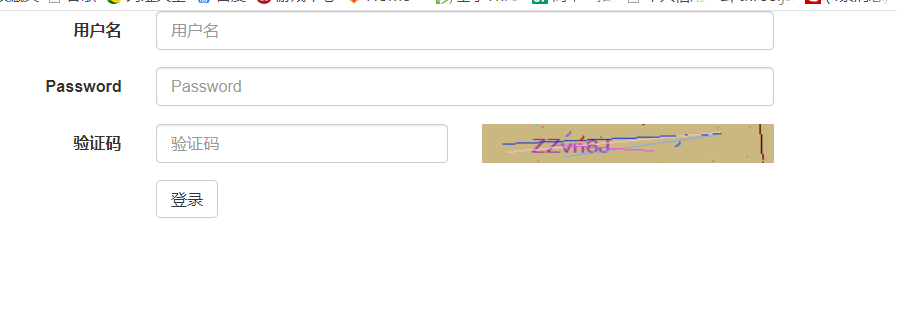
<form class="form-horizontal" id="fm">
  <div class="form-group">
    <label for="username" class="col-sm-2 control-label">用户名</label>
    <div class="col-sm-4">
      <input type="text" class="form-control" name="username" id="username" placeholder="用户名">
    </div>
  </div>
  <div class="form-group">
    <label for="inputPassword3" class="col-sm-2 control-label">Password</label>
    <div class="col-sm-4">
      <input type="password" class="form-control" name="password" id="inputPassword3" placeholder="Password">
    </div>
  </div>
  <div class="form-group">
    <label for="valid-img" class="col-sm-2 control-label">验证码</label>
    <div class="col-sm-2">
      <input type="text" class="form-control" name="valid_img" id="valid-img" placeholder="验证码">
    </div>
      <div class="col-sm-2">
          <img src="{% url 'get_valid_img' %}" alt=""id="img"height="34"width="100%">
    </div>
      <span class="error" style="color: red;"></span>
  </div>
  <div class="form-group">
    <div class="col-sm-offset-2 col-sm-10">
      <button type="button" class="btn btn-default" id="login-in">登录</button>
    </div>
  </div>
</form>
<img src="{% url 'get_valid_img' %}" alt=""id="img"height="34"width="100%">
$("#login-in").click(function () {
        $.ajax({
            url:'{% url 'login_valid' %}',
            type:'post',
            data:$("#fm").serialize(),
            dataType:'json',
            success:function (arg) {
                if(arg.user){
                    $('.error').text('');
                    window.location.href('{% url 'index' %}');
                }else {
                    $(".error").text(arg.error_msg);
                }
            }
        })
    });
    //点击图片,通过img自带的点击事件,完成局部刷新验证码
    $('#img').click(function () {
        $('#img')[0].src+='?'//通过这个方式就能刷新img的src的值,并让img的src属性重新发送请求,注意是+=,并且后面是个特殊符号(?/等都可以)
    })
#验证码
    url(r"^get_valid_img/",views.get_valid_img,name="get_valid_img"),
    url(r"^login2/",views.login_valid,name="login_valid"),
from django.contrib import auth
from django.views.decorators.csrf import csrf_exempt
@csrf_exempt
def login_valid(request):
    if request.is_ajax():#可以判断是否是通过ajax方式提交的请求
        ret={'user':None,'error_msg':''}
        username=request.POST.get('username')
        password=request.POST.get('password')
        validcode=request.POST.get('valid_img')
        print(username,password,validcode)
        if validcode.upper()==request.session.get("valid_str").upper():
            user_obj=auth.authenticate(username=username,password=password)
            if user_obj:
                ret['user']=username
            else:
                ret['error_msg']='用户名或者密码错误'
            import json
            return HttpResponse(json.dumps(ret))
        else:
            ret['error_msg'] = '验证码错误'
            import json
            return HttpResponse(json.dumps(ret))
    else:
        return render(request,'valid_img.html')

def get_valid_img(request):
    from PIL import Image,ImageDraw,ImageFont

    import random,os
    from superCRMPratice import settings
    def get_random_color():
        return (random.randint(0,255),random.randint(0,255),random.randint(0,255))
    img_obj=Image.new("RGB",(200,34),get_random_color())#"RGB"、"RGBA"等,(200,34)为图片尺寸
    draw_obj=ImageDraw.Draw(img_obj)#通过图片对象生成一个画笔对象
    font_path=os.path.join(settings.BASE_DIR,'static/font/Helvetica.ttf')
    #获取字体,注意有些字体文件不能识别数字,所以如果数字显示不出来,就换个字体
    font_obj=ImageFont.truetype(font_path,16)#16是字体大小
    sum_str=''#这个数据就是用户需要输入的验证码内容
    for i in range(6):
        num=str(random.randint(0,9))
        lower=chr(random.randint(97,122))
        upper=chr(random.randint(65,90))
        a=random.choice([num,lower,upper])
        sum_str+=a
    draw_obj.text((34,10),sum_str,fill=get_random_color(),font=font_obj)#(64,10)为画笔画的起始位置
    #通过画笔对象添加文字
    img_width=200
    img_height=34
    for i in range(5):
        #画5条噪线
        x1=random.randint(0,img_width)
        x2=random.randint(0,img_width)
        y1=random.randint(0,img_height)
        y2=random.randint(0,img_height)
        draw_obj.line((x1,y1,x2,y2),fill=get_random_color())
    for i in range(16):
        #加噪点
        draw_obj.point((random.randint(0,img_width),random.randint(0,img_height)),fill=get_random_color())
    for i in range(4):
        #加噪弧
        x=random.randint(0,img_width)
        y=random.randint(0,img_height)
        draw_obj.arc((x,y,x+8,y+8),0,90,fill=get_random_color())#0,90:0-90度的弧1/4圆

    from io import BytesIO
    f=BytesIO()
    img_obj.save(f,'png')#在内存中保存
    data=f.getvalue()
    request.session['valid_str']=sum_str
    return HttpResponse(data)


 浙公网安备 33010602011771号