


一:安装ss
pip3.5 install --user ***
二:配置config文件xx.json
{
"server":"your_public_IP_address",
"server_port":xxxxx,
"local_port":1080,
"password":"your_password",
"timeout":600,
"method":"aes-256-gcm",
}

三:启动ss
sslocal -c xx.json start
四:配置chrome,先github(https://github.com/FelisCatus/SwitchyOmega/releases)下载 SwitchyOmega
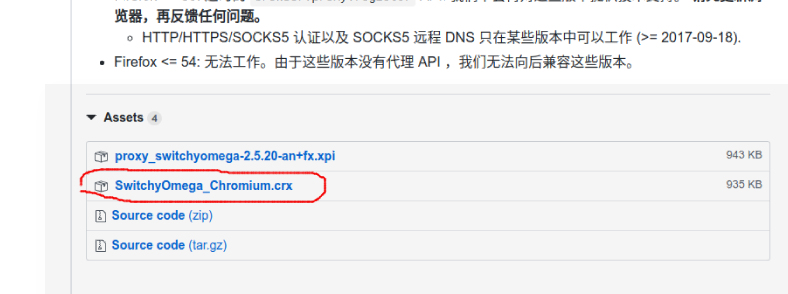
更改后缀.ctx为.rar并解压
五:加载扩展,1)chrome网址输入chrome://extensions/ 进入扩展界面。选择

2)选择之前的文件夹确定,此时chrome右上角会多一个蓝色圈圈
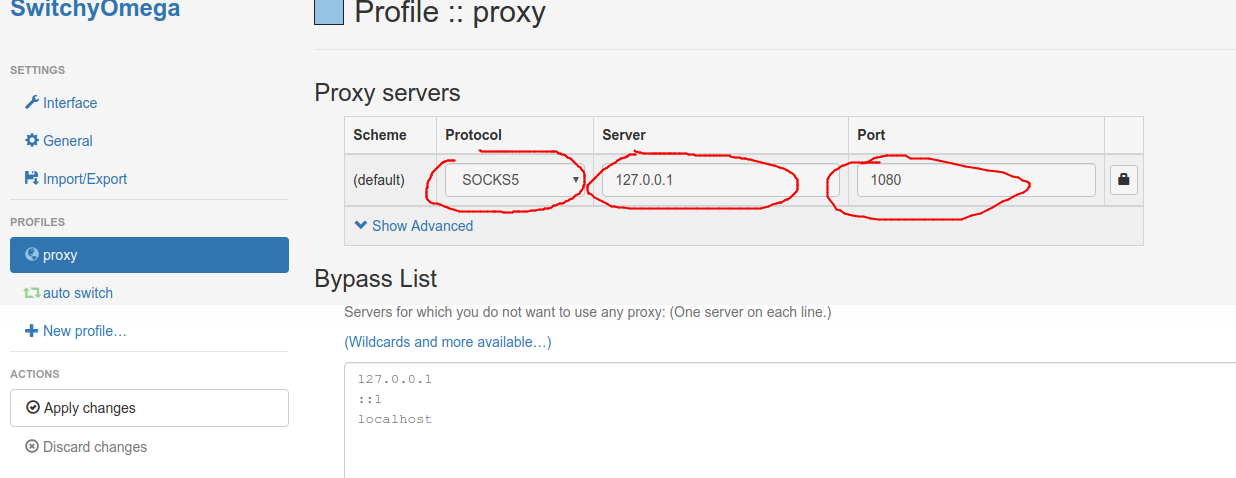
3)点击进入后,选择options,然后进行如下设置
六:至此完成

 浙公网安备 33010602011771号