


LangGraph学习记录1:入门篇
0. 写在前面
想搭建一个多智能体框架,已经设计好了,之前了解和使用过OpenAI早期的多智能体框架Swarm(主打轻量原生),huggingface的smolagent(侧重agent的行动是执行代码),还有魔改的openmanus。现在回归正规军,准备学习一下LangGraph的使用,并搭建解决我的领域特定任务的多智能体系统。
1. 安装
新建虚拟环境 python版本 > 3.10(langchain的要求)
pip install -U langchain
pip install -U langgraph
2. 入门一:第一个demo
这个demo是官方文档提供的,我改成openrouter的模型来使用。对于初学者来说这个其实不是特别好懂(也许是因为我太菜了),和我之前接触的框架搭建逻辑很不一样。可以先在AI辅助下理解这个demo,也可以先看下一部分入门二的demo我感觉更好懂。
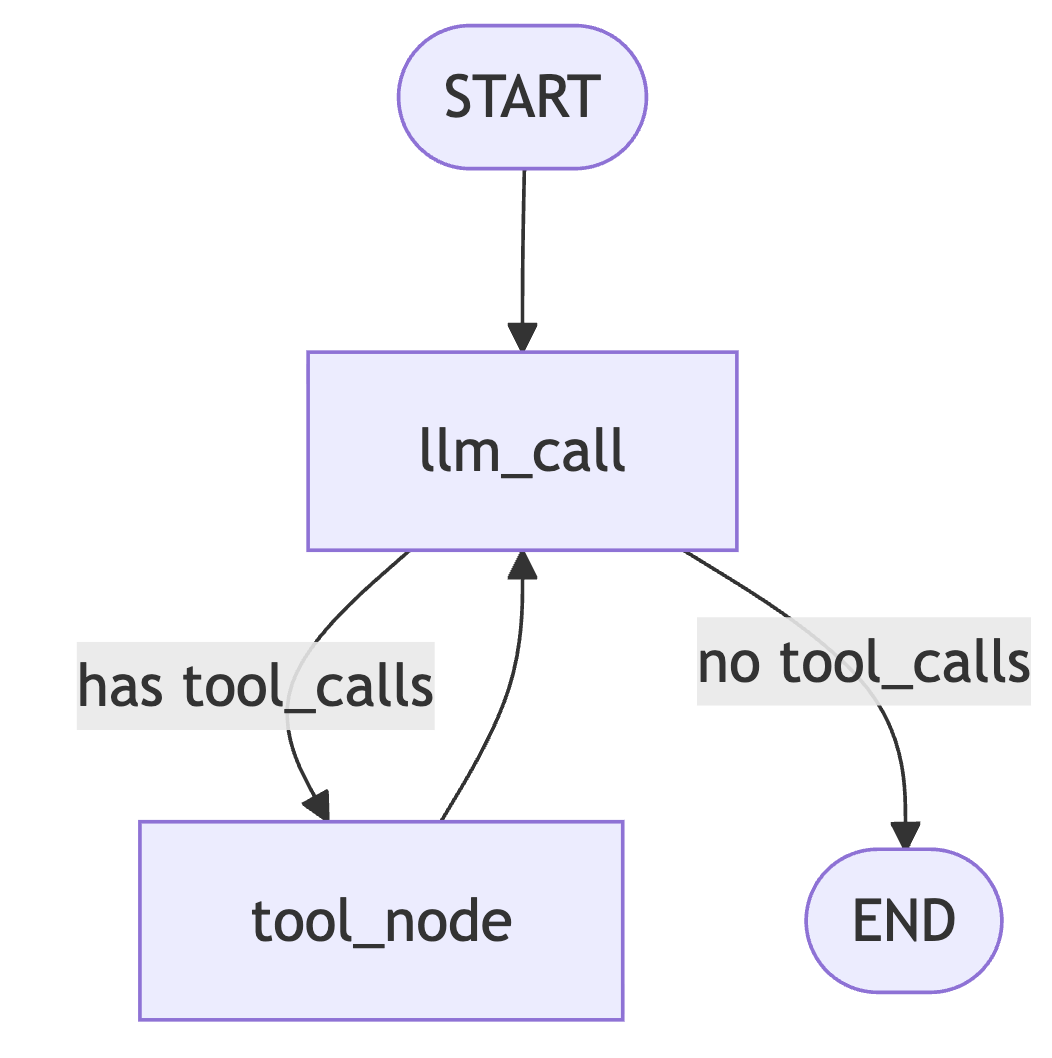
# Step 1: Define tools and model

from langchain.tools import tool
from langchain_openai import ChatOpenAI
from dotenv import load_dotenv
import os
load_dotenv()

model = ChatOpenAI(
    model="anthropic/claude-sonnet-4.5",
    temperature=0,
    base_url="https://openrouter.ai/api/v1",
    api_key=os.getenv("OPENROUTER_API_KEY")

)


# Define tools
@tool
def multiply(a: int, b: int) -> int:
    """Multiply `a` and `b`.

    Args:
        a: First int
        b: Second int
    """
    return a * b


@tool
def add(a: int, b: int) -> int:
    """Adds `a` and `b`.

    Args:
        a: First int
        b: Second int
    """
    return a + b


@tool
def divide(a: int, b: int) -> float:
    """Divide `a` and `b`.

    Args:
        a: First int
        b: Second int
    """
    return a / b


# Augment the LLM with tools
tools = [add, multiply, divide]
tools_by_name = {tool.name: tool for tool in tools}
model_with_tools = model.bind_tools(tools)

# Step 2: Define state

from langchain.messages import AnyMessage
from typing_extensions import TypedDict, Annotated
import operator


class MessagesState(TypedDict):
    messages: Annotated[list[AnyMessage], operator.add]
    llm_calls: int

# Step 3: Define model node
from langchain.messages import SystemMessage


def llm_call(state: dict):
    """LLM decides whether to call a tool or not"""

    return {
        "messages": [
            model_with_tools.invoke(
                [
                    SystemMessage(
                        content="You are a helpful assistant tasked with performing arithmetic on a set of inputs."
                    )
                ]
                + state["messages"]
            )
        ],
        "llm_calls": state.get('llm_calls', 0) + 1    #字典取值,不存在则返回0
    }


# Step 4: Define tool node

from langchain.messages import ToolMessage


def tool_node(state: dict):
    """Performs the tool call"""

    result = []
    for tool_call in state["messages"][-1].tool_calls:
        tool = tools_by_name[tool_call["name"]]
        observation = tool.invoke(tool_call["args"])
        result.append(ToolMessage(content=observation, tool_call_id=tool_call["id"]))
    return {"messages": result}

# Step 5: Define logic to determine whether to end

from typing import Literal
from langgraph.graph import StateGraph, START, END


# Conditional edge function to route to the tool node or end based upon whether the LLM made a tool call
def should_continue(state: MessagesState) -> Literal["tool_node", END]:
    """Decide if we should continue the loop or stop based upon whether the LLM made a tool call"""

    messages = state["messages"]
    last_message = messages[-1]

    # If the LLM makes a tool call, then perform an action
    if last_message.tool_calls:
        return "tool_node"

    # Otherwise, we stop (reply to the user)
    return END

# Step 6: Build agent

# Build workflow
agent_builder = StateGraph(MessagesState)

# Add nodes
agent_builder.add_node("llm_call", llm_call)
agent_builder.add_node("tool_node", tool_node)

# Add edges to connect nodes
agent_builder.add_edge(START, "llm_call")
agent_builder.add_conditional_edges(
    "llm_call",
    should_continue,
    ["tool_node", END]
)
agent_builder.add_edge("tool_node", "llm_call")

# Compile the agent
agent = agent_builder.compile()


from IPython.display import Image, display
# Show the agent and write the graph to disk for later viewing
agent_graph = agent.get_graph(xray=True)
agent_png_bytes = agent_graph.draw_mermaid_png()
with open("agent_graph.png", "wb") as f:
    f.write(agent_png_bytes)
display(Image(data=agent_png_bytes))

# Invoke
from langchain.messages import HumanMessage
messages = [HumanMessage(content="Add 3 and 4.")]
messages = agent.invoke({"messages": messages}) #返回最终的全局状态字典
for m in messages["messages"]:
    m.pretty_print()
3.入门二:三阶段搭建agent
这里是参考这篇文章点击查看,这位佬分三个阶段(基础,加工具,加内存)渐进实现agent,更加好懂一些。

 浙公网安备 33010602011771号