
C#-使用脚本启动程序并传参以及读取程序启动状态
winform和控制台的程序入口都是program.cs中的Main函数。
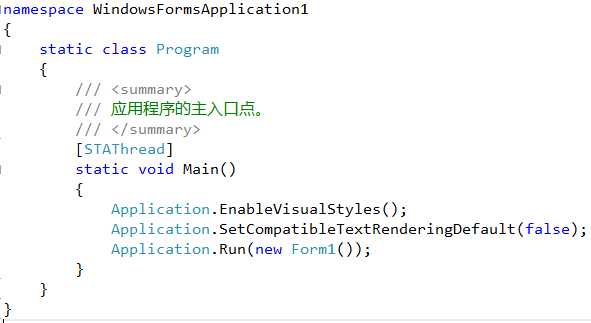
我们可以F5启动程序,也可以双击bin目录下的exe启动。现在我想通过exe启动程序时,给程序传入参数,程序根据收到的参数进行逻辑处理。
首先给Main函数增加参数:
static void Main(string[] args)
{
    if (args.Length > 0)
        IO.parameter = args[0];
    Application.EnableVisualStyles();
    Application.SetCompatibleTextRenderingDefault(false);
    Application.Run(new Form1());
}
在Form中显示收到的参数,然后生成解决方案后将bin放在D盘下:
public Form1()
{
    InitializeComponent();
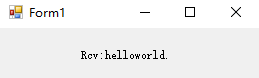
    this.label1.Text = "Rcv:" + IO.parameter;
}
创建bat文件,输入内容后保存:
start /d "D:\bin\Debug\" WindowsFormsApplication1.exe helloworld.
双击bat文件,启动程序:

如果是要在代码中启动外部程序并传入参数,可以如下写法:
using System.Diagnostics;//引入命名空间

class Program
{
    static void Main(string[] args)
    {
        string path = @"D:\bin\Debug\WindowsFormsApplication1.exe";
        string parm = "123";
        Process p = Process.Start(path, parm);//启动程序并传入参数
        p.WaitForExit();//等待程序退出
    }
}
如果要获取该程序启动信息,可在被启动程序中使用Console.WriteLine输出信息,在启动程序中:
public void StartExtraProcess()
{
    Process p = new Process();
    p.StartInfo.FileName = file;
    p.StartInfo.CreateNoWindow = true;
    p.StartInfo.RedirectStandardOutput = true;
    p.StartInfo.UseShellExecute = false;
    p.OutputDataReceived += p_OutputDataReceived;
    p.Start();
    p.BeginOutputReadLine();
}
p_OutputDataReceived 函数:
void p_OutputDataReceived(object sender, DataReceivedEventArgs e)
{
    if (!string.IsNullOrEmpty(e.Data))
        rcvStr = e.Data;
}

 浙公网安备 33010602011771号