
Lvs-DR
DR模式
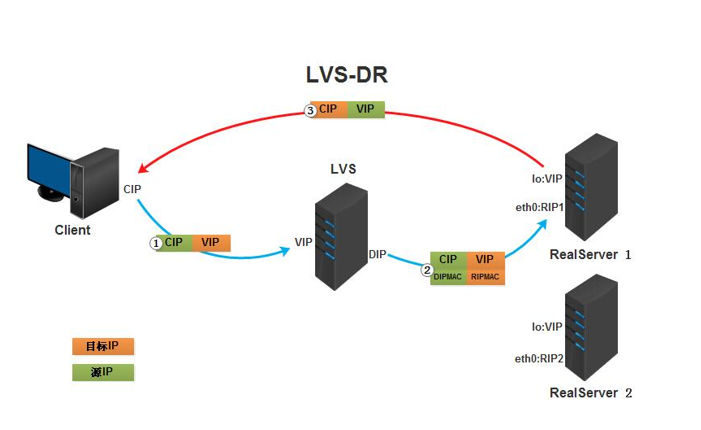
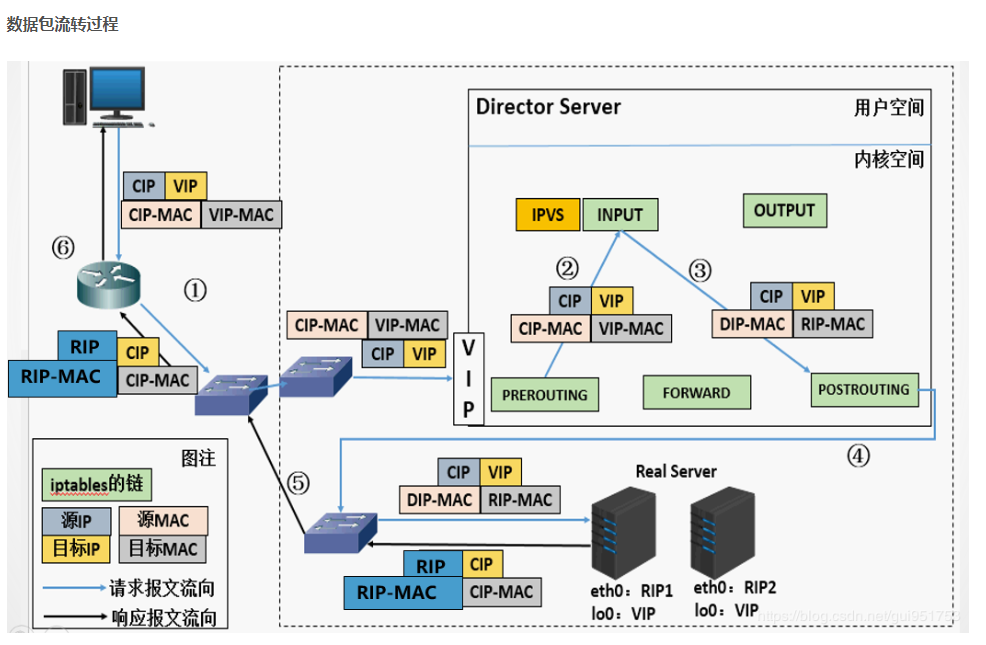
直接路由技术实现虚拟服务器。当参与集群的计算机和作为控制管理的计算机在同一个网段时可以用此方法,控制管理的计算机接收到请求包时直接送到参与集群的节点。直接路由模式比较特别,很难说和什么方面相似,前种模式基本上都是工作在网络层上(三层),而直接路由模式则应该是工作在数据链路层上(二层)。
DR模式的特性
1、保证前端路由将目标地址为VIP报文统统发给Director Server,而不是RS
2、RS可以使用私有地址;也可以是公网地址,如果使用公网地址,此时可以通过互联网对RIP进行直接访问
3、RS跟Director Server必须在同一个物理网络中
4、所有的请求报文经由Director Server,但响应报文必须不能进过Director Server
5、不支持地址转换,也不支持端口映射
6、RS可以是大多数常见的操作系统
7、RS的网关绝不允许指向DIP
8、RS上的lo接口配置VIP的IP地址
Clinet:
CIP:110.0.0.1/24
DGW:
110.0.0.254
192.168.0.15
Director:
DIP:192.168.0.208/24
VIP:192.168.0.250/24
RealServer:
RIP:192.168.0.188
RIP:192.168.0.111
配置:
Client:
配置IP 110.0.0.1/24
网关: 110.0.0.254
DGW:
配置IP
110.0.0.254
192.168.0.15
IP转发
Director:
1,
eth0 DIP
eth0:1 VIP
ifconfig eth0 192.168.0.245 netmask 255.255.255.0
ifconfig eth0:1 192.168.0.250 netmask 255.255.255.0
检查:
ip route show
192.168.0.0/24 dev eth0 proto kernel scope link src DIP
2,
getconf LONG_BIT
ipvsadm -A -t VIP:POdm -A -t VRT -s rr
ipvsadm -a -t VIP:PORT -r RIP -g
ipvsadm -A -t 192.168.0.250:80 -s rr
ipvsadm -a -t 192.168.0.250:80 -r 192.168.0.188 -g
ipvsadm -a -t 192.168.0.250:80 -r 192.168.0.111 -g
RealServer:
1,
配置IP
eth0 192.168.0.188
2,
模板:
ifconfig lo:1 VIP netmask 255.255.255.255
实际配置:
ifconfig lo:1 192.168.0.250 netmask 255.255.255.255
3,
作用:关闭ARP转发。
echo 1 > /proc/sys/net/ipv4/conf/eth0/arp_ignore
echo 2 > /proc/sys/net/ipv4/conf/eth0/arp_announce
永久生效:
vim sysctl.conf
net.ipv4.conf.eth0.arp_ignore = 1
net.ipv4.conf.eth0.arp_announce = 2
4,
route add default gw 192.168.0.15
5、vsftpd.conf
pasv_max_port=20000
pasv_min_port=10000
如果LVS/NAT,补充这个
pasv_address=VIP
watch -n 1 'ipvsadm -L -n -c | grep NONE'
解决arp很重要
这里可以有三种方式解决:
第一种是最保险的
#DGW
arp -s VIP mac(Director)
第二种是在real server上改内核的参数
#vim /etc/sysctl.conf在net.ipv4.ip_forward = 1下加入
net.ipv4.conf.lo.arp_ignore=0
net.ipv4.conf.lo.arp_announce=1
net.ipv4.conf.lo.arp_filter=1
就是让回环设备不响应arp的请求
第三种方式是最常用的,在real server上配置arptables
如果没装包的话需要先安装arptables_jf的包
#arptables -A IN -d VIP -j DROP
要清除所加入的规则,则#arptables -F
再#service arptables_jf save
进入到/etc/sysconfig/arptables看看写入的情况
#service arptables_jf save
#chkconfig arptables_jf on
trouble shooting:
如果作完还没有反应,网页看不见,也没提示其他的错误,则在real server上用tcpdump命令#tcpdump port 80 ,看是否收到包
arp_announce : INTEGER
默认为0
对网络接口上本地IP地址发出的ARP回应作出相应级别的限制:
确定不同程度的限制,宣布对来自本地源IP地址发出Arp请求的接口
0 - (默认) 在任意网络接口上的任何本地地址
1 -尽量避免不在该网络接口子网段的本地地址. 当发起ARP请求的源IP地址是被设置应该经由路由达到此网络接口的时候很有用.此时会检查来访IP是否为所有接口上
的子网段内ip之一.
如果改来访IP不属于各个网络接口上的子网段内,那么将采用级别2的方式来进行处理.
2 - 对查询目标使用最适当的本地地址.在此模式下将忽略这个IP数据包的源地址并尝试选择与能与该地址通信的本地地址.首要是选择所有的网络接口的子网中外
出访问子网中包含该
目标IP地址的本地地址.
如果没有合适的地址被发现,将选择当前的发送网络接口或其他的有可能接受到该ARP回应的网络接口来进行发送
all/ 和{interface}/ 下两者同时比较,取较大一个值生效.
提高约束级别有益于从指定的目标接受应答,而降低级别可以给予更多的arp查询者以反馈信息(关于arp代理这一段我普遍翻译地不好,去啃一下tcp/ip bible的卷一,
然后再翻译吧)
arp_ignore : INTEGER
默认为0
定义对目标地址为本地IP的ARP询问不同的应答模式
0 - (默认值): 回应任何网络接口上对任何本地IP地址的arp查询请求(比如eth0=192.168.0.1/24,eth1=10.1.1.1/24,那么即使eth0收到来自10.1.1.2这样地址发起的对
10.1.1.1 的
arp查询也会回应--而原本这个请求该是出现在eth1上,也该有eth1回应的)
1 - 只回答目标IP地址是来访网络接口本地地址的ARP查询请求(比如eth0=192.168.0.1/24,eth1=10.1.1.1/24,那么即使eth0收到来自10.1.1.2这样地址发起的对
192.168.0.1的查询会回答,
而对10.1.1.1 的arp查询不会回应)
2 -只回答目标IP地址是来访网络接口本地地址的ARP查询请求,且来访IP必须在该网络接口的子网段内(比如eth0=192.168.0.1/24,eth1=10.1.1.1/24,eth1收到来
自10.1.1.2
这样地址发起的对192.168.0.1的查询不会回答,而对192.168.0.2发起的对192.168.0.1的arp查询会回应)
3 - 不回应该网络界面的arp请求,而只对设置的唯一和连接地址做出回应
(do not reply for local addresses configured with scope host,only resolutions for global and link addresses are replied 翻译地似乎不好,这个我的去问问人)
4-7 - 保留未使用
8 -不回应所有(本地地址)的arp查询
all/ 和{interface}/ 下两者同时比较,取较大一个值生效.
注意IP:
VIP eth0:1
DIP eth0
问题1:为什么Director要有两个IP
核心:Director改数据包的目标MAC地址为RIP网卡对应的MAC(Director必须得知道RIP的MAC地址。通过ARP广播查询)
Director上发送的arp广播 :
srcip: VIP 还是DIP srcmac: DIP_mac 如果这里源IP是VIP的话,那么,实际上real server的lo接口上也配置了vip,数据包将不会回应给Director。
所以需要源IP是另外一个IP,也就是DIP
dstip: RIP dstmac: 0xffff
问题2:real server为什么是要有公网IP
VIP是公有IP,所以 DGW的内部接口(与VIP接口相连的)是公有IP,而Real server需要把包直接交给DGW,所以Real server的IP是公网地址!
问题3:VIP为什么要配置在eth0:0上?而不配置在eth0上 ---因为 要保证数据包arp找real server的MAC时,数据包的源IP是DIP。见问题1
[root@localhost networks]# ifconfig eth0:0 VIP
[root@localhost networks]# ifconfig eth0 DIP
[root@localhost networks]# ip route show
192.168.1.0/24 dev eth0 proto kernel scope link src DIP
如果把VIP配置到eth0接口上,将会看到这样的一条路由条目192.168.1.0/24 dev eth0 proto kernel scope link src VIP 这样就出问题了!
问题4:为什么real server不在eth1接口上配置VIP,而在lo接口上配置VIP呢
首先配置在lo接口上是因为方便,如果有第二块网卡,配置在eth1网卡接口上也是可行的。但是eth1接口不能响应对VIP的mac地址的ARP查询。
必须要通过arptables加规则,规则如下:
rpm -q arptables_if
arptables -A IN -d 220.0.0.2 -j DROP
为什么配置的子网掩码是255.255.255.255
子网掩码是32位,意味着不会在路由表中添加到相应网络的路由,这里并不需要路由条目,只需要直接走默认路由(把包交给DGW就行)
(路由表有名为main,default表。)
问题5:VS/DR方式时,如果Director上是双网卡eth0(用于连接DGW) 、 eth1(用于连接real server)
此时,见问题1 。需要确保路由条目为 ,并且在最上面(生效): Real Server的网段 dev eth0 proto kernel scope link src DIP
由于eth0,eth1上都 是公有IP,如果在同一网段,才需要把eth0到达网络的路由删除(以避免路由顺序不对带来的问题)!
[root@CIP]# tcpdump -i eth0 -nn -vv -e port 80
tcpdump: listening on eth0, link-type EN10MB (Ethernet), capture size 96 bytes
15:10:45.266037 00:e0:4c:44:9f:85(CIP) > 00:e0:4c:45:61:c4(DGW), ethertype IPv4 (0x0800), length 74: (tos 0x0, ttl 64, id 22704, offset 0, flags [DF], proto:
TCP (6), length: 60) 202.106.0.1.23958 > 192.168.0.253.80: S, cksum 0x92bf (correct), 1317340828:1317340828(0) win 5840 <mss 1460,sackOK,timestamp
19684908 0,nop,wscale 7>
15:10:45.266307 00:e0:4c:45:61:c4(DGW) > 00:e0:4c:44:9f:85(CIP), ethertype IPv4 (0x0800), length 74: (tos 0x0, ttl 63, id 0, offset 0, flags [DF], proto: TCP
(6), length: 60) 192.168.0.253.80 > 202.106.0.1.23958: S, cksum 0x943d (correct), 1321983549:1321983549(0) ack 1317340829 win 5792
<mss 1460,sackOK,timestamp 18927735 19684908,nop,wscale 7>
[root@DGW]# tcpdump -i eth0 -nn -vv -e port 80
tcpdump: listening on eth0, link-type EN10MB (Ethernet), capture size 96 bytes
15:13:51.991314 00:e0:4c:44:9f:85(CIP) > 00:e0:4c:45:61:c4(DGW), ethertype IPv4 (0x0800), length 74: (tos 0x0, ttl 64, id 29747, offset 0, flags [DF], proto: TCP (6),
length: 60) 202.106.0.1.23958 > 192.168.0.253.80: S, cksum 0x82ae (correct), 1643865869:1643865869(0) win 5840 <mss 1460,sackOK,timestamp 19993406 0,nop,wscale 7>
15:13:52.029861 00:e0:4c:45:61:c4(DGW) > 00:e0:1c:3e:79:7f(VIP), ethertype IPv4 (0x0800), length 74: (tos 0x0, ttl 63, id 29747, offset 0, flags [DF], proto: TCP (6), length: 60)
202.106.0.1.23958 > 192.168.0.253.80: S, cksum 0x82ae (correct), 1643865869:1643865869(0) win 5840 <mss 1460,sackOK,timestamp 19993406 0,nop,wscale 7>
15:13:51.991491 00:0c:29:c5:24:05 > 00:e0:4c:45:61:c4, ethertype IPv4 (0x0800), length 74: (tos 0x0, ttl 64, id 0, offset 0, flags [DF], proto: TCP (6), length: 60)
192.168.0.253.80 > 202.106.0.1.23958: S, cksum 0x1d04 (correct), 1644133662:1644133662(0) ack 1643865870 win 5792 <mss 1460,sackOK,timestamp
19236230 19993406,nop,wscale 7>
15:13:51.991525 00:e0:4c:45:61:c4 > 00:e0:4c:44:9f:85, ethertype IPv4 (0x0800), length 74: (tos 0x0, ttl 63, id 0, offset 0, flags [DF], proto: TCP (6), length: 60)
192.168.0.253.80 > 202.106.0.1.23958: S, cksum 0x1d04 (correct), 1644133662:1644133662(0) ack 1643865870 win 5792 <mss 1460,sackOK,timestamp
19236230 19993406,nop,wscale 7>
由于抓包工具软件的问题,无法抓取DGW发送过来的原始数据包,只能抓取到DGW送过来被LVS修改后的数据包。
[root@DIP]# tcpdump -i eth0 -nn -vv -e port 80
tcpdump: listening on eth0, link-type EN10MB (Ethernet), capture size 96 bytes
15:20:06.634782 00:e0:1c:3e:79:7f(DIP) > 00:0c:29:c5:24:05(RIP_192.168.0.118),
ethertype IPv4 (0x0800), length 74: (tos 0x0, ttl 63, id 10788, offset 0, flags [DF], proto: TCP (6), length: 60)
202.106.0.1.23958 > 192.168.0.253.80: S, cksum 0x10e2 (correct), 1838139864:1838139864(0) win 5840 <mss 1460,sackOK,timestamp 20177916 0,nop,wscale 7>
[root@RS]# tcpdump -i eth0 -nn -vv -e port 80
tcpdump: listening on eth0, link-type EN10MB (Ethernet), capture size 96 bytes
15:27:50.355542 00:e0:1c:3e:79:7f(DIP) > 00:0c:29:c5:24:05(RIP), ethertype IPv4 (0x0800), length 74: (tos 0x0, ttl 63, id 5913, offset 0, flags [DF], proto: TCP (6),
length: 60) 202.106.0.1.23958 > 192.168.0.253.80: S, cksum 0xa3e5 (correct), 2217890588:2217890588(0) win 5840 <mss 1460,sackOK,timestamp 20530181 0,nop,wscale 7>
15:27:50.420348 00:0c:29:c5:24:05(RIP) > 00:e0:4c:45:61:c4(DGW), ethertype IPv4 (0x0800), length 74: (tos 0x0, ttl 64, id 0, offset 0, flags [DF], proto: TCP (6), length: 60)
192.168.0.253.80 > 202.106.0.1.23958: S, cksum 0xfa86 (correct), 1497090819:1497090819(0) ack 2217890589 win 5792 <mss 1460,sackOK,timestamp
4556025 20530181,nop,wscale 7>

 浙公网安备 33010602011771号