

Iconfont使用
Iconfont 是阿里矢量库,有很多各种图片,
地址: https://www.iconfont.cn
准备工作
添加一个项目,然后将自己喜欢的图片添加进去然后下载到本地
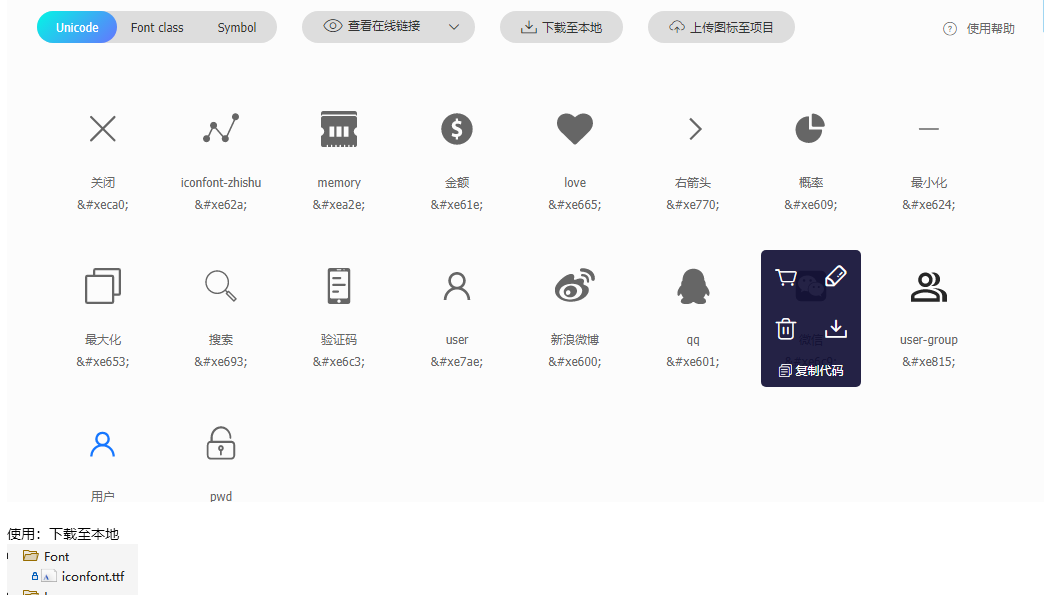
注意:需要将文件添加成资源文件在桌面程序中的时候
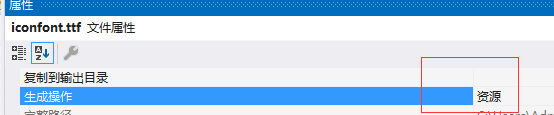
调用
<Button Content="" Width="40" Height="40" VerticalAlignment="Top" HorizontalAlignment="Left" Name="btnCloseStrotBoard"
BorderThickness="0" FontFamily="/Font/#iconfont" />
效果类似

扩展说明 win7 不支持,所以win7 你要下载图片才可以
    <!--最小化按钮-->
                        <Button  x:Name="btnMin"   Background="Transparent"
                             Visibility="{Binding  IsMinimizeButtonVisible,RelativeSource={RelativeSource AncestorType={x:Type local:wBase}}}">
                            <Image Source="/Images/min.png" Width="26" Height="26" />
                        </Button>
封装成样式统一调用
MenButtonTemplate.xaml

    <Style x:Key="MenuButtonTemplate" TargetType="{x:Type Button}">
        <Setter Property="Width" Value="40"/>
        <Setter Property="Height" Value="40"/>
        <Setter Property="Foreground" Value="White"/>
        <Setter Property="Template">
            <Setter.Value>
                <ControlTemplate TargetType="{x:Type Button}">
                    <Border Background="Transparent" Name="back">

                        <!--win7 不支持iconfont 代码形式-->
                        <TextBlock Text="{TemplateBinding Content}"
                                   Foreground="{TemplateBinding Foreground}" VerticalAlignment="Center"
                                   HorizontalAlignment="Center" FontFamily="/Font/#iconfont" FontSize="16"/>
                    </Border>
                    <ControlTemplate.Triggers>
                        <Trigger Property="IsMouseOver" Value="True">
                            <Setter TargetName="back" Property="Background" Value="#22ffffff"/>
                        </Trigger>
                        <Trigger Property="IsPressed" Value="True">
                            <Setter TargetName="back" Property="Background" Value="#44ffffff"/>
                        </Trigger>
                    </ControlTemplate.Triggers>
                </ControlTemplate>
            </Setter.Value>
        </Setter>
    </Style>
将样式添加到资源文件中
 <Application.Resources>
        <ResourceDictionary>
            <!-- 资源合并 -->
            <ResourceDictionary.MergedDictionaries>
                <ResourceDictionary  Source="/Template/MenButtonTemplate.xaml" />
调用刚才写的样式
<Button Style="{StaticResource MenuButtonTemplate }" Content="" Command="{Binding MaxClick}" CommandParameter="{ Binding ElementName=MainView}"/>
效果如图


 浙公网安备 33010602011771号