
【WPF 数据验证机制】二、Validation 数据验证 简单使用
上一篇:【WPF】一、WPF 数据验证机制 Validation---重要
只设计Mvvm的View层和Viewmodel层,未设计到model。下面一篇重点介绍IDataErrorInfoINotifyDataErrorInfo +数据标注的联合使用,主要在model层
- By using INotifyDataErrorInfo
- By using Exception validation
- By using IDataErrorInfo
- By using ValidationRules
INotifyDataErrorInfo

TextBox.Text 在 WPF 里只能绑定 string(这是 WPF 绑定引擎的硬限制,不是 MVVM 框架的限制)。所以:
- ViewModel 暴露给 XAML 绑定的属性必须是
string(如你现在的ScoreText) - 校验逻辑在这个 string 属性的 setter /
ValidateProperty里做,包括"是否能转成数字"+"数值范围"两层校验 - 如果业务逻辑(存库、计算)需要 int,再额外加一个派生的 int 属性,但这个 int 属性不参与绑定,只是内部转换用
完整示例
public partial class QAEditViewModel : ObservableValidator
{
    [ObservableProperty]
    [NotifyDataErrorInfo]//这个很关键
    [CustomValidation(typeof(QAEditViewModel), nameof(ValidateScore))]
    private string scoreText = "0";

    // 业务层用的 int,不绑定,只在需要存库/计算时调用
    public int ScoreValue => int.TryParse(ScoreText, out var v) ? v : 0;

    public static ValidationResult ValidateScore(string value, ValidationContext context)
    {
        if (string.IsNullOrWhiteSpace(value))
            return new ValidationResult("分值不能为空");

        if (!int.TryParse(value, out int score))
            return new ValidationResult("请输入有效的整数");

        if (score < 1 || score > 100)
            return new ValidationResult("分值必须在 1~100 之间");

        return ValidationResult.Success;
    }
}
固定的,可以当模板套
签名必须严格符合这个形态(这是 ValidationAttribute 体系的约定,不是 MVVM Toolkit 发明的):
public static ValidationResult ValidateXXX(类型 value, ValidationContext context)
{
    if (/* 不满足条件 */)
        return new ValidationResult("错误提示文案");

    return ValidationResult.Success;
}
三个硬性要求:
- 必须是
static(因为特性是在类型层面声明的,调用时还没有实例上下文,只能传值进去) - 第一个参数类型要匹配被验证的属性类型(你这里是
string) - 返回值必须是
ValidationResult
XAML 端只绑定 ScoreText:
<TextBox Text="{Binding ScoreText, UpdateSourceTrigger=PropertyChanged,
               ValidatesOnNotifyDataErrors=True}"/>
至此验证流程就完了。
接下来要讲的是新手常见的操作错误:
(1)反过来:ViewModel 里直接用 int 属性绑定
[ObservableProperty]
private int score; // 绑定到 TextBox.Text
WPF 会先尝试用默认的 Int32Converter 把用户输入的字符串转成 int,转换失败时(比如输入了字母)会在转换器层面直接报ValidatesOnExceptions错,根本进不到你的 setter,INotifyDataErrorInfo 校验逻辑完全拿不到这个"非数字"的错误信息,只能依赖 ValidatesOnExceptions(绑定异常)去捕获转换器抛出的异常。
所以结论是:string 是绑定层的最优解,"是否是数字"也作为校验规则的一部分(而不是依赖类型转换失败),这样错误信息完全在你掌控之中,也方便做本地化文案。
(2)没有添加[NotifyDataErrorInfo]
[NotifyDataErrorInfo] 是 CommunityToolkit.Mvvm 提供的特性,加在 [ObservableProperty] 字段上,作用是让这个属性的赋值自动触发验证(调用 ValidateProperty),并在验证失败时通过 INotifyDataErrorInfo 接口通知 UI 显示错误。
简单说:它是连接"属性变化"和"触发校验"的开关。
不加它会发生什么
如果只写:
[ObservableProperty]
[CustomValidation(typeof(QAEditViewModel), nameof(ValidateScore))]
private string scoreText = "0";
CustomValidation 特性只是声明了校验规则,但没有任何东西会在 ScoreText 被赋值时主动调用这个规则。ObservableValidator 提供的 ValidateProperty() 方法必须被显式调用才会执行校验、产生错误、并触发 ErrorsChanged 事件让 UI 刷新红框提示。
加了它之后发生什么
[ObservableProperty]
[NotifyDataErrorInfo]
[CustomValidation(typeof(QAEditViewModel), nameof(ValidateScore))]
private string scoreText = "0";
源生成器(source generator)会在生成的 ScoreText 属性 setter 里,自动追加一行类似:
public string ScoreText
{
    get => scoreText;
    set
    {
        if (SetProperty(ref scoreText, value))
        {
            ValidateProperty(value, nameof(ScoreText)); // 这一行是 NotifyDataErrorInfo 加的
        }
    }
}
也就是说,每次 ScoreText 被修改(包括 TextBox 输入触发的绑定更新),都会自动跑一遍 ValidateScore,校验失败就把错误塞进 INotifyDataErrorInfo.GetErrors(),并触发 ErrorsChanged,XAML 里 ValidatesOnNotifyDataErrors=True 才能感知到错误并显示出来。
三者缺一不可:没有 [NotifyDataErrorInfo],校验规则写了也不会被执行;没有校验规则特性,[NotifyDataErrorInfo] 也无事可做。
By Using Exception Validation
The View
<TextBox Text="{Binding StudentName,
                ValidatesOnExceptions=True,
                UpdateSourceTrigger=PropertyChanged}"
                VerticalAlignment="Center"
                FontSize="20"/>
The Code behind View
namespace TestWpfValidation
{
    public partial class MainWindow : Window
    {
        private string _studentName;

        public string StudentName
        {
            get { return _studentName; }
            set
            {
                if (value.Length < 6 || value.Length > 50)
                {
                    throw new ArgumentException("Name should be between range 6-50");
                }

                _studentName = value;
            }
        }

        public MainWindow()
        {
            this.DataContext = this;
            InitializeComponent();
        }
    }
}
Output

By Using IDataErrorInfo
The View
TextBox Text="{Binding StudentName,
               UpdateSourceTrigger=PropertyChanged, ValidatesOnDataErrors=True}"
               VerticalAlignment="Center"
               FontSize="20"/>
The ViewModel
public partial class MainWindow : Window, IDataErrorInfo, INotifyPropertyChanged
    {
        public MainWindow()
        {
            this.DataContext = this;
            InitializeComponent();
        }

        public string StudentName
        {
            get { return _studentName; }
            set
            {
                _studentName = value;
                OnPropertyChanged("StudentName");
            }
        }

        public string this[string columnName]
        {
            get
            {
                 switch (columnName)
                 {
                case "Age":
                    if (this.Age < 10 || this.Age > 100)
                        return "The age must be between 10 and 100";
                    break;
                }

                return result;
            }
        }

        public string Error
        {
            get
            {
                return string.Empty;
            }
        }

        public event PropertyChangedEventHandler PropertyChanged;

        protected void OnPropertyChanged(string name)
        {
            PropertyChangedEventHandler handler = PropertyChanged;
            if (handler != null)
            {
                handler(this, new PropertyChangedEventArgs(name));
            }
        }

        private string _studentName;
}
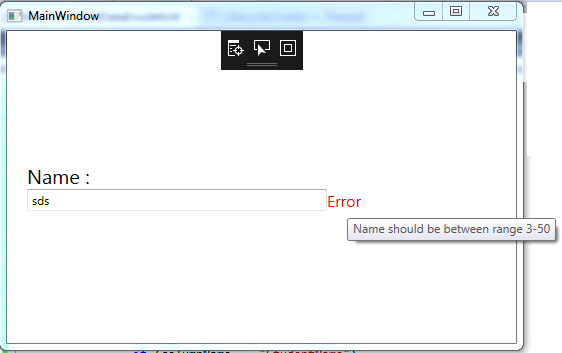
By Using ValidationRules
public class StudentNameValidationRule : ValidationRule
    {
        public override ValidationResult Validate(object value, CultureInfo cultureInfo)
        {
            string valueToValidate = value as string;
            if (valueToValidate.Length < 6 || valueToValidate.Length > 10)
            {
                return new ValidationResult(false, "Name should be between range 3-50");
            }

            return new ValidationResult(true, null);
        }
}
In XAML,
<TextBox VerticalAlignment="Center" FontSize="20">
      <TextBox.Text>
       <Binding Path="StudentName" UpdateSourceTrigger="PropertyChanged">
            <Binding.ValidationRules>
                 <local:StudentNameValidationRule/>
            </Binding.ValidationRules>
       </Binding>
      </TextBox.Text>
<TextBox>
Adding Style to the Error
<Style x:Key="GeneralErrorStyle">
            <Setter Property="Validation.ErrorTemplate">
                <Setter.Value>
                    <ControlTemplate>
                        <DockPanel>
                            <TextBlock DockPanel.Dock="Right"
                                       Foreground="Red"
                                       FontSize="12pt"
                                       Text="Error"
                                       ToolTip="{Binding ElementName=placeholder,
                                       Path= AdornedElement.(Validation.Errors)[0].ErrorContent}"/>
                            <AdornedElementPlaceholder x:Name="placeholder" />
                        </DockPanel>
                    </ControlTemplate>
                </Setter.Value>
            </Setter>
        </Style>
XaML
<TextBox Style="{StaticResource GeneralErrorStyle}"
                 Text="{Binding StudentName,
                        UpdateSourceTrigger=PropertyChanged,
                        ValidatesOnDataErrors=True}"
                 HorizontalAlignment="Left"
                 Width="300"/>

 浙公网安备 33010602011771号