
【java】javaSE知识梳理-网络编程
网络信息
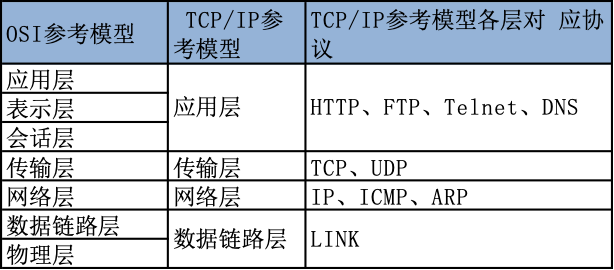
获取IP和端口信息



package javaNet.inetAddress;

import java.net.InetAddress;
import java.net.UnknownHostException;

/**
 * @author ChenDan
 * @create 2021-06-01
 * @desc
 */
public class InetAddressTest {
    /**
     * 实例化
         * public static InetAddress getLocalHost() throws UnknownHostException:主机名/IP
         * public static InetAddress getByName(String host) throws UnknownHostException:主机名/IP
     * 实例化对象使用
         * public String getHostName():主机名
         * public String getHostAddress():IP
     */
    public static void main(String[] args) {
        try {
            InetAddress localHost = InetAddress.getLocalHost();
            InetAddress inetAddress = InetAddress.getByName("www.baidu.com");

            System.out.println(localHost);
            System.out.println(inetAddress);
            System.out.println(inetAddress.getHostName());
            System.out.println(inetAddress.getHostAddress());
        } catch (UnknownHostException e) {
            e.printStackTrace();
        }
    }
}
TCP+UDP通信过程
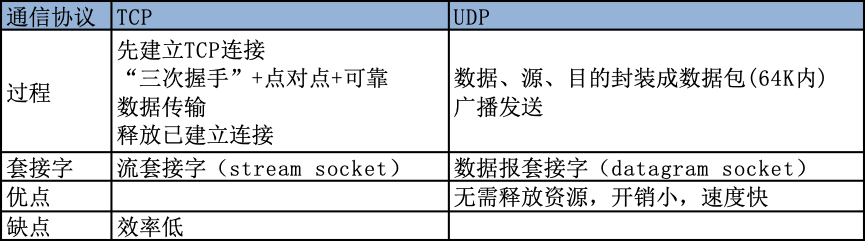
TCP通信-Socket套接字
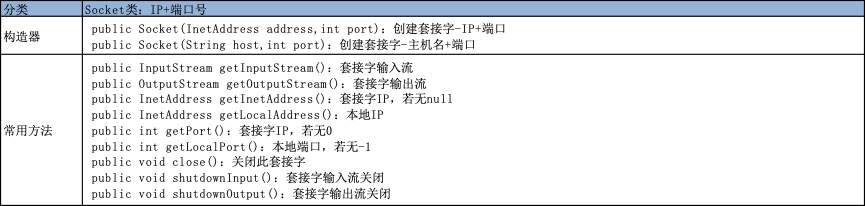
程序应用
package javaNet.scoket;

import org.junit.Test;

import java.io.*;
import java.net.InetAddress;
import java.net.ServerSocket;
import java.net.Socket;

/**
 * @author ChenDan
 * @create 2021-06-01
 * 应用1: 客户端向服务器发送信息,服务器将收到的信息发送到控制台
 * 应用2:客户端向服务器发送文件,服务器将收到的文件保存到本地,并返回"发送成功"给客户端
 *
 * 客户端
     * 确定连接的IP+端口:InetAddress+Socket
     * 输出流:OutputStream
     * 输入流:InputStream的派生类
 * 服务器
     * 确定服务器的端口:ServerSocket
     * 创建自己的套接字-连接那个端口:Socket
     * 输入流:InutStream
     * 输出流:OutputStream的派生类
 *
 */
public class TCPTest {

    /**
     * 应用2:客户端向服务器发送文件,服务器将收到的文件保存到本地,并返回"发送成功"给客户端
     */
    @Test
    public void client2() throws IOException {
        // 套接字获取接收端IP+端口
        Socket socket = new Socket(InetAddress.getByName("127.0.0.1"), 7799);
        // 套接字对象获取客户端的输出权限
        OutputStream os = socket.getOutputStream();
        // 将文件中的内容通过IO流读取+写入输出流
        FileInputStream fis = new FileInputStream(new File("xx.png"));
        byte[] buffer = new byte[5];
        os.write("传输xx.png文件给服务器".getBytes());
        while ((fis.read(buffer)) != -1) {
            os.write(buffer);
        }
        // 资源关闭
        os.write("传输完毕!".getBytes());
        os.close();
        fis.close();
    }

    @Test
    public void server2() throws IOException {
        // 服务器的套接字-创建+确定端口
        ServerSocket ss = new ServerSocket(7799);
        // 套接字对象连接端口
        Socket socket = ss.accept();
        // 将套接字作为输入流+创建一个文件输出流,输入的信息写入文件输出流中
        InputStream is = socket.getInputStream();
        FileOutputStream fos = new FileOutputStream(new File("xx3.png"));
        byte[] buffer = new byte[5];
        int len;
        while((len = is.read(buffer)) != -1) {
            fos.write(buffer, 0, len);
        }
        // 资源关闭
        ss.close();
        socket.close();
        is.close();
        fos.close();
    }


    /**
     * 应用1: 客户端向服务器发送信息,服务器将收到的信息发送到控制台
     */
    @Test
    public void client1() {
        // 创建套接字+将此作为输出流,输出流输出字符串信息,关闭资源
        Socket socket = null;
        OutputStream os = null;

        try {
            InetAddress inetAddress = InetAddress.getByName("127.0.0.1");
            socket = new Socket(inetAddress, 7799);
            os = socket.getOutputStream();
            os.write("Hello I'm client!".getBytes());
            os.write("您好,我是客户端!".getBytes());
        } catch (IOException e) {
            e.printStackTrace();
        } finally {
            if(socket != null) {
                try {
                    socket.close();
                } catch (IOException e) {
                    e.printStackTrace();
                }
            }
            if(os != null) {
                try {
                    os.close();
                } catch (IOException e) {
                    e.printStackTrace();
                }
            }
        }

    }

    @Test
    public void server1() {
        // 创建服务器套接字,确定端口,套接字对象连接服务器,套接字对象作为输入流向服务器套接字传送数据
        ServerSocket ss = null;
        Socket socket = null;
        InputStream is = null;
        ByteArrayOutputStream baos = null;

        try {
            ss = new ServerSocket(7799);
            socket = ss.accept();
            is = socket.getInputStream();
            baos = new ByteArrayOutputStream();
            byte[] buffer = new byte[5];
            int len;
            while((len = is.read(buffer)) != -1) {
                baos.write(buffer,0,len);
            }
            System.out.println(baos.toString());
        } catch (IOException e) {
            e.printStackTrace();
        } finally {
            if(ss != null) {
                try {
                    ss.close();
                } catch (IOException e) {
                    e.printStackTrace();
                }
            }
            if(socket != null) {
                try {
                    socket.close();
                } catch (IOException e) {
                    e.printStackTrace();
                }
            }
            if(is != null) {
                try {
                    is.close();
                } catch (IOException e) {
                    e.printStackTrace();
                }
            }
            if(baos != null) {
                try {
                    baos.close();
                } catch (IOException e) {
                    e.printStackTrace();
                }
            }
        }
    }
}
UDP通信-数据报+套接字
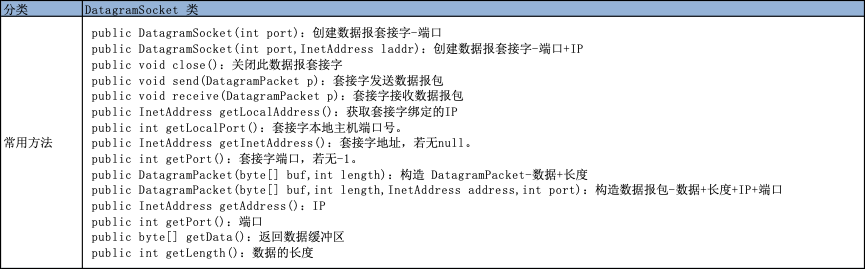
程序应用
package javaNet.scoket;

import org.junit.Test;

import java.io.IOException;
import java.net.*;

/**
 * @author ChenDan
 * @create 2021-06-01
 * @desc 应用: 客户端向服务器发送信息,服务器将收到的信息发送到控制台
 * 客户端
 *  创建数据包套接字:DatagramSocket
 *  获取接收端的IP+端口:InetAddress
 *  构造数据包
     *  public DatagramPacket(byte buf[], int offset, int length,
     *                           InetAddress address, int port) {
     *         setData(buf, offset, length)
 *  发送:public void send(DatagramPacket p) throws IOException
 *  资源关闭
 * 服务器
 *  创建据包套接字:DatagramSocket-端口
 *  构造数据包
     *  public DatagramPacket(byte buf[], int offset, int length)
 *  接收:public synchronized void receive(DatagramPacket p) throws IOException
 *  资源关闭
 */
public class UDPTest {

    @Test
    public void client() throws IOException {
        DatagramSocket socket = new DatagramSocket();

        String str = "我是UDP方式发送的导弹";
        byte[] buffer = str.getBytes();
        InetAddress inet = InetAddress.getByName("www.baidu.com");
        System.out.println(inet);
        DatagramPacket packet = new DatagramPacket(buffer,0,buffer.length,inet,9090);

        socket.send(packet);

        socket.close();
    }

    @Test
    public void server() throws IOException {
        DatagramSocket socket = new DatagramSocket(9090);

        byte[] buffer = new byte[100];
        DatagramPacket packet = new DatagramPacket(buffer,0,buffer.length);

        socket.receive(packet);
        System.out.println(new String(packet.getData(),0,packet.getLength()));
        socket.close();

    }
}
URL信息

程序应用
package javaNet.scoket;

import org.junit.Test;

import java.io.FileOutputStream;
import java.io.IOException;
import java.io.InputStream;
import java.net.HttpURLConnection;
import java.net.MalformedURLException;
import java.net.URL;
import java.net.URLConnection;

/**
 * @author ChenDan
 * @create 2021-06-02
 * @desc
 */
public class URLTest {

    @Test
    public void test() throws IOException {
        URL url = new URL("http://localhost:8020/examples/xx.png");
        URLConnection urlConnection = (HttpURLConnection)url.openConnection();
        urlConnection.connect();

        InputStream is = urlConnection.getInputStream();

        FileOutputStream fos = new FileOutputStream("xx.png");

        byte[] buffer = new byte[1024];
        int len;
        while((len = is.read(buffer)) != -1) {
            fos.write(buffer,0,len);
        }

        is.close();
        fos.close();
        ((HttpURLConnection) urlConnection).disconnect();

    }

    /**
     * URI
         * uniform resource identifier:统一资源标识符
         * URL
             * uniform resource locator:统一资源定位符,URI的一种
             * <协议号>://<主机名>:<端口号>/<文件名>#片段名?参数列表
         * URN
             * uniform resource name:统一资源命名,URI的一种
     *
     */
    @Test
    public void URLInfo() throws MalformedURLException {
        URL url = new URL("http://c.biancheng.net/view/1203.html");

        System.out.println(url.getProtocol());  // 协议名
        System.out.println(url.getHost());  // 主机名
        System.out.println(url.getPort());  // 端口号
        System.out.println(url.getPath());  // 文件路径
        System.out.println(url.getFile());  // 文件名
        System.out.println(url.getQuery());  // 查询名
    }
}

 浙公网安备 33010602011771号