
2022-08-08 第三组 陈迪 学习笔记
单元测试/IO流
1、JUnit单元测试
JUnit是一个Java语言单元测试框架。
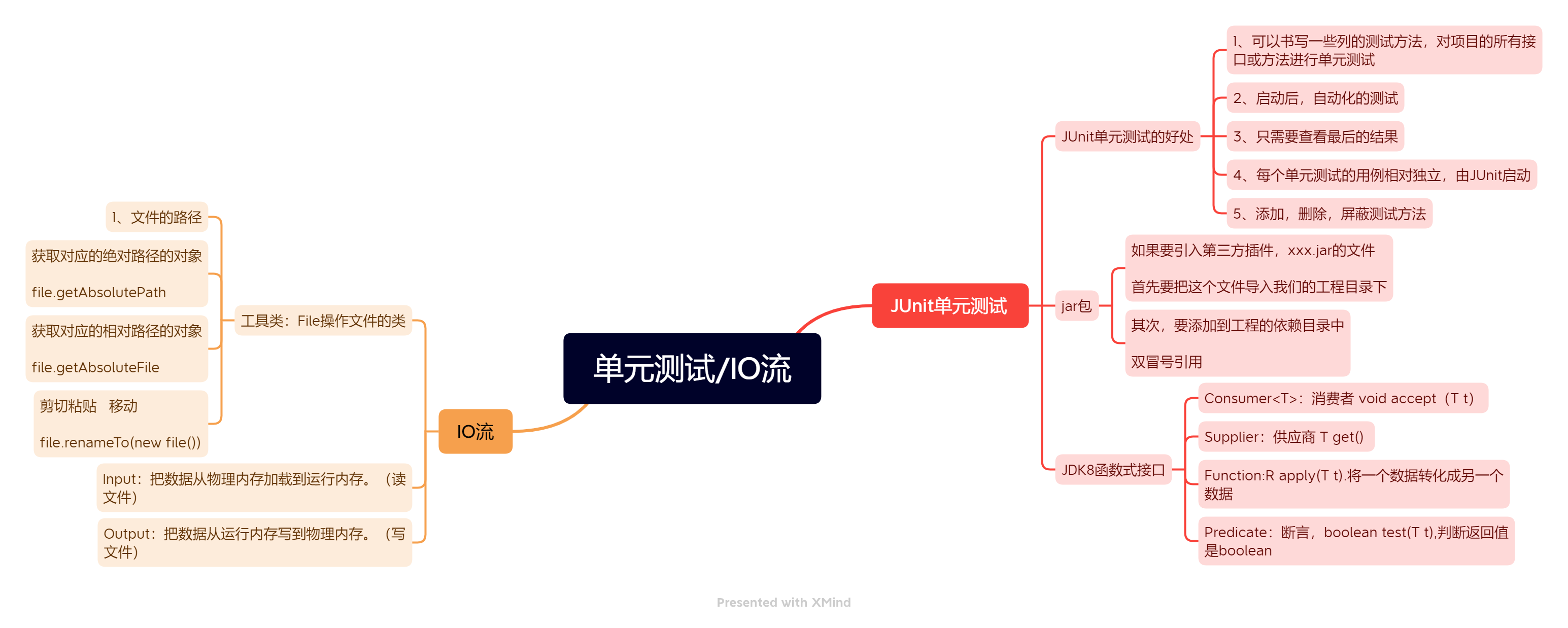
JUnit单元测试的好处:
1、可以书写一些列的测试方法,对项目的所有接口或方法进行单元测试
//Test注解是JUnit提供的一个单元测试注解
//如果工程没有导入JUnit的jar包,Test注解是不认识的。
//测试方法:1、不能有返回值,2、不能有参数
import org.junit.Test;

public class Ch01 {
    @Test
    public void test01(){
        System.out.println("hello");
    }
    @Test
    public  void test02(){
        System.out.println("你好");
    }
}
2、启动后,自动化的测试
/**
 * JUnit注解
 * 1、Test
 * 2、Before:在测试方法执行之前执行的方法
 * 3、After:在测试方法执行之后执行的方法
 * 命名规范:
 * 单元测试类的命名:被测试类的类名+Test
 * 测试方法的命名:test+被测试方法的方法名
 */
public class Ch03 {
    @Test
    public void a(){
        System.out.println("1");
    }
    @Test
    public void t(){
        System.out.println("2");
    }
    @Before
    public void b(){
        System.out.println("3");
    }
    @After
    public void c(){
        System.out.println("4");
    }
}
3、只需要查看最后的结果
4、每个单元测试的用例相对独立,由JUnit启动
5、添加,删除,屏蔽测试方法
集合的好多面试
 * 1、Hashtable和ConcurrentHashMap性能测试
 * 2/ArrayList和LinkedList性能测试
 * 数组查询快,插入慢,链表插入快,查询慢
 * 1、尾插数组快,链表慢
 * 2、遍历,数组快
 * 3、头插:链表快,数组慢
 * 4、随机删除,如果要过滤,建议用LinkedList
 * 开发中,以ArrayList为主
 */
public class Ch04 {
    /*
    尝试开辟50个线程,每个线程向集合中put100000个元素
    测试两个类所需的时间
     */
    @Test
    public void hashtableTest(){
        final Map<Integer, Integer>map = new HashMap<>(500000);
        //计数器
       // final CountDownLatch countDownLatch=new CountDownLatch(50);
        System.out.println("开始测试");
        long start=System.currentTimeMillis();
        for (int i = 0; i < 50; i++) {
            final  int j=i;
            new Thread(()->{
                for (int k = 0; k < 100000; k++) {
                    map.put(j*k,1);
                }
            }).start();
        }
        long end=System.currentTimeMillis();
        System.out.println((end-start));
    }
@Test
    public void concurrenttest(){
    final ConcurrentHashMap<Integer, Integer> map = new ConcurrentHashMap<>(500000);
    //计数器
    //final CountDownLatch count=new CountDownLatch(50);
    System.out.println("开始测试");
    long start=System.currentTimeMillis();
    for (int i = 0; i < 50; i++) {
        final  int j=i;
        new Thread(()->{
            for (int k = 0; k < 100000; k++) {
                map.put(j*k,1);
            }
        }).start();
    }
    long end=System.currentTimeMillis();
    System.out.println((end-start));
}
}
* JDK8
 * stream流程
 * 容器对象功能的增强
 * 使用流的时候
 * 1、获取一个数据源
 * 2、执行操作获取想要的结果
 * 3、每次操作,原有的流结果不改变
 * stream几个特性:
 * 1、不存储数据,一般会输出结果
 * 2、不会改变数据源,通常会生成一个新的集合
 * 3、具有延迟执行的特性,
 * anyMatch任意匹配
 * allMatch全部匹配
 * 归约:缩减,把一个流缩减成一个值
 * 可以实现对集合的求和,求乘积,求最值
 *映射:将一个流的元素映射到另一个流中
 * 排序:sorted(sort永远是排序)
 * 自然排序(升序);临时排序
 * 筛选,收集
 * */
public class Ch05 {
    @Test
    public void test01(){
        List<String>list= Arrays.asList("A","b","c");
    Stream<String> stream=list.stream();
        System.out.println(stream);
    }
}
jar包
如果要引入第三方插件,xxx.jar的文件
首先要把这个文件导入我们的工程目录下
其次,要添加到工程的依赖目录中
双冒号引用
JDK8函数式接口
Consumer
Supplier:供应商 T get()
Function:R apply(T t).将一个数据转化成另一个数据
Predicate:断言,boolean test(T t),判断返回值是boolean
JUnit 断言
- JUnit的所有断言都包含在Assert类中
- 这个类提供了很多有用的断言来编写测试用例
- 只有失败的断言才会被记录
- 1、assertEquals:检查两个变量或等式是否为空
- 2、assertTrue:检查条件是否为真
- 3、assertFalse:检查条件是否为假
- 4、assertNotNull:检查对象是否不为空
- 5、assertNull:检查对象是否为空
- 断言不成功会抛异常,即使程序正常运行,但结果不正确,也会以失败结束。
箭头函数,函数式接口必须掌握。
java;IO流
Input:把数据从物理内存加载到运行内存。(读文件)
Output:把数据从运行内存写到物理内存。(写文件)
java.io包下的类
计算机的输入输出都是通过二进制完成
0和1
工具类:File操作文件的类
1、文件的路径
正斜杠:左斜杠 /
反斜杠:右斜杠 \
在Unix/Linux,路径分隔采用正斜杠/
在windows中,路径分隔采用反斜杠\
在Java中,\代表转义
public class Ch01 {
    public static void main(String[] args) {
        System.out.println("\t");
        System.out.println("E:\\");
        System.out.println("E:/");
        //分隔符
        System.out.println(File.separator);
        System.out.println("E:"+File.separator+"吉软");
        //分号
        System.out.println(File.pathSeparator);
    }
}
//File类的构造器:
public class Ch02 {
    public static void main(String[] args) {
        //file代表当前目录
        File file1=new File("E:\\吉软");
        System.out.println(file1);
        File file2=new File("E:\\吉软","aaa");
        File file3=new File(file1,"AAA");
        System.out.println(file2);
        System.out.println(file3);
    }
}
file.getAbsolutePath
获取对应的相对路径的对象
file.getAbsoluteFile
剪切粘贴 移动
file.renameTo(new file())
public class Ch03 {
    @Test
   public void test(){
        //创建一个文件
        File file4 = new File("aaa.txt");
        try {
            file4.createNewFile();
            System.out.println(file4);
        } catch (IOException e) {
            e.printStackTrace();
        }
    }
    @Test
    public void test1() {
        //新建文件或文件夹mkdir(鸡肋)/mkdirs
        File file = new File("E:/a/b/c");
        boolean b = file.mkdirs();
        System.out.println(b);
    }
    @Test
    public void test2() {
        //删除
        File file = new File("E:/a/b");
        file.delete();
    }
public class Ch04 {
     //新建某一个路径下的某一个文件,这个路径还不存在,没有这个方法,需要封装工具类
    private String file;
    private String dir;
    public Ch04(String file, String dir) {
        this.file = file;
        this.dir = dir;
    }
    @Test
    public void test1(){
        File file1=new File(dir+file);
        try {
            file1.createNewFile();
        } catch (IOException e) {
            throw new RuntimeException(e);
        }
    }
    @Test
    public void test2(){
        File file1=new File(dir);
        file1.mkdirs();
    }

    public static void main(String[] args) {
        Ch04 ch04=new Ch04("a.txt","E:/look/");
        ch04.test2();
        ch04.test1();

    }
    @Test
    public void test04(){
        File file1=new File("E:\\look");
        String[]filenames=file1.list();
        System.out.println(Arrays.toString(filenames));
        File[]files=file1.listFiles();
        System.out.println(Arrays.toString(files));
    }
}
作业:
输入指定的磁盘名:直接进入磁盘
 * 输入mkdir,创建目录
 * 输入rd,删除文件
 * 输入cnf:创建文件
 * 输入dir:遍历当前目录的文件
 */
public class CMD {
    public static void main(String[] args) {
        Scanner sc = new Scanner(System.in);
        for (; ; ) {
            System.out.println(System.getProperty("user.dir") + " >");
            String s = sc.next();
            String filename = sc.next();
            switch (s) {
                case "mkdir":
                    File file1 = new File(filename);
                    file1.mkdirs();
                    break;
                case "rd":
                    File file2 = new File(filename);
                    file2.delete();
                    break;
                case "cnf":
                    File file3 = new File(filename);
                    try {
                        file3.createNewFile();
                    } catch (IOException e) {
                        throw new RuntimeException(e);
                    }
                    break;
                case "dir":
                    File file4 = new File(filename);
                    File[] files = file4.listFiles();
                    for (File file : files) {
                        System.out.println(file);
                    }
                    break;
            }
            continue;
        }
    }
}
心得体会
今天学习了JUnit单元测试,以及IO流的部分知识,对于今天学到的知识,感觉掌握的较好,能听懂老师讲的内容,作业也可以很早的完成,在代码方面还是要继续努力。

 浙公网安备 33010602011771号