
Elasticsearch填充
在本节中,我们将向Elasticsearch添加一些索引,映射和数据。此数据将用于本教程中解释的示例中。
创建索引
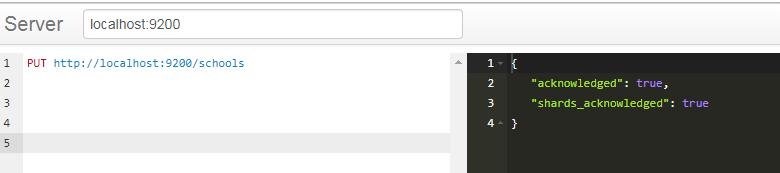
PUT http://localhost:9200/schools
其实我们在创建索引的时候可以指定索引特定的设置,但是现在,它的默认设置为空
响应 :如下图所示
{"acknowledged": true}
创建映射和添加数据
Elasticsearch将根据请求体中提供的数据自动创建映射,我们将使用其批量功能在此索引中添加多个JSON对象。
POST http://localhost:9200/schools/_bulk //_bulk是批量添加的意思
请求体 (注意:我们使用的时候不能直接复制粘贴就使用,要注意换行的问题,见下面代码下面的图)
{
   "index":{
      "_index":"schools", "_type":"school", "_id":"1"
   }
}
{
   "name":"Central School", "description":"CBSE Affiliation", "street":"Nagan",
   "city":"paprola", "state":"HP", "zip":"176115", "location":[31.8955385, 76.8380405],
   "fees":2000, "tags":["Senior Secondary", "beautiful campus"], "rating":"3.5"
}
{
   "index":{
      "_index":"schools", "_type":"school", "_id":"2"
   }
}
{
   "name":"Saint Paul School", "description":"ICSE
   Afiliation", "street":"Dawarka", "city":"Delhi", "state":"Delhi", "zip":"110075",
   "location":[28.5733056, 77.0122136], "fees":5000,
   "tags":["Good Faculty", "Great Sports"], "rating":"4.5"
}
{
   "index":{"_index":"schools", "_type":"school", "_id":"3"}
}
{
   "name":"Crescent School", "description":"State Board Affiliation", "street":"Tonk Road",
   "city":"Jaipur", "state":"RJ", "zip":"176114","location":[26.8535922, 75.7923988],
   "fees":2500, "tags":["Well equipped labs"], "rating":"4.5"
}

相应的结果:
{
   "took": 571,
   "errors": false,  //说明没有errors,所以说明创建映射和添加数据成功了
   "items": [
      {
         "index": {
            "_index": "schools",
            "_type": "school",
            "_id": "1",
            "_version": 1,
            "result": "created",
            "_shards": {
               "total": 2,
               "successful": 1,
               "failed": 0
            },
            "created": true,
            "status": 201
         }
      },
      {
         "index": {
            "_index": "schools",
            "_type": "school",
            "_id": "2",
            "_version": 1,
            "result": "created",
            "_shards": {
               "total": 2,
               "successful": 1,
               "failed": 0
            },
            "created": true,
            "status": 201
         }
      },
      {
         "index": {
            "_index": "schools",
            "_type": "school",
            "_id": "3",
            "_version": 1,
            "result": "created",
            "_shards": {
               "total": 2,
               "successful": 1,
               "failed": 0
            },
            "created": true,
            "status": 201
         }
      }
   ]
}
现在公众号迁移到这个啦, 不要迷路了,慕仔们,加油哦!

接下来的一段时间,我会专注Java技术栈,计算机网络,数据结构和算法,操作系统,设计模式,计算机组成原理,数据库原理,设计模式来做分享,欢迎你们和我一起学习,一起提高,Fighting!
本文转载自:https://www.yiibai.com/elasticsearch/elasticsearch_populate.html

 浙公网安备 33010602011771号