
linux(acl权限,attr属性,sudo)
acl 可以细分每个用户(或组)的权限(小明,李雷都是其他用户,想让小明有r权限,李雷有w权限)
当acl与other权限有冲突时,先匹配acl权限,若acl权限为-,则匹配other设置的权限
getfacl a.txt 查看acl
setfacl -m u:sb01:r a.txt 设置用户sb01权限
setacl - m g::- a.txt 设置属组权限
serfacl -m m:rxx a.txt 设置mask为rwx
setfacl -m d:u:sb01:rw /test 对/test文件夹下的文件继承acl权限(d:为继承)
setfacl -b a.txt 清除该文件的所有acl
setfacl -x u:sb01 a.txt 清除指定用户的acl
权限有个+,表示设置了acl

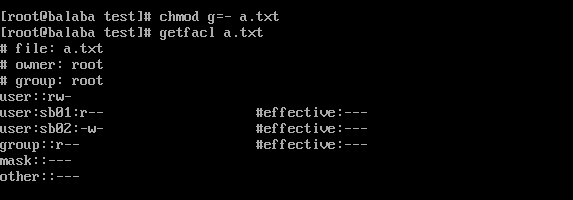
effective为用户实际权限(用户设定的权限与msak与运算后的结果)
mask可以控制最大权限

--------------------------------------------------------------------------------------------------------------------------------------------------------------------------
lsattr /opt 浏览属性
chattr +a /opt/1.txt 只允许追加内容(不能删除,不能覆盖,可以cat)
chattr +i /opt/1.txt 禁止任何修改
chattr +A /opt/1.txt 不能更改文件访问时间
chattr -a a.txt 清除属性
--------------------------------------------------------------------------------------------------------------------------------------------------------------------------
登录级别shell:su - sb01(切换后,当前目录为sb01家目录)
/etc/profile
/etc/profile.d/*.sh
~/.bash_profile
~/.bashrc
/etc/bashrc
非登录级别shell:su sb01(切换后,当前目录不变)
~/.bashrc
/etc/bashrc
/etc/profile.d/*.sh
--------------------------------------------------------------------------------------------------------------------------------------------------------------------------
sudo
方法一:
vim /etc/sudoers 直接配置文件分配权限
visudo -c 检查语法错误
编辑样式:
root ALL=(ALL) ALL
sb01 ALL=(ALL) NOPASSWD: /sbin/mount (无需输入密码)
sb01 ALL=(ALL) ALL, !usr/bin/vim a.txt (取反,所有命令都能用除了vim编辑a.txt)
sb01 ALL=(ALL) /usr/sbin/ifconfig, /sbin/mount
用户名 主机名或IP地址=(转换的用户身份) 提权的命令(绝对路径,或sudoers中设置的命令的别名)
其中用户名、主机名、提权命令可以使用sudoers中设置的别名
主机名:假设设置为192.168.1.1,那么sudo配置仅允许在192.168.1.1上使用,在别的主机上无法使用这条sudo
方法二:
visudo
sudo 命令
sudo -l 查看可以提权的命令
sudo -k 清除缓存的密码

 浙公网安备 33010602011771号