SpringBoot整合MybatisPlus
1、引入mybatis-plus坐标
<dependency>
     <groupId>com.baomidou</groupId>
     <artifactId>mybatis-plus-boot-starter</artifactId>
     <version>3.2.0</version>
</dependency>
2、配置数据源
spring:
  datasource:
    username: root
    password: root
    url: jdbc://192.168.5.1:3306/admin?useUnicode=true&characterEncoding=UTF-8&useSSL=false&allowPublicKeyRetrieval=true&serverTimezone=Asia/Shanghai
    driver-class-name: com.mysql.cj.jdbc.Driver
3、开启Mapper扫描
使用@MapperScan开启mapper扫描,指定需要扫描的mapper位置

4、指定Mapper.xml所在的文件的位置
mybatis-plus:
  mapper-locations: classpath*:/mapper/**/*.xml

5、设置全局主键ID属性
设置全局ID统一属性之后,就不需要针对每个单独的实体类去设置了,即不需要再@TableId指定具体的IdType类型

mybatis-plus:
  global-config:
    db-config:
      id-type: auto
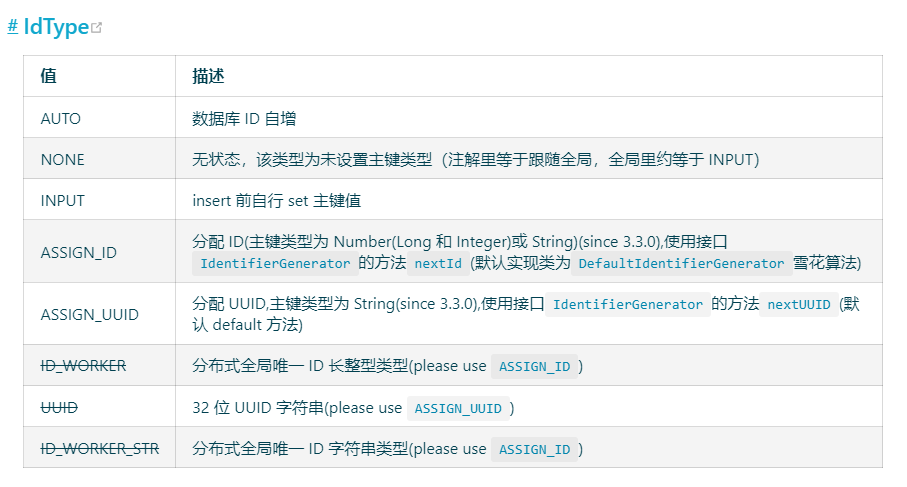
Id-type具体含义
|


 浙公网安备 33010602011771号