监控服务zabbix部署
zabbix介绍
zabbix是一个基于WEB界面的提供分布式系统监视以及网络监视功能的企业级的开源解决方案。
zabbix能监视各种网络参数,保证服务器系统的安全运营;并提供灵活的通知机制以让系统管理员快速定位/解决存在的各种问题。
zabbix由2部分构成,zabbix server与可选组件zabbix agent。
zabbix server可以通过SNMP,zabbix agent,ping,端口监视等方法提供对远程服务器/网络状态的监视,数据收集等功能,它可以运行在Linux,Ubuntu,Solaris,HP-UX,AIX,Free BSD,Open BSD,OS X等平台上。
zabbix agent需要安装在被监视的目标服务器上,它主要完成对硬件信息或与操作系统有关的内存,CPU等信息的收集。
zabbix server可以单独监视远程服务器的服务状态;同时也可以与zabbix agent配合,可以轮询zabbix agent主动接收监视数据(agent方式),同时还可被动接收zabbix agent发送的数据(trapping方式)。
另外zabbix server还支持SNMP (v1,v2),可以与SNMP软件(例如:net-snmp)等配合使用。
zabbix特点
zabbix的主要特点:
- 安装与配置简单,学习成本低
- 支持多语言(包括中文)
- 免费开源
- 自动发现服务器与网络设备
- 分布式监视以及WEB集中管理功能
- 可以无agent监视
- 用户安全认证和柔软的授权方式
- 通过WEB界面设置或查看监视结果
- email等通知功能
Zabbix主要功能:
- CPU负荷
- 内存使用
- 磁盘使用
- 网络状况
- 端口监视
- 日志监视
zabbix配置文件
zabbix配置文件有两种:
- 服务器端配置文件(/usr/local/etc/zabbix_server.conf)
- 客户端配置文件(/usr/local/etc/zabbix_agentd.conf)
- zabbix代理配置文件(/usr/local/etc/zabbix_proxy.conf)
服务器端配置文件zabbix_server.conf常用配置参数:
| 参数 | 作用 |
|---|---|
| LogFile | 设置服务端日志文件存放路径 |
| ListenIP | 设置服务端监听IP |
| ListenPort | 设置服务端监听的端口号 |
| PidFile | 设置服务端进程号文件存放路径 |
| DBHost | 指定zabbix的数据库服务器IP |
| DBName | 指定zabbix使用的数据库库名 |
| DBUser | 指定zabbix数据库登录用户 |
| DBPassword | 指定zabbix数据库登录密码 |
| DBPort | 指定zabbix数据库端口号 |
| User | 设置zabbix以什么用户的身份运行 |
| AlertScriptsPath | 设置告警脚本存放路径 |
| ExternalScripts | 外部脚本存放路径 |
客户端配置文件zabbix_agentd.conf常用配置参数:
| 参数 | 作用 |
|---|---|
| Server | 指定zabbix服务器的IP或域名 |
| ServerActive | 指定zabbix服务器的IP或域名 |
| Hostname | 指定本机的主机名,此项必须与web界面配置项一致 |
| UnsafeUserParameters | 是否启用自定义监控项,可选值为{1 | 0} |
| UserParameter | 指定自定义监控脚本参数 |
| LogFile | 设置客户端日志文件存放路径 |
部署zabbix
环境说明:
| 环境 | IP | 要安装的应用 |
|---|---|---|
| 服务器 | 172.168.122.143 | lamp架构 zabbix server zabbix agent |
| 客户端 | 172.168.122.147 | zabbix agent |
zabbix服务端安装
//安装依赖包
[root@cb ~]# yum -y install net-snmp-devel libevent-devel

//下载zabbix
[root@cb ~]# cd /usr/src/
[root@cb src]# wget https://nchc.dl.sourceforge.net/project/zabbix/ZABBIX%20Latest%20Stable/5.6.2/zabbix-5.2.6.tar.gz
//解压
[root@cb src]# ls
debug  kernels  zabbix-5.2.6.tar.gz
[root@cb src]# tar xf zabbix-5.2.6.tar.gz
[root@cb src]# ls
debug  kernels  zabbix-5.2.6  zabbix-5.2.6.tar.gz

//创建zabbix用户和组
[root@cb src]# useradd -r -M -s /sbin/nologin zabbix

//配置zabbix数据库
[root@cb ~]# mysql -uroot -p
Enter password:
Welcome to the MySQL monitor.  Commands end with ; or \g.
Your MySQL connection id is 7
Server version: 5.7.31 MySQL Community Server (GPL)

Copyright (c) 2000, 2020, Oracle and/or its affiliates. All rights reserved.

Oracle is a registered trademark of Oracle Corporation and/or its
affiliates. Other names may be trademarks of their respective
owners.

Type 'help;' or '\h' for help. Type '\c' to clear the current input statement.

mysql>
mysql> create database zabbix character set utf8 collate utf8_bin;
Query OK, 1 row affected (0.00 sec)

mysql> grant all privileges on zabbix.* to zabbix@localhost identified by '123';
Query OK, 0 rows affected, 2 warnings (0.01 sec)

mysql> grant all privileges on zabbix.* to zabbix@192.168.122.143 identified by '123';
Query OK, 0 rows affected, 1 warning (0.00 sec)

mysql> flush privileges;
Query OK, 0 rows affected (0.00 sec)

mysql> quit
Bye

[root@cb ~]# cd /usr/src/zabbix-5.2.6/database/mysql/
[root@cb mysql]# mysql -uzabbix -p123 zabbix < schema.sql
mysql: [Warning] Using a password on the command line interface can be insecure.
[root@cb mysql]# mysql -uzabbix -p123 zabbix < images.sql
mysql: [Warning] Using a password on the command line interface can be insecure.
[root@cb mysql]# mysql -uzabbix -p123 zabbix < data.sql
mysql: [Warning] Using a password on the command line interface can be insecure.
[root@cb mysql]# ls
data.sql  double.sql  images.sql  Makefile.am  Makefile.in  schema.sql

//编译安装zabbix
[root@cb zabbix-5.2.6]# ./configure --enable-server \
> --enable-agent \
> --with-mysql \
> --with-net-snmp \
> --with-libcurl \
> --with-libxml2
[root@cb zabbix-5.2.6]# make install
zabbix服务端配置
[root@cb zabbix-5.2.6]# vim /usr/local/etc/zabbix_server.conf
### Option: DBPassword
#       Database password.
#       Comment this line if no password is used.
#
# Mandatory: no
# Default:
 DBPassword=123
//取消注释加上数据库密码
[root@cb zabbix-5.2.6]# zabbix_server
[root@cb zabbix-5.2.6]# zabbix_agentd
[root@cb zabbix-5.2.6]# ss -antl
State      Recv-Q      Send-Q            Local Address:Port            Peer Address:Port
LISTEN     0           128                     0.0.0.0:22                   0.0.0.0:*
LISTEN     0           128                     0.0.0.0:10050                0.0.0.0:*
LISTEN     0           128                     0.0.0.0:10051                0.0.0.0:*
LISTEN     0           128                     0.0.0.0:9000                 0.0.0.0:*
LISTEN     0           128                        [::]:22                      [::]:*
LISTEN     0           80                            *:3306                       *:*
zabbix web界面安装前配置
//修改/etc/php.ini的配置并重启php-fpm
[root@cb zabbix-5.2.6]# sed -ri 's/(post_max_size =).*/\1 16M/g' /etc/php.ini
[root@cb zabbix-5.2.6]# sed -ri 's/(max_execution_time =).*/\1 300/g' /etc/php.ini
[root@cb zabbix-5.2.6]# sed -ri 's/(max_input_time =).*/\1 300/g' /etc/php.ini
[root@cb zabbix-5.2.6]# sed -i '/;date.timezone/a date.timezone = Asia/Shanghai' /etc/php.ini[root@cb zabbix-5.2.6]# service php-fpm restart
Redirecting to /bin/systemctl restart php-fpm.service
[root@cb zabbix-5.2.6]# mkdir /usr/local/apache/htdocs/zabbix
[root@cb zabbix-5.2.6]# cp -r ui/* /usr/local/apache/htdocs/zabbix/
[root@cb zabbix-5.2.6]# chown -R apache.apache /usr/local/apache/htdocs

//配置apache虚拟主机
[root@cb zabbix-5.2.6]# vim /usr/local/apache/conf/extra/vhosts.conf

<VirtualHost *:80>
    DocumentRoot "/usr/local/apache/htdocs/zabbix"
    ServerName www.cb.com
    ProxyRequests Off
    ProxyPassMatch ^/(.*\.php)$ fcgi://127.0.0.1:9000/usr/local/apache/htdocs/zabbix/$1
    <Directory "/usr/local/apache/htdocs/zabbix">
        Options none
        AllowOverride none
        Require all granted
    </Directory>
</VirtualHost>
//设置zabbix/conf目录的权限,让zabbix有权限生成配置文件zabbix.conf.php
[root@cb zabbix-5.2.6]# chmod 777 /usr/local/apache/htdocs/zabbix/conf
[root@cb zabbix-5.2.6]# apachectl restart
httpd not running, trying to start
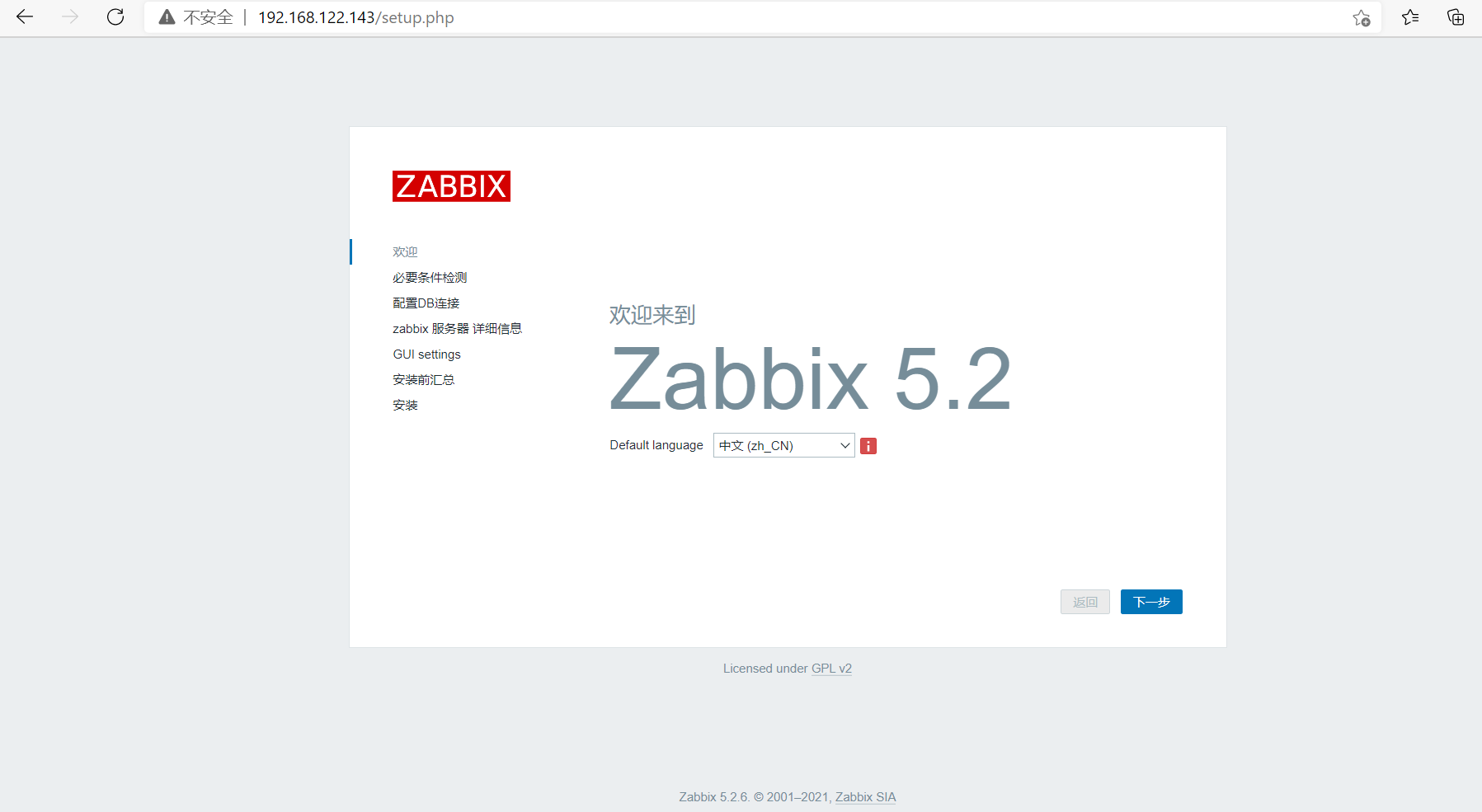
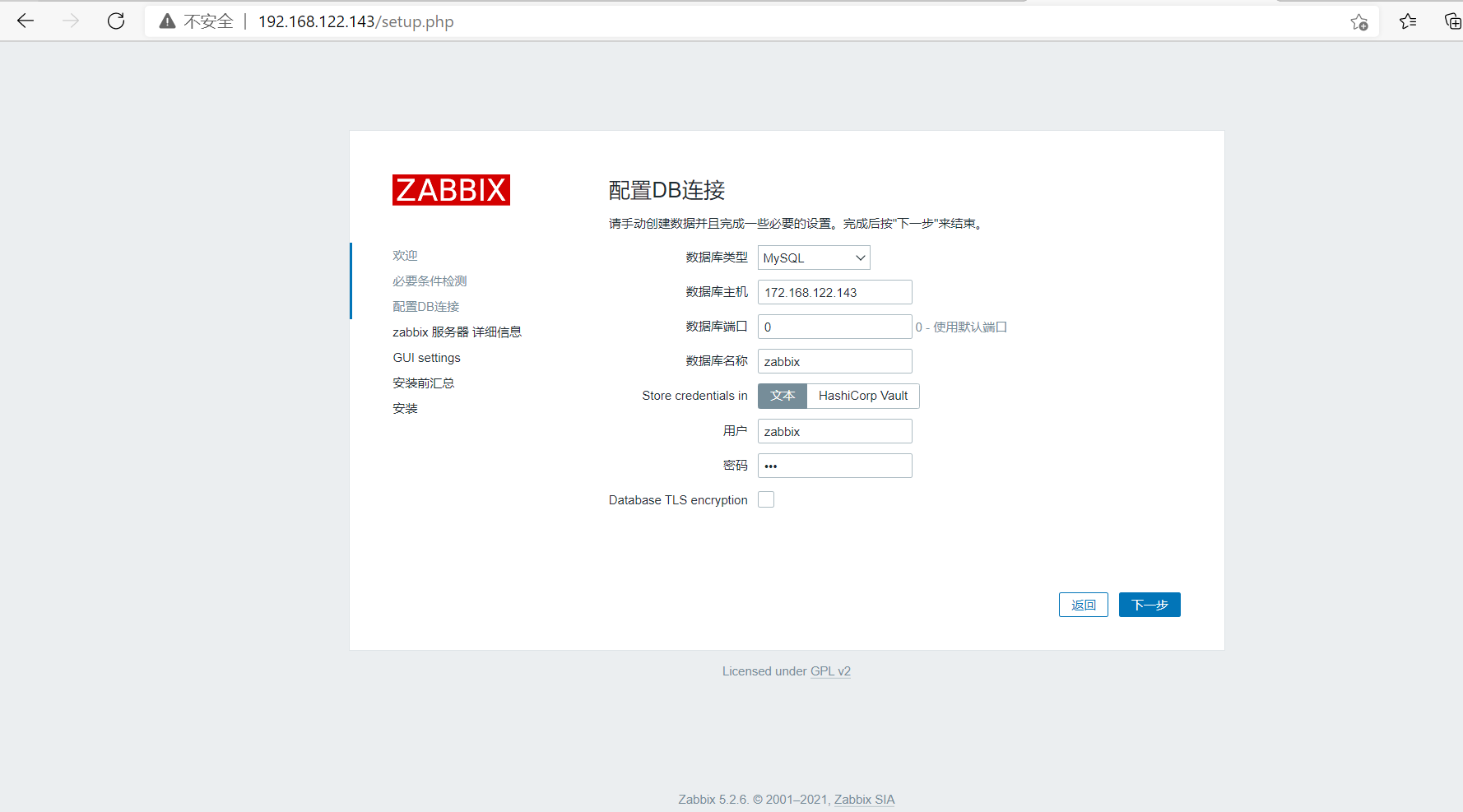
zabbix配置开机自启动
[root@cb ~]# cd /usr/src/zabbix-5.2.6/misc/init.d/fedora/core5
[root@cb core5]# cp -a zabbix_server /etc/init.d/
[root@cb core5]# cp -a zabbix_agentd /etc/init.d/
[root@cb core5]# chkconfig --add zabbix_server
[root@cb core5]# chkconfig zabbix_server on
[root@cb core5]# chkconfig --add zabbix_agentd
[root@cb core5]# chkconfig zabbix_agentd on
[root@cb core5]# chkconfig --list | grep zabbix_agentd

注:该输出结果只显示 SysV 服务,并不包含
原生 systemd 服务。SysV 配置数据
可能被原生 systemd 配置覆盖。

      要列出 systemd 服务,请执行 'systemctl list-unit-files'。
      查看在具体 target 启用的服务请执行
      'systemctl list-dependencies [target]'。

zabbix_agentd      0:关    1:关    2:开    3:开    4:开    5:开    6:关
[root@cb core5]# chkconfig --list | grep zabbix_server

注:该输出结果只显示 SysV 服务,并不包含
原生 systemd 服务。SysV 配置数据
可能被原生 systemd 配置覆盖。

      要列出 systemd 服务,请执行 'systemctl list-unit-files'。
      查看在具体 target 启用的服务请执行
      'systemctl list-dependencies [target]'。

zabbix_server      0:关    1:关    2:开    3:开    4:开    5:开    6:关
[root@cxx ~]# wget https://cdn.zabbix.com/zabbix/sources/stable/5.2/zabbix-5.2.6.tar.gz
[root@cxx ~]# tar xf zabbix-5.2.6.tar.gz
[root@cxx ~]# cd zabbix-5.2.6/
[root@cxx zabbix-5.2.6]# ./configure --enable-agent
[root@cxx zabbix-5.2.6]# make install
[root@cxx ~]# useradd -r -M -s /sbin/nologin zabbix

//修改配置文件
[root@cxx etc]# vim zabbix_agentd.conf

# Server=

Server=192.168.122.143

# ServerActive=

ServerActive=192.168.122.143

# Hostname=

Hostname=cb

[root@cxx etc]# zabbix_agentd
[root@cxx etc]# ss -antl
State      Recv-Q      Send-Q            Local Address:Port            Peer Address:Port
LISTEN     0           128                     0.0.0.0:22                   0.0.0.0:*
LISTEN     0           128                     0.0.0.0:10050                0.0.0.0:*
LISTEN     0           128                        [::]:22                      [::]:*
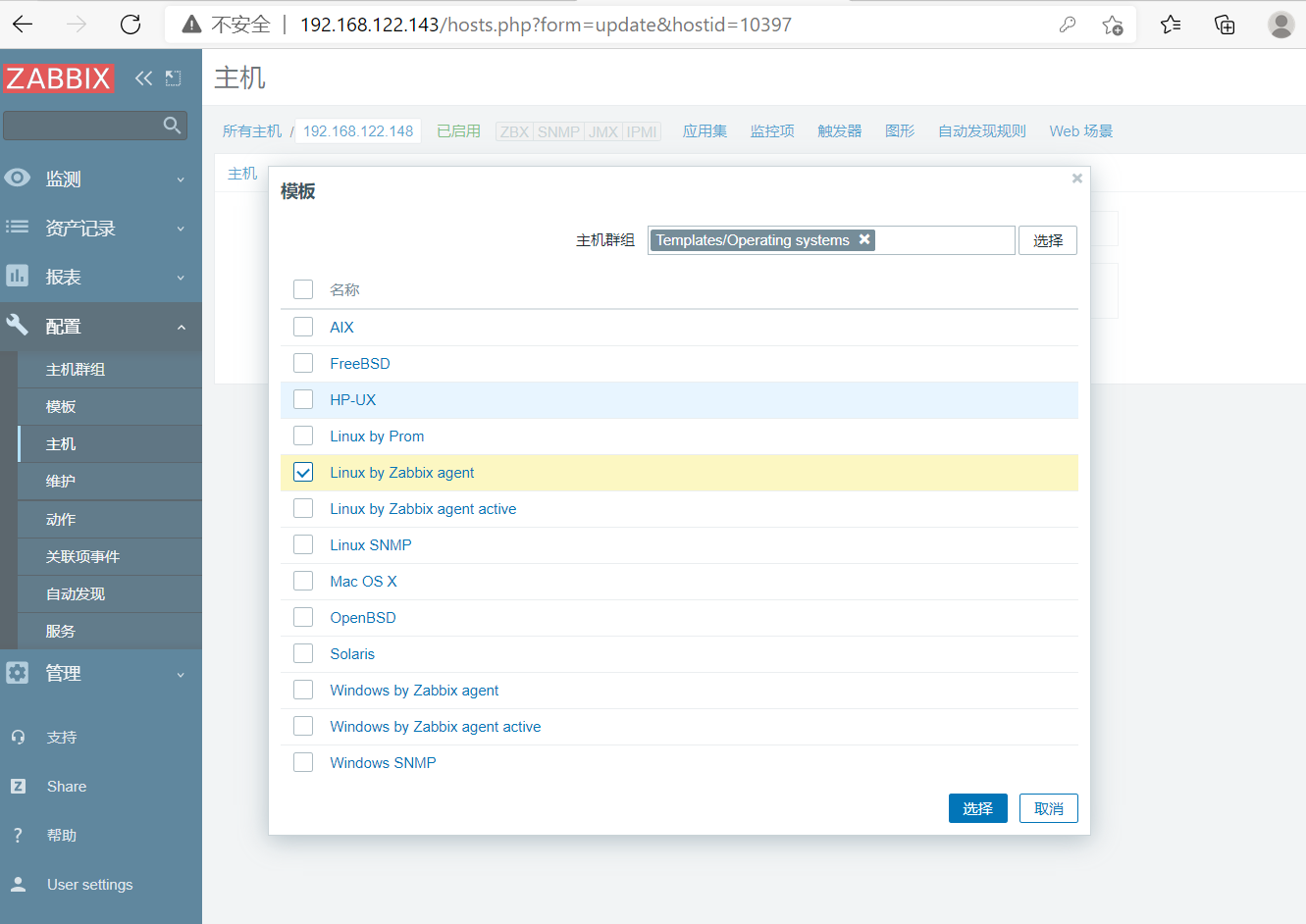
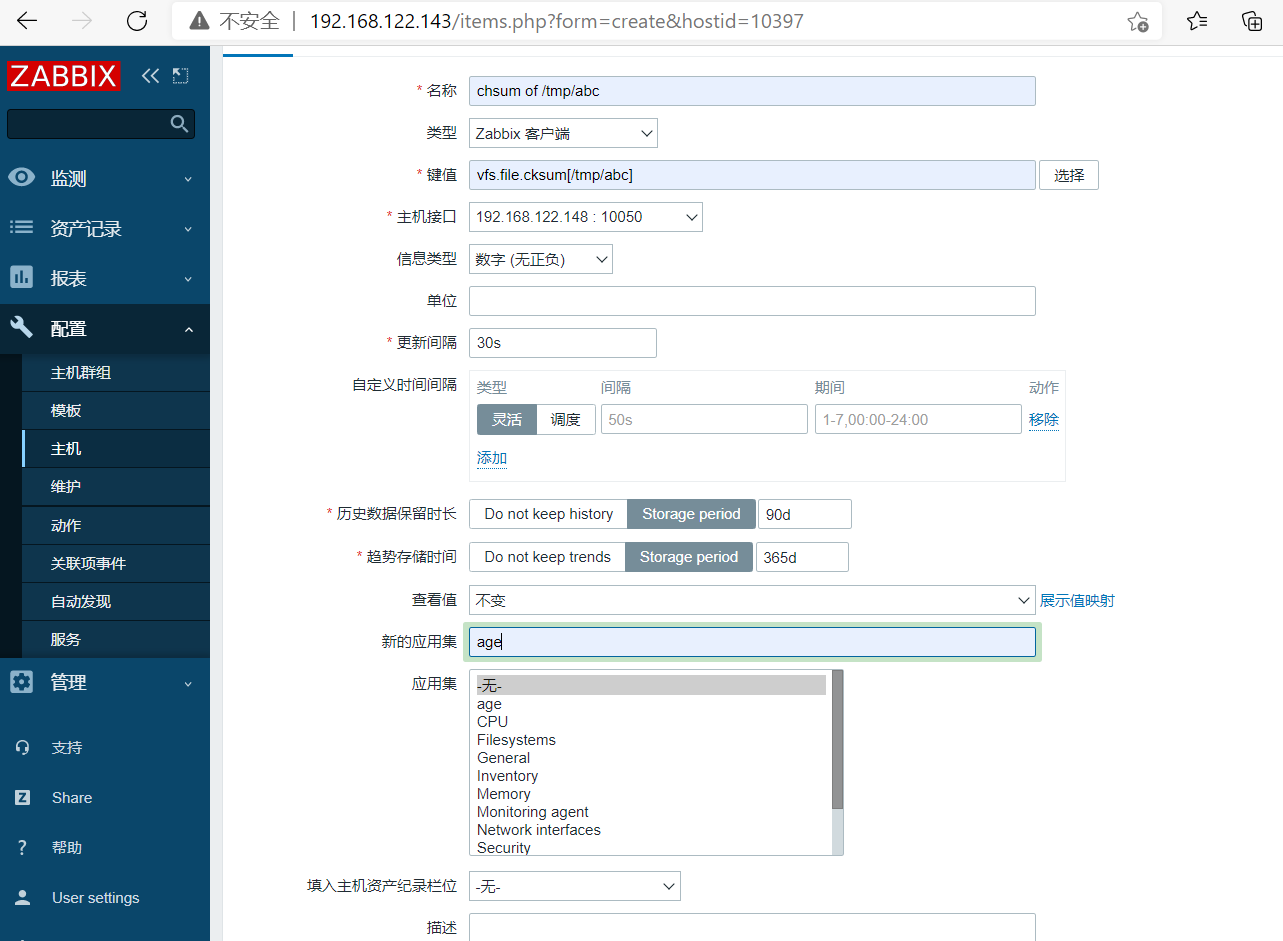
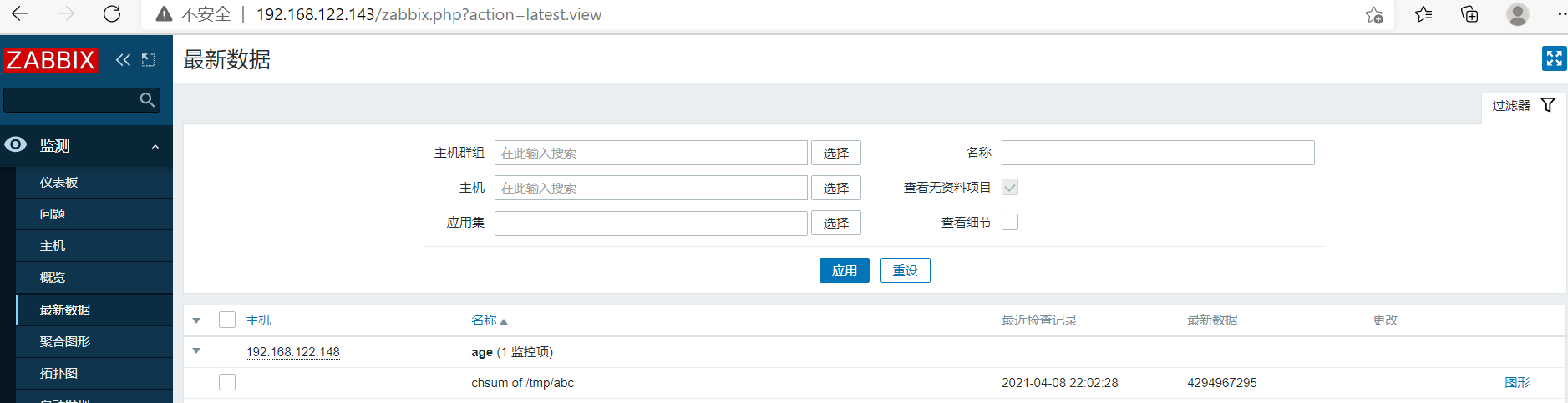
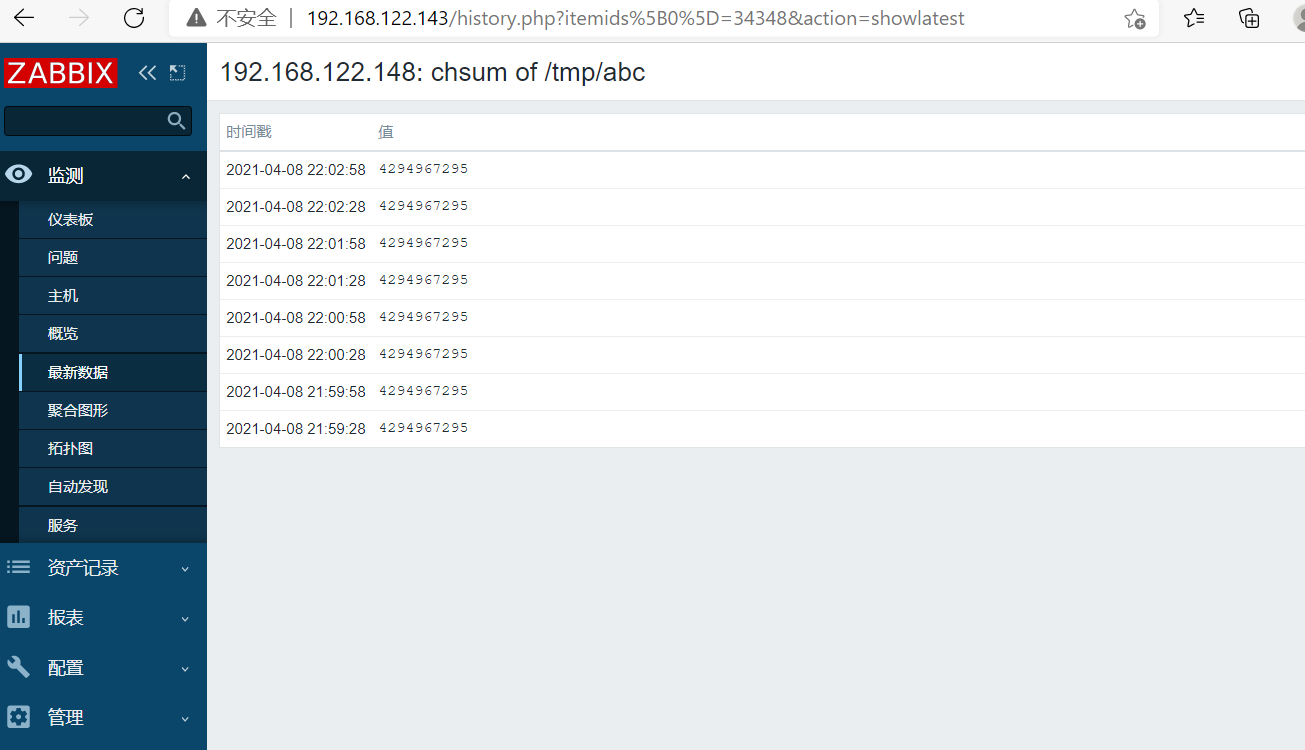
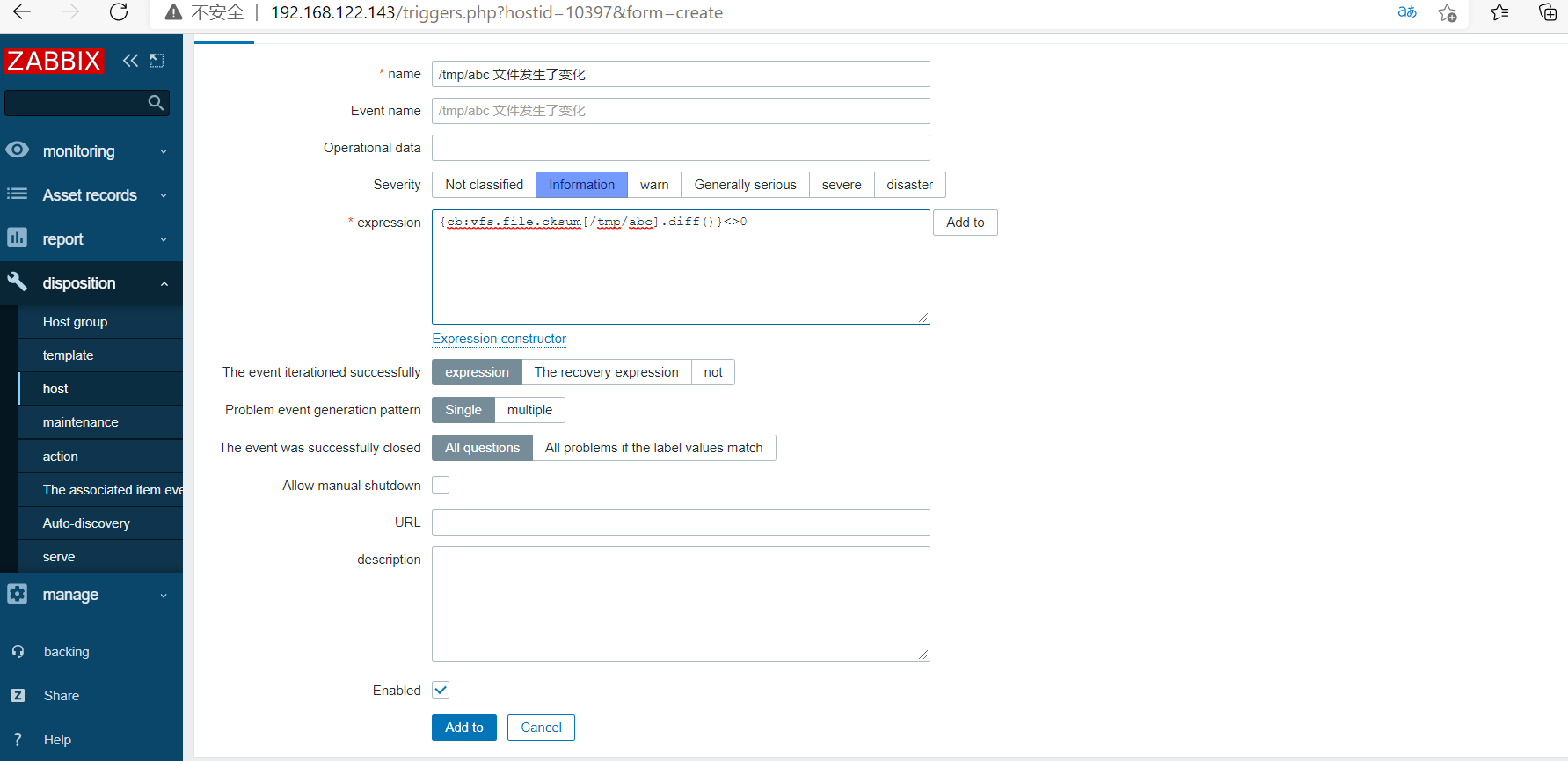
//网页上步骤做完后触发条件
[root@cxx ~]# touch /tmp/abc
[root@cxx ~]# echo "hello world" >> /tmp
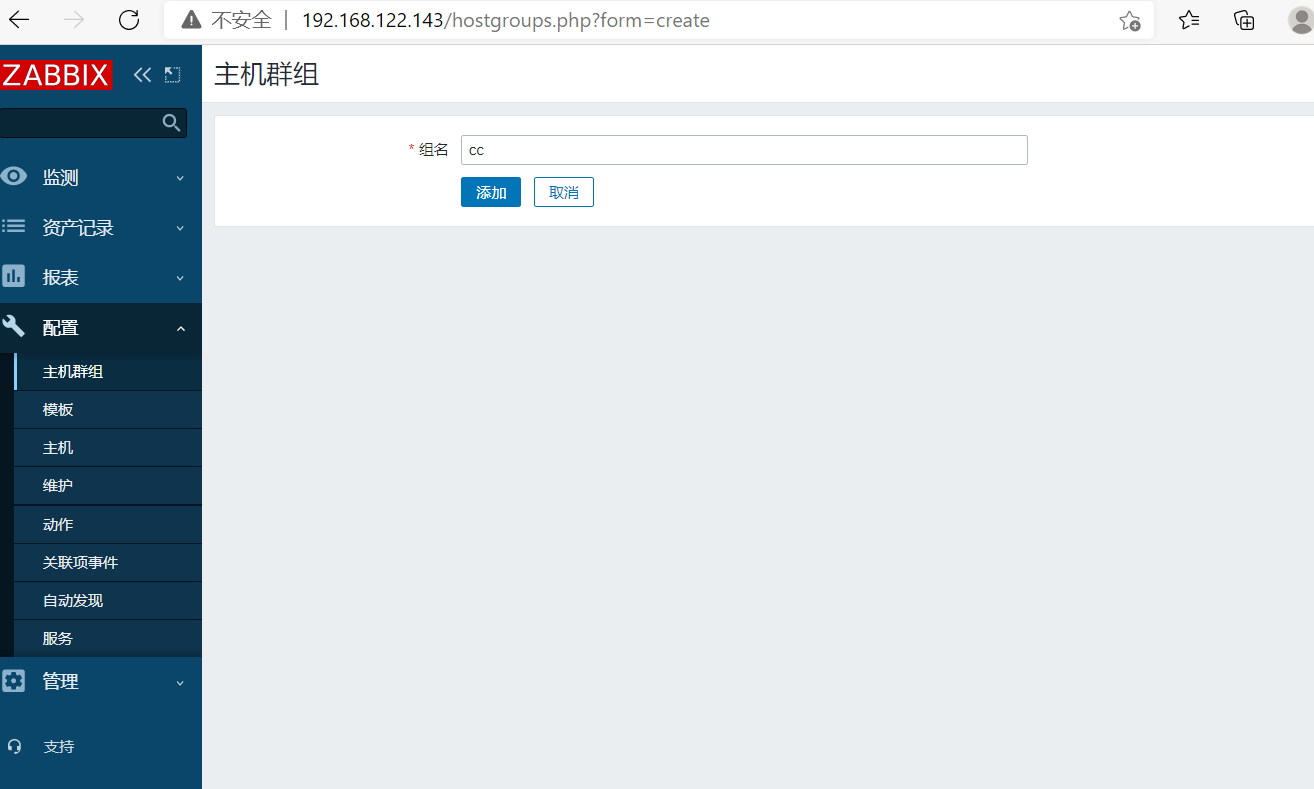
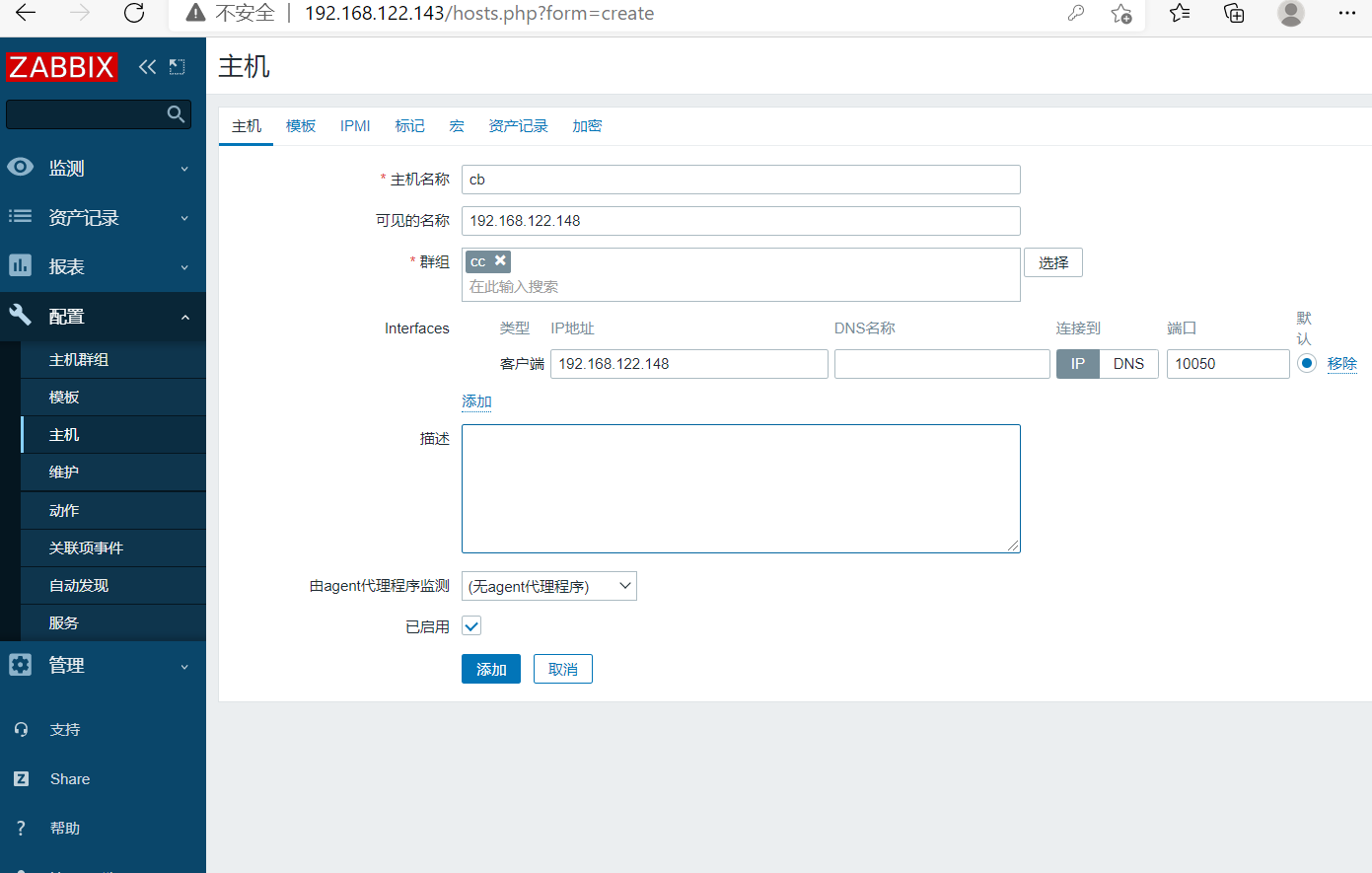

 浙公网安备 33010602011771号