docker基础用法
OCI
Open Container-initiative
- 由Linux基金会主导于2015年6月创立
- 旨在围绕容器格式和运行时制定一个开放的工业化标准
- contains two specifications
- the Runtime Specification(runtime-spec)
- the Image Specification(image-spec)
OCF
Open Container Format
runC is a CLI tool for spawning and running containers according to the OCI specification
- Containers are started as a child process of runC and can be embedded into various other systems without having to run a daemon
- runC is built on libcontainer, the same container technology powering millions of Docker Engine installations
docker提供了一个专门容纳容器镜像的站点:https://hub.docker.com
docker架构

docker镜像与镜像仓库
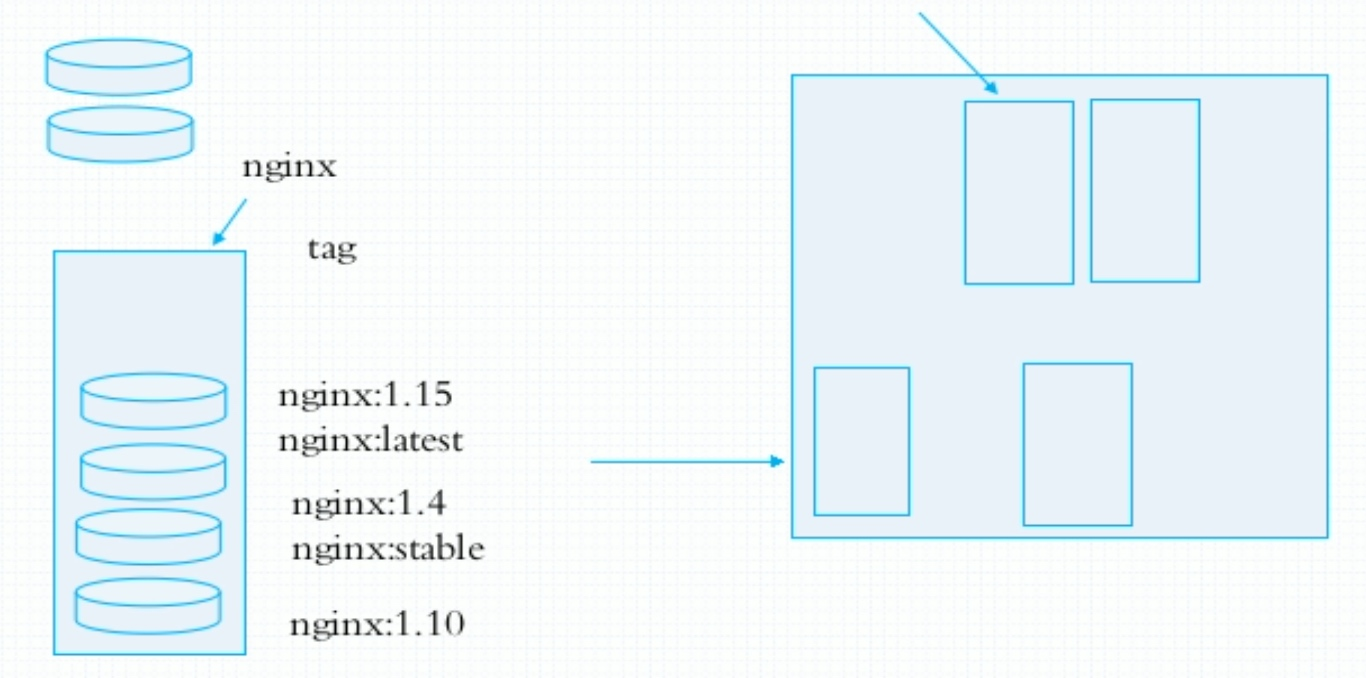
镜像是静态的,而容器是动态的,容器有其生命周期,镜像与容器的关系类似于程序与进程的关系。镜像类似于文件系统中的程序文件,而容器则类似于将一个程序运行起来的状态,也即进程。所以容器是可以删除的,容器被删除后其镜像是不会被删除的。
docker对象
When you use docker, you are creating and using images, containers, networks, volumes, pluginns, and other objects.
- IMAGES
- An image is a read-only template with instructions for creating a docker container.
- Often, an image is based on another image, with some additional customization.
- You might create your own images or you might only use those created by others and published in a registry.
- CONTAINERS
- A conntainer is a runnable instance of an image.
- You can create, run, stop, move, or delete a container using the docker API or CLI.
- You can connect a container to one or more networks, attach storage to it, or even create a new image based on its current state.
安装及使用docker
docker安装
[root@localhost ~]# cd /etc/yum.repos.d/
[root@localhost yum.repos.d]# curl -o docker-ce.repo https://mirrors.tuna.tsinghua.edu.cn/docker-ce/linux/centos/docker-ce.repo
  % Total    % Received % Xferd  Average Speed   Time    Time     Time  Current
                                 Dload  Upload   Total   Spent    Left  Speed
  0     0    0     0    0     0      0      0 --:--:-- --:--:-- --:--:--     0     0    0     0    0     0      0      0 --:--:-- --:--:-- --:--:--     0     0    0     0    0     0      0      0 --:--:--  0:00:01 --:--:--   100  1919  100  1919    0     0    767      0  0:00:02  0:00:02 --:--:--   767
[root@localhost yum.repos.d]# sed -i 's@https://download.docker.com@https://mirrors.tuna.tsinghua.edu.cn/docker-ce@g' docker-ce.repo
[root@localhost yum.repos.d]# yum clean all
Updating Subscription Management repositories.
Unable to read consumer identity
This system is not registered to Red Hat Subscription Management. You can use subscription-manager to register.
Repository AppStream is listed more than once in the configuration
46 文件已删除
[root@localhost yum.repos.d]# yum -y install docker-ce
完毕!
[root@localhost yum.repos.d]# systemctl start docker
[root@localhost yum.repos.d]#
docker加速
docker-ce的配置文件是/etc/docker/daemon.json,此文件默认不存在,需要我们手动创建并进行配置,而docker的加速就是通过配置此文件来实现的。
docker的加速有多种方式:
- docker cn
- 中国科技大学加速器
- 阿里云加速器(需要通过阿里云开发者平台注册帐号,免费使用个人私有的加速器)
docker常用操作
| 命令 | 功能 |
|---|---|
| docker search | 从Docker Hub查找镜像 |
| docker pull | 从镜像仓库中拉取或者更新指定镜像 |
| docker images | 列出本地镜像 |
| docker create | 创建一个新的容器 |
| docker start | 启动一个或多个已经被停止的容器 |
| docker run | 创建一个新的容器并运行一个命令 |
| docker attach | 连接到正在运行中的容器 |
| docker ps | 列出容器 |
| docker logs | 获取容器的日志 |
| docker restart | 重启容器 |
| docker stop | 停止一个运行中的容器 |
| docker kill | 杀掉一个运行中的容器 |
| docker rm | 删除一个容器或多个 |
| docker exec | 在运行的容器中执行命令 |
| docker info | 显示 Docker 系统信息,包括镜像和容器数 |
| docker inspect | 获取容器/镜像的元数据 |
docker search
[root@localhost ~]# docker search centos
NAME                               DESCRIPTION                                     STARS     OFFICIAL   AUTOMATED
centos                             The official build of CentOS.                   6423      [OK]
ansible/centos7-ansible            Ansible on Centos7                              132                  [OK]
consol/centos-xfce-vnc             Centos container with "headless" VNC session…   125                  [OK]
jdeathe/centos-ssh                 OpenSSH / Supervisor / EPEL/IUS/SCL Repos - …   117                  [OK]
centos/systemd                     systemd enabled base container.                 96                   [OK]
imagine10255/centos6-lnmp-php56    centos6-lnmp-php56                              58                   [OK]
tutum/centos                       Simple CentOS docker image with SSH access      46
kinogmt/centos-ssh                 CentOS with SSH                                 29                   [OK]
pivotaldata/centos-gpdb-dev        CentOS image for GPDB development. Tag names…   13
guyton/centos6                     From official centos6 container with full up…   10                   [OK]
centos/tools                       Docker image that has systems administration…   7                    [OK]
drecom/centos-ruby                 centos ruby                                     6                    [OK]
pivotaldata/centos                 Base centos, freshened up a little with a Do…   5
mamohr/centos-java                 Oracle Java 8 Docker image based on Centos 7    3                    [OK]
darksheer/centos                   Base Centos Image -- Updated hourly             3                    [OK]
pivotaldata/centos-mingw           Using the mingw toolchain to cross-compile t…   3
pivotaldata/centos-gcc-toolchain   CentOS with a toolchain, but unaffiliated wi…   3
amd64/centos                       The official build of CentOS.                   2
miko2u/centos6                     CentOS6 日本語環境                                   2                    [OK]
mcnaughton/centos-base             centos base image                               1                    [OK]
indigo/centos-maven                Vanilla CentOS 7 with Oracle Java Developmen…   1                    [OK]
blacklabelops/centos               CentOS Base Image! Built and Updates Daily!     1                    [OK]
pivotaldata/centos6.8-dev          CentosOS 6.8 image for GPDB development         0
pivotaldata/centos7-dev            CentosOS 7 image for GPDB development           0
smartentry/centos                  centos with smartentry                          0                    [OK]
docker pull
[root@localhost ~]# docker pull centos
Using default tag: latest
latest: Pulling from library/centos
7a0437f04f83: Pull complete
Digest: sha256:5528e8b1b1719d34604c87e11dcd1c0a20bedf46e83b5632cdeac91b8c04efc1
Status: Downloaded newer image for centos:latest
docker.io/library/centos:latest
[root@localhost ~]#
docker images
[root@localhost ~]# docker images
REPOSITORY   TAG       IMAGE ID       CREATED        SIZE
centos       latest    300e315adb2f   2 months ago   209MB
[root@localhost ~]#
docker create
[root@localhost ~]# docker create centos:latest
519a59f646dcf1569ed6676020e64ab0d00d8f57cd743c1211ba547d7a95a8b6
[root@localhost ~]#
docker start
[root@localhost ~]# docker start 519a59f646dc
519a59f646dc
docker ps
[root@localhost ~]# docker ps -a
CONTAINER ID   IMAGE           COMMAND       CREATED          STATUS                     PORTS     NAMES
519a59f646dc   centos:latest   "/bin/bash"   20 minutes ago   Exited (0) 7 seconds ago             intelligent_albattani
[root@localhost ~]#
docker rm
[root@localhost ~]# docker rm -f 519a59f646dc
519a59f646dc
[root@localhost ~]# docker ps -a
CONTAINER ID   IMAGE     COMMAND   CREATED   STATUS    PORTS     NAMES
[root@localhost ~]#
docker run
[root@localhost ~]# docker run httpd:latest
Unable to find image 'httpd:latest' locally
latest: Pulling from library/httpd
45b42c59be33: Pull complete
83ac8490fcc3: Pull complete
bdb2d204d86d: Pull complete
243acf75a504: Pull complete
8fc1ad93a9b1: Pull complete
Digest: sha256:3c252c919ef2445a6a41dde913a56202754821af87c049c4312bf81bdbc6df4b
[root@localhost ~]# docker ps -a
CONTAINER ID   IMAGE          COMMAND              CREATED          STATUS          PORTS     NAMES
59d3a4fcabcc   httpd:latest   "httpd-foreground"   34 seconds ago   Up 33 seconds   80/tcp    wonderful_carson
fc4f74de4178   httpd:latest   "httpd-foreground"   26 minutes ago   Up 26 minutes   80/tcp    silly_einstein
docker logs
[root@localhost ~]# docker logs 59d3a4fcabcc
AH00558: httpd: Could not reliably determine the server's fully qualified domain name, using 172.17.0.3. Set the 'ServerName' directive globally to suppress this message
AH00558: httpd: Could not reliably determine the server's fully qualified domain name, using 172.17.0.3. Set the 'ServerName' directive globally to suppress this message
[Fri Feb 26 12:51:06.886049 2021] [mpm_event:notice] [pid 1:tid 140494586573952] AH00489: Apache/2.4.46 (Unix) configured -- resuming normal operations
[Fri Feb 26 12:51:06.886206 2021] [core:notice] [pid 1:tid 140494586573952] AH00094: Command line: 'httpd -D FOREGROUND'
[Fri Feb 26 12:52:19.990760 2021] [mpm_event:notice] [pid 1:tid 140494586573952] AH00491: caught SIGTERM, shutting down
docker inspect
[root@localhost ~]# docker inspect 59d3a4fcabcc
[
    {
        "Id": "59d3a4fcabcc23df155628fcfdf383bcef3cf3515e2dd5fe14acdf8500d02493",
        "Created": "2021-02-26T12:51:06.248185821Z",
        "Path": "httpd-foreground",
        "Args": [],
        "State": {
            "Status": "exited",
            "Running": false,
            "Paused": false,
            "Restarting": false,
            "OOMKilled": false,
            "Dead": false,
            "Pid": 0,
            "ExitCode": 0,
            "Error": "",
            "StartedAt": "2021-02-26T12:51:06.864845592Z",
            "FinishedAt": "2021-02-26T12:52:20.00336636Z"
        },
docker event state

 浙公网安备 33010602011771号