lamp分离部署
实验环境
| 系统平台 | IP |
| cb1(red hat8) | 192.168.122.134 |
| cb2(red hat8) | 192.168.122.138 |
| cb3(red hat8) | 192.168.122.139 |
三台机用的都是阿里云的网络源:https://developer.aliyun.com/mirror/centos?spm=a2c6h.13651102.0.0.3e221b11VQAboO
安装httpd
//安装开发工具包
[root@cb1 ~]# yum -y groups mark install 'Development Tools'
//创建apache服务的用户和组
[root@cb1 ~]# useradd -r -M -s /sbin/nologin apache
//解压
[root@cb1~]# tar -xf apr-1.7.0.tar.gz
[root@cb1~]# tar -xf httpd-2.4.46.tar.gz
[root@cb1~]# tar -xf apr-util-1.6.1.tar.gz
//安装依赖包
[root@cb1 ~]# wget https://mirrors.tuna.tsinghua.edu.cn/apache/httpd/httpd-2.4.46.tar.gz
//下载源码包
[root@cb1~]# wget https://mirrors.tuna.tsinghua.edu.cn/apache/httpd/httpd-2.4.46.tar.gz

[root@cb1~]# wget http://mirrors.tuna.tsinghua.edu.cn/apache//apr/apr-1.7.0.tar.gz

[root@cb1~]# wget http://mirrors.hust.edu.cn/apache//apr/apr-util-1.6.1.tar.gz
//安装apr
[root@cb1 ~]# tar xf apr-1.7.0.tar.gz
[root@cb1 ~]# cd apr-1.7.0
[root@cb1 apr-1.7.0]# vim configure
    cfgfile=${ofile}T
    trap "$RM \"$cfgfile\"; exit 1" 1 2 15
    # $RM "$cfgfile"
[root@cb1 apr-1.7.0]# ./configure  --prefix=/usr/local/apr
[root@cb1 apr-1.7.0]# make && make instal
//安装apr-util
[root@cb1 ~]# cd apr-util-1.6.1
[root@cb1 apr-util-1.6.1]# ./configure --prefix=/usr/local/apr-util --with-apr=/usr/local/apr
[root@cb1 apr-util-1.6.1]# make && make install
//安装httpd
[root@cb1 ~]# cd httpd-2.4.46
[root@cb1 httpd-2.4.46]# ./configure --prefix=/usr/local/apache \
--sysconfdir=/etc/httpd24 \
--enable-so \
--enable-ssl \
--enable-cgi \
--enable-rewrite \
--with-zlib \
--with-pcre \
--with-apr=/usr/local/apr \
--with-apr-util=/usr/local/apr-util/ \
--enable-modules=most \
--enable-mpms-shared=all \
--with-mpm=prefork
[root@cb1 apr-util-1.6.1]# make && make install
//安装后配置
[root@cb1 ~]# echo 'export PATH=/usr/local/apache/bin:$PATH' > /etc/profile.d/httpd.sh
[root@cb1 ~]# source /etc/profile.d/httpd.sh
[root@cb1 ~]# ln -s /usr/local/apache/include/ /usr/include/httpd
[root@cb1 ~]# vim /etc/man_db.conf
MANDATORY_MANPATH                       /usr/man
MANDATORY_MANPATH                       /usr/share/man
MANDATORY_MANPATH                       /usr/local/share/man
MANDATORY_MANPATH                       /usr/local/apache/man
[root@cb1~]# vim /etc/httpd24/httpd.conf
#
ServerName www.example.com:80 //取消前面的注释
//启动apache
[root@httpd ~]# apachectl start
[root@httpd ~]# ss -antl
State    Recv-Q    Send-Q       Local Address:Port       Peer Address:Port
LISTEN   0         128                0.0.0.0:22              0.0.0.0:*
LISTEN   0         128                      *:80                    *:*
LISTEN   0         128                   [::]:22                 [::]:*
安装mysql
//安装依赖包
[root@cb2 ~]#  yum -y install ncurses-devel openssl-devel openssl cmake mariadb-devel ncurses-compat-libs
//创建mysql用户和组
[root@cb2 ~]# useradd -r -M -s /sbin/nologin mysql
//下载源码包
[root@cb2 ~]# wget https://downloads.mysql.com/archives/get/p/23/file/mysql-5.7.31-linux-glibc2.12-x86_64.tar.gz
//解压
[root@cb2 ~]# tar  -xf mysql-5.7.31-linux-glibc2.12-x86_64.tar.gz -C /usr/local/
[root@cb2 ~]# ln -s  /usr/local/mysql-5.7.31-linux-glibc2.12-x86_64 /usr/local/mysql
[root@cb2 ~]# chown -R mysql.mysql /usr/local/mysql*
//添加环境变量
[root@cb2 ~]# echo 'export PATH=/usr/local/mysql/bin:$PATH' > /etc/profile.d/mysql.sh
[root@cb2 ~]# source /etc/profile.d/mysql.sh
//创建数据存放目录
[root@cb2 local]# mkdir  /mydata
[root@cb2 local]# chown  -R mysql.mysql  /opt/data/
//初始化数据库
[root@cb2 ~]# mysqld --initialize --user=mysql --datadir=/opt/data
...
root@localhost: >m]4eD.8daw(
//配置mysql
[root@mysql ~]# vim /etc/my.cnf
[mysqld]
basedir = /usr/local/mysql
datadir = /opt/data
socket = /tmp/mysql.sock
port = 3306
pid-file = /opt/data/mysql.pid
user = mysql
skip-name-resolve
//配置服务启动脚本
[root@cb2 ~]# cp /usr/local/mysql/support-files/mysql.server /etc/init.d/mysqld
[root@cb2 ~]# vim /etc/init.d/mysqld
# If you change base dir, you must also change datadir. These may get
# overwritten by settings in the MySQL configuration files.

basedir=/usr/local/mysql
datadir=/opt/data
//启动mysql
[root@cb2 ~]# service mysqld start
[root@cb2 ~]# ss -antl
State    Recv-Q    Send-Q       Local Address:Port       Peer Address:Port
LISTEN   0         128                0.0.0.0:22              0.0.0.0:*
LISTEN   0         128                      *:80                    *:*
LISTEN   0         128                   [::]:22                 [::]:*
LISTEN   0         80                       *:3306                  *:*
//设置新密码
[root@cb2 ~]# mysql -uroot -p'm]4eD.8daw('
mysql: [Warning] Using a password on the command line interface can be insecure.
Welcome to the MySQL monitor.  Commands end with ; or \g.
Your MySQL connection id is 2
Server version: 5.7.31

Copyright (c) 2000, 2020, Oracle and/or its affiliates. All rights reserved.

Oracle is a registered trademark of Oracle Corporation and/or its
affiliates. Other names may be trademarks of their respective
owners.

Type 'help;' or '\h' for help. Type '\c' to clear the current input statement.

mysql> set password = password('123456')
    -> ;
Query OK, 0 rows affected, 1 warning (0.00 sec)
mysql> quit
Bye
安装php
//搭建源
[root@cb3 ~]# yum install -y https://mirrors.aliyun.com/epel/epel-release-latest-8.noarch.rpm

[root@cb3 ~]# sed -i 's|^#baseurl=https://download.fedoraproject.org/pub|baseurl=https://mirrors.aliyun.com|' /etc/yum.repos.d/epel*

[root@cb3 ~]# sed -i 's|^metalink|#metalink|' /etc/yum.repos.d/epel*
//安装依赖包
[root@cb3 ~]#  yum -y install libxml2 libxml2-devel openssl openssl-devel bzip2 bzip2-devel libcurl libcurl-devel libicu-devel libjpeg libjpeg-devel libpng libpng-devel openldap-devel  pcre-devel freetype freetype-devel gmp gmp-devel libmcrypt libmcrypt-devel readline readline-devel libxslt libxslt-devel mhash mhash-devel php-mysqlnd
//安装php
[root@cb3 ~]# yum -y install php-*
[root@cb3 ~]# vim /etc/php-fpm.d/www.conf
;listen = /run/php-fpm/www.sock  //注释这行
liten = 0.0.0.0:9000   //改为0.0.0.0:9000
[root@cb3 ~]# systemctl start php-fpm
[root@cb3 ~]# ss -antl
State         Recv-Q          Send-Q                    Local Address:Port                   Peer Address:Port
LISTEN        0               128                             0.0.0.0:22                          0.0.0.0:*
LISTEN        0               128                             0.0.0.0:9000                        0.0.0.0:*
LISTEN        0               128                                [::]:22
//启动php
[root@cb3 ~]# systemctl start php-fpm
//启用httpd的相关模块
[root@cb3 ~]# sed -i '/proxy_module/s/#//g' /etc/httpd24/httpd.conf
[root@cb3 ~]# sed -i '/proxy_fcgi_module/s/#//g' /etc/httpd24/httpd.conf
[root@cb3 ~]# chown -R apache.apache /usr/local/apache/htdocs/
[root@cb3 ~]# vim /etc/php-fpm.d/www.conf
listen = 0.0.0.0:9000                    //修改成0.0.0.0:9000
listen.allowed_clients = 192.168.122.139
//创建php测试页面
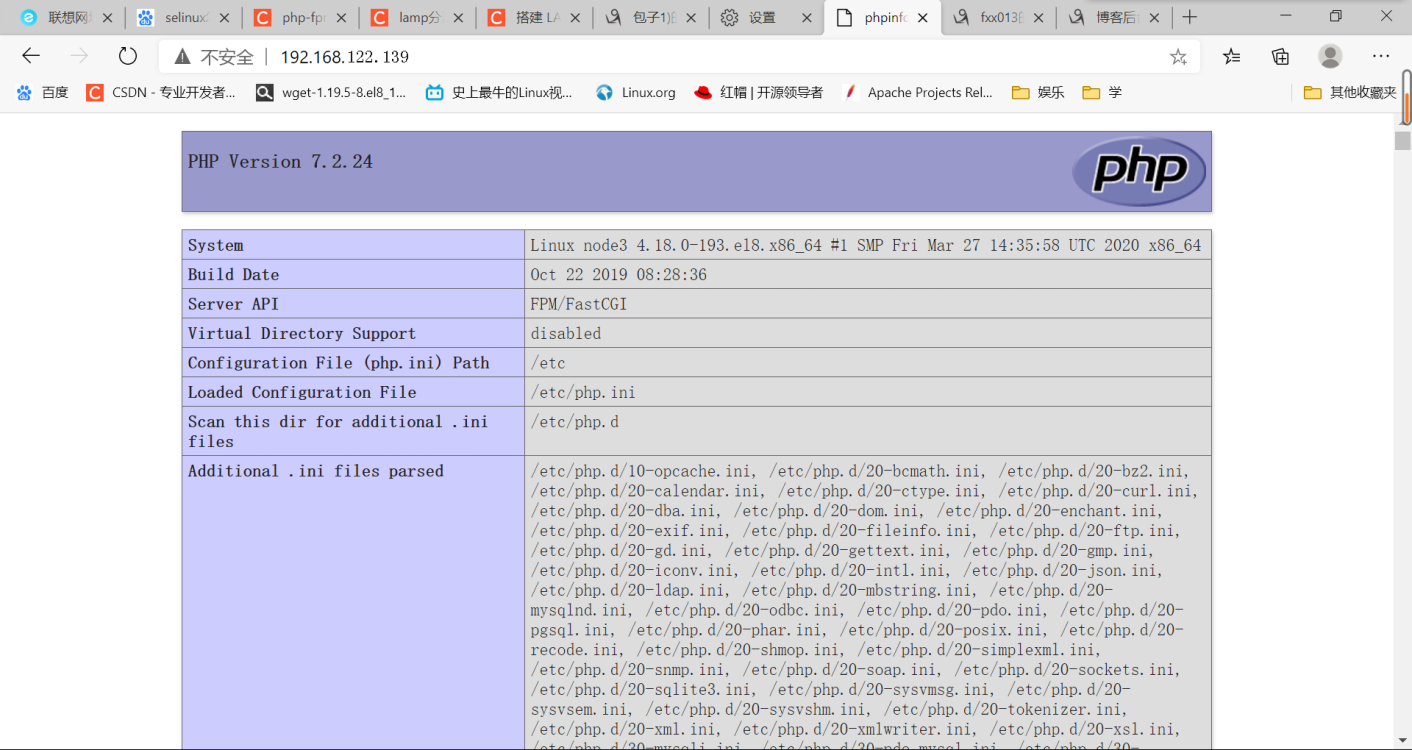
[root@cb3 ~]# echo -e "<?php\n\tphpinfo();\n?>" > /var/www/html/index.php
[root@cb3 ~]# chown -R apache.apache /var/www/html/
//重启httpd和php服务
[root@cb1 ~]# apachectl restart
[root@cb3 ~]# systemctl restart php-fpm
测试

 浙公网安备 33010602011771号