
Ubuntu上安装和配置Supervisor
一、前言
在许多服务器环境中,通常情况下,您将拥有许多要持久运行的小程序,无论这些程序是小型shell脚本,Node.js应用程序还是任何大型软件包。
通常,外部包随单元文件一起提供,允许它们由 init 系统(如 systemd)管理,或者打包为可由容器引擎管理的 docker 映像。但是,对于未很好地打包的软件,或者对于不希望与服务器上的低级 init 系统交互的用户,拥有轻量级替代方案是有帮助的。
Supervisor是一个进程管理器,它提供了一个单一的界面来管理和监视许多长时间运行的程序。在本教程中,您将在 Linux 服务器上安装 Supervisor,并学习如何管理多个应用程序的 Supervisor 配置。
以下是 Supervisor 的主要优势:
- 方便:为所有单流程实例编写 rc.d 很不方便。同样,Rc.d 脚本不会自动重新启动崩溃的进程。但是,可以将 Supervisor 配置为在进程崩溃时自动重启进程。
- 准确性: 在 UNIX 中,通常很难获得进程的准确启动/停止状态。Supervisor 将进程作为子进程启动,因此它知道其子进程的 up/down 状态。这很容易为最终用户查询。
二、Supervisor安装与配置
1.安装
sudo apt update && sudo apt install supervisor
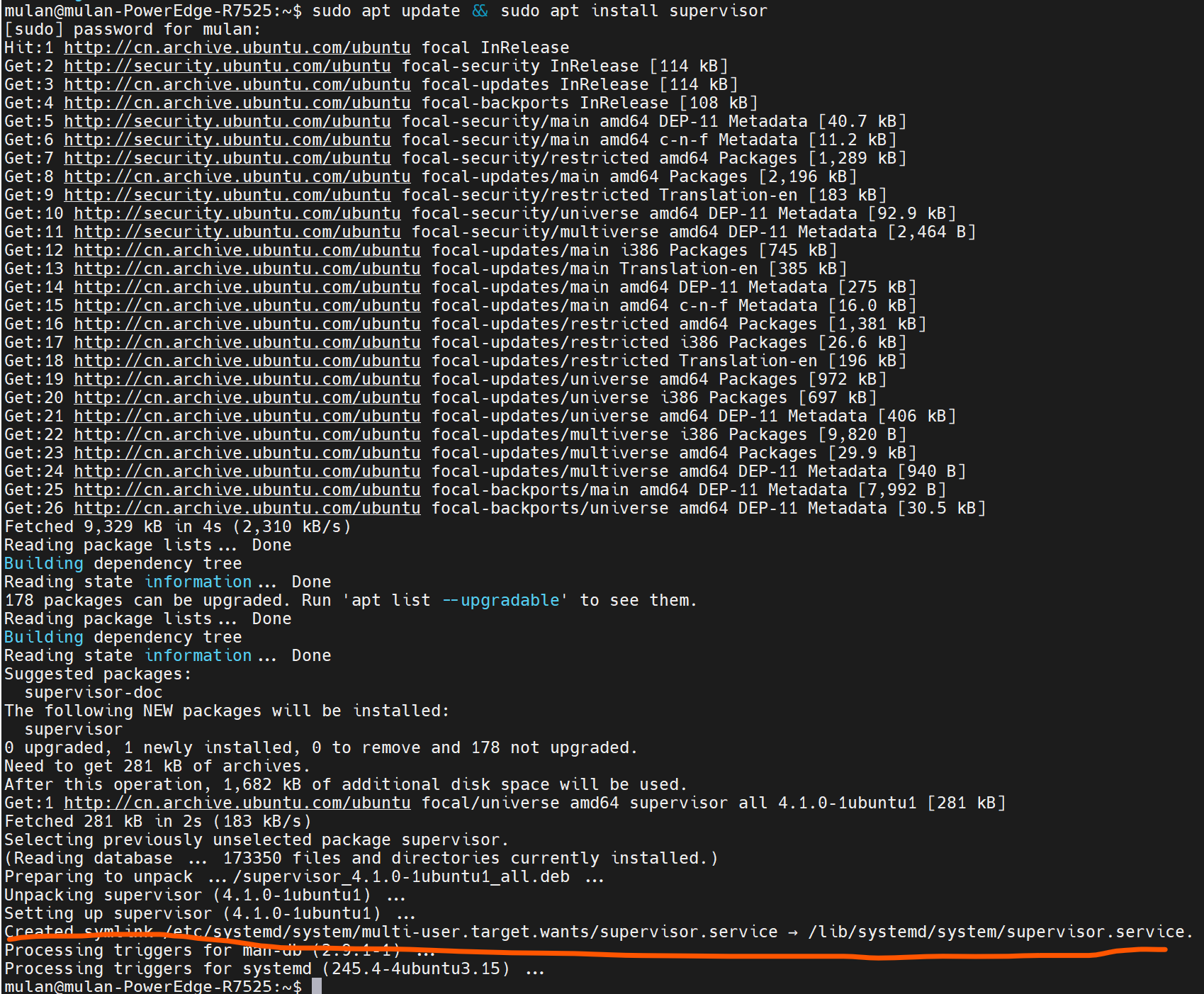
Supervisor服务在安装后自动运行(这点从安装后创建的symlink到systemd的自启动服务可以看出)。检查其状态:
sudo systemctl status supervisor

2. 添加程序
使用 Supervisor 的最佳实践是为它将处理的每个程序编写一个配置文件。
在 Supervisor 下运行的所有程序都必须在非守护模式下运行(有时也称为“前台模式”)。如果默认情况下你的程序在运行后会自动返回到 shell,那么你可能需要查阅程序的手册来找到启用此模式的选项,否则 Supervisor 将无法正确确定程序的状态。
2.1 创建一个脚本
sudo touch /home/mulan/analysis_service.sh
里面添加需要执行的内容。
2.2 创建配置文件
Supervisor程序的每个程序配置文件位于 /etc/supervisor/conf.d 目录中,通常每个文件运行一个程序,并以 .conf 结尾。我们将为此脚本创建一个配置文件:
sudo touch /etc/supervisor/conf.d/algo-analysis.conf
添加以下内容:
[program:algo-analysis-service]
command=/bin/bash -c /home/mulan/analysis_service.sh
autostart=true
autorestart=true
startretries=3
redirect_stderr=true
stderr_logfile=/var/log/analysis_service.err.log
stdout_logfile=/var/log/analysis_service.out.log
注意:上面当我使用下述command的时候,会出现“can't find command”的错误而导致服务起不来,那是因为Supervisor does not start a shell at all, either bash or sh -- so it's no surprise that it can't find shell-builtin commands. If you need one, you're obliged to start one yourself. 详情可参考:https://stackoverflow.com/questions/43076406/why-cant-supervisor-find-command-source
command=/home/mulan/analysis_service.sh
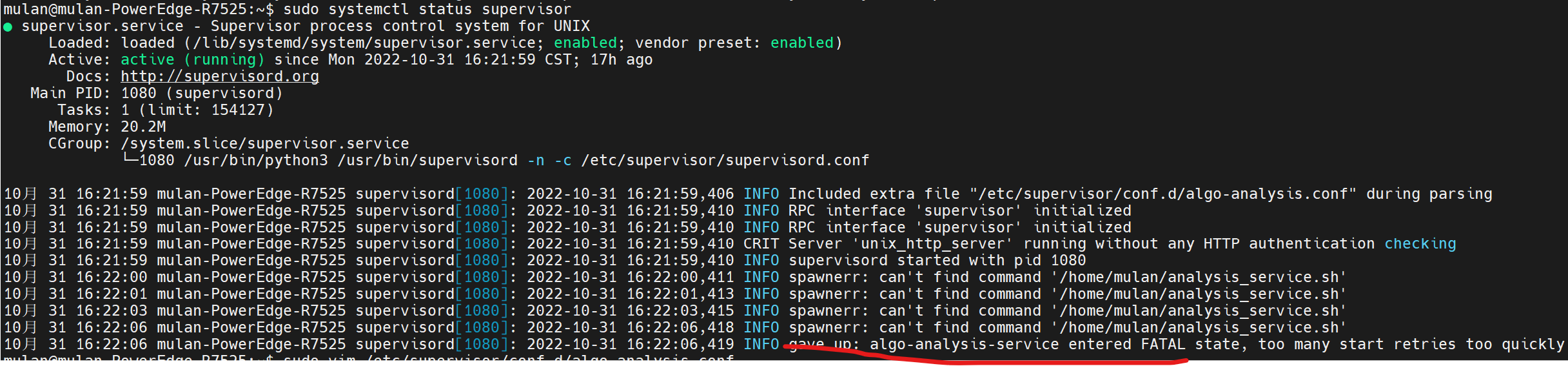
加上/bin/bash -c之后,服务就正常起来了:
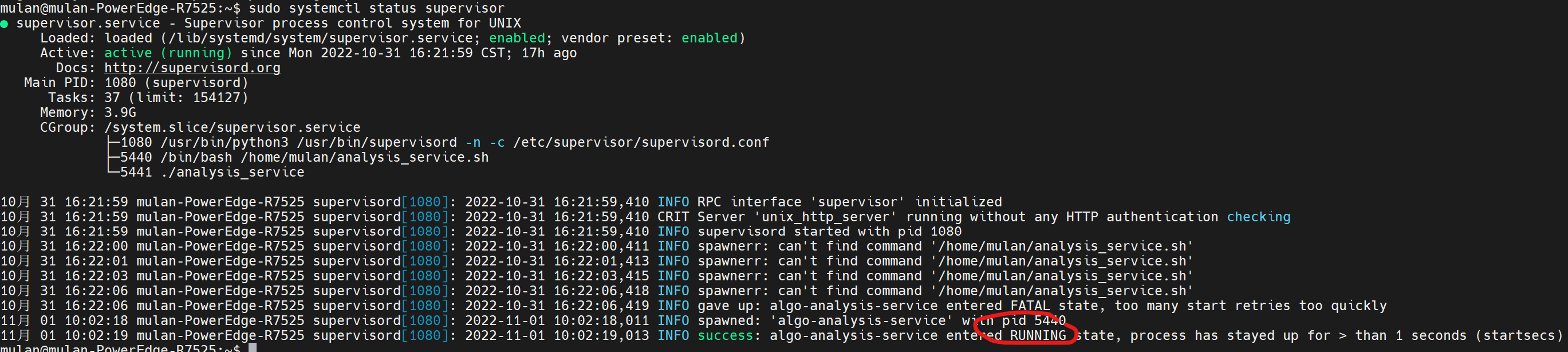
创建并保存配置文件后,我们可以通过 supervisorctl 命令通知 Supervisor 我们的新程序。首先,我们告诉 Supervisor 在 /etc/supervisor/conf.d 目录中查找任何新的或已更改的程序配置:
sudo supervisorctl reread

然后告诉它通过以下方式进行任何更改:
sudo supervisorctl update

每当您对任何程序配置文件进行更改时,运行前面的两个命令都会使更改生效。
此时我们的程序应该正在运行。我们可以通过查看输出日志文件来检查它的输出:
sudo tail /var/log/analysis_service.out.log
3. 管理程序
除了正在运行的程序之外,您还需要停止、重新启动或查看它们的状态。我们在上面使用的 supervisorctl 程序也有一个交互模式,我们可以使用它来控制我们的程序。
要进入交互模式,请运行不带参数的 supervisorctl:
sudo supervisorctl

supervisorctl最初将打印所有已配置程序的状态和正常运行时间,然后是其命令提示符。输入help将显示其所有可用命令:
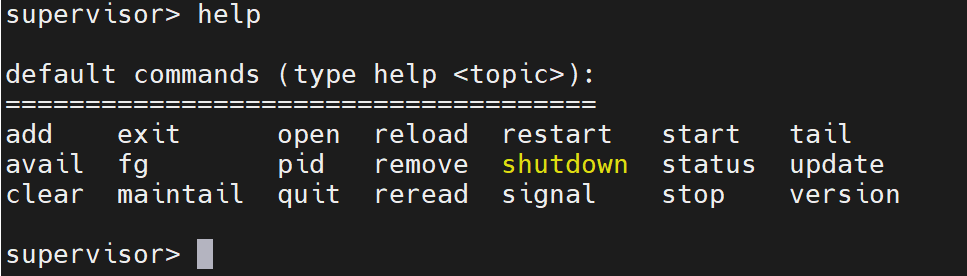
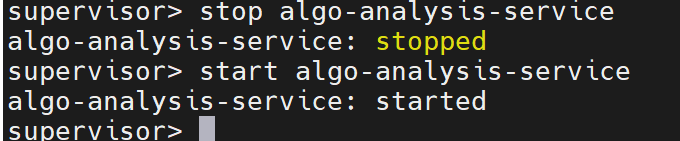
您可以使用关联的命令后跟程序名称来start or stop程序:
使用tail命令,您可以查看程序的 stdout 和 stderr 日志中的最新条目:


4.启用 Supervisor Web 界面
Supervisor 提供了一个基于 Web 的界面来管理所有进程,但默认情况下它是禁用的。您可以通过编辑文件 /etc/supervisor/supervisord.conf 来启用它:
sudo vim /etc/supervisor/supervisord.conf
在如下内容中:
; supervisor config file

[unix_http_server]
file=/var/run/supervisor.sock   ; (the path to the socket file)
chmod=0700                       ; sockef file mode (default 0700)

[supervisord]
logfile=/var/log/supervisor/supervisord.log ; (main log file;default $CWD/supervisord.log)
pidfile=/var/run/supervisord.pid ; (supervisord pidfile;default supervisord.pid)
childlogdir=/var/log/supervisor            ; ('AUTO' child log dir, default $TEMP)

; the below section must remain in the config file for RPC
; (supervisorctl/web interface) to work, additional interfaces may be
; added by defining them in separate rpcinterface: sections
[rpcinterface:supervisor]
supervisor.rpcinterface_factory = supervisor.rpcinterface:make_main_rpcinterface

[supervisorctl]
serverurl=unix:///var/run/supervisor.sock ; use a unix:// URL  for a unix socket

; The [include] section can just contain the "files" setting.  This
; setting can list multiple files (separated by whitespace or
; newlines).  It can also contain wildcards.  The filenames are
; interpreted as relative to this file.  Included files *cannot*
; include files themselves.

[include]
files = /etc/supervisor/conf.d/*.conf
添加以下行:
[inet_http_server]
port=*:9001
username=admin
password=admin
保存并关闭文件,然后重新启动 Supervisor 服务以应用更改:
systemctl restart supervisor

5.访问Supervisor Web 界面
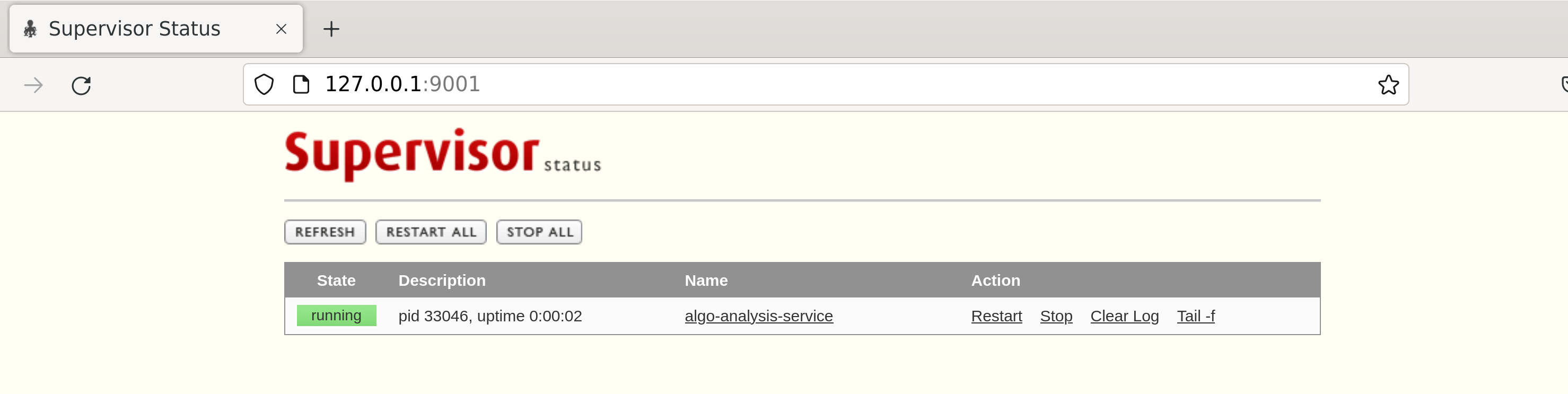
您现在可以使用 URL http://your-server-ip:9001访问 Supervisor Web 界面。提供您在配置文件中定义的管理员用户名和密码,然后单击登录按钮。您应该在以下页面中看到 Supervisor Web 界面:
三. Supervisor实战(绝知此事要躬行)
supervisord的主要目的是根据配置文件中的数据创建和管理进程。它通过创建子进程来实现这一点。supervisor生成的每个子进程在其整个生命周期内都由supervisord管理( supervisord是它创建的每个进程的父进程)。当子进程死亡时,通过 SIGCHLD信号通知supervisor其子进程死亡,并执行适当的操作。
在官方文档http://supervisord.org/subprocess.html中的pidproxy Program一节讲到,
有些进程(比如mysqld)会忽略由supervisor生成的发送给实际进程的信号。相反,由这些程序创建的“特殊”线程/进程负责处理信号。这是有问题的,因为supervisor只能终止它自己创建的进程。如果由supervisor创建的进程创建了自己的子进程,则supervisor不能杀死它们。
问题1:如何管理多进程服务?
解决方案1:就是使用pidproxy:
幸运的是,这些类型的程序通常会编写一个“pidfile”,其中包含“特殊”进程的PID,并用于读取和杀死进程。作为这种情况的解决方案,一个特殊的pidproxy程序可以处理这类进程的启动。pidproxy程序是一个启动进程的小垫片,在接收到信号后,将信号发送给pidfile中提供的pid。
使用方式如下:

#找到pidproxy位置
mulan@mulan-PowerEdge-Rxxx:~$ locate pidproxy
/usr/bin/pidproxy
/usr/lib/python3/dist-packages/supervisor/pidproxy.py
/usr/lib/python3/dist-packages/supervisor/__pycache__/pidproxy.cpython-38.pyc
/usr/share/man/man1/pidproxy.1.gz

#查看pidproxy.py脚本内容
mulan@mulan-PowerEdge-Rxxx:~$ vim /usr/lib/python3/dist-packages/supervisor/pidproxy.py

#创建pidfile
mulan@mulan-PowerEdge-Rxxx:~$ sudo touch /home/mulan/pidfile

mulan@mulan-PowerEdge-Rxxx:~$ sudo vim /etc/supervisor/conf.d/algo-analysis.conf
[program:algo-analysis-service]
command=/usr/bin/pidproxy /home/mulan/pidfile /home/mulan/analysis_service.sh
supervisor 本身提供了 pidproxy 程序,我们在配置 supervisor command 时候使用 pidproxy 来做一层代理。由于进程的id会随着不停的发布 fork 子进程而变化,所以需要将程序的每次启动 PID 保存在一个文件中,一般大型分布式软件都需要这样的一个文件,mysql、zookeeper 等,目的就是为了拿到目标进程id。
这其实是一种 master/worker 模式,master 进程交给 supervisor 管理,supervisor 启动 master 进程,也就是 pidproxy 程序,再由 pidproxy 来启动我们目标程序,随便我们目标程序 fork 多少次子进程都不会影响 pidproxy master 进程。
pidproxy 依赖 PID 文件,我们需要保证程序每次启动的时候都要写入当前进程 id 进 PID 文件,这样 pidproxy 才能工作。
supervisor 默认的 pidproxy 文件是不能直接使用的,我们需要适当的修改。
#!/usr/bin/env python

""" An executable which proxies for a subprocess; upon a signal, it sends that
signal to the process identified by a pidfile. """

import os
import sys
import signal
import time

class PidProxy:
    pid = None
    def __init__(self, args):
        self.setsignals()
        try:
            self.pidfile, cmdargs = args[1], args[2:]
            self.command = os.path.abspath(cmdargs[0])
            self.cmdargs = cmdargs
        except (ValueError, IndexError):
            self.usage()
            sys.exit(1)

    def go(self):
        self.pid = os.spawnv(os.P_NOWAIT, self.command, self.cmdargs)
        while 1:
            time.sleep(5)
            try:
                pid = os.waitpid(-1, os.WNOHANG)[0]
            except OSError:
                pid = None
            if pid:
                break

    def usage(self):
        print("pidproxy.py <pidfile name> <command> [<cmdarg1> ...]")

    def setsignals(self):
        signal.signal(signal.SIGTERM, self.passtochild)
        signal.signal(signal.SIGHUP, self.passtochild)
        signal.signal(signal.SIGINT, self.passtochild)
        signal.signal(signal.SIGUSR1, self.passtochild)
        signal.signal(signal.SIGUSR2, self.passtochild)
        signal.signal(signal.SIGQUIT, self.passtochild)
        signal.signal(signal.SIGCHLD, self.reap)

    def reap(self, sig, frame):
        # do nothing, we reap our child synchronously
        pass

    def passtochild(self, sig, frame):
        try:
            with open(self.pidfile, 'r') as f:
                pid = int(f.read().strip())
        except:
            print("Can't read child pidfile %s!" % self.pidfile)
            return
        os.kill(pid, sig)
        if sig in [signal.SIGTERM, signal.SIGINT, signal.SIGQUIT]:
            sys.exit(0)

def main():
    pp = PidProxy(sys.argv)
    pp.go()

if __name__ == '__main__':
    main()
go 方法是守护方法,会拿到启动进程的id,然后做 waitpid ,但是当我们 fork 进程的时候主进程会退出,os.waitpid 会收到退出信号,然后就退出了,但是这是个正常的切换逻辑。
可以两个办法解决,第一个就是让 go 方法纯粹是个守护进程,去掉退出逻辑,在信号处理方法中处理:
    def passtochild(self, sig, frame):
        pid = self.getPid()
        os.kill(pid, sig)
        time.sleep(5)
        try:
            pid = os.waitpid(self.pid, os.WNOHANG)[0]
        except OSError:
            print("wait pid null pid %s", self.pid)
        print("pid shutdown.%s", pid)
        self.pid = self.getPid()

        if self.pid == 0:
            sys.exit(0)

        if sig in [signal.SIGTERM, signal.SIGINT, signal.SIGQUIT]:
            print("exit:%s", sig)
            sys.exit(0)
还有一个方法就是修改原有go方法:
    def go(self):
        self.pid = os.spawnv(os.P_NOWAIT, self.command, self.cmdargs)
        while 1:
            time.sleep(5)
            try:
                pid = os.waitpid(-1, os.WNOHANG)[0]
            except OSError:
                pid = None
            try:
                with open(self.pidfile, 'r') as f:
                    pid = int(f.read().strip())
            except:
                print("Can't read child pidfile %s!" % self.pidfile)
            try:
                os.kill(pid, 0)
            except OSError:
                sys.exit(0)
可以直接在本地 debug pidproxy 脚本文件以解决具体情况!
解决方案2:stop 服务时,允许 supervisor stop 该进程组下的所有进程
前面我们知道:
● /etc/supervisor/supervisor.conf 主配置文件。
一般用于配置supservisor的通用参数,如指定自动加载的目录,设置http服务地址等。
● /etc/supervisor/conf.d 自定义的进程管理文件存放目录。
主要添加进程名、进程组、进程的启动命令、进程的log日志路径等参数。
其实我们通过supervisor的主配置文件可以获取很多有用的信息:
[unix_http_server]
file=/tmp/supervisor.sock   ;UNIX socket 文件,supervisorctl 会使用
;chmod=0700                 ;socket文件的mode,默认是0700
;chown=nobody:nogroup       ;socket文件的owner,格式:uid:gid

;[inet_http_server]         ;HTTP服务器,提供web管理界面
;port=127.0.0.1:9001        ;Web管理后台运行的IP和端口,如果开放到公网,需要注意安全性
;username=user              ;登录管理后台的用户名
;password=123               ;登录管理后台的密码

[supervisord]
logfile=/tmp/supervisord.log ;日志文件,默认是 $CWD/supervisord.log
logfile_maxbytes=50MB        ;日志文件大小,超出会rotate,默认 50MB,如果设成0,表示不限制大小
logfile_backups=10           ;日志文件保留备份数量默认10,设为0表示不备份
loglevel=info                ;日志级别,默认info,其它: debug,warn,trace
pidfile=/tmp/supervisord.pid ;pid 文件
nodaemon=false               ;是否在前台启动,默认是false,即以 daemon 的方式启动
minfds=1024                  ;可以打开的文件描述符的最小值,默认 1024
minprocs=200                 ;可以打开的进程数的最小值,默认 200

[supervisorctl]
serverurl=unix:///tmp/supervisor.sock ;通过UNIX socket连接supervisord,路径与unix_http_server部分的file一致
;serverurl=http://127.0.0.1:9001 ; 通过HTTP的方式连接supervisord

; [program:xx]是被管理的进程配置参数,xx是进程的名称
[program:xx]
command=/opt/apache-tomcat-8.0.35/bin/catalina.sh run  ; 程序启动命令
autostart=true       ; 在supervisord启动的时候也自动启动
startsecs=10         ; 启动10秒后没有异常退出,就表示进程正常启动了,默认为1秒
autorestart=true     ; 程序退出后自动重启,可选值:[unexpected,true,false],默认为unexpected,表示进程意外杀死后才重启
startretries=3       ; 启动失败自动重试次数,默认是3
user=tomcat          ; 用哪个用户启动进程,默认是root
priority=999         ; 进程启动优先级,默认999,值小的优先启动
redirect_stderr=true ; 把stderr重定向到stdout,默认false
stdout_logfile_maxbytes=20MB  ; stdout 日志文件大小,默认50MB
stdout_logfile_backups = 20   ; stdout 日志文件备份数,默认是10
; stdout 日志文件,需要注意当指定目录不存在时无法正常启动,所以需要手动创建目录(supervisord 会自动创建日志文件)
stdout_logfile=/opt/apache-tomcat-8.0.35/logs/catalina.out
stopasgroup=false     ;默认为false,进程被杀死时,是否向这个进程组发送stop信号,包括子进程
killasgroup=false     ;默认为false,向进程组发送kill信号,包括子进程

;包含其它配置文件
[include]
files = supervisord.d/*.ini    ;可以指定一个或多个以.ini结束的配置文件
那么对于多进程服务,我们需要允许 supervisor stop 该进程组下的所有进程,只需要在我们的子配置文件加入下面最后两行即可(亲测有效,强烈推荐):
[program:algo-analysis-service]
command=/bin/bash -c /home/mulan/analysis_service.sh
autostart=true
autorestart=true
startretries=3
redirect_stderr=true
stderr_logfile=/var/log/analysis_service.err.log
stdout_logfile=/var/log/analysis_service.out.log
stopasgroup=true ;默认为false,进程被杀死时,是否向这个进程组发送stop信号,包括子进程
killasgroup=true ;默认为false,向进程组发送kill信号,包括子进程
参考:
http://supervisord.org/introduction.html(官方文档)

 浙公网安备 33010602011771号