vue3学习笔记之Pinia状态管理
状态管理
<script setup>
import { ref } from "vue";
import { storeToRefs } from "pinia";
import { useCounterStore } from "../stores/counter";
import { useTodos } from "../stores/todos";

// 可以在组件中的任意位置访问 `store` 变量
const store = useCounterStore();

// const { count, doubleCount } = store; // `count` 和 `doubleCount` 没有响应式
let { count, doubleCount } = storeToRefs(store); // `count` 和 `doubleCount` 是响应式的 ref

// 作为 action 的 increment 可以直接解构
const { increment } = store;

store.count++;
setTimeout(() => {
  count.value++;
}, 2000);
setTimeout(() => {
  increment();
}, 4000);

const todoStore = useTodos();
const text = ref("");

function addTodo() {
  if (text != "") {
    todoStore.addTodo(text.value);
    text.value = "";
  }
}

function updateStatus(item) {
  todoStore.$patch((state) => {
    for (var i in state.todos) {
      if (item == state.todos[i]) {
        state.todos[i]["isFinished"] = !state.todos[i]["isFinished"];
      }
    }
  });
}

function delTodo(item) {
  let tmp = [];
  for (var i in todoStore.todos) {
    if (item != todoStore.todos[i]) {
      tmp.push(todoStore.todos[i]);
    }
  }
  todoStore.$patch({ todos: tmp });
}

todoStore.$subscribe((mutation, state) => {
  // 每当状态发生变化时,将整个 state 持久化到本地存储。
  localStorage.setItem("todos", JSON.stringify(state));
});
</script>
<template>
  <div>
    <div>
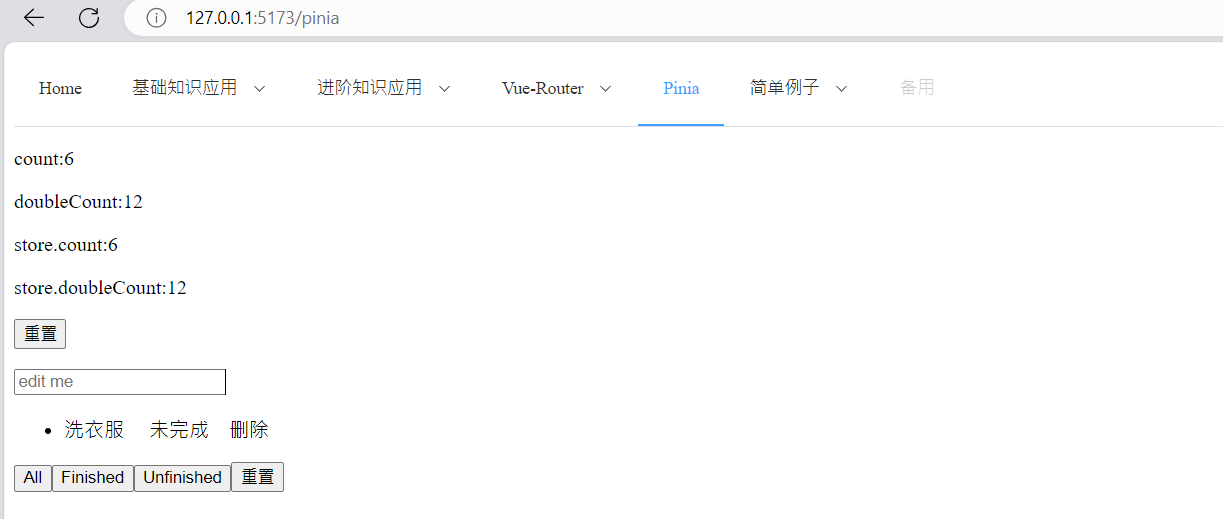
      <p>count:{{ count }}</p>
      <p>doubleCount:{{ doubleCount }}</p>
      <p>store.count:{{ store.count }}</p>
      <p>store.doubleCount:{{ store.doubleCount }}</p>
      <!-- 重置 state -->
      <button @click="store.$reset">重置</button>
    </div>

    <div>
      <p><input v-model="text" placeholder="edit me" @keyup.enter="addTodo" /></p>
      <ul>
        <li v-for="item in todoStore.filteredTodos" :key="item.id">
          {{ item.text }}
          <a v-if="item.isFinished">完成</a>
          <a v-else @click="updateStatus(item)">未完成</a>
          <a @click="delTodo(item)">删除</a>
        </li>
      </ul>
      <!-- 变更 state -->
      <button @click="todoStore.$patch({ filter: 'all' })">All</button>
      <button @click="todoStore.$patch({ filter: 'finished' })">Finished</button>
      <button @click="todoStore.$patch({ filter: 'unfinished' })">Unfinished</button>
      <!-- 重置 state -->
      <button @click="todoStore.$reset">重置</button>
    </div>
  </div>
</template>

<style scoped>
span,
a {
  margin-left: 1rem;
}

a {
  cursor: pointer;
}
</style>
src/stores/counter.js
import { defineStore } from "pinia";
import { ref, computed } from "vue";

export const useCounterStore = defineStore("counter", () => {
  const count = ref(0);
  function increment() {
    count.value++;
  }
  const doubleCount = computed(() => count.value * 2);

  //在 Setup Stores 中,需要创建自己的 $reset() 方法,Option Store不需要手段创建
  function $reset() {
    count.value = 0;
  }

  return { count, doubleCount, increment, $reset };
});
src/stores/todos.js
import { defineStore } from "pinia";

export const useTodos = defineStore("todos", {
  state: () => ({
    /** @type {{ text: string, id: number, isFinished: boolean }[]} */
    todos: [],

    /** @type {'all' | 'finished' | 'unfinished'} */
    filter: "all",

    // 类型将自动推断为 number
    nextId: 0,
  }),
  getters: {
    finishedTodos(state) {
      return state.todos.filter((todo) => todo.isFinished);
    },
    unfinishedTodos(state) {
      return state.todos.filter((todo) => !todo.isFinished);
    },

    /**
     * @returns {{ text: string, id: number, isFinished: boolean }[]}
     */
    filteredTodos() {
      if (this.filter === "finished") {
        return this.finishedTodos;
      } else if (this.filter === "unfinished") {
        return this.unfinishedTodos;
      }
      return this.todos;
    },
  },
  actions: {
    addTodo(text) {
      this.todos.push({ text, id: this.nextId++, isFinished: false });
    },
  },
});

 浙公网安备 33010602011771号