

H3C 三层交换实验
H3C 三层交换实验
实验拓扑
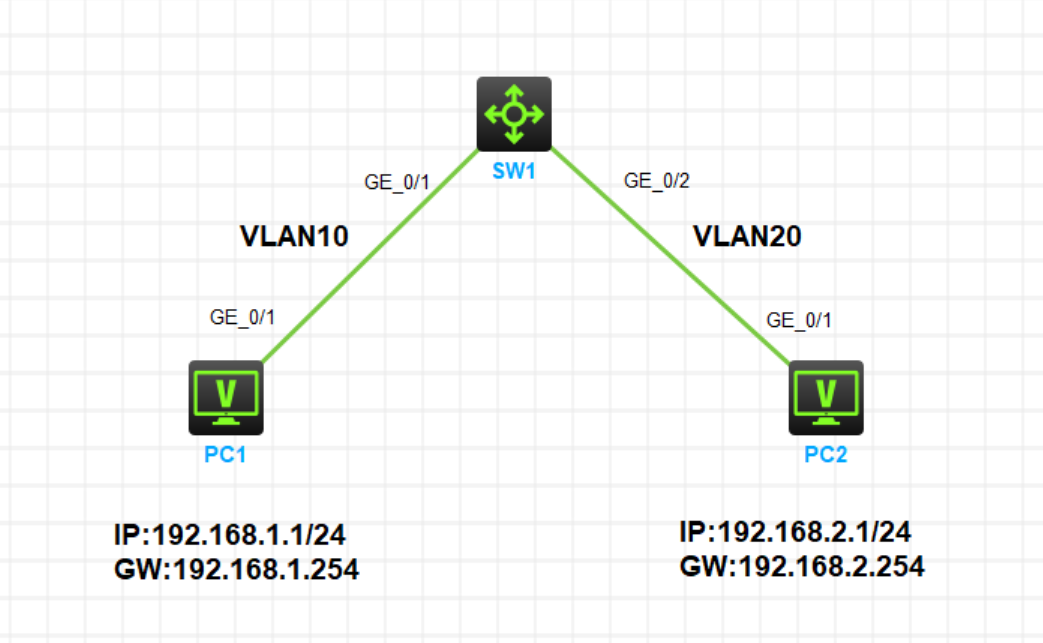
实验需求
- 按照图示为 PC1 和 PC2 配置 IP 地址和网关
- PC1 属于 Vlan10,PC2 属于 Vlan20,在三层交换机上配置 Vlanif 三层接口实现 Vlan10 和 Vlan20 三层互通
- PC1 和 PC2 可以互通
实验步骤
PC配置IP地址(略)
SW1配置
创建VLAN10和VLAN20
#
vlan 10
#
vlan 20
将VLAN加入到对应接口
#
interface GigabitEthernet1/0/1
 port link-mode bridge
 port access vlan 10
#
interface GigabitEthernet1/0/2
 port link-mode bridge
 port access vlan 20
配置Vlanif接口
#
interface Vlan-interface10
 ip address 192.168.1.254 255.255.255.0
#
interface Vlan-interface20
 ip address 192.168.2.254 255.255.255.0
实验验证
在 SW1 上查看路由表,会发现已经产生了到达192.168.1.0/24网段和192.168.2.0/24网段的直连路由,出接口分别指向各自 Vlanif 接口,证明 SW1 已经可以对 Vlan10 和 Vlan20 间的数据进行三层转发
[SW1]display ip routing-tableDestinations : 16 Routes : 16
Destination/Mask Proto Pre Cost NextHop Interface
0.0.0.0/32 Direct 0 0 127.0.0.1 InLoop0
127.0.0.0/8 Direct 0 0 127.0.0.1 InLoop0
127.0.0.0/32 Direct 0 0 127.0.0.1 InLoop0
127.0.0.1/32 Direct 0 0 127.0.0.1 InLoop0
127.255.255.255/32 Direct 0 0 127.0.0.1 InLoop0
192.168.1.0/24 Direct 0 0 192.168.1.254 Vlan10
192.168.1.0/32 Direct 0 0 192.168.1.254 Vlan10
192.168.1.254/32 Direct 0 0 127.0.0.1 InLoop0
192.168.1.255/32 Direct 0 0 192.168.1.254 Vlan10
192.168.2.0/24 Direct 0 0 192.168.2.254 Vlan20
192.168.2.0/32 Direct 0 0 192.168.2.254 Vlan20
192.168.2.254/32 Direct 0 0 127.0.0.1 InLoop0
192.168.2.255/32 Direct 0 0 192.168.2.254 Vlan20
224.0.0.0/4 Direct 0 0 0.0.0.0 NULL0
224.0.0.0/24 Direct 0 0 0.0.0.0 NULL0
255.255.255.255/32 Direct 0 0 127.0.0.1 InLoop0
PC1 和 PC2 可以互通
PC1 Ping PC2
<H3C>ping 192.168.2.1
Ping 192.168.2.1 (192.168.2.1): 56 data bytes, press CTRL_C to break
56 bytes from 192.168.2.1: icmp_seq=0 ttl=254 time=1.000 ms
56 bytes from 192.168.2.1: icmp_seq=1 ttl=254 time=0.000 ms
56 bytes from 192.168.2.1: icmp_seq=2 ttl=254 time=1.000 ms
56 bytes from 192.168.2.1: icmp_seq=3 ttl=254 time=1.000 ms
56 bytes from 192.168.2.1: icmp_seq=4 ttl=254 time=1.000 ms
--- Ping statistics for 192.168.2.1 ---

5 packet(s) transmitted, 5 packet(s) received, 0.0% packet loss

round-trip min/avg/max/std-dev = 0.000/0.800/1.000/0.400 ms

<H3C>%Jan 31 17:29:42:616 2024 H3C PING/6/PING_STATISTICS: Ping statistics for 192.168.2.1: 5 packet(s) transmitted, 5 packet(s) received, 0.0% packet loss, round-trip min/avg/max/std-dev = 0.000/0.800/1.000/0.400 ms.
PC2 Ping PC1
<H3C>ping 192.168.1.1
Ping 192.168.1.1 (192.168.1.1): 56 data bytes, press CTRL_C to break
56 bytes from 192.168.1.1: icmp_seq=0 ttl=254 time=0.648 ms
56 bytes from 192.168.1.1: icmp_seq=1 ttl=254 time=0.728 ms
56 bytes from 192.168.1.1: icmp_seq=2 ttl=254 time=0.964 ms
56 bytes from 192.168.1.1: icmp_seq=3 ttl=254 time=1.350 ms
56 bytes from 192.168.1.1: icmp_seq=4 ttl=254 time=0.620 ms
--- Ping statistics for 192.168.1.1 ---

5 packet(s) transmitted, 5 packet(s) received, 0.0% packet loss

round-trip min/avg/max/std-dev = 0.620/0.862/1.350/0.272 ms

<H3C>%Jan 31 17:27:57:878 2024 H3C PING/6/PING_STATISTICS: Ping statistics for 192.168.1.1: 5 packet(s) transmitted, 5 packet(s) received, 0.0% packet loss, round-trip min/avg/max/std-dev = 0.620/0.862/1.350/0.272 ms.

 浙公网安备 33010602011771号