
Linux时钟同步
Linux时钟同步
查看时间命令:date
方法一:使用ntpdate同步时钟(必须联网)
执行命令: ntpdate us.pool.ntp.org (手动模式)
定时任务: crontab -e (自动模式)
在文本中添加: */1 * * * * /usr/sbin/ntpdate us.pool.ntp.org;
注:
手动执行报错:
[root@localhost /]# /usr/sbin/ntpdate cn.pool.ntp.org
22 May 13:56:26 ntpdate[17023]: the NTP socket is in use, exiting

停止ntp服务:
[root@localhost /]# service ntpd stop
Shutting down ntpd: [  OK  ]

设置ntp服务开机不自启动:
[root@localhost /]# chkconfig ntpd off

手动执行成功:
[root@localhost /]# /usr/sbin/ntpdate cn.pool.ntp.org
22 May 14:11:27 ntpdate[17352]: step time server 5.79.108.34 offset 826.232303 sec
方法二:同步自己的服务器时钟
1.确定是否安装了ntpd的服务,执行命令: rpm -qa | grep ntpd
2.如果没有安装,可以进行在线安装,执行命令: yum -y install ntpd
配置: 目标服务器配置
1.在同步时钟的目标服务器修改配置文件,执行以下命令:
vim /etc/ntp.conf
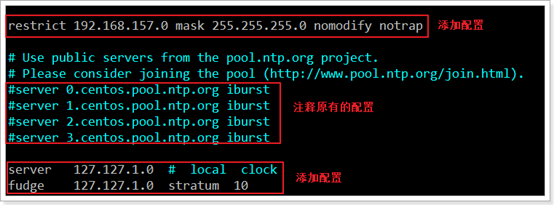
2.在文件中添加如下内容(注意修改157网段为实际网段)
restrict 192.168.157.0 mask 255.255.255.0 nomodify notrap
注释以下四行内容
#server 0.centos.pool.ntp.org
#server 1.centos.pool.ntp.org
#server 2.centos.pool.ntp.org
#server 3.centos.pool.ntp.org
去掉以下内容的注释,如果没有这两行注释,那就自己添加上
server 127.127.1.0 # local clock
fudge 127.127.1.0 stratum 10
3.修改配置保证主板BIOS与系统时间同步,执行命令:
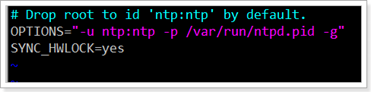
vim /etc/sysconfig/ntpd
4.在编辑器中添加以下配置
SYNC_HWLOCK=yes
5.重启ntpd服务,执行以下命令:
service ntpd restart
6.配置其他服务器,实现和目标服务器进行时钟同步。所有需要进行时钟同步的服务器都需要进行以下配置,其实就是配置定时任务同步时钟。
7.配置另外两台机器与192.168.102.130进行时钟同步,执行以下命令:
crontab -e
8.添加以下内容(修改实际的ip地址):
*/1 * * * * /usr/sbin/ntpdate 192.168.102.130

 浙公网安备 33010602011771号