
docker命令
# 进入容器脚本
[root@Ago ~]# vim docker_ns.sh
#!/bin/sh
# 进入容器出来不会关闭容器
# 获取容器启动的PID号
PID=$(docker inspect --format "{{.State.Pid}}" $1)
# yum install util-linux 获取该命令
nsenter -t $PID -u -i -n -p
# 创建容器,执行立马删除 容器
docker run --rm centos /bin/echo "can"
docker rm docker_id # 删除容器 -f 删除正在运行的容器
docker kill $(docker ps -q -a) # 列出所有的正在运行ID 然后杀掉
docker start/stop # 开启关闭容器
docker run --name mydocker centos# 创建容器并取名 名唯一
docker run --name mydocker -t -i centos /bin/bash # 创建伪终端 并进入,不关闭容器
docker ps -a -l # 查看容器
docker logs docker_id
# 网络
docker run -P # 随机映射
docker run -p hostPort:containerPort # 指定映射
docker run -p ip:hostPort:containerPort
docker run -p ip::containerPort
docker run -p hostPort:containerPort:udp
docker run -d -p 91:80 nginx
docker inspect docker_id # 容器的所有信息
# 数据卷
docker run -it -v /opt:/opt centos
docker run -it -v /data centos
docker run -it -v /opt:/opt:rw centos # 指定权限
# 数据卷容器 --volumes-from 让容器 volumes-test 的数据都访问nfs,而且nfs无所谓是否开启
docker -run -d --name nfs -v /data centos
docker -run -it --name volumes-test --volumes-from nfs centos
# 创建镜像
docker run --name mydocker centos
docker commit -m "my docker" docker_id can/centos:v1
docker images
docker run -it -m
# dockerfile
docker build /opt/nginx/Dockerfile
# 注释
# 基础镜像
FROM centos
# 维护者信息
MAINTAINER Ago Ago@genchui.com
# 你想要干什么 commond
RUN rpm -ivh https://mirrors.aliyun.com/epel/epel-release-latest-7.noarch.rpm
RUN yum install -y nginx
# COPY文件,会自动解压
ADD index.html /usr/share/nginx/html/index.html
RUN echo "daemon off;" >> /etc/nginx/nginx.conf
# WORKDIR 当前工作目录 等于cd
# VOLUME 指定挂在
# EXPOSE 打开的端口
EXPOSE 80
# RUN 启动
CMD [“nginx”]
[root@Ago ~]# vim /opt/dockerfile/nginx/
Dockerfile index.html
[root@Ago ~]# vim /opt/dockerfile/nginx/Dockerfile
[root@Ago ~]# do
do docker-containerd-shim dockerd done
docker docker-containerd-shim-current dockerd-current dos2unix
docker-containerd docker-ctr-current docker-storage-setup doxygen
docker-containerd-current docker-current domainname
[root@Ago ~]# docker build -t ago/nginx:v2 /opt/dockerfile/nginx/
docker run -d -p 86:80 --name nginx02 ago/nginx:v2
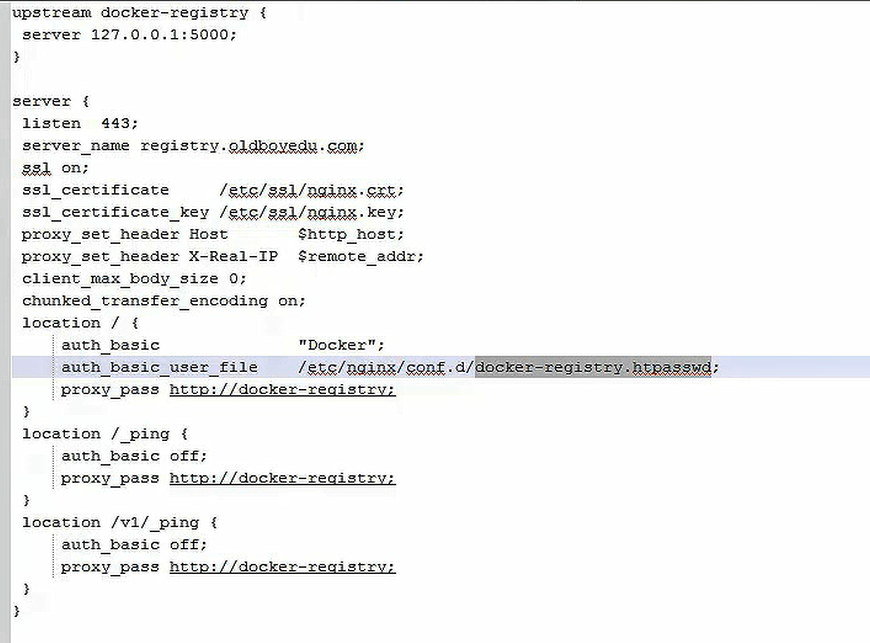
# 私有仓库
# 生成证书
touch ./{serial,index.txt}
cd /etc/pki/CA/
[root@Ago CA]# openssl req -new -x509 -key private/cakey.pem -days 3650 -out cacert.pem
You are about to be asked to enter information that will be incorporated
into your certificate request.
What you are about to enter is what is called a Distinguished Name or a DN.
There are quite a few fields but you can leave some blank
For some fields there will be a default value,
If you enter '.', the field will be left blank.
-----
Country Name (2 letter code) [XX]:CN
State or Province Name (full name) []:Shenzhen
Locality Name (eg, city) [Default City]:shenzhen
Organization Name (eg, company) [Default Company Ltd]:genchui
Organizational Unit Name (eg, section) []:genchui.cn
Common Name (eg, your name or your server's hostname) []:genchui
Email Address []:ago@genchui.com
[root@Ago CA]# cd /etc/ssl/
[root@Ago ssl]# openssl genrsa -out nginx.key 2048
Generating RSA private key, 2048 bit long modulus
.............+++
...........+++
e is 65537 (0x10001)
[root@Ago ssl]# openssl req -new -key nginx.key -out nginx.csr
You are about to be asked to enter information that will be incorporated
into your certificate request.
What you are about to enter is what is called a Distinguished Name or a DN.
There are quite a few fields but you can leave some blank
For some fields there will be a default value,
If you enter '.', the field will be left blank.
-----
Country Name (2 letter code) [XX]:CN
State or Province Name (full name) []:Shenzhen
Locality Name (eg, city) [Default City]:shenzhen
Organization Name (eg, company) [Default Company Ltd]:genchui
Organizational Unit Name (eg, section) []:genchui.cn
Common Name (eg, your name or your server's hostname) []:genchui
Email Address []:ago@genchui.com
Please enter the following 'extra' attributes
to be sent with your certificate request
A challenge password []:
An optional company name []:
# 直接回车没有密码
openssl ca -in nginx.csr -days 3650 -out nginx.crt
cat /etc/pki/CA/cacert.pem >> /etc/pki/tls/certs/ca-bundle.crt # 让系统承认这个证书
shipyard Dashbord页面管理docker
管理工具
swarm mesos k8s

 浙公网安备 33010602011771号