

C# 执行Python 脚本文件
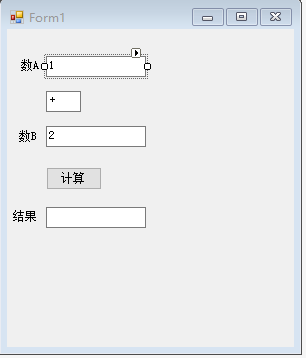
1.UI类
文本框,由上至下命名为:tb_DataA,tb_DataB,tb_Result
按钮,btn_GetResult
using System;
using System.Collections.Generic;
using System.ComponentModel;
using System.Data;
using System.Drawing;
using System.Linq;
using System.Text;
using System.Threading.Tasks;
using System.Windows.Forms;

namespace WindowsFormsApp_Python
{
    public partial class Form1 : Form
    {
        Def_UserPython userPy;

        public Form1()
        {
            InitializeComponent();
            userPy = new Def_UserPython();
            userPy.UserData+= ShowResult;
        }

        private void btn_GetResult_Click(object sender, EventArgs e)
        {
            Calculate();
        }

        private void Calculate()
        {
            int a = int.Parse(tb_DataA.Text);
            int b = int.Parse(tb_DataB.Text);

            string[] args = new string[2];
            args[0] = a.ToString();
            args[1] = b.ToString();

            string path= @"C:\Users\user\test.py";
            userPy.RunPythonSript(path, args);

        }

        private void ShowResult(string str)
        {
            if (this.tb_Result.InvokeRequired)
            {
                GetMessageHandle d = new GetMessageHandle(ShowResult);
                this.Invoke(d, new object[] { str });
            }
            else
            {
                this.tb_Result.Text = str;
            }
        }
    }
}
2.Python脚本处理类
using System;
using System.Collections.Generic;
using System.Linq;
using System.Text;
using System.Threading.Tasks;

using System.Diagnostics;

namespace WindowsFormsApp_Python
{
    class MessageEvent
    {
        private string msg;

        public string BackMsg()
        {
            return this.msg;
        }

        public MessageEvent(string str)
        {
            this.msg = str;
        }
    }

    delegate void GetMessageHandle(string str);
    class Def_UserPython
    {
        public  string result="";
        public  event GetMessageHandle UserData;

        public  void RunPythonSript(string path, params string[] args)
        {
            string strAppPath = @"C:\python\python.exe";

            string userArgs = path;
            foreach (string str in args)
            {
                userArgs += " " + str;
            }
            userArgs += " " + "-u";

            Process p = new Process();
            p.StartInfo.FileName = strAppPath;
            p.StartInfo.Arguments = userArgs;
            p.StartInfo.UseShellExecute = false;

            p.StartInfo.RedirectStandardError = true;
            p.StartInfo.RedirectStandardInput = true;
            p.StartInfo.RedirectStandardOutput = true;

            p.Start();
            p.BeginOutputReadLine();
            p.OutputDataReceived += new DataReceivedEventHandler(ReceiveData);

            //Console.ReadLine();
            //p.WaitForExit();
        }

        private void ReceiveData(object sender, DataReceivedEventArgs e)
        {
            if (string.IsNullOrWhiteSpace(e.Data) == false)
            {

                Console.WriteLine("Python文件,返回值:" + e.Data);
                result = e.Data;
            }

            if (UserData != null)
            {
                UserData(result);
            }

        }

    }
}
3. 自定义的Python脚本(脚本名称:test.py)
#!/usr/bin/python
# -*- coding: UTF-8 -*-
import sys
a=eval(sys.argv[1])
b=eval(sys.argv[2])
print(a+b)

 浙公网安备 33010602011771号