win7安装teams软件报错
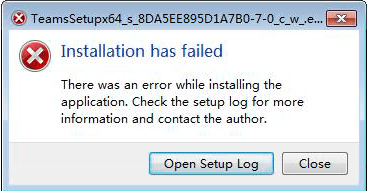
win7安装时,有时会报错
2022-07-06 08:47:11> Unhandled exception: System.IO.FileNotFoundException: Could not load file or assembly 'System.ValueTuple, Version=4.0.2.0, Culture=neutral, PublicKeyToken=cc7b13ffcd2ddd51' or one of its dependencies. 系统找不到指定的文件。
File name: 'System.ValueTuple, Version=4.0.2.0, Culture=neutral, PublicKeyToken=cc7b13ffcd2ddd51'
at Squirrel.Update.Program.executeCommandLine(String[] args)
at Squirrel.Update.Program.main(String[] args)
解决方法:
安装 Microsoft .NET Framework 4.7.2
20240906更新
win10系统脱机安装新版Teams
-
更改windows系统设置
开始,设置,更新和安全,开发者选项,临时更改为“旁加载应用” -
安装离线安装包
-
恢复windows系统设置
20241213更新
-
下载(在错误日志中有提示下载路径)
https://statics.teams.cdn.office.net/production-windows-x64/1.7.00.19353/Teams_windows_x64.exe -
先卸载旧版软件,再安装离线安装包

 浙公网安备 33010602011771号