在服务器端在线解压.ZIP文件的小工具(源码打包)以后向服务器发布程序就快了。
之前用过一个用PHP 写的一个可以在服务器端在线解压.ZIP文件的小工具(只有一个文件),但最近,公司项目是用.NET 开发的,服务器上不支持PHP ,所以就自己动手写了个。
解压的核心代码是从网上找的。不知道是哪位大侠写的。小的我就拿来用了。用了ICSharpCode.SharpZipLib.dll类库。
为了让文件的个数减少到最少,所有的后台代码都写到前台aspx页面中了。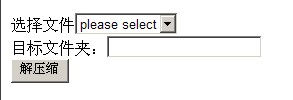
<%@ Page Language="C#" %>
<%@ Import Namespace="System.Collections.Generic" %>
<%@ Import Namespace="System.Web" %>
<%@ Import Namespace="System.Web.UI"%>
<%@ Import Namespace="System.Web.UI.WebControls" %>
<%@ Import Namespace="System.IO" %>
<%@ Import Namespace="System.Threading"%>
<%@ Import Namespace="ICSharpCode.SharpZipLib.Zip" %>

<!DOCTYPE html PUBLIC "-//W3C//DTD XHTML 1.0 Transitional//EN" "http://www.w3.org/TR/xhtml1/DTD/xhtml1-transitional.dtd">

<html xmlns="http://www.w3.org/1999/xhtml">
<head runat="server">
    <title></title>
    <script runat="server" type="text/C#">
        protected void Page_Load(object sender, EventArgs e)
        {
            if (!IsPostBack)
            {
                string f = Server.MapPath(".");
                foreach (FileInfo fi in new System.IO.DirectoryInfo(f).GetFiles())
                {
                    if (fi.Name.LastIndexOf(".zip") > 0)
                    {
                        ddlFileList.Items.Add(new ListItem(fi.Name, fi.Name));
                    }
                }
                ddlFileList.Items.Insert(0, new ListItem("please select", "-1"));

            }

        }

        public void btnDecompress_Click(object s, EventArgs e)
        {

            string zipFilePath = Server.MapPath("./") + ddlFileList.SelectedValue.Trim();//
            if (File.Exists(zipFilePath))
            {
                string TargetPath = txtTargetPath.Text.Trim();
                if (TargetPath.LastIndexOf("\\") < 0)
                {
                    TargetPath += "\\\\";
                }
                string targetPath = Server.MapPath(TargetPath);
                FileCompression.Decompress(zipFilePath, targetPath);
                Response.Write("文件解压成功,请在" + TargetPath + "文件夹查看。");
            }
            else
            {
                Response.Write("压缩文件不存在,请先压缩文件。");
            }
        }

        public class FileCompression
        {
            /// <summary>
            /// 构造函数
            /// </summary>
            public FileCompression()
            {
            }

            #region 加密、压缩文件

            /// <summary>
            /// 压缩文件
            /// </summary>
            /// <param name="fileNames">要打包的文件列表</param>
            /// <param name="GzipFileName">目标文件名</param>
            /// <param name="CompressionLevel">压缩品质级别(0~9)</param>
            /// <param name="SleepTimer">休眠时间(单位毫秒)</param>
            public static void Compress(List<FileInfo> fileNames, string GzipFileName, int CompressionLevel, int SleepTimer)
            {
                ZipOutputStream s = new ZipOutputStream(File.Create(GzipFileName));
                try
                {
                    s.SetLevel(CompressionLevel);   //0 - store only to 9 - means best compression

                    foreach (FileInfo file in fileNames)
                    {
                        FileStream fs = null;
                        try
                        {
                            fs = file.Open(FileMode.Open, FileAccess.ReadWrite);
                        }
                        catch
                        { continue; }

                        //  方法二,将文件分批读入缓冲区
                        byte[] data = new byte[2048];
                        int size = 2048;
                        ZipEntry entry = new ZipEntry(Path.GetFileName(file.Name));
                        entry.DateTime = (file.CreationTime > file.LastWriteTime ? file.LastWriteTime : file.CreationTime);

                        s.PutNextEntry(entry);

                        while (true)
                        {
                            size = fs.Read(data, 0, size);
                            if (size <= 0) break;

                            s.Write(data, 0, size);
                        }

                        fs.Close();
                        file.Delete();

                        Thread.Sleep(SleepTimer);
                    }
                }
                finally
                {
                    s.Finish();
                    s.Close();
                }
            }

            #endregion

            #region 解密、解压缩文件

            /// <summary>
            /// 解压缩文件
            /// </summary>
            /// <param name="GzipFile">压缩包文件名</param>
            /// <param name="targetPath">解压缩目标路径</param>
            public static void Decompress(string GzipFile, string targetPath)
            {
                //string directoryName = Path.GetDirectoryName(targetPath + "\\") + "\\";
                string directoryName = targetPath;
                if (!Directory.Exists(directoryName)) Directory.CreateDirectory(directoryName);//生成解压目录
                string CurrentDirectory = directoryName;

                byte[] data = new byte[2048];
                int size = 2048;

                ZipEntry theEntry = null;
                using (ZipInputStream s = new ZipInputStream(File.OpenRead(GzipFile)))
                {
                    while ((theEntry = s.GetNextEntry()) != null)
                    {
                        if (theEntry.IsDirectory)
                        {// 该结点是目录
                            if (!Directory.Exists(CurrentDirectory + theEntry.Name)) Directory.CreateDirectory(CurrentDirectory + theEntry.Name);
                        }
                        else
                        {
                            if (theEntry.Name != String.Empty)
                            {
                                //解压文件到指定的目录
                                using (FileStream streamWriter = File.Create(CurrentDirectory + theEntry.Name))
                                {
                                    while (true)
                                    {
                                        size = s.Read(data, 0, data.Length);
                                        if (size <= 0) break;

                                        streamWriter.Write(data, 0, size);
                                    }
                                    streamWriter.Close();
                                }
                            }
                        }
                    }
                    s.Close();
                }
            }

            #endregion

        }


    </script>


</head>
<body>
    <form id="form1" runat="server">
    <div>
    选择文件<asp:DropDownList ID="ddlFileList" runat="server"></asp:DropDownList><br />
    目标文件夹:<asp:TextBox ID="txtTargetPath" runat="server"></asp:TextBox><br />

        <asp:Button ID="btnDecompress" runat="server"
            Text="解压缩" onclick="btnDecompress_Click" />

    </div>
    </form>
</body>
</html>
https://files.cnblogs.com/chjf2008/unzip.zip

 浙公网安备 33010602011771号