

vue3写页面(分页查询,table状态,页面下载excel、上传)
<template>
  <div>
    <div class="crumbs">
      <el-breadcrumb separator="/">
        <el-breadcrumb-item>
        </el-breadcrumb-item>
      </el-breadcrumb>
    </div>
    <div class="container">
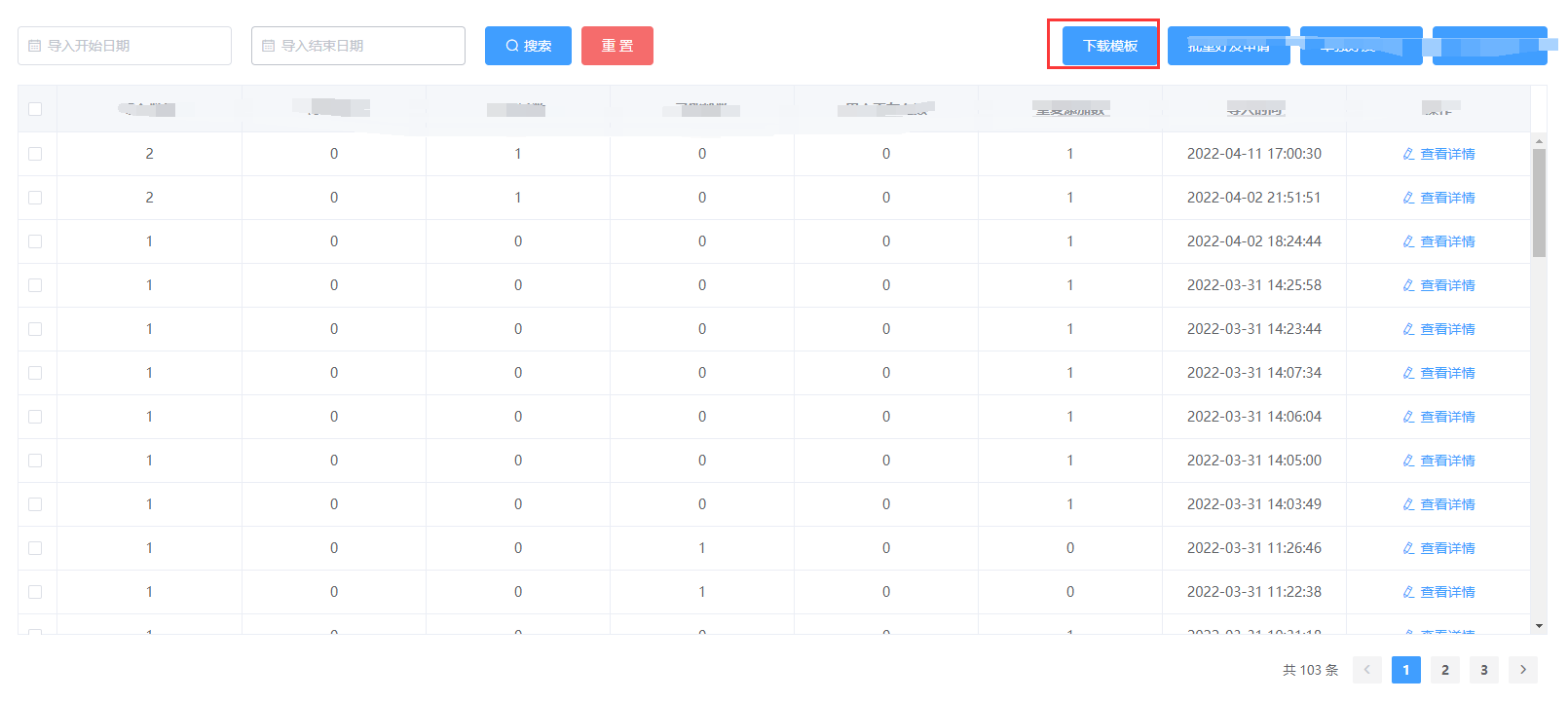
      <el-date-picker v-model="beginTime" type="date" placeholder="导入开始日期"></el-date-picker>
      <el-date-picker style="margin-left:20px" v-model="endTime" type="date" placeholder="导入结束日期"></el-date-picker>
      <el-button type="primary" icon="el-icon-search" @click="handleSearchBatch" style="margin-left:20px">搜索</el-button>
      <el-button type="danger" style="margin-left: 10px" @click="resetSearch">重 置</el-button>
      <div style="margin-bottom: 20px;float: right">
        <el-button type="primary"><a style="color: white" :href="downloadUrl" download="excelDemo.xlsx">下载模板</a></el-button>
        <el-button type="primary" @click="addVisible = true">批量好友申请</el-button>
        <el-button type="primary">单独好友申请</el-button>
        <el-button type="primary" @click="goExcel">Excel加好友</el-button>
      </div>

      <el-table :data="batchTableData" height="565"
                :cell-style="{padding: '2px 0'}" border class="table" ref="multipleTable" header-cell-class-name="table-header" @selection-change="selectChanges">
        <el-table-column type="selection" width="40"/>
        <el-table-column prop="allNum" label="导入数量" align="center">
          <template #default="scope">{{ scope.row.allNum }}</template>
        </el-table-column>
        <el-table-column prop="toBeSent" label="待发送数"  align="center">
          <template #default="scope">{{ scope.row.toBeSent }}</template>
        </el-table-column>
        <el-table-column prop="toBeAdopted" label="待通过数"  align="center">
          <template #default="scope">{{ scope.row.toBeAdopted }}</template>
        </el-table-column>
        <el-table-column prop="added" label="已涨粉数"  align="center">
          <template #default="scope">{{ scope.row.added }}</template>
        </el-table-column>
        <el-table-column prop="nonExistent" label="用户不存在数"  align="center">
          <template #default="scope">{{ scope.row.nonExistent }}</template>
        </el-table-column>
        <el-table-column prop="repeatAdd" label="重复添加数"  align="center">
          <template #default="scope">{{ scope.row.repeatAdd }}</template>
        </el-table-column>
        <el-table-column prop="createTime" label="导入时间"  align="center">
          <template #default="scope">{{ scope.row.createTime }}</template>
        </el-table-column>
        <el-table-column prop="batchNo" label="批次号"  align="center" v-if="false">
          <template #default="scope">{{ scope.row.batchNo }}</template>
        </el-table-column>
        <el-table-column label="操作" align="center">
            <template #default="scope">
              <el-button type="text" icon="el-icon-edit" @click="handleEdit(scope.$index, scope.row)">查看详情
              </el-button>
            </template>
        </el-table-column>
      </el-table>
      <div class="pagination" >
        <el-pagination background layout="total, prev, pager, next" :current-page="queryBatch.page"
                       :page-size="queryBatch.size" :total="pageTotalBatch" @current-change="handlePageChangeBatch"></el-pagination>
      </div>

    </div>

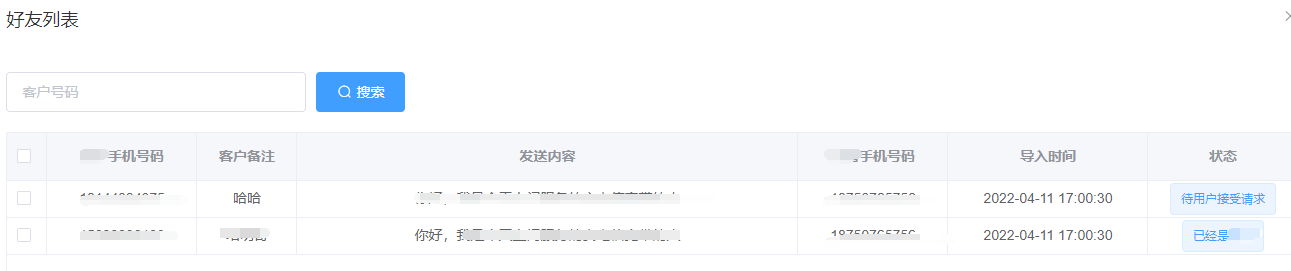
    <el-dialog v-model="batchFriends" title="好友列表" width="70%" :before-close="handleClose">
      <el-input v-model="query.mobile" placeholder="客户号码" class="handle-input mr10"></el-input>
      <el-button type="primary" icon="el-icon-search" @click="handleSearch">搜索</el-button>
      <el-table :data="tableData" height="565" style="margin-top:20px"
                :cell-style="{padding: '2px 0'}" border class="table" ref="multipleTable" header-cell-class-name="table-header" @selection-change="selectChanges">
        <el-table-column type="selection" width="40"/>
        <el-table-column prop="area" label="客户手机号码" width="150" align="center">
          <template #default="scope">{{ scope.row.mobile }}</template>
        </el-table-column>
        <el-table-column prop="area_in" label="客户备注" width="100" align="center">
          <template #default="scope">{{ scope.row.cust_mark }}</template>
        </el-table-column>
        <el-table-column label="发送内容" align="center">
          <template #default="scope">{{ scope.row.send_content }}</template>
        </el-table-column>
        <el-table-column label="托管手机号码" width="150" align="center">
          <template #default="scope">{{ scope.row.trust_mobile }}</template>
        </el-table-column>
        <el-table-column label="导入时间" width="200" align="center">
          <template #default="scope">{{ scope.row.createTime }}</template>
        </el-table-column>
        <el-table-column label="状态"  width="150" align="center">
          <template #default="scope">
            <el-tag>{{ scope.row.state === '1'?'待添加':
              scope.row.state === '2'?'待用户接受请求':
              scope.row.state === '3'?'已添加':
              scope.row.state === '4'?'该用户不存在':
              scope.row.state === '5'?'已经是用户':
              scope.row.state}}</el-tag>
          </template>
        </el-table-column>
      </el-table>
      <div class="pagination" >
        <el-pagination background layout="total, prev, pager, next" :current-page="query.page"
                       :page-size="query.size" :total="pageTotal" @current-change="handlePageChange"></el-pagination>
      </div>
    </el-dialog>

    <el-dialog title="导入" v-model="addVisible" width="500px"  v-if="addVisible">
      <div style="text-align: center;margin-top: 20px">
        <el-upload
                class="upload-demo"
                drag
                :action="url"
                :data="addParams"
                :on-success="uploadSuc"
                :on-remove="removeFile"
                :on-error="uploadErr">
          <i class="el-icon-upload"></i>
          <div class="el-upload__text">将文件拖到此处,或<em>点击上传</em></div>
        </el-upload>
      </div>
    </el-dialog>
  </div>
</template>

<script>
  import { ref, reactive } from "vue";
  import { ElMessage, ElMessageBox } from "element-plus";
  import {FL_SERVICE} from "../../api/config";
  import {
    queryAddCustlist,
    addCustlistAft,
    queryBatchList,
  } from "../../api/apiIndex";
  import {
    REQ_SUCCESS_GET
  } from "../../assets/js/commonConfig";

  export default {
    name: "addCustlist",
    data(){
      return{
      }
    },
    methods:{
      goExcel(){
        this.$router.push({path:'/ExcelAdds'})
      }
    },
    setup() {
      const addParams = reactive({
        reqTicket: sessionStorage.getItem("reqClientTicket")
      });
      // 批次数据列表 -------------------------
      const beginTime = ref('')
      const endTime = ref('')
      const batchFriends = ref(false)
      const handleClose = () =>{
        batchFriends.value = false;
        query.mobile = '';
        tableData.value = null;

      }
      const batchNo = ref('')
      const handleEdit = (index,row) => {
        batchFriends.value = true;
        batchNo.value = row.batchNo;
        console.log(batchNo.value);
        getData();
      }
      const batchTableData = ref([])
      // 查询操作(批次列表)
      const handleSearchBatch = () => {
        queryBatch.page = 1;
        getBatchTableData();
      };
      // 重置
      const resetSearch = () =>{
          beginTime.value = '';
          endTime.value = '';
          handleSearchBatch();
      }
      // 分页导航(批次列表)
      const handlePageChangeBatch = (val) => {
        queryBatch.page = val;
        getBatchTableData();
      };
      const queryBatch = reactive({
        flag:0,
        page:1,
        size:50,
        clientId:'',
        state:'',
        hasMsg:'',
        markState:''
      });
      const pageTotalBatch = ref(0);
      const getBatchTableData = () =>{
        queryBatchList({
          flag:queryBatch.flag,
          page:queryBatch.page,
          size:queryBatch.size,
          state:queryBatch.state,
          hasMsg:queryBatch.hasMsg,
          markState:queryBatch.markState,
          reqTicket:addParams.reqTicket,
          beginTime:(beginTime.value?beginTime.value.format("yyyy-MM-dd"):''),
          endTime:(endTime.value?endTime.value.format("yyyy-MM-dd"):'')
        },res => {
          console.log(res);
          if(res.retCode == REQ_SUCCESS_GET){
            if(res.body.total != null){
              pageTotalBatch.value = res.body.total;
            }
            batchTableData.value = res.body.list;
          }else {
            ElMessage.error(res.retMsg);
          }
        },err => {
          ElMessage.error('查询异常');
          console.log(err);
        })
      }
      getBatchTableData();
      // 批次数据列表 -------------------------

      const query = reactive({
        flag:0,
        page:1,
        size:100,
        clientId:'',
        state:'',
        mobile:'',
        hasMsg:'',
        markState:''
      });

      const tableData = ref([]);
      const pageTotal = ref(0);
      const url = ref(FL_SERVICE + "/qwAddCustlist/excelAdd")

      // 获取表格数据
      const getData = () =>{
        queryAddCustlist({
          flag:query.flag,
          page:query.page,
          size:query.size,
          state:query.state,
          mobile:query.mobile,
          hasMsg:query.hasMsg,
          markState:query.markState,
          reqTicket:addParams.reqTicket,
          batchNo:batchNo.value
        },res => {
          console.log(res);
          if(res.retCode == REQ_SUCCESS_GET){
            if(res.body.total != null){
              pageTotal.value = res.body.total;
            }
            tableData.value = res.body.list;
          }else {
            ElMessage.error(res.retMsg);
          }
        },err => {
          ElMessage.error('查询异常');
          console.log(err);
        })
      }

      // 查询操作
      const handleSearch = () => {
        query.page = 1;
        getData();
      };
      // 分页导航
      const handlePageChange = (val) => {
        query.page = val;
        getData();
      };

      const addVisible = ref(false);

      let form = reactive({
        id:"",
        name: "",
        isBackToCenter:""
      });
      let idx = -1;

      const selectChanges = (val) => {
        val.forEach(item =>{
          console.log(item.id)
        })
        // queryStoreInfo.selected = val;
      };

      const uploadSuc = (response,file,fileList) =>{
        console.log(response);
        if(response.retCode == REQ_SUCCESS_GET){
          ElMessage.success(response.body);
          addVisible.value = false;
          removeFile();
          importAfter();
          handleSearchBatch();
        }else{
          ElMessage.error(response.retMsg);
        }
      }

      const uploadErr = (err,file,fileList) =>{
        console.log(err);
        ElMessage.error("上传失败");
      }

      const removeFile = (file, fileList) =>{
        console.log("文件删除");
      }

      let idxx = -1;

      const downloadUrl = ref(process.env.BASE_URL +'/excelDemo.xlsx')
      const ExcelAddUrl = ref(process.env.BASE_URL +'/ExcelAdds')
      console.log(ExcelAddUrl.value);

      const importAfter = () =>{
        console.log("导入成功后调用此接口");
        addCustlistAft({
        },res => {
          console.log(res);
          console.log("调用结果:" + res.body);
        },err => {
          console.log(err);
        })
      }


      return {
        query,
        tableData,
        pageTotal,
        addVisible,
        form,
        url,
        downloadUrl,
        addParams,
        handleSearch,
        handlePageChange,
        selectChanges,
        uploadSuc,
        uploadErr,
        removeFile,
        importAfter,
        ExcelAddUrl,
        batchFriends,
        handleClose,
        beginTime,
        endTime,
        batchTableData,
        handleEdit,
        handleSearchBatch,
        handlePageChangeBatch,
        getBatchTableData,
        queryBatch,
        pageTotalBatch,
        resetSearch
      };
    },
  };
</script>

<style scoped>
  .handle-box {
    margin-bottom: 20px;
  }

  .handle-select {
    width: 120px;
  }

  .handle-input {
    width: 300px;
    display: inline-block;
  }
  .table {
    width: 100%;
    font-size: 14px;
  }
  table tbody::-webkit-scrollbar {
    width: 6px;
  }
  .red {
    color: #ff0000;
  }
  .mr10 {
    margin-right: 10px;
  }
  .table-td-thumb {
    display: block;
    margin: auto;
    width: 40px;
    height: 40px;
  }
</style>

 浙公网安备 33010602011771号