• 博客园logo
  • 会员
  • 周边
  • 新闻
  • 博问
  • 闪存
  • 众包
  • 赞助商
  • Chat2DB
    • 搜索
      所有博客
    • 搜索
      当前博客
  • 写随笔 我的博客 短消息 简洁模式
    用户头像
    我的博客 我的园子 账号设置 会员中心 简洁模式 ... 退出登录
    注册 登录

bwbj

  • 博客园
  • 联系
  • 订阅
  • 管理

公告

View Post

Bit与Byte的区别(转载)

在工作中遇到一些概念模糊的地方, 需要记住了
bit意为“位”或“比特”,是计算机运算的基础; 
byte意为“字节”,是计算机文件大小的基本计算单位; 

说到usb2.0标准接口传输速率。许多人都将“480mbps”误解为480兆/秒。其实,这是错误的,事实上“480mbps”应为“480兆比特/秒”或“480兆位/秒”,它等于“60兆字节/秒”,大家看到差距了吧。 

这要从bit和byte说起:bit和byte同译为"比特",都是数据量度单位,bit=“比特”或“位”。 
byte=字节即1byte=8bits,两者换算是1:8的关系。 
mbps=mega bits per second(兆位/秒)是速率单位,所以正确的说法应该是说usb2.0的传输速度是480兆位/秒,即480mbps。 
mb=mega bytes(兆比、兆字节)是量单位,1mb/s(兆字节/秒)=8mbps(兆位/秒)。 

我们所说的硬盘容量是40gb、80gb、100gb,这里的b指是的byte也就是“字节”。 
1 kb = 1024 bytes =2^10 bytes 
1 mb = 1024 kb = 2^20 bytes 
1 gb = 1024 mb = 2^30 bytes 

比如以前所谓的56kb的modem换算过来56kbps除以8也就是7kbyte,所以真正从网上下载文件存在硬盘上的速度也就是每秒7kbyte。 
也就是说与传输速度有关的b一般指的是bit。 
与容量有关的b一般指的是byte。 

最后再说一点: usb2.0 480mbps=60mb/s的传输速率还只是理论值,它还要受到系统环境的制约(cpu、硬盘和内存等),其实际读、取写入硬盘的速度约在11~16mb/s。但这也比usb1.1的12mbps(1.5m/s)快了近10倍。 


Bits and Bytes

< CS101


At the smallest scale in the computer, information is stored as bits and bytes. In this section, we'll look at how that works.

Bit

  • Bit, like an atom, the smallest unit of storage
  • A bit stores just a 0 or 1
  • "In the computer it's all 0's and 1's" ... bits
  • Anything with two separate states can store 1 bit
  • &nbps;-Nick's tennis racket example
  • Chip uses areas of electric charge as 0/1 states
  • Hard drive uses spots North/South magnetism 0/1 states
  • A bit is too small to be much use
  • Group 8 bits into a byte

Everything in a computer is 0's and 1's ... what does that mean? The bit stores just a 0 or 1 .. it's the smallest building block of storage.

Byte

  • One byte = grouping of 8 bits
  • e.g. 0 1 0 1 1 0 1 0
  • One byte can store one letter, e.g. 'A' or 'x'

How much exactly can one byte hold?

  • How many distinct patterns can be made with 1, 2, or 3 bits?
  • (You don't need to memorize all the details, but you should be familiar with the derivation.)
Number of bitsDistinct Patterns
1 0 1
2 00 01 10 11
3 000 001 010 011 
100 101 110 111
  • 3 Bits
  • Consider just the leftmost bit
  • It can only be 0 or 1
  • Lefmost bit is 0, then append 2-bit patterns
  • Leftmost bit is 1, then append 2-bit patterns again
  • Result ... 3-bits has twice as many patterns as 2-bits
Number of bitsDistinct Patterns
1 0 1
2 00 01 10 11
3 000 001 010 011 
100 101 110 111
  • In general: add 1 bit, double the number of patterns
  • 1 bit - 2 patterns
  • 2 bits - 4
  • 3 bits - 8
  • 4 bits - 16
  • 5 bits - 32
  • 6 bits - 64
  • 7 bits - 128
  • 8 bits - 256
  • Mathematically: n bits yields 2n patterns (2 to the nth power)

One Byte - 256 Patterns

  • Need to know:
  • 1 byte is group of 8 bits
  • 8 bits can make 256 different patterns
  • How to use the 256 patterns?
  • How to store a number in a byte?
  • Start with 0, go up, one pattern per number, until run out of patterns
  • 0, 1, 2, 3, 4, 5, ... 254, 255
  • One byte holds a number 0..255
  • i.e. with 256 distinct patterns, we can store a number in the range 0..255
  • Code: pixel.setRed(n) took a number 0..255. Why?
  • Red/green/blue image values each stored in one byte

Bytes

  • "Byte" - unit of information storage
  • A document, an image, a movie .. how many bytes?
  • 1 byte is enough to hold 1 typed letter, e.g. 'b' or 'X'
  • Later we'll look at storage in: RAM, hard drives, flash drives
  • All measured in bytes, despite being very different hardware
  • Kilobyte, KB, about 1 thousand bytes
  • Megabyte, MB, about 1 million bytes
  • Gigabyte, GB, about 1 billion bytes
  • Terabyte, TB, about 1 trillion bytes (rare)

The space that data takes up in the computer is measured in by the "byte". One byte is big enough to hold a single typed letter, like 'a'. Here we'll look at storing data in RAM memory and in persistent storage like a hard drive. All of that storage space will be measured in bytes. We'll look at byte arithmetic in more detail later.

Bytes and Letters - ASCII Code

  • ASCII is an encoding representing each typed letter by number
  • Each number is stored in one byte of space in the computer (0..255)
  • A is 65
  • B is 66
  • a is 96
  • space is 32
32 space
33 !
34 "
35 #
36 $
37 %
38 &
39 '
40 (
41 )
42 *
43 +
44 ,
45 -
46 .
47 /
48 0
49 1
50 2
51 3
52 4
53 5
54 6
55 7
56 8
57 9
58 :
59 ;
60 <
61 =
62 >
63 ?
64 @
65 A
66 B
67 C
68 D
69 E
70 F
71 G
72 H
73 I
74 J
75 K
76 L
77 M
78 N
79 O
80 P
81 Q
82 R
83 S
84 T
85 U
86 V
87 W
88 X
89 Y
90 Z
91 [
92 \
93 ]
94 ^
95 _
96 `
97 a
98 b
99 c
100 d
101 e
102 f
103 g
104 h
105 i
106 j
107 k
108 l
109 m
110 n
111 o
112 p
113 q
114 r
115 s
116 t
117 u
118 v
119 w
120 x
121 y
122 z
123 {
124 |
125 }
126 ~

Typing, Bytes, and You

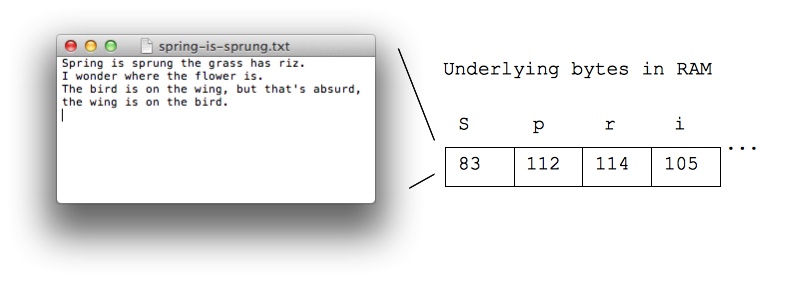
  • An example of bytes in your daily life
  • When you type letters on your phone or computer
  • Each letter is stored as a number in a byte, as below
  • When you send, say, a text message, the numbers are sent


typed letters correspond to bytes in RAM

posted on 2015-04-14 16:35  bwbj  阅读(1401)  评论(0)    收藏  举报

刷新页面返回顶部
 
博客园  ©  2004-2026
浙公网安备 33010602011771号 浙ICP备2021040463号-3