


C# 使用EF Core db first 无法迁移的问题
前言:我在用ef core遇到了一点问题,特地分享一下解决办法,希望能帮助到各位!

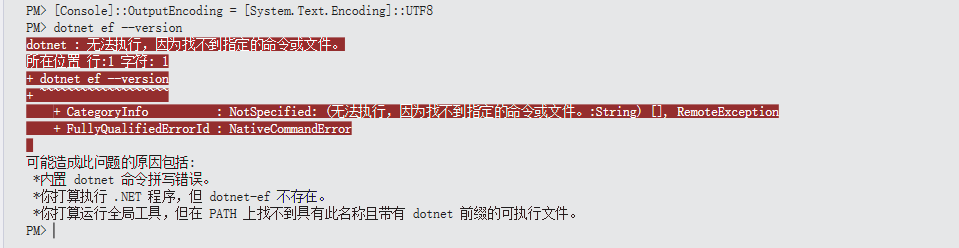
我下载了Tools 这个包之后
在解决程序包管理器控制台执行迁移命令无效,找不到指定的命令或文件
通过AI了解到需要在电脑上安装环境
重新安装 dotnet-ef(使用国内镜像源)
dotnet tool install --global dotnet-ef --version 9.0.11 --add-source https://nuget.tuna.tsinghua.edu.cn/nugget/v3/index.json
第一步 打开Windows PowerShell(管理员身份)检查是否有环境
dotnet tool list --global

没有的话就是上面这个样子

有的话就是这样的
第二步 安装 dotnet-ef 工具
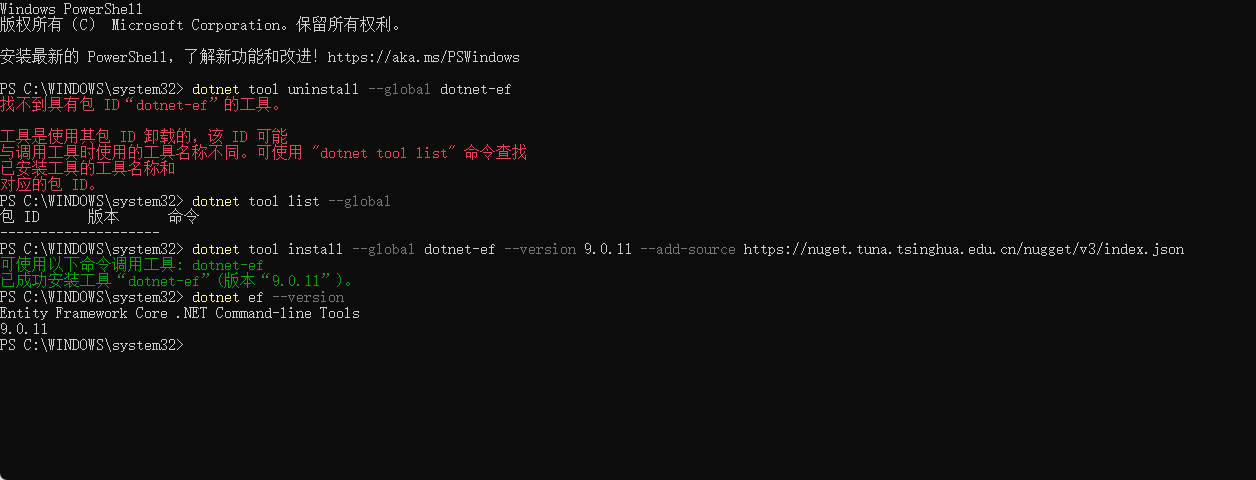
命令在上方 安装成功如下图所示

第三步 验证版本信息
dotnet ef --version

以下是完整的操作步骤
小Tips
使用迁移命令 需要先导航到项目根目录 然后再执行迁移命令
因为 dotnet ef 需要在这个目录里找到你的 .csproj 文件(比如 YourProject.csproj),否则就会报错:

迁移命令:
dotnet ef dbcontext scaffold "Your DataBase ConnectingString" Microsoft.EntityFrameworkCore.SqlServer -o Models --context AppDbContext --table table1 --table table2 --table table3 --force
2025.12.17补充 --use-database-names 保留数据库结构 表名和字段名和映射的实体一致
我也是踩了坑,在记录一下,希望小伙伴注意。
注意一行执行,不要分开,不要斜杠

官方文档 https://learn.microsoft.com/zh-cn/ef/core/managing-schemas/scaffolding/?tabs=dotnet-core-cli

 浙公网安备 33010602011771号