
Spring Boot——Security(安全管理)
重要前提说明:Spring Boot项目中引入了Spring Security框架后,自动开启了CSRF防护功能(跨站请求伪造防护——get),所以要实现一些特定功能需要使用post请求。
WebSecurityConfigurerAdapter类中有
configure方法进行身份验证,实现安全控制。
拦截器:
在这个项目中,通过configure这定义了一个HTTP请求的验证,因为有CSRF的原因如果网站上
进行get请求都会给此处的流程拦截,
第二步=验证用户状态,根据状态选择跳转的页面。
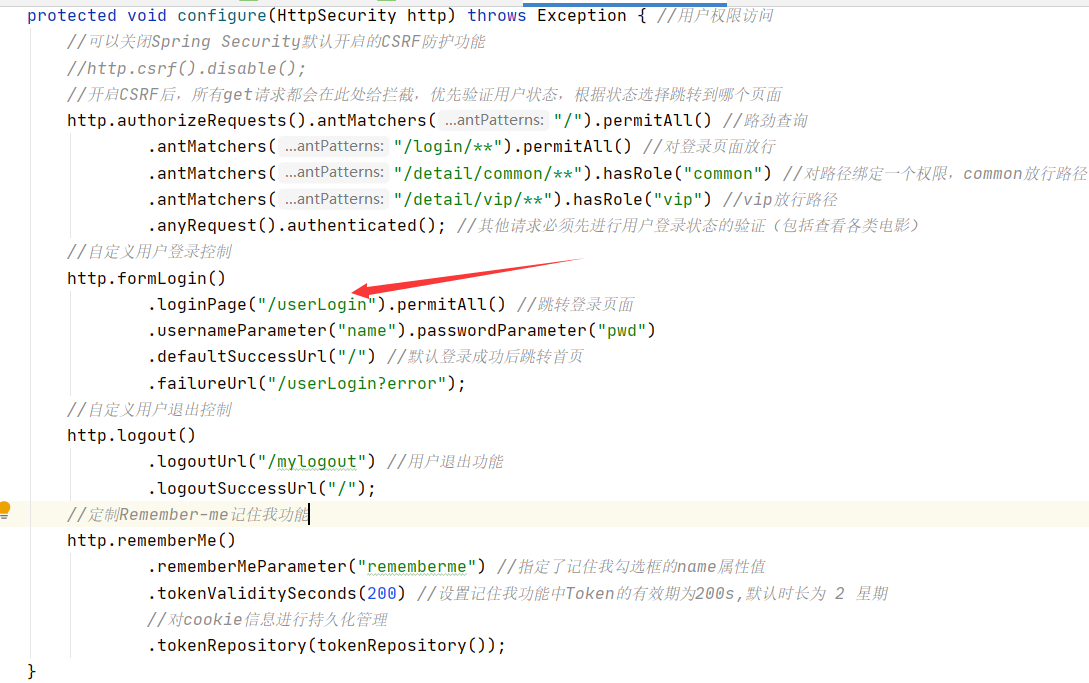
此处对三个例外进行说明:
![]()

当请求路径有/login/时,所有角色进行放行,此处放行的是JS不是页面。
有/detail/common/时,对common用户权限放行。
有/detail/vip/时,对vip用户权限放行。
①假如我common用户去访问/detail/vip/时,就会出现403(拒绝访问页面)。
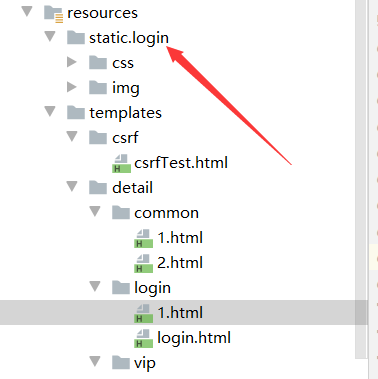
②若我没有登录就去访问/detail/下的东西时会被拦截,并且流程控制就会默认跳转到自定义用户登录控制的URL中,
如图所示,然后去controller中跳转对应的网址。
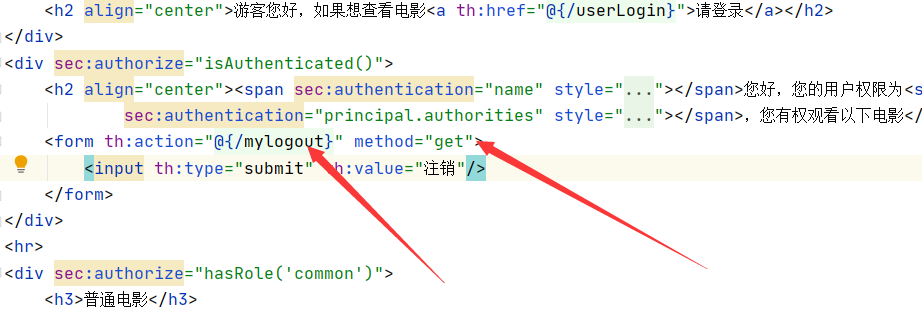
若登录进去后,执行get请求如图所示:
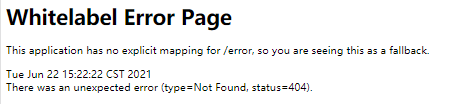
结果:404
原因:因为在登录进去后,用户状态是存在的,那么便不去拦截此次get请求,而对应的get请求中controller控制层并没有/mylogout这个路径,所以会报404.
![]()
!!那么我们去controller层添加上试一下
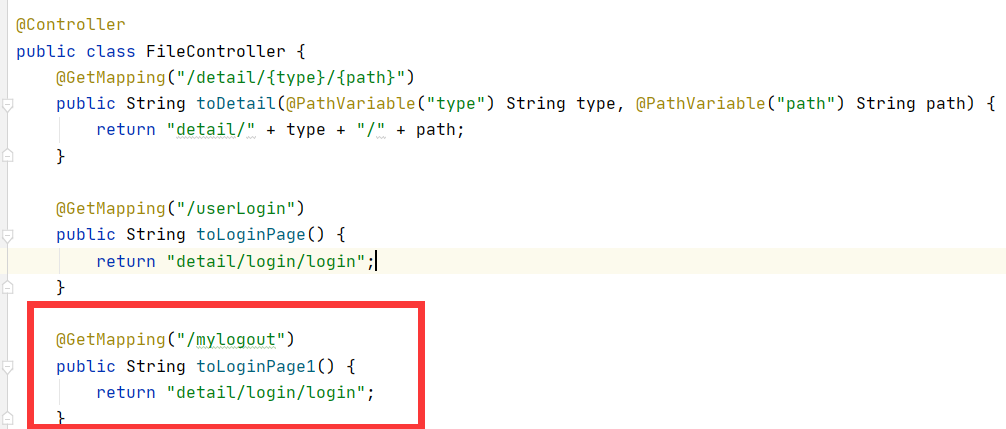
结果:能正确跳转到登录页面。
若想要使用http中的功能(如下),需要使用post请求。
![]()
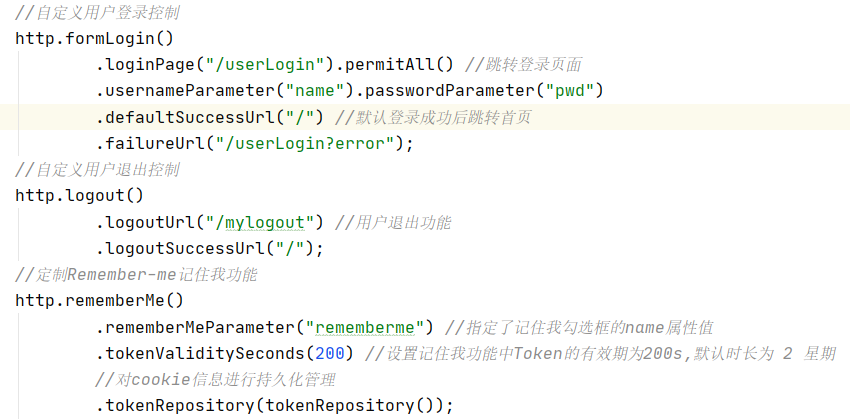
remeberMe():
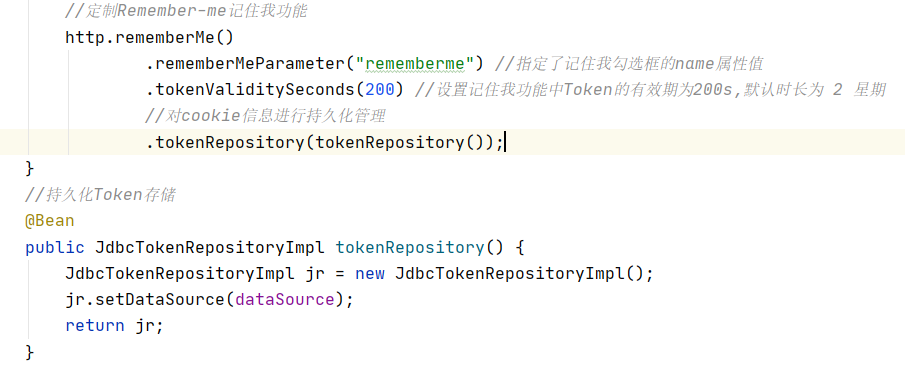
勾选了登录界面的记住我后,通过post登录请求,会自动调用此处的功能模块,将对应的用户的token信息放到数据库中,下次浏览器关闭时,再重新打开,就不需要登录了。
默认会生成一个名为 remember-me 的 Cookie 储存 Token,并发送给浏览器,具体实现流程如下:
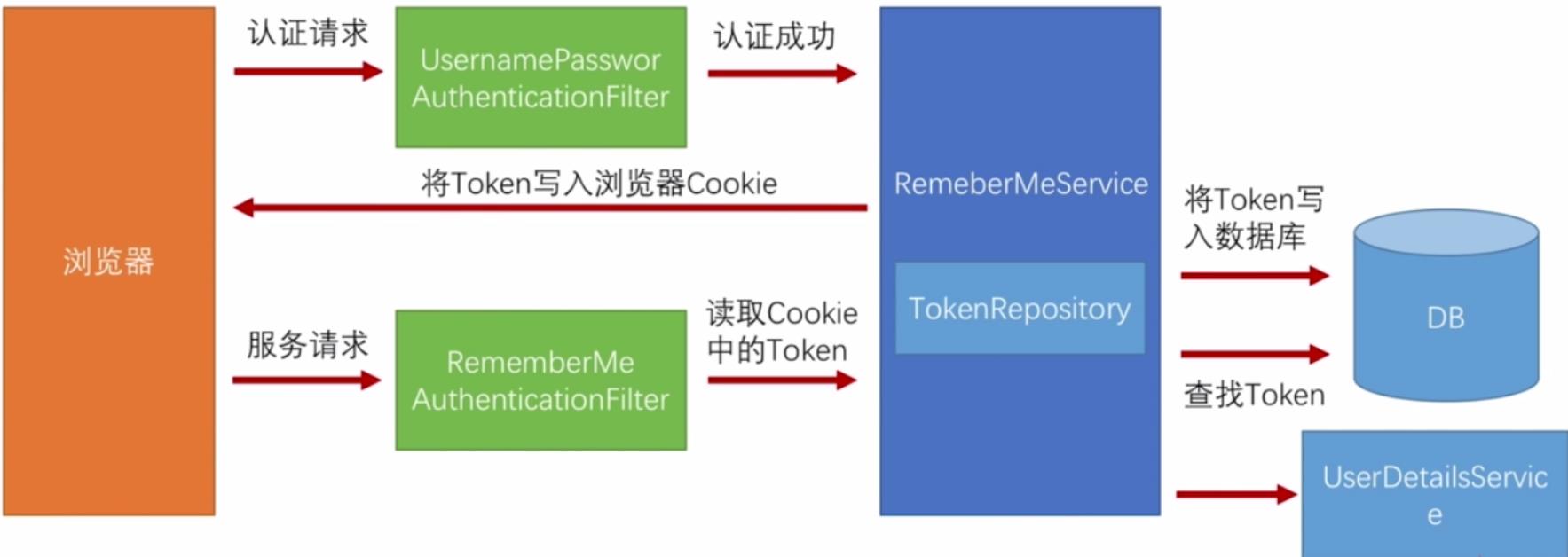
- 用户选择“记住我”功能成功登录认证后,
Spring Security会把用户名 username、序列号 series、令牌值 token 和最后一次使用自动登录的时间 last_used 作为一条 Token 记录存入数据库表中,同时生成一个名为 remember-me 的 Cookie 存储series:token的 base64 编码,该编码为发送给浏览器的 Token。 - 当用户需要再次登录时,RememberMeAuthenticationFilter 过滤器首先会检查请求是否有 remember-me 的 Cookie。如果存在,则检查其 Token 值中的 series 和 token 字段是否与数据库中的相关记录一致,一致则通过验证,并且系统重新生成一个新 token 值替换数据库中对应记录的旧 token,该记录的序列号 series 保持不变,认证时间 last_used 更新,同时重新生成新的 Token(旧 series : 新 token)通过 Cookie 发送给浏览器,remember-me 的 Cookie 的 Max-Age 也因此重置。
- 上述验证通过后,获取数据库中对应 Token 记录的 username 字段,调用 UserDetailsService 获取用户信息。之后进行登录认证,认证成功后将认证用户信息 Authentication 对象存入 SecurityContext。
- 如果对应的 Cookie 值包含的 token 字段与数据库中对应 Token 记录的 token 字段不匹配,则有可能是用户的 Cookie 被盗用,这时将会删除数据库中与当前用户相关的所有 Token 记录,用户需要重新进行表单登录。
- 如果对应的 Cookie 不存在,或者其值包含的 series 和 token 字段与数据库中的记录不匹配,则用户需要重新进行表单登录。如果用户退出登录,则删除数据库中对应的 Token 记录,并将相应的 Cookie 的 Max-Age 设置为 0。
在实现上,Spring Security使用 PersistentRememberMeToken 来表明一个验证实体:
public class PersistentRememberMeToken {
    private final String username;
    private final String series;
    private final String tokenValue;
    // 最后一个使用自动登录的时间
    private final Date date;
    //...
}
对应的,在数据库需要有一张 persistent_logins 表(存储自动登录信息的表),流程控制中若使用logout(注销功能),则会检索有无remenberMe功能,
如果存在此功能,则会去该表中删去对应用户的信息。表结构如下:
CREATE TABLE `persistent_logins` (
  `username` varchar(64) NOT NULL,
  `series` varchar(64) PRIMARY KEY,
  `token` varchar(64) NOT NULL,
  `last_used` timestamp NOT NULL
);
-----------------------------------------------------------------------剖析security-------------------------------------------------------------------------
先把SecurityConfig配置类代码展示:


package com.example.chapter07.config;

import com.example.chapter07.service.UserDetailsServiceImpl;
import org.springframework.beans.factory.annotation.Autowired;
import org.springframework.context.annotation.Bean;
import org.springframework.security.config.annotation.authentication.builders.AuthenticationManagerBuilder;
import org.springframework.security.config.annotation.web.builders.HttpSecurity;
import org.springframework.security.config.annotation.web.configuration.EnableWebSecurity;
import org.springframework.security.config.annotation.web.configuration.WebSecurityConfigurerAdapter;
import org.springframework.security.crypto.bcrypt.BCryptPasswordEncoder;
import org.springframework.security.web.authentication.rememberme.JdbcTokenRepositoryImpl;
import org.springframework.security.web.authentication.rememberme.PersistentTokenRepository;

import javax.sql.DataSource;

@EnableWebSecurity //开启MVC Security安全支持
public class SecurityConfig extends WebSecurityConfigurerAdapter {

    @Autowired
    private DataSource dataSource;
    @Autowired
    private UserDetailsServiceImpl userDetailsService;

    @Override
    protected void configure(AuthenticationManagerBuilder auth) throws Exception {
        //密码需要设置编译器
        BCryptPasswordEncoder encoder = new BCryptPasswordEncoder();
        //1.使用内存用户信息,作为测试使用
//        auth.inMemoryAuthentication().passwordEncoder(encoder).withUser("shitou").password(encoder.encode("123456")).roles("common")
//                .and()
//                .withUser("李四").password(encoder.encode("123456")).roles("vip");
//        System.out.println(encoder.encode("123456"));
        //2.使用jdbc进行身份认证
        /*String userSQL="select username,password,valid from t_customer "+"where username=?";
        String authoritySQL="select c.username,a.authority from t_customer c,t_authority a,"+
                "t_customer_authority ca where ca.customer_id=c.id " +
                "and ca.authority_id=a.id and c.username =?";
        auth.jdbcAuthentication().passwordEncoder(encoder)
                .dataSource(dataSource)
                .usersByUsernameQuery(userSQL)
                .authoritiesByUsernameQuery(authoritySQL);*/
//        3.使用UserDetailsService进行身份认证
        auth.userDetailsService(userDetailsService).passwordEncoder(encoder);
    }

    /**
     * 定制基于 HTTP 请求的用户访问控制
     */
    @Override
    protected void configure(HttpSecurity http) throws Exception { //用户权限访问
        //可以关闭Spring Security默认开启的CSRF防护功能
        //http.csrf().disable();
        //开启CSRF后,所有get请求都会在此处给拦截,优先验证用户状态,根据状态选择跳转到哪个页面
        http.authorizeRequests().antMatchers("/").permitAll() //路劲查询
                .antMatchers("/login/**").permitAll() //对登录页面放行
                .antMatchers("/detail/common/**").hasRole("common") //对路径绑定一个权限,common放行路径
                .antMatchers("/detail/vip/**").hasRole("vip") //vip放行路径
                .anyRequest().authenticated(); //其他请求必须先进行用户登录状态的验证(包括查看各类电影)
        //自定义用户登录控制
        http.formLogin()
                .loginPage("/userLogin").permitAll() //跳转登录页面
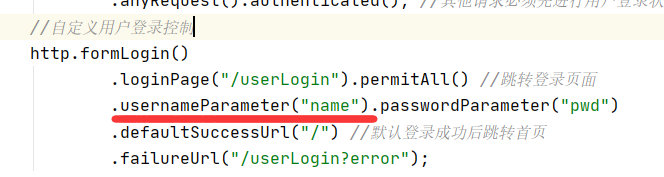
                .usernameParameter("name").passwordParameter("pwd")
                .defaultSuccessUrl("/") //默认登录成功后跳转首页
                .failureUrl("/userLogin?error");
        //自定义用户退出控制
        http.logout()
                .logoutUrl("/mylogout") //用户退出功能
                .logoutSuccessUrl("/");
        //定制Remember-me记住我功能
        http.rememberMe()
                .rememberMeParameter("rememberme") //指定了记住我勾选框的name属性值
                .tokenValiditySeconds(200) //设置记住我功能中Token的有效期为200s,默认时长为 2 星期
                //对cookie信息进行持久化管理
                .tokenRepository(tokenRepository());
    }
    //持久化Token存储
    @Bean
    public JdbcTokenRepositoryImpl tokenRepository() {
        JdbcTokenRepositoryImpl jr = new JdbcTokenRepositoryImpl();
        jr.setDataSource(dataSource);
        System.out.println("调用了token");
        return jr;
    }

}
//自定义一个UserDetailsService接口实现类进行用户认证信息封装
@Service
public class UserDetailsServiceImpl implements UserDetailsService {

    @Autowired
    private CustomerService customerService;

    @Override
    public UserDetails loadUserByUsername(String s) throws UsernameNotFoundException {
        System.out.println(s);
        //通过业务方法获取用户及权限信息
        Customer customer = customerService.getCustomer(s);
        List<Authority> authorities = customerService.getCustomerAuthority(s);
        //对用户权限进行封装
        List<SimpleGrantedAuthority> list = authorities.stream().map(authority -> new SimpleGrantedAuthority(authority.getAuthority())).collect(Collectors.toList());
        //返回封装的UserDetails用户详情类
        if (customer != null) {
            UserDetails userDetails = new User(customer.getUsername(), customer.getPassword(), list);
            System.out.println(userDetails.getUsername()+userDetails.getPassword());
            return userDetails;
        } else {
            //如果查询的用户不存在(用户名不存在),必须抛出此异常
            throw new UsernameNotFoundException("当前用户不存在!");
        }
    }
}
1.security如何进行用户验证的。
//        3.使用UserDetailsService进行身份认证
        auth.userDetailsService(userDetailsService).passwordEncoder(encoder);
————>>>>>>> 此处采用了这个方法验证方式。userDetailsService,点进去查看:传入的参数为UserDetailsServiceImpl类,此类实现了UserDetailsService类
个人理解这个地方的作用相当于传入激活UserDetailsSerciceImpl类,使得能用该类的验证方法去验证用户信息。
 public <T extends UserDetailsService> DaoAuthenticationConfigurer<AuthenticationManagerBuilder, T> userDetailsService(T userDetailsService) throws Exception {
        this.defaultUserDetailsService = userDetailsService; //此处的defaultUserDetailsService就是UserDetailsService类对象名。
        return (DaoAuthenticationConfigurer)this.apply(new DaoAuthenticationConfigurer(userDetailsService));
    }
————>>>>>>> 此处很好奇这个s为何代表登陆界面的用户名,为啥不是密码。通过此处调用了CustomerService类中的getCustomer()方法判断用户有无,getCustomerAuthority()方法判断用户的权限。
后续探究结论:此处的s是对应SecurityConfig配置类对登陆界面参数的usernameParameter()设定传入的,虽然不知道底层传入在哪里写的。
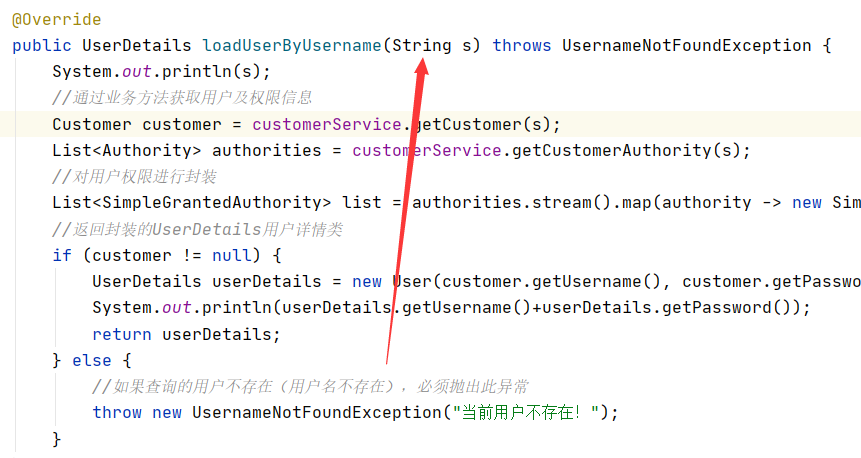
————>>>>>>> 点击源码进行查看后:发现并没有什么地方能表示,猜测是SecurityConfig配置类中的http配置登陆定义的参数导入。

————>>>>>>> 于是去把对应的username改动,发现和前端的输入框name不一致,参数s传入失败。猜测准确!
2.关于Redis缓存和记住我(如何实现的关闭浏览器后打开对应界面还能实现用户信息存在)
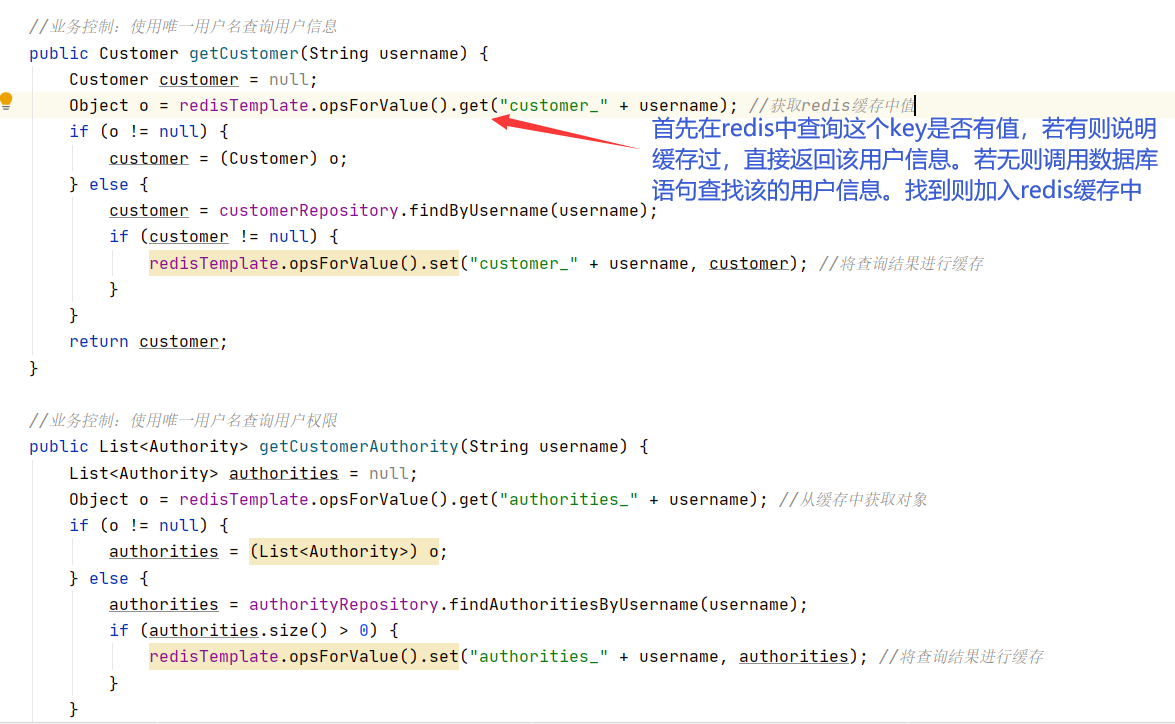
————>>>>>>> 此处只是实现了不用频繁去访问数据库。
@Service
public class CustomerService {
    @Autowired
    private AuthorityRepository authorityRepository;
    @Autowired
    private CustomerRepository customerRepository;
    @Autowired
    private RedisTemplate redisTemplate;

    //业务控制:使用唯一用户名查询用户信息
    public Customer getCustomer(String username) {
        Customer customer = null;
        Object o = redisTemplate.opsForValue().get("customer_" + username); //获取redis缓存中值
        if (o != null) {
            customer = (Customer) o;
        } else {
            customer = customerRepository.findByUsername(username);
            if (customer != null) {
                redisTemplate.opsForValue().set("customer_" + username, customer); //将查询结果进行缓存
            }
        }
        return customer;
    }

    //业务控制:使用唯一用户名查询用户权限
    public List<Authority> getCustomerAuthority(String username) {
        List<Authority> authorities = null;
        Object o = redisTemplate.opsForValue().get("authorities_" + username); //从缓存中获取对象
        if (o != null) {
            authorities = (List<Authority>) o;
        } else {
            authorities = authorityRepository.findAuthoritiesByUsername(username);
            if (authorities.size() > 0) {
                redisTemplate.opsForValue().set("authorities_" + username, authorities); //将查询结果进行缓存
            }
        }
        return authorities;
    }
}
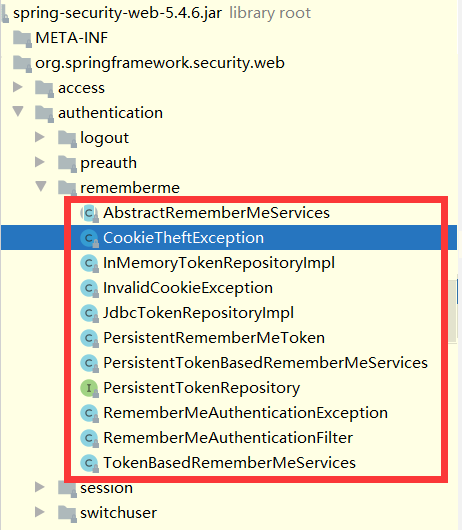
————>>>>>>>开始探究token,此处是记住我用到的功能类。
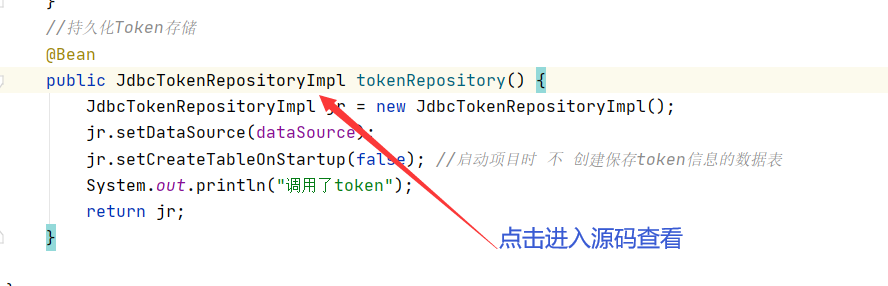
public class JdbcTokenRepositoryImpl extends JdbcDaoSupport implements PersistentTokenRepository {
    public static final String CREATE_TABLE_SQL = "create table persistent_logins (username varchar(64) not null, series varchar(64) primary key, token varchar(64) not null, last_used timestamp not null)";
    public static final String DEF_TOKEN_BY_SERIES_SQL = "select username,series,token,last_used from persistent_logins where series = ?";
    public static final String DEF_INSERT_TOKEN_SQL = "insert into persistent_logins (username, series, token, last_used) values(?,?,?,?)";
    public static final String DEF_UPDATE_TOKEN_SQL = "update persistent_logins set token = ?, last_used = ? where series = ?";
    public static final String DEF_REMOVE_USER_TOKENS_SQL = "delete from persistent_logins where username = ?";
    private String tokensBySeriesSql = "select username,series,token,last_used from persistent_logins where series = ?";
    private String insertTokenSql = "insert into persistent_logins (username, series, token, last_used) values(?,?,?,?)";
    private String updateTokenSql = "update persistent_logins set token = ?, last_used = ? where series = ?";
    private String removeUserTokensSql = "delete from persistent_logins where username = ?";
    private boolean createTableOnStartup;

    public JdbcTokenRepositoryImpl() {
    }

    protected void initDao() {
        if (this.createTableOnStartup) {
            this.getJdbcTemplate().execute("create table persistent_logins (username varchar(64) not null, series varchar(64) primary key, token varchar(64) not null, last_used timestamp not null)");
        }

    }

    public void createNewToken(PersistentRememberMeToken token) {
        this.getJdbcTemplate().update(this.insertTokenSql, new Object[]{token.getUsername(), token.getSeries(), token.getTokenValue(), token.getDate()});
    }

    public void updateToken(String series, String tokenValue, Date lastUsed) {
        this.getJdbcTemplate().update(this.updateTokenSql, new Object[]{tokenValue, lastUsed, series});
    }

    public PersistentRememberMeToken getTokenForSeries(String seriesId) {
        try {
            return (PersistentRememberMeToken)this.getJdbcTemplate().queryForObject(this.tokensBySeriesSql, this::createRememberMeToken, new Object[]{seriesId});
        } catch (EmptyResultDataAccessException var3) {
            this.logger.debug(LogMessage.format("Querying token for series '%s' returned no results.", seriesId), var3);
        } catch (IncorrectResultSizeDataAccessException var4) {
            this.logger.error(LogMessage.format("Querying token for series '%s' returned more than one value. Series should be unique", seriesId));
        } catch (DataAccessException var5) {
            this.logger.error("Failed to load token for series " + seriesId, var5);
        }

        return null;
    }

    private PersistentRememberMeToken createRememberMeToken(ResultSet rs, int rowNum) throws SQLException {
        return new PersistentRememberMeToken(rs.getString(1), rs.getString(2), rs.getString(3), rs.getTimestamp(4));
    }

    public void removeUserTokens(String username) {
        this.getJdbcTemplate().update(this.removeUserTokensSql, new Object[]{username});
    }

    public void setCreateTableOnStartup(boolean createTableOnStartup) {
        this.createTableOnStartup = createTableOnStartup;
    }
}
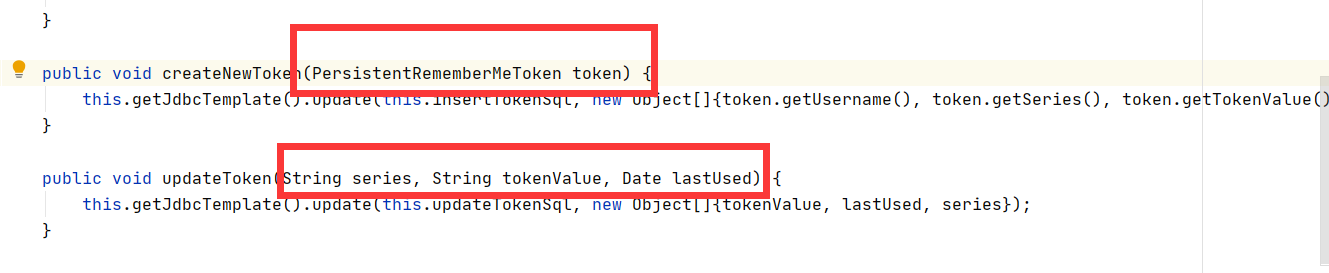
————>>>>>>>发现这个JdbcTokenRepositoryImpl类源码就是token管理的核心,包括了创建自动登录表、CRUD等等。讲解简单三个:
 protected void initDao() {
        if (this.createTableOnStartup) { //如果开启项目启动自动创建表,则会执行以下创建表sql
            this.getJdbcTemplate().execute("create table persistent_logins (username varchar(64) not null, series varchar(64) primary key, token varchar(64) not null, last_used timestamp not null)");
        }

    }

    public void createNewToken(PersistentRememberMeToken token) { //创建一个新的token,发现创建的值都是从PersistentRememberMeToken类中寻觅的
        this.getJdbcTemplate().update(this.insertTokenSql, new Object[]{token.getUsername(), token.getSeries(), token.getTokenValue(), token.getDate()});
    }

    public void updateToken(String series, String tokenValue, Date lastUsed) {
        this.getJdbcTemplate().update(this.updateTokenSql, new Object[]{tokenValue, lastUsed, series});
    }
getJdbcTemplate():
————>>>>>>>其中getJdbcTemplate() 是JdbcDaoSupport类中的方法,在此处调用了JdbcTemplate类中的update() 方法。
作用:就是作为一个封装的jdbc的Dao层,实现对数据库的事务管理的。
public abstract class JdbcDaoSupport extends DaoSupport {
    @Nullable
    private JdbcTemplate jdbcTemplate;

    public JdbcDaoSupport() {
    }

    public final void setDataSource(DataSource dataSource) {
        if (this.jdbcTemplate == null || dataSource != this.jdbcTemplate.getDataSource()) {
            this.jdbcTemplate = this.createJdbcTemplate(dataSource);
            this.initTemplateConfig();
        }

    }

    protected JdbcTemplate createJdbcTemplate(DataSource dataSource) {
        return new JdbcTemplate(dataSource);
    }

    @Nullable
    public final DataSource getDataSource() {
        return this.jdbcTemplate != null ? this.jdbcTemplate.getDataSource() : null;
    }

    public final void setJdbcTemplate(@Nullable JdbcTemplate jdbcTemplate) {
        this.jdbcTemplate = jdbcTemplate;
        this.initTemplateConfig();
    }

    @Nullable
    public final JdbcTemplate getJdbcTemplate() {
        return this.jdbcTemplate;
    }

    protected void initTemplateConfig() {
    }

    protected void checkDaoConfig() {
        if (this.jdbcTemplate == null) {
            throw new IllegalArgumentException("'dataSource' or 'jdbcTemplate' is required");
        }
    }

    protected final SQLExceptionTranslator getExceptionTranslator() {
        JdbcTemplate jdbcTemplate = this.getJdbcTemplate();
        Assert.state(jdbcTemplate != null, "No JdbcTemplate set");
        return jdbcTemplate.getExceptionTranslator();
    }

    protected final Connection getConnection() throws CannotGetJdbcConnectionException {
        DataSource dataSource = this.getDataSource();
        Assert.state(dataSource != null, "No DataSource set");
        return DataSourceUtils.getConnection(dataSource);
    }

    protected final void releaseConnection(Connection con) {
        DataSourceUtils.releaseConnection(con, this.getDataSource());
    }
}
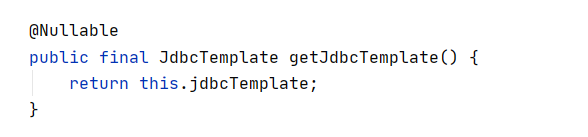
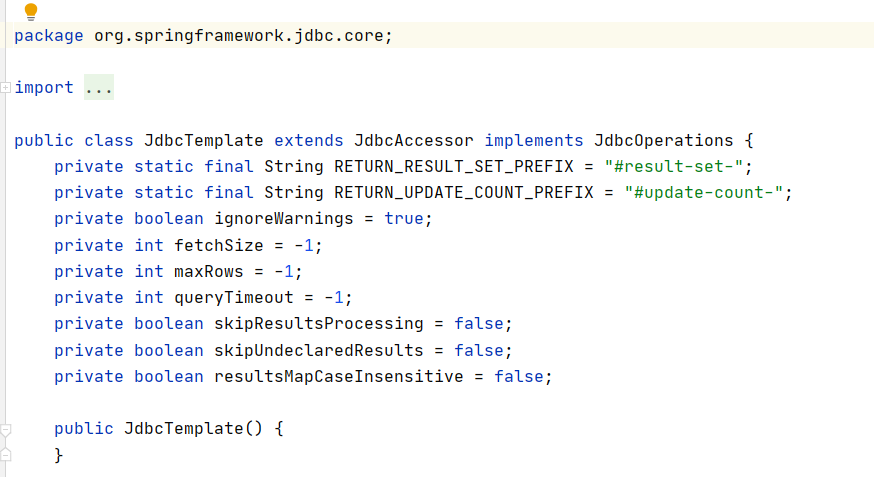
————>>>>>>>其中JdbcTemplate类中的源码太多,就不附上了。
PersistentRememberMeToken: (个人理解这个类可以获取到浏览器的token信息。)
————>>>>>>>点击进入该类中查看,
public class PersistentRememberMeToken {
    private final String username;
    private final String series;
    private final String tokenValue;
    private final Date date;

    public PersistentRememberMeToken(String username, String series, String tokenValue, Date date) {
        this.username = username;
        this.series = series;
        this.tokenValue = tokenValue;
        this.date = date;
    }

    public String getUsername() {
        return this.username;
    }

    public String getSeries() {
        return this.series;
    }

    public String getTokenValue() {
        return this.tokenValue;
    }

    public Date getDate() {
        return this.date;
    }
}
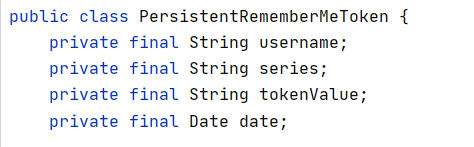
————>>>>>>>可以发现此处的变量和 persistent_logins 这个表中的属性信息贴合。
找不到地方查看哪里调用了这两个方法,大胆假设这两个参数,直接传入实体类、3个参数信息,都是类似于前端发送请求到controller层一样,通过security的框架能直接将带值的请求传入。然后进行后续操作。

 浙公网安备 33010602011771号