

简单大数据分析测试
这周五就要靠软件设计了,还没有复习有点小方,但是周一做的大数据实验感觉很有意思,又做了一边,想着理解一下大概流程
本次实验是老师给了一个数据集,让我们进行分析
题目为
Result文件数据说明:** **Ip:106.39.41.166,(城市)** **Date:10/Nov/2016:00:01:02 +0800,(日期)** **Day:10,(天数)** **Traffic: 54 ,(流量)** **Type: video,(类型:视频video或文章article)** **Id: 8701(视频或者文章的id)** **测试要求:** **1、数据清洗:按照进行数据清洗,并将清洗后的数据导入hive数据库中。** **两阶段数据清洗:** **(1)第一阶段:把需要的信息从原始日志中提取出来** **ip: 199.30.25.88** **time: 10/Nov/2016:00:01:03 +0800** **traffic: 62** **文章: article/11325** **视频: video/3235** **(2)第二阶段:根据提取出来的信息做精细化操作** **ip--->城市 city(IP)** **date--> time:2016-11-10 00:01:03** **day: 10** **traffic:62** **type:article/video** **id:11325** **(3)hive数据库表结构: ** **create table data( ip string, time string , day string, traffic bigint,** **type string, id string ) ** **2、数据分析:在HIVE统计下列数据。** **(1)统计最受欢迎的视频/文章的Top10访问次数 (video/article)** **(2)按照地市统计最受欢迎的Top10课程 (ip)** **(3)按照流量统计最受欢迎的Top10课程 (traffic)** **3、数据可视化:** **将统计结果倒入MySql数据库中,通过图形化展示的方式展现出来。
题目要求就是,有两个阶段的数据清洗,然后再hive里进行数据统计,然后导入到mysql文件里,
进行过程分析是
1.使用python进行数据清洗(比较省事)
2.在hive中使用sql语句统计,将统计后的文字导出为csv文件
3.python连接mysql数据库进行可视化处理
1.一阶段数据清洗
`import re
def clean_data_stage1(input_file, output_file):
"""
第一阶段数据清洗:从原始日志中提取需要的信息
提取格式:
ip:    199.30.25.88
time:  10/Nov/2016:00:01:03 +0800
traffic:  62
文章: article/11325
视频: video/3235
"""

try:
    with open(input_file, 'r', encoding='utf-8') as f_in, \
         open(output_file, 'w', encoding='utf-8') as f_out:

        for line_num, line in enumerate(f_in, 1):
            line = line.strip()
            if not line:
                continue

            try:
                # 按逗号分割字段,但注意time字段内也有逗号
                # 使用正则表达式分割,考虑time字段可能包含空格
                parts = line.split(',')

                if len(parts) < 6:
                    print(f"警告: 第{line_num}行字段不足: {line}")
                    continue

                # 提取各字段
                ip = parts[0].strip()

                # time是第二部分,但要处理可能的空格
                time_str = parts[1].strip()

                # 跳过day字段(parts[2])

                # traffic是第四部分,去除可能的空格
                traffic = parts[3].strip()

                # type是第五部分
                content_type = parts[4].strip()

                # id是第六部分
                content_id = parts[5].strip()

                # 输出清洗后的数据
                f_out.write(f"ip: {ip}\n")
                f_out.write(f"time: {time_str}\n")
                f_out.write(f"traffic: {traffic}\n")

                if content_type.lower() == 'article':
                    f_out.write(f"文章: article/{content_id}\n")
                elif content_type.lower() == 'video':
                    f_out.write(f"视频: video/{content_id}\n")
                else:
                    f_out.write(f"{content_type}: {content_type}/{content_id}\n")

                f_out.write("-" * 50 + "\n")

            except Exception as e:
                print(f"错误处理第{line_num}行: {line}")
                print(f"错误信息: {str(e)}")
                continue

    print(f"第一阶段数据清洗完成!结果已保存到: {output_file}")

except FileNotFoundError:
    print(f"错误: 文件 {input_file} 未找到!")
except Exception as e:
    print(f"处理文件时发生错误: {str(e)}")
def clean_data_stage1_simple(input_file, output_file):
"""
第一阶段数据清洗 - 简化版本,以CSV格式输出
格式: ip,time,traffic,type,id
"""
try:
    with open(input_file, 'r', encoding='utf-8') as f_in, \
         open(output_file, 'w', encoding='utf-8') as f_out:

        # 写入CSV头部
        f_out.write("ip,time,traffic,type,id\n")

        for line_num, line in enumerate(f_in, 1):
            line = line.strip()
            if not line:
                continue

            try:
                # 按逗号分割字段
                parts = line.split(',')

                if len(parts) < 6:
                    print(f"警告: 第{line_num}行字段不足: {line}")
                    continue

                # 提取各字段
                ip = parts[0].strip()
                time_str = parts[1].strip()
                traffic = parts[3].strip()
                content_type = parts[4].strip()
                content_id = parts[5].strip()

                # 输出CSV格式
                f_out.write(f"{ip},{time_str},{traffic},{content_type},{content_id}\n")

            except Exception as e:
                print(f"错误处理第{line_num}行: {line}")
                print(f"错误信息: {str(e)}")
                continue

    print(f"第一阶段数据清洗完成!CSV格式结果已保存到: {output_file}")

except FileNotFoundError:
    print(f"错误: 文件 {input_file} 未找到!")
except Exception as e:
    print(f"处理文件时发生错误: {str(e)}")
if name == "main":
input_file = "result.txt"
output_file_detailed = "cleaned_data_stage1_detailed.txt"
output_file_csv = "cleaned_data_stage1.csv"
print("开始第一阶段数据清洗...")
print("=" * 60)

# 运行详细格式的清洗
clean_data_stage1(input_file, output_file_detailed)

print("\n" + "=" * 60)

# 运行CSV格式的清洗(更适合导入Hive)
clean_data_stage1_simple(input_file, output_file_csv)

print("\n清洗完成!")
print(f"详细格式: {output_file_detailed}")
print(f"CSV格式: {output_file_csv}")`
一阶段洗完后的文件

然后要进行二阶段清洗,二阶段涉及到了ip->城市的转换,这个我使用了免费的geoip数据库进行转换
`import re
import datetime
from typing import Dict, Tuple
import ipaddress
import geoip2.database
import geoip2.errors
def simple_ip_to_city(ip_address: str) -> str:
"""
简单的IP到城市映射函数(备用方案)
当GeoIP数据库不可用时使用
"""
# 简化的IP段到城市的映射
ip_map = {
"106.39": "北京",
"113.140": "西安",
"125.122": "杭州",
"116.231": "上海",
"61.136": "广州",
"39.186": "南京",
"101.200": "北京",
"58.241": "南京",
}
try:
    # 获取IP的前两段
    ip_prefix = ".".join(ip_address.split('.')[:2])

    # 检查是否在映射表中
    if ip_prefix in ip_map:
        return ip_map[ip_prefix]

    # 根据IP段进行基础判断
    first_octet = int(ip_address.split('.')[0])

    if first_octet in [1, 14, 27, 36, 39, 42, 49, 50, 52, 58, 59, 60, 61, 101, 103, 106, 110, 111, 112, 113, 114, 115, 116, 117, 118, 119, 120, 121, 122, 123, 124, 125, 126, 139, 140, 144, 146, 150, 152, 153, 157, 159, 160, 161, 162, 163, 164, 165, 166, 167, 168, 169, 170, 171, 172, 173, 174, 175, 176, 177, 178, 180, 182, 183, 184, 202, 203, 210, 211, 218, 219, 220, 221, 222, 223]:
        return "中国"
    elif first_octet in [10, 172, 192]:
        return "内网地址"
    else:
        return "海外或其他地区"

except Exception:
    return "无效IP"
class GeoIP2CityResolver:
"""
使用GeoLite2数据库将IP地址转换为城市名称
需要提前下载GeoLite2-City.mmdb文件
"""
def init(self, db_path='GeoLite2-City.mmdb'):
"""
初始化数据库读取器
:param db_path: GeoLite2-City.mmdb文件的路径
"""
try:
# 创建数据库读取器
self.reader = geoip2.database.Reader(db_path)
print(f"成功加载GeoIP数据库: {db_path}")
except FileNotFoundError:
print(f"错误: 未找到数据库文件 {db_path}")
print("请从 https://dev.maxmind.com/geoip/geolite2-free-geolocation-data 下载GeoLite2-City数据库")
raise
except Exception as e:
print(f"加载GeoIP数据库时发生错误: {str(e)}")
raise
def ip_to_city(self, ip_address: str) -> str:
    """
    将IP地址转换为城市名称

    :param ip_address: IP地址字符串
    :return: 城市名称,如果无法解析则返回"未知"
    """
    try:
        # 查询城市信息
        response = self.reader.city(ip_address)

        # 优先返回城市中文名,如果没有则返回英文名
        if response.city.names and 'zh-CN' in response.city.names:
            city_name = response.city.names['zh-CN']
        elif response.city.name:
            city_name = response.city.name
        elif response.subdivisions.most_specific.names and 'zh-CN' in response.subdivisions.most_specific.names:
            # 如果没有城市信息,使用地区信息
            city_name = response.subdivisions.most_specific.names['zh-CN']
        else:
            city_name = response.country.names.get('zh-CN', response.country.name)

        return city_name if city_name else "未知"

    except geoip2.errors.AddressNotFoundError:
        # IP地址不在数据库中(可能是私有IP等)
        return "未知"
    except ValueError as e:
        # IP地址格式无效
        print(f"IP地址格式错误 {ip_address}: {str(e)}")
        return "无效IP"
    except Exception as e:
        # 其他错误
        print(f"查询IP地址 {ip_address} 时发生错误: {str(e)}")
        return "未知"

def close(self):
    """关闭数据库读取器"""
    if hasattr(self, 'reader'):
        self.reader.close()

def __enter__(self):
    """支持上下文管理器"""
    return self

def __exit__(self, exc_type, exc_val, exc_tb):
    """退出上下文时自动关闭"""
    self.close()
第二阶段清洗函数中整合GeoIP
def clean_data_stage2_with_geoip(input_file: str, output_file: str, geoip_db_path: str = 'GeoLite2-City.mmdb'):
"""
第二阶段数据清洗(整合GeoIP数据库版本)
"""
# 初始化GeoIP解析器
try:
geoip_resolver = GeoIP2CityResolver(geoip_db_path)
except Exception as e:
print(f"初始化GeoIP解析器失败: {str(e)}")
print("将使用备用方案(IP地址本身)")
# 可以在这里使用备用的简单方案
geoip_resolver = None
try:
    with open(input_file, 'r', encoding='utf-8') as f_in, \
         open(output_file, 'w', encoding='utf-8') as f_out:

        # 写入CSV头部
        f_out.write("city,time,day,traffic,type,id\n")

        line_count = 0
        processed_count = 0
        error_count = 0

        for line in f_in:
            line_count += 1

            # 跳过头部
            if line_count == 1 and ("ip,time,day,traffic,type,id" in line or "ip,time,traffic,type,id" in line):
                continue

            line = line.strip()
            if not line:
                continue

            try:
                # 解析CSV行
                parts = line.split(',')

                # 根据第一阶段输出的格式调整索引
                if len(parts) == 6:  # 有day字段
                    ip, time_str, day, traffic, content_type, content_id = parts
                elif len(parts) == 5:  # 没有day字段
                    ip, time_str, traffic, content_type, content_id = parts
                    day = "0"  # 默认值
                else:
                    print(f"警告: 第{line_count}行字段格式异常: {line}")
                    error_count += 1
                    continue

                # 1. IP转换为城市
                if geoip_resolver:
                    city = geoip_resolver.ip_to_city(ip.strip())
                else:
                    city = simple_ip_to_city(ip.strip())  # 备用方案

                # 2. 时间标准化并获取星期几
                standardized_time, day_of_week = parse_apache_time(time_str.strip())

                # 3. 输出所有字段
                f_out.write(f"{city},{standardized_time},{day_of_week},{traffic.strip()},{content_type.strip()},{content_id.strip()}\n")

                processed_count += 1

            except Exception as e:
                print(f"错误处理第{line_count}行: {line}")
                print(f"错误信息: {str(e)}")
                error_count += 1
                continue

    print(f"\n第二阶段数据清洗完成(使用GeoIP数据库)!")
    print(f"处理统计:")
    print(f"  总行数: {line_count}")
    print(f"  成功处理: {processed_count}")
    print(f"  错误行数: {error_count}")
    print(f"结果已保存到: {output_file}")

except FileNotFoundError:
    print(f"错误: 文件 {input_file} 未找到!")
except Exception as e:
    print(f"处理文件时发生错误: {str(e)}")
finally:
    # 确保关闭GeoIP解析器
    if geoip_resolver:
        geoip_resolver.close()
def parse_apache_time(apache_time_str: str) -> Tuple[str, int]:
"""
解析Apache日志时间格式
输入: 10/Nov/2016:00:01:02 +0800
输出: (标准化时间字符串, 星期几)
"""
try:
# 解析Apache时间格式
# 格式示例: 10/Nov/2016:00:01:02 +0800
    # 分离日期时间和时区
    if ' +' in apache_time_str:
        date_part, timezone = apache_time_str.split(' +')
    elif ' -' in apache_time_str:
        date_part, timezone = apache_time_str.split(' -')
    else:
        date_part = apache_time_str
        timezone = '+0800'  # 默认时区

    # 分离日期和时间
    if ':' in date_part:
        date_str, time_str = date_part.split(':', 1)
    else:
        date_str = date_part
        time_str = "00:00:00"

    # 解析日期 (格式: 10/Nov/2016)
    day, month_str, year = date_str.split('/')

    # 月份缩写转数字
    month_dict = {
        'Jan': 1, 'Feb': 2, 'Mar': 3, 'Apr': 4,
        'May': 5, 'Jun': 6, 'Jul': 7, 'Aug': 8,
        'Sep': 9, 'Oct': 10, 'Nov': 11, 'Dec': 12
    }

    month = month_dict.get(month_str, 1)

    # 创建datetime对象
    dt = datetime.datetime(
        int(year), month, int(day),
        *map(int, time_str.split(':'))
    )

    # 格式化为标准时间字符串
    standardized_time = dt.strftime("%Y-%m-%d %H:%M:%S")

    # 获取星期几 (0=周一, 6=周日)
    weekday = dt.weekday()  # 0-6, 周一为0

    # 转换为1-7,周日为7
    day_of_week = weekday + 1 if weekday < 6 else 7

    return standardized_time, day_of_week

except Exception as e:
    print(f"时间解析错误: {apache_time_str}, 错误: {str(e)}")
    return apache_time_str, 0
def clean_data_stage2(input_file: str, output_file: str):
"""
第二阶段数据清洗:精细化操作(使用GeoIP数据库)
处理内容:
1. IP -> 城市(使用GeoIP数据库)
2. 时间标准化
3. 提取星期几
4. 输出所有字段
"""

# 初始化GeoIP解析器
try:
    geoip_resolver = GeoIP2CityResolver('GeoLite2-City.mmdb')
except Exception as e:
    print(f"初始化GeoIP解析器失败: {str(e)}")
    print("将使用备用方案(IP地址本身)")
    geoip_resolver = None

try:
    with open(input_file, 'r', encoding='utf-8') as f_in, \
         open(output_file, 'w', encoding='utf-8') as f_out:

        # 写入CSV头部
        f_out.write("city,time,day,traffic,type,id\n")

        line_count = 0
        processed_count = 0
        error_count = 0

        for line in f_in:
            line_count += 1

            # 跳过头部(如果是CSV格式)
            if line_count == 1 and "ip,time,traffic,type,id" in line:
                continue

            line = line.strip()
            if not line:
                continue

            try:
                # 解析CSV行
                parts = line.split(',')

                if len(parts) < 5:
                    print(f"警告: 第{line_count}行字段不足: {line}")
                    error_count += 1
                    continue

                ip = parts[0].strip()
                time_str = parts[1].strip()
                traffic = parts[2].strip()
                content_type = parts[3].strip()
                content_id = parts[4].strip()

                # 1. IP转换为城市(使用GeoIP)
                if geoip_resolver:
                    city = geoip_resolver.ip_to_city(ip)
                else:
                    city = simple_ip_to_city(ip)  # 备用方案

                # 2. 时间标准化并获取星期几
                standardized_time, day_of_week = parse_apache_time(time_str)

                # 3. 输出所有字段
                f_out.write(f"{city},{standardized_time},{day_of_week},{traffic},{content_type},{content_id}\n")

                processed_count += 1

            except Exception as e:
                print(f"错误处理第{line_count}行: {line}")
                print(f"错误信息: {str(e)}")
                error_count += 1
                continue

    print(f"\n第二阶段数据清洗完成!")
    print(f"处理统计:")
    print(f"  总行数: {line_count}")
    print(f"  成功处理: {processed_count}")
    print(f"  错误行数: {error_count}")
    print(f"结果已保存到: {output_file}")

except FileNotFoundError:
    print(f"错误: 文件 {input_file} 未找到!")
except Exception as e:
    print(f"处理文件时发生错误: {str(e)}")
finally:
    # 确保关闭GeoIP解析器
    if geoip_resolver:
        geoip_resolver.close()
def clean_data_stage2_from_raw(input_file: str, output_file: str):
"""
直接从原始文件进行第二阶段清洗(使用GeoIP数据库)
适用于没有第一阶段输出文件的情况
"""
# 初始化GeoIP解析器
try:
    geoip_resolver = GeoIP2CityResolver('GeoLite2-City.mmdb')
except Exception as e:
    print(f"初始化GeoIP解析器失败: {str(e)}")
    print("将使用备用方案(IP地址本身)")
    geoip_resolver = None

try:
    with open(input_file, 'r', encoding='utf-8') as f_in, \
         open(output_file, 'w', encoding='utf-8') as f_out:

        # 写入CSV头部
        f_out.write("city,time,day,traffic,type,id\n")

        line_count = 0
        processed_count = 0
        error_count = 0

        for line in f_in:
            line_count += 1
            line = line.strip()
            if not line:
                continue

            try:
                # 解析原始日志行
                parts = line.split(',')

                if len(parts) < 6:
                    print(f"警告: 第{line_count}行字段不足: {line}")
                    error_count += 1
                    continue

                # 提取原始字段
                ip = parts[0].strip()
                time_str = parts[1].strip()
                day = parts[2].strip()  # 原始数据中的day字段
                traffic = parts[3].strip()
                content_type = parts[4].strip()
                content_id = parts[5].strip()

                # 1. IP转换为城市(使用GeoIP)
                if geoip_resolver:
                    city = geoip_resolver.ip_to_city(ip)
                else:
                    city = simple_ip_to_city(ip)  # 备用方案

                # 2. 时间标准化
                standardized_time, day_of_week = parse_apache_time(time_str)

                # 注意:这里我们使用解析出的day_of_week,而不是原始数据中的day字段
                # 如果需要原始day字段,可以使用 int(day)

                # 3. 输出所有字段
                f_out.write(f"{city},{standardized_time},{day_of_week},{traffic},{content_type},{content_id}\n")

                processed_count += 1

            except Exception as e:
                print(f"错误处理第{line_count}行: {line}")
                print(f"错误信息: {str(e)}")
                error_count += 1
                continue

    print(f"\n第二阶段数据清洗完成(从原始文件)!")
    print(f"处理统计:")
    print(f"  总行数: {line_count}")
    print(f"  成功处理: {processed_count}")
    print(f"  错误行数: {error_count}")
    print(f"结果已保存到: {output_file}")

except FileNotFoundError:
    print(f"错误: 文件 {input_file} 未找到!")
except Exception as e:
    print(f"处理文件时发生错误: {str(e)}")
finally:
    # 确保关闭GeoIP解析器
    if geoip_resolver:
        geoip_resolver.close()
def generate_hive_table_sql(table_name: str = "user_behavior", hdfs_path: str = "/user/hive/warehouse/user_behavior"):
"""
生成Hive建表SQL语句
"""
sql = f"""
-- 创建外部表,便于数据管理
CREATE EXTERNAL TABLE IF NOT EXISTS {table_name} (
city STRING COMMENT '城市',
access_time TIMESTAMP COMMENT '访问时间',
day_of_week INT COMMENT '星期几(1-7, 1=周一, 7=周日)',
traffic BIGINT COMMENT '流量(字节)',
content_type STRING COMMENT '内容类型(video/article)',
content_id BIGINT COMMENT '内容ID'
)
COMMENT '用户行为日志表'
ROW FORMAT DELIMITED
FIELDS TERMINATED BY ','
STORED AS TEXTFILE
LOCATION '{hdfs_path}'
TBLPROPERTIES ('skip.header.line.count'='1');
-- 创建分区表(如果需要按日期分区)
-- CREATE EXTERNAL TABLE IF NOT EXISTS {table_name}_partitioned (
-- city STRING COMMENT '城市',
-- access_time TIMESTAMP COMMENT '访问时间',
-- day_of_week INT COMMENT '星期几',
-- traffic BIGINT COMMENT '流量(字节)',
-- content_type STRING COMMENT '内容类型',
-- content_id BIGINT COMMENT '内容ID'
-- )
-- PARTITIONED BY (dt STRING COMMENT '日期分区')
-- ROW FORMAT DELIMITED
-- FIELDS TERMINATED BY ','
-- STORED AS TEXTFILE;
-- 加载数据到Hive表
-- LOAD DATA INPATH '/path/to/cleaned_data_stage2.csv' INTO TABLE {table_name};
-- 查询示例
-- SELECT city, COUNT(*) as visit_count, SUM(traffic) as total_traffic
-- FROM {table_name}
-- WHERE content_type = 'video'
-- GROUP BY city
-- ORDER BY visit_count DESC;
"""
return sql
def main():
"""
主函数:执行第二阶段数据清洗
"""
print("=" * 60)
print("第二阶段数据清洗")
print("=" * 60)

# 输入文件选择
print("\n请选择输入文件:")
print("1. 使用第一阶段清洗后的CSV文件 (cleaned_data_stage1.csv)")
print("2. 直接使用原始数据文件 (result.txt)")

choice = input("请选择 (1 或 2): ").strip()

if choice == "1":
    input_file = "cleaned_data_stage1.csv"
    output_file = "cleaned_data_stage2.csv"
    print(f"\n使用第一阶段清洗结果: {input_file}")

    # 检查输入文件是否存在
    try:
        with open(input_file, 'r') as f:
            pass
        clean_data_stage2(input_file, output_file)
    except FileNotFoundError:
        print(f"错误: 文件 {input_file} 未找到!")
        print("请先运行第一阶段数据清洗。")
        return

elif choice == "2":
    input_file = "result.txt"
    output_file = "cleaned_data_stage2_from_raw.csv"
    print(f"\n直接使用原始数据文件: {input_file}")
    clean_data_stage2_from_raw(input_file, output_file)

else:
    print("无效选择,程序退出。")
    return

# 生成Hive建表SQL
print("\n" + "=" * 60)
print("Hive建表SQL:")
print("=" * 60)

hive_sql = generate_hive_table_sql()
print(hive_sql)

# 将SQL保存到文件
sql_file = "create_hive_table.sql"
with open(sql_file, 'w', encoding='utf-8') as f:
    f.write(hive_sql)

print(f"\nHive建表SQL已保存到: {sql_file}")

# 显示清洗后的数据示例
print("\n" + "=" * 60)
print("清洗后的数据示例:")
print("=" * 60)

try:
    with open(output_file, 'r', encoding='utf-8') as f:
        lines = f.readlines()

        # 显示前5行数据
        print("前5行数据:")
        for i, line in enumerate(lines[:6]):  # 包含标题行
            if i == 0:
                print("标题行:", line.strip())
            else:
                print(f"第{i}行:", line.strip())

        print(f"\n总数据行数: {len(lines)-1} (不包含标题行)")

except FileNotFoundError:
    print(f"错误: 输出文件 {output_file} 未找到!")
if name == "main":
main()
`
二阶段清洗后的文件

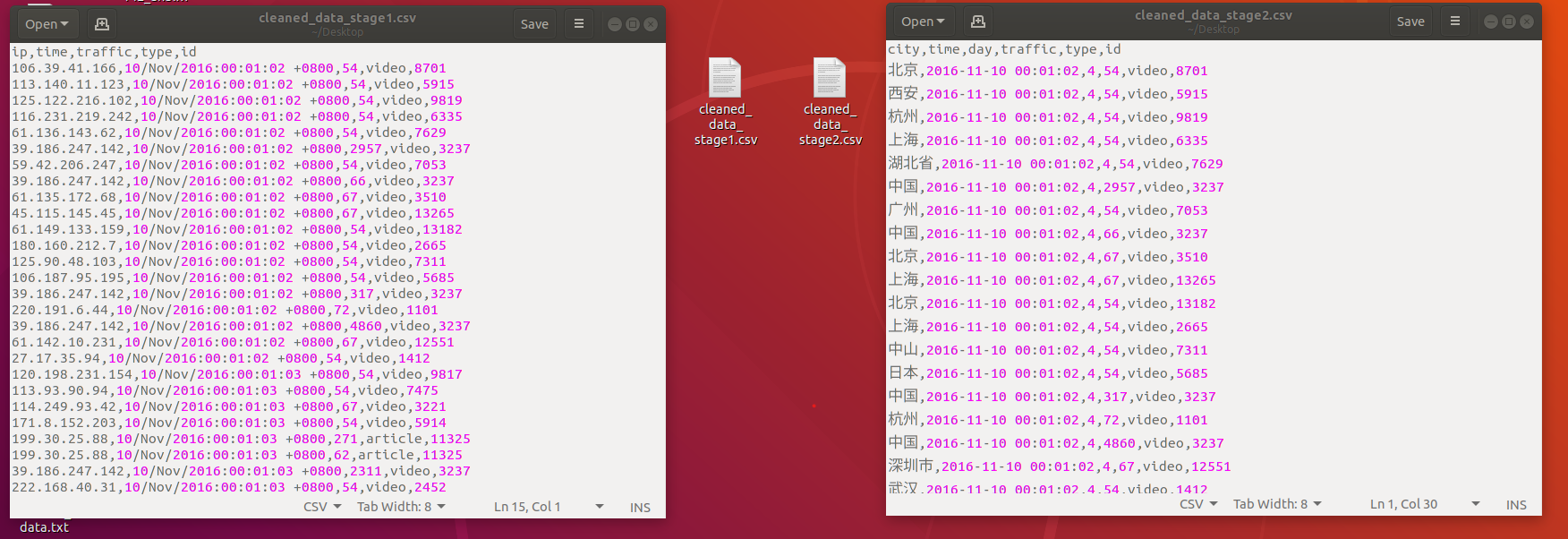
然后就要将二阶段清洗后的数据上传到hive里进行数据统计了
`
hive
-- 创建数据库
CREATE DATABASE IF NOT EXISTS user_behavior;
USE user_behavior;
-- 查看已有表
SHOW TABLES;
-- 创建数据表(完全按照要求的结构)
CREATE TABLE data (
ip STRING COMMENT 'IP地址',
time STRING COMMENT '访问时间',
day STRING COMMENT '天数',
traffic BIGINT COMMENT '流量(字节)',
type STRING COMMENT '内容类型',
id STRING COMMENT '内容ID'
)
COMMENT '用户行为日志表'
ROW FORMAT DELIMITED
FIELDS TERMINATED BY ','
STORED AS TEXTFILE
TBLPROPERTIES ('skip.header.line.count'='1');`
这个comment是乱码是由于编码有些问题,只有备注有这个问题,存入到后台的中文,例如地点,北京广州东京,都是没有问题的
我们这个表实在是太简单,即使看着英文都知道是什么意思,备注这个存入问号没关系,但是之后要是表变得繁琐,我们需要解决,这里先不用管

然后要导入将csv数据导入到hive中
这个我使用了hadoop,也可以进行本地导入
`-- 创建临时目录
!hadoop fs -mkdir -p /tmp/hive_loading/
-- 复制文件到临时目录
!hadoop fs -cp /user/hive/warehouse/user_behavior.db/data/cleaned_data_stage2.csv /tmp/hive_loading/
-- 从临时目录加载
LOAD DATA INPATH '/tmp/hive_loading/cleaned_data_stage2.csv'
OVERWRITE INTO TABLE data;**然后我们看看数据**-- 查看表结构
DESCRIBE data;
DESCRIBE FORMATTED data;
-- 查询总记录数
SELECT COUNT(*) FROM data;
-- 查看前10条数据
SELECT * FROM data LIMIT 10;
-- 按类型统计
SELECT type, COUNT(*) as count, SUM(traffic) as total_traffic
FROM data
GROUP BY type;
-- 查看不同IP数量
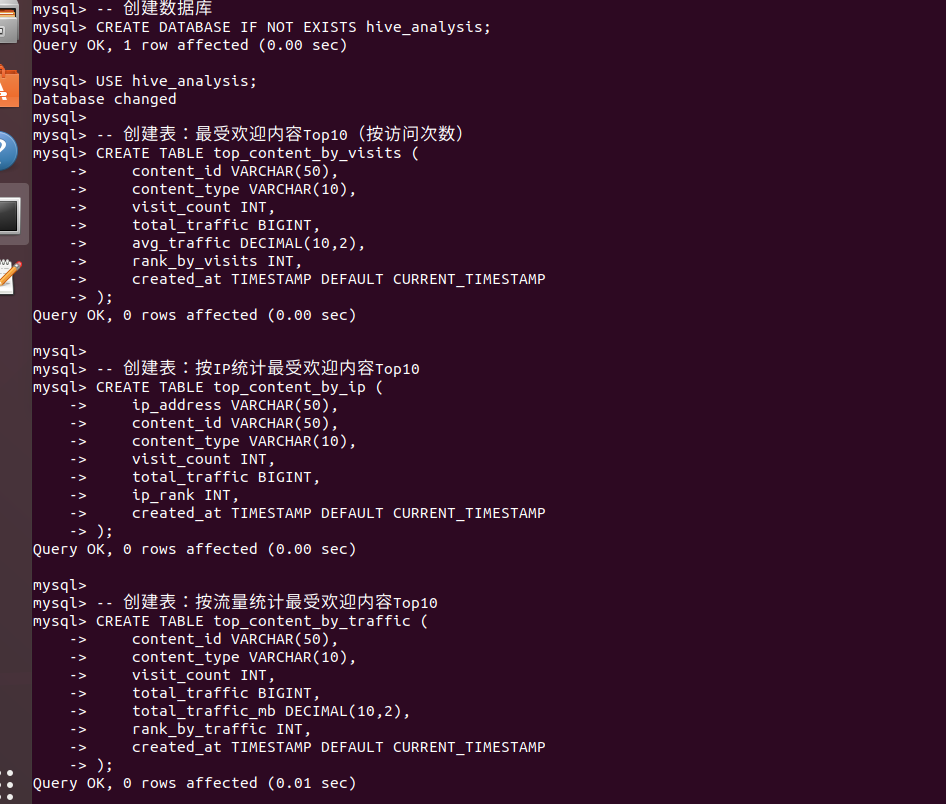
SELECT COUNT(DISTINCT ip) as distinct_ips FROM data;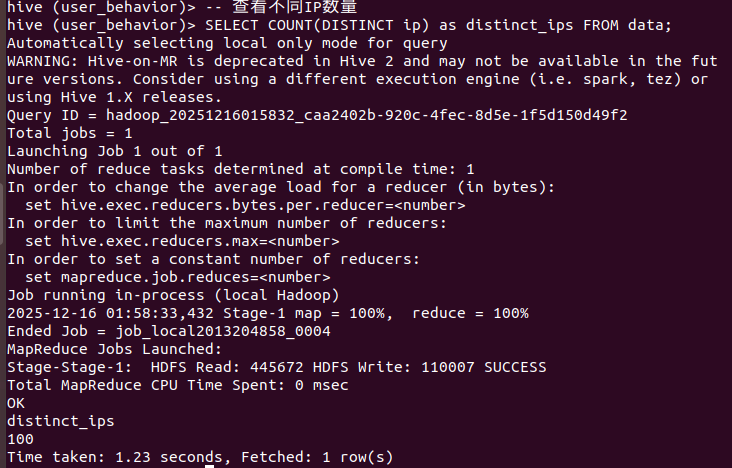  **然后就是mysql建表,准备将hive导入到mysql里**-- MySQL中执行
-- 创建数据库
CREATE DATABASE IF NOT EXISTS hive_analysis;
USE hive_analysis;
-- 创建表:最受欢迎内容Top10(按访问次数)
CREATE TABLE top_content_by_visits (
content_id VARCHAR(50),
content_type VARCHAR(10),
visit_count INT,
total_traffic BIGINT,
avg_traffic DECIMAL(10,2),
rank_by_visits INT,
created_at TIMESTAMP DEFAULT CURRENT_TIMESTAMP
);
-- 创建表:按IP统计最受欢迎内容Top10
CREATE TABLE top_content_by_ip (
ip_address VARCHAR(50),
content_id VARCHAR(50),
content_type VARCHAR(10),
visit_count INT,
total_traffic BIGINT,
ip_rank INT,
created_at TIMESTAMP DEFAULT CURRENT_TIMESTAMP
);
-- 创建表:按流量统计最受欢迎内容Top10
CREATE TABLE top_content_by_traffic (
content_id VARCHAR(50),
content_type VARCHAR(10),
visit_count INT,
total_traffic BIGINT,
total_traffic_mb DECIMAL(10,2),
rank_by_traffic INT,
created_at TIMESTAMP DEFAULT CURRENT_TIMESTAMP
);
-- 创建表:综合统计结果
CREATE TABLE summary_statistics (
analysis_type VARCHAR(50),
content_id VARCHAR(50),
content_type VARCHAR(10),
visit_count INT,
total_traffic BIGINT,
city VARCHAR(50),
overall_rank INT,
created_at TIMESTAMP DEFAULT CURRENT_TIMESTAMP
); **然后就是将hive的文件导出为csv,将csv导入到mysql文件,** **hive导出**# 切换到Hive数据库
hive -e "USE user_behavior;"
导出最受欢迎内容Top10(按访问次数)
hive -e "
USE user_behavior;
SELECT id, type, COUNT(*) as visit_count, SUM(traffic) as total_traffic,
ROUND(AVG(traffic), 2) as avg_traffic
FROM data
GROUP BY id, type
ORDER BY visit_count DESC
LIMIT 10;
" | sed 's/\t/,/g' > /tmp/top_content_visits.csv
导出按IP统计最受欢迎内容Top10(每个IP的Top1)
hive -e "
USE user_behavior;
SELECT ip, id, type, visit_count, total_traffic
FROM (
SELECT ip, id, type, COUNT() as visit_count, SUM(traffic) as total_traffic,
ROW_NUMBER() OVER (PARTITION BY ip ORDER BY COUNT() DESC) as rank
FROM data
GROUP BY ip, id, type
) ranked
WHERE rank = 1
ORDER BY visit_count DESC
LIMIT 10;
" | sed 's/\t/,/g' > /tmp/top_content_ip.csv
导出按流量统计最受欢迎内容Top10
hive -e "
USE user_behavior;
SELECT id, type, COUNT(*) as visit_count, SUM(traffic) as total_traffic,
ROUND(SUM(traffic) / 1024 / 1024, 2) as total_traffic_mb
FROM data
GROUP BY id, type
ORDER BY total_traffic DESC
LIMIT 10;
" | sed 's/\t/,/g' > /tmp/top_content_traffic.csv
导出综合统计数据
hive -e "
USE user_behavior;
SELECT '访问次数Top10' as analysis_type, id, type, COUNT() as visit_count,
SUM(traffic) as total_traffic, '' as city,
ROW_NUMBER() OVER (ORDER BY COUNT() DESC) as overall_rank
FROM data
GROUP BY id, type
ORDER BY visit_count DESC
LIMIT 10
UNION ALL
SELECT 'IP热度Top10' as analysis_type, id, type, COUNT() as visit_count,
SUM(traffic) as total_traffic, ip as city,
ROW_NUMBER() OVER (ORDER BY COUNT() DESC) as overall_rank
FROM data
GROUP BY ip, id, type
ORDER BY visit_count DESC
LIMIT 10
UNION ALL
SELECT '流量Top10' as analysis_type, id, type, COUNT(*) as visit_count,
SUM(traffic) as total_traffic, '' as city,
ROW_NUMBER() OVER (ORDER BY SUM(traffic) DESC) as overall_rank
FROM data
GROUP BY id, type
ORDER BY total_traffic DESC
LIMIT 10;
" | sed 's/\t/,/g' > /tmp/summary_statistics.csv
查看导出的文件
echo "导出的文件:"
ls -lh /tmp/top_content_*.csv
echo "文件内容示例:"
head -5 /tmp/top_content_visits.csv**mysql导入**# 使用mysql命令导入数据
mysql -u root -p hive_analysis << EOF
-- 导入最受欢迎内容Top10
LOAD DATA LOCAL INFILE '/tmp/top_content_visits.csv'
INTO TABLE top_content_by_visits
FIELDS TERMINATED BY ','
LINES TERMINATED BY '\n'
(content_id, content_type, visit_count, total_traffic, avg_traffic);
-- 导入按IP统计最受欢迎内容Top10
LOAD DATA LOCAL INFILE '/tmp/top_content_ip.csv'
INTO TABLE top_content_by_ip
FIELDS TERMINATED BY ','
LINES TERMINATED BY '\n'
(ip_address, content_id, content_type, visit_count, total_traffic);
-- 导入按流量统计最受欢迎内容Top10
LOAD DATA LOCAL INFILE '/tmp/top_content_traffic.csv'
INTO TABLE top_content_by_traffic
FIELDS TERMINATED BY ','
LINES TERMINATED BY '\n'
(content_id, content_type, visit_count, total_traffic, total_traffic_mb);
-- 导入综合统计数据
LOAD DATA LOCAL INFILE '/tmp/summary_statistics.csv'
INTO TABLE summary_statistics
FIELDS TERMINATED BY ','
LINES TERMINATED BY '\n'
(analysis_type, content_id, content_type, visit_count, total_traffic, city, overall_rank);
-- 为top_content_by_ip表添加排名
UPDATE top_content_by_ip
SET ip_rank = (@rank := @rank + 1)
ORDER BY visit_count DESC;
-- 为top_content_by_visits表添加排名
UPDATE top_content_by_visits
SET rank_by_visits = (@rank := @rank + 1)
ORDER BY visit_count DESC;
-- 为top_content_by_traffic表添加排名
UPDATE top_content_by_traffic
SET rank_by_traffic = (@rank := @rank + 1)
ORDER BY total_traffic DESC;
-- 验证数据
SELECT 'top_content_by_visits 表数据量:', COUNT() FROM top_content_by_visits;
SELECT 'top_content_by_ip 表数据量:', COUNT() FROM top_content_by_ip;
SELECT 'top_content_by_traffic 表数据量:', COUNT() FROM top_content_by_traffic;
SELECT 'summary_statistics 表数据量:', COUNT() FROM summary_statistics;
EOF`
然后就是使用python链接mysql数据库将结果可视化,这个就不写了

 浙公网安备 33010602011771号