
在centos6.9上 简单部署gluster系统
一、 环境
2台DELL710服务器,系统centos6.9 ,IP 192.168.80.136 192.168.80.137
二、软件部署
系统安装 略
gluster安装部署
1 修改两台服务器的主机名
vi /etc/hosts
127.0.0.1 localhost localhost.localdomain localhost4 localhost4.localdomain4
::1 localhost localhost.localdomain localhost6 localhost6.localdomain6
192.168.80.136 gluster136.01
192.168.80.137 gluster137.02
存盘退出,两台都这样写;
2 下载gluster源并安装
yum search centos-release-gluster
centos-release-gluster312.noarch : Gluster 3.12 (Long Term Stable) packages from the CentOS Storage SIG repository
centos-release-gluster41.x86_64 : Gluster 4.1 (Long Term Stable) packages from the CentOS Storage SIG repository
我选了3.12版本
yum install -y centos-release-gluster312.noarch
安装好源之后就可yum install 安装了
yum --enablerepo=centos-gluster*-test install glusterfs-server glusterfs-cli glusterfs-geo-replication -y
安装完毕后 启动服务
/etc/init.d/glusterd start
两台都同样安装
3 分布式主机加入主机池
在两台服务器中任意一台输入命令加入另外一台
gluster peer probe 192.168.80.136
如果成功则提示如下
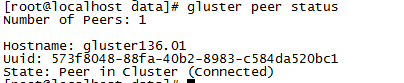
4 创建卷
创建了两个 命名为xiaoyi 的replica 卷 这个卷其实就是 /data目录
gluster volume create xiaoyi replica 2 gluster136.01:/data gluster137.02:/data force
5 创建目录并挂载
mkdir -p /data10 //两台电脑分别执行
mount.glusterfs gluster136.01:/data /data10 //136上执行
mount.glusterfs gluster137.02:/data /data10 //137上执行
启动卷
gluster volume start xiaoyi //两台机器都执行
gluster volume status //查看状态
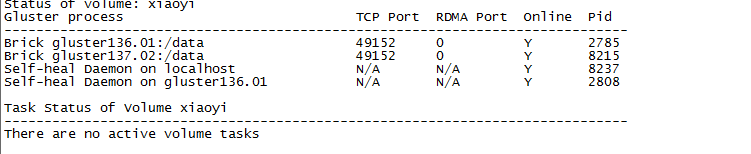
简单安装完成

 浙公网安备 33010602011771号