
需求
把一部短剧中的人物都截图出来。
安装
git clone https://github.com/ultralytics/yolov5  # clone
cd yolov5
pip install -r requirements.txt  # install
训练
打开yolov5目录下的README.zh-CN.md,根据提示中的训练命令进行训练。
推理
yolov5有自带的detect.py根据不同的参数可以推理生成不同的结果。
但是,我们想把短剧中的人物截图出来,自带的脚本就不行了。
而且只是截图还不行,一个视频每秒最少25帧,如果每帧都截,数据量太大。我们还需要指定每秒只截取几帧,那怎么写?
直接上代码。
import argparse
import os
import platform
import sys
from pathlib import Path

import torch
import torch.backends.cudnn as cudnn

FILE = Path(__file__).resolve()
ROOT = FILE.parents[0]  # YOLOv5 root directory
if str(ROOT) not in sys.path:
    sys.path.append(str(ROOT))  # add ROOT to PATH
ROOT = Path(os.path.relpath(ROOT, Path.cwd()))  # relative

from models.common import DetectMultiBackend
from utils.dataloaders import IMG_FORMATS, VID_FORMATS, LoadImages, LoadStreams
from utils.general import (LOGGER, Profile, check_file, check_img_size, check_imshow, check_requirements, colorstr, cv2,
                           increment_path, non_max_suppression, print_args, scale_boxes, strip_optimizer, xyxy2xywh)
from utils.plots import Annotator, colors, save_one_box
from utils.torch_utils import select_device, smart_inference_mode


@smart_inference_mode()
def run(
        weights=ROOT / 'yolov5s.pt',  # model path or triton URL
        source=ROOT / 'data/images',  # file/dir/URL/glob/screen/0(webcam)
        data=ROOT / 'data/coco128.yaml',  # dataset.yaml path
        imgsz=(640, 640),  # inference size (height, width)
        conf_thres=0.25,  # confidence threshold
        iou_thres=0.45,  # NMS IOU threshold
        max_det=1000,  # maximum detections per image
        device='',  # cuda device, i.e. 0 or 0,1,2,3 or cpu
        view_img=False,  # show results
        save_txt=False,  # save results to *.txt
        save_conf=False,  # save confidences in --save-txt labels
        save_crop=True,  # save cropped prediction boxes
        nosave=False,  # do not save images/videos
        classes=None,  # filter by class: --class 0, or --class 0 2 3
        agnostic_nms=False,  # class-agnostic NMS
        augment=False,  # augmented inference
        visualize=False,  # visualize features
        update=False,  # update all models
        project=ROOT / 'runs/detect',  # save results to project/name
        name='exp',  # save results to project/name
        exist_ok=False,  # existing project/name ok, do not increment
        line_thickness=3,  # bounding box thickness (pixels)
        hide_labels=False,  # hide labels
        hide_conf=False,  # hide confidences
        half=False,  # use FP16 half-precision inference
        dnn=False,  # use OpenCV DNN for ONNX inference
        vid_stride=1,  # video frame-rate stride
        sample_fps=1.0,  # 新增参数:每秒采样的帧数
):
    source = str(source)
    save_img = not nosave and not source.endswith('.txt')  # save inference images
    is_file = Path(source).suffix[1:] in (IMG_FORMATS + VID_FORMATS)
    is_url = source.lower().startswith(('rtsp://', 'rtmp://', 'http://', 'https://'))
    webcam = source.isnumeric() or source.endswith('.txt') or (is_url and not is_file)
    if is_url and is_file:
        source = check_file(source)  # download

    # Directories
    save_dir = increment_path(Path(project) / name, exist_ok=exist_ok)  # increment run
    (save_dir / 'labels' if save_txt else save_dir).mkdir(parents=True, exist_ok=True)  # make dir

    # Load model
    device = select_device(device)
    model = DetectMultiBackend(weights, device=device, dnn=dnn, data=data, fp16=half)
    stride, names, pt = model.stride, model.names, model.pt
    imgsz = check_img_size(imgsz, s=stride)  # check image size

    # Dataloader
    if webcam:
        view_img = check_imshow()
        dataset = LoadStreams(source, img_size=imgsz, stride=stride, auto=pt, vid_stride=vid_stride)
        bs = len(dataset)  # batch_size
    else:
        dataset = LoadImages(source, img_size=imgsz, stride=stride, auto=pt, vid_stride=vid_stride)
        bs = 1  # batch_size
    vid_path, vid_writer = [None] * bs, [None] * bs

    # 新增:视频采样相关变量
    frame_count = 0
    prev_time = 0

    # Run inference
    model.warmup(imgsz=(1 if pt else bs, 3, *imgsz))  # warmup
    seen, windows, dt = 0, [], (Profile(), Profile(), Profile())
    for path, im, im0s, vid_cap, s in dataset:
        # 新增:视频采样逻辑
        if dataset.mode == 'video':
            if vid_cap:
                fps = vid_cap.get(cv2.CAP_PROP_FPS)
                current_time = frame_count / fps
                # 计算需要跳过的帧数
                frames_to_skip = max(1, int(fps / sample_fps))
                # 只处理指定间隔的帧
                if frame_count % frames_to_skip != 0:
                    frame_count += 1
                    continue
                frame_count += 1
                # 打印采样信息
                if frame_count % 100 == 0:
                    LOGGER.info(f"视频采样: FPS={fps}, 目标采样率={sample_fps}fps, 实际采样率={1/(current_time-prev_time):.2f}fps")
                    prev_time = current_time

        with dt[0]:
            im = torch.from_numpy(im).to(model.device)
            im = im.half() if model.fp16 else im.float()  # uint8 to fp16/32
            im /= 255  # 0 - 255 to 0.0 - 1.0
            if len(im.shape) == 3:
                im = im[None]  # expand for batch dim

        # Inference
        with dt[1]:
            visualize = increment_path(save_dir / Path(path).stem, mkdir=True) if visualize else False
            pred = model(im, augment=augment, visualize=visualize)

        # NMS
        with dt[2]:
            pred = non_max_suppression(pred, conf_thres, iou_thres, classes, agnostic_nms, max_det=max_det)

        # Process predictions
        for i, det in enumerate(pred):  # per image
            seen += 1
            if webcam:  # batch_size >= 1
                p, im0, frame = path[i], im0s[i].copy(), dataset.count
                s += f'{i}: '
            else:
                p, im0, frame = path, im0s.copy(), getattr(dataset, 'frame', 0)

            p = Path(p)  # to Path
            save_path = str(save_dir / p.name)  # im.jpg
            txt_path = str(save_dir / 'labels' / p.stem) + ('' if dataset.mode == 'image' else f'_{frame}')  # im.txt
            s += '%gx%g ' % im.shape[2:]  # print string
            gn = torch.tensor(im0.shape)[[1, 0, 1, 0]]  # normalization gain whwh
            imc = im0.copy() if save_crop else im0  # for save_crop
            annotator = Annotator(im0, line_width=line_thickness, example=str(names))
            if len(det):
                # Rescale boxes from img_size to im0 size
                det[:, :4] = scale_boxes(im.shape[2:], det[:, :4], im0.shape).round()

                # Print results
                for c in det[:, 5].unique():
                    n = (det[:, 5] == c).sum()  # detections per class
                    s += f"{n} {names[int(c)]}{'s' * (n > 1)}, "  # add to string

                # Write results
                for *xyxy, conf, cls in reversed(det):
                    if save_txt:  # Write to file
                        xywh = (xyxy2xywh(torch.tensor(xyxy).view(1, 4)) / gn).view(-1).tolist()  # normalized xywh
                        line = (cls, *xywh, conf) if save_conf else (cls, *xywh)  # label format
                        with open(f'{txt_path}.txt', 'a') as f:
                            f.write(('%g ' * len(line)).rstrip() % line + '\n')

                    if save_img or save_crop or view_img:  # Add bbox to image
                        c = int(cls)  # integer class
                        label = None if hide_labels else (names[c] if hide_conf else f'{names[c]} {conf:.2f}')
                        annotator.box_label(xyxy, label, color=colors(c, True))
                    if save_crop:  # 保存裁剪的图像
                        # 获取检测框坐标
                        x1, y1, x2, y2 = map(int, xyxy)
                        # 裁剪图像
                        cropped_img = imc[y1:y2, x1:x2]
                        if cropped_img.size == 0:
                            continue
                        # 保存裁剪的图像
                        crop_dir = save_dir / 'crops' / names[c]
                        crop_dir.mkdir(parents=True, exist_ok=True)
                        # 新增:在文件名中包含时间信息
                        if dataset.mode == 'video':
                            time_str = f"{current_time:.2f}s" if 'current_time' in locals() else f"frame{frame}"
                            crop_path = crop_dir / f"{p.stem}_{time_str}_{x1}_{y1}_{x2}_{y2}.jpg"
                        else:
                            crop_path = crop_dir / f"{p.stem}_{x1}_{y1}_{x2}_{y2}.jpg"
                        cv2.imwrite(str(crop_path), cropped_img)
                        LOGGER.info(f"裁剪的对象已保存至 {crop_path}")

            # Stream results
            im0 = annotator.result()
            if view_img:
                if platform.system() == 'Linux' and p not in windows:
                    windows.append(p)
                    cv2.namedWindow(str(p), cv2.WINDOW_NORMAL | cv2.WINDOW_KEEPRATIO)  # allow window resize (Linux)
                    cv2.resizeWindow(str(p), im0.shape[1], im0.shape[0])
                cv2.imshow(str(p), im0)
                cv2.waitKey(1)  # 1 millisecond

            # Save results (image with detections)
            if save_img:
                if dataset.mode == 'image':
                    cv2.imwrite(save_path, im0)
                else:  # 'video' or 'stream'
                    if vid_path[i] != save_path:  # new video
                        vid_path[i] = save_path
                        if isinstance(vid_writer[i], cv2.VideoWriter):
                            vid_writer[i].release()  # release previous video writer
                        if vid_cap:  # video
                            fps = vid_cap.get(cv2.CAP_PROP_FPS)
                            w = int(vid_cap.get(cv2.CAP_PROP_FRAME_WIDTH))
                            h = int(vid_cap.get(cv2.CAP_PROP_FRAME_HEIGHT))
                        else:  # stream
                            fps, w, h = 30, im0.shape[1], im0.shape[0]
                        save_path = str(Path(save_path).with_suffix('.mp4'))  # force *.mp4 suffix on results videos
                        vid_writer[i] = cv2.VideoWriter(save_path, cv2.VideoWriter_fourcc(*'mp4v'), fps, (w, h))
                    vid_writer[i].write(im0)

        # Print time (inference-only)
        LOGGER.info(f"{s}{'' if len(det) else '(no detections), '}{dt[1].dt * 1000:.1f}ms")

    # Print results
    t = tuple(x.t / seen * 1000 for x in dt)  # speeds per image
    LOGGER.info(f'Speed: %.1fms pre-process, %.1fms inference, %.1fms NMS per image at shape {(1, 3, *imgsz)}' % t)
    if save_txt or save_img:
        s = f"\n{len(list(save_dir.glob('labels/*.txt')))} labels saved to {save_dir / 'labels'}" if save_txt else ''
        LOGGER.info(f"Results saved to {colorstr('bold', save_dir)}{s}")
    if update:
        strip_optimizer(weights[0])  # update model (to fix SourceChangeWarning)


def parse_opt():
    parser = argparse.ArgumentParser()
    parser.add_argument('--weights', nargs='+', type=str, default=ROOT / 'yolov5s.pt', help='model path or triton URL')
    parser.add_argument('--source', type=str, default=ROOT / 'data/images', help='file/dir/URL/glob/screen/0(webcam)')
    parser.add_argument('--data', type=str, default=ROOT / 'data/coco128.yaml', help='(optional) dataset.yaml path')
    parser.add_argument('--imgsz', '--img', '--img-size', nargs='+', type=int, default=[640], help='inference size h,w')
    parser.add_argument('--conf-thres', type=float, default=0.25, help='confidence threshold')
    parser.add_argument('--iou-thres', type=float, default=0.45, help='NMS IoU threshold')
    parser.add_argument('--max-det', type=int, default=1000, help='maximum detections per image')
    parser.add_argument('--device', default='', help='cuda device, i.e. 0 or 0,1,2,3 or cpu')
    parser.add_argument('--view-img', action='store_true', help='show results')
    parser.add_argument('--save-txt', action='store_true', help='save results to *.txt')
    parser.add_argument('--save-conf', action='store_true', help='save confidences in --save-txt labels')
    parser.add_argument('--save-crop', action='store_true', help='save cropped prediction boxes')
    parser.add_argument('--nosave', action='store_true', help='do not save images/videos')
    parser.add_argument('--classes', nargs='+', type=int, help='filter by class: --classes 0, or --classes 0 2 3')
    parser.add_argument('--agnostic-nms', action='store_true', help='class-agnostic NMS')
    parser.add_argument('--augment', action='store_true', help='augmented inference')
    parser.add_argument('--visualize', action='store_true', help='visualize features')
    parser.add_argument('--update', action='store_true', help='update all models')
    parser.add_argument('--project', default=ROOT / 'runs/detect', help='save results to project/name')
    parser.add_argument('--name', default='exp', help='save results to project/name')
    parser.add_argument('--exist-ok', action='store_true', help='existing project/name ok, do not increment')
    parser.add_argument('--line-thickness', default=3, type=int, help='bounding box thickness (pixels)')
    parser.add_argument('--hide-labels', default=False, action='store_true', help='hide labels')
    parser.add_argument('--hide-conf', default=False, action='store_true', help='hide confidences')
    parser.add_argument('--half', action='store_true', help='use FP16 half-precision inference')
    parser.add_argument('--dnn', action='store_true', help='use OpenCV DNN for ONNX inference')
    parser.add_argument('--vid-stride', type=int, default=1, help='video frame-rate stride')
    parser.add_argument('--sample-fps', type=float, default=1.0, help='每秒采样的帧数')  # 新增参数
    opt = parser.parse_args()
    opt.imgsz *= 2 if len(opt.imgsz) == 1 else 1  # expand
    print_args(vars(opt))
    return opt


def main(opt):
    check_requirements(exclude=('tensorboard', 'thop'))
    run(**vars(opt))


if __name__ == "__main__":
    opt = parse_opt()
    main(opt)
截图命令
截取小猫
python detect.py --classes=15 --source="data/src/demoCat" --project="runs/demoCatResult" --save-txt --save-csv
截取视频中的所有门类
python detect.py --source="data/src/mp4/1.mp4" --project="runs/mp4Result" --save-txt --save-csv
把目录中的小猫图片中的小猫截取出来
python detect_with_crop.py --source data/src/demoCat --weights yolov5s.pt --project runs/demoCatResult --save-crop
把短剧视频中的人物都截取出来
python detect_with_crop2.py --classes 0 --source data/src/mp4/2.mp4 --weights yolov5s.pt --project runs/mp4Result --save-crop --sample-fps 2.0
说明
--classes 指定目标匹配的门类,0代表人,15代表猫;
--save-txt 会把匹配的结果写到text里,text里的内容有五列```<类别编号> <中心点 x> <中心点 y> <宽度> <高度> <置信度>```
--weights 指定已经训练好的模型;
--save-crop 上述自定义脚本的自有命令,用于把源中的目标截图出来
--sample-fps 指定目标识别的帧率,2.0 表示每秒只选取两帧识别
其他关键字和参数说明
    weights: 训练的权重路径,可以使用自己训练的权重,也可以使用官网提供的权重
    默认官网的权重yolov5s.pt(yolov5n.pt/yolov5s.pt/yolov5m.pt/yolov5l.pt/yolov5x.pt/区别在于网络的宽度和深度以此增加)
    source: 测试数据,可以是图片/视频路径,也可以是'0'(电脑自带摄像头),也可以是rtsp等视频流, 默认data/images
    data: 配置数据文件路径, 包括image/label/classes等信息, 训练自己的文件, 需要作相应更改, 可以不用管
    如果设置了只显示个别类别即使用了--classes = 0 或二者1, 2, 3等, 则需要设置该文件,数字和类别相对应才能只检测某一个类
    imgsz: 网络输入图片大小, 默认的大小是640
    conf-thres: 置信度阈值, 默认为0.25
    iou-thres:  做nms的iou阈值, 默认为0.45
    max-det: 保留的最大检测框数量, 每张图片中检测目标的个数最多为1000类
    device: 设置设备CPU/CUDA, 可以不用设置
    view-img: 是否展示预测之后的图片/视频, 默认False, --view-img 电脑界面出现图片或者视频检测结果
    save-txt: 是否将预测的框坐标以txt文件形式保存, 默认False, 使用--save-txt 在路径runs/detect/exp*/labels/*.txt下生成每张图片预测的txt文件
    save-conf: 是否将置信度conf也保存到txt中, 默认False
    save-crop: 是否保存裁剪预测框图片, 默认为False, 使用--save-crop 在runs/detect/exp*/crop/剪切类别文件夹/ 路径下会保存每个接下来的目标
    nosave: 不保存图片、视频, 要保存图片,不设置--nosave 在runs/detect/exp*/会出现预测的结果
    classes: 设置只保留某一部分类别, 形如0或者0 2 3, 使用--classes = n, 则在路径runs/detect/exp*/下保存的图片为n所对应的类别, 此时需要设置data
    agnostic-nms: 进行NMS去除不同类别之间的框, 默认False
    augment: TTA测试时增强/多尺度预测, 可以提分
    visualize: 是否可视化网络层输出特征
    update: 如果为True,则对所有模型进行strip_optimizer操作,去除pt文件中的优化器等信息,默认为False
    project: 保存测试日志的文件夹路径
    name: 保存测试日志文件夹的名字, 所以最终是保存在project/name中
    exist_ok: 是否重新创建日志文件, False时重新创建文件
    line-thickness: 画框的线条粗细
    hide-labels: 可视化时隐藏预测类别
    hide-conf: 可视化时隐藏置信度
    half: 是否使用F16精度推理, 半进度提高检测速度
    dnn: 用OpenCV DNN预测
最终结果
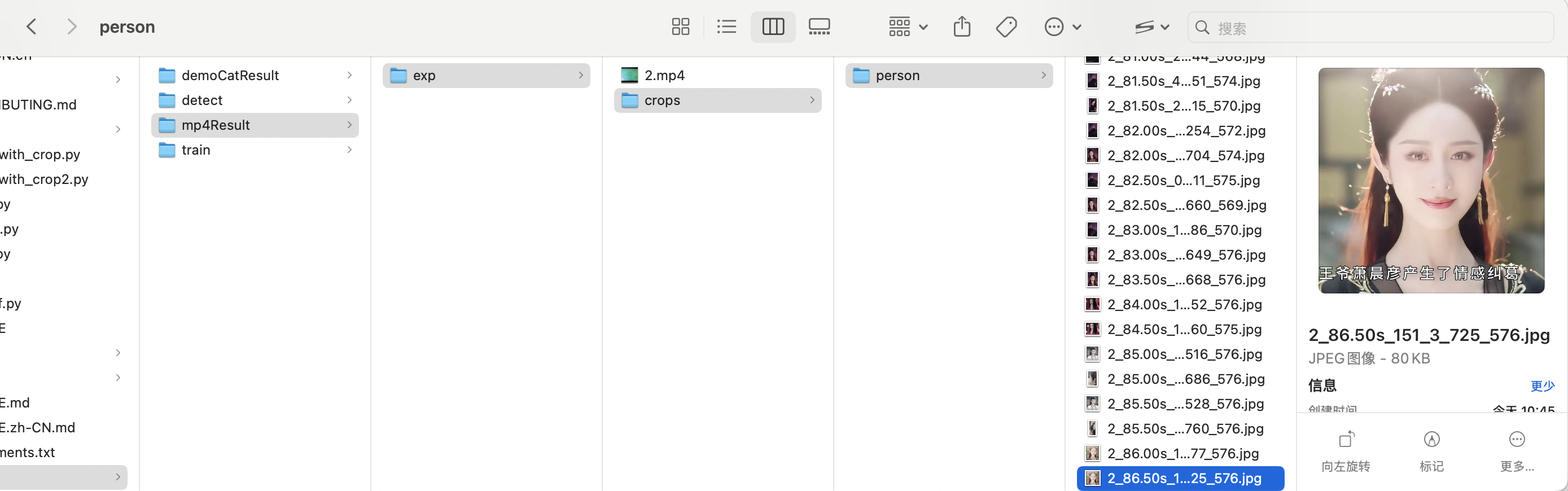
以上面最后一条命令举例,在“runs/mp4Result”目录中生成了在源视频上打标之后的结果。在runs/mp4Result/crops/person内生成了从视频中截取的人物图片。

参考文献
转载请注明来源:https://www.cnblogs.com/bugutian/

 浙公网安备 33010602011771号