
使用maven构建自定义项目脚手架
起因
老大:咱们公司项目的包结构是真乱呀,每个项目都不一样,今后做的项目的包结构需要控制一下,小布交给你来做了~~
小布:emmm...
Maven 版本
- 3.6.2
创建符合team规范的maven项目
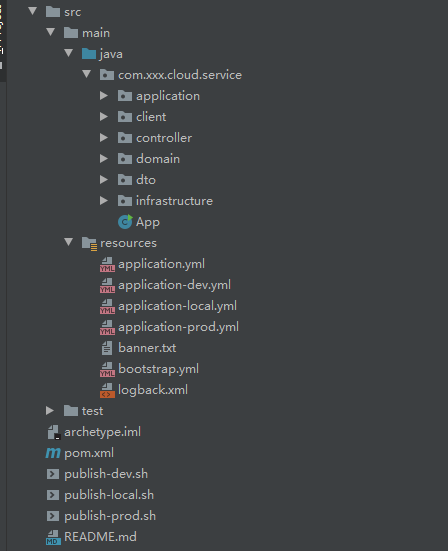
在项目pom文件中添加maven archetype插件
<plugins>
    <plugin>
        <groupId>org.apache.maven.plugins</groupId>
        <artifactId>maven-archetype-plugin</artifactId>
        <version>3.0.1</version>
    </plugin>
    <plugin>
        <groupId>org.apache.maven.plugins</groupId>
        <artifactId>maven-compiler-plugin</artifactId>
        <version>3.6.1</version>
        <configuration>
            <source>1.8</source>
            <target>1.8</target>
        </configuration>
    </plugin>
    <plugin>
        <groupId>org.apache.maven.plugins</groupId>
        <artifactId>maven-resources-plugin</artifactId>
        <version>3.0.2</version>
        <configuration>
            <encoding>UTF-8</encoding>
        </configuration>
    </plugin>
</plugins>
创建archetype到本地仓库
项目根目录下执行以下命令
mvn archetype:create-from-project
cd target/generated-sources/archetype/
mvn clean install
此时本地项目中就会有创建的骨架项目的jar包
执行以下命令
mvn archetype:crawl
会将本地maven仓库中的 archetype 信息爬到本地maven仓库的archetype-catalog.xml文件中
提交archetype到远程仓库
打开项目\target\generated-sources\archetype\目录中的pom.xml文件,添加distributionManagement配置
<distributionManagement>
    <repository>
        <id>id</id><!-- 此id要与setting.xml中的<server>中的id对应上,以匹配账号密码 -->
        <name>name</name>
        <url>maven私服的发布库地址</url>
    </repository>
    <snapshotRepository>
        <id>id</id><!-- 此id要与setting.xml中的<server>中的id对应上,以匹配账号密码 -->
        <name>name</name>
        <url>maven私服的快照库地址</url>
    </snapshotRepository>
</distributionManagement>
然后在项目\target\generated-sources\archetype\目录下执行如下shell命令
mvn deploy
利用archetype构建本地项目
执行如下命令便可直接构建
mvn archetype:generate "-DgroupId=com.xxx.cloud.service" "-DartifactId=wh-service" "-DarchetypeArtifactId=archetype-archetype" "-DarchetypeGroupId=com.xxx.cloud.service.xxx" "-DinteractiveMode=false"
参数说明:
- DgroupId:被构建项目的 groupId
- DartifactId:被构建项目的 artifactId
- DarchetypeGroupId:骨架项目的 groupId
- DarchetypeArtifactId:骨架项目的 artifactId +
-archetype- DinteractiveMode:是否使用交互试命令构建项目
- 因为:这里填 true 或者不填此参数,在构建的过程当中会以交互的方式让你填一遍
DgroupId、DartifactId、DarchetypeArtifactId参数;- 所以:请直接使用以上命令构建
后记
老大:这样创建的项目骨架,和我放在gitlab上一个项目拉下来用有啥区别
老布:gitlab拉下来的模板需要修改
项目名和pom.xml中的<groupId><artifactId>等一系列的地方...
以上

 浙公网安备 33010602011771号