
Android 系统文件分享写法
首先在AndroidManifestxml文件创建一个Fileprovider(适配7.0以上的系统)
Google参考:https://developer.android.google.cn/training/secure-file-sharing/setup-sharing
   <provider
            android:name="androidx.core.content.FileProvider"
            android:authorities="com.mxy.filemanger.fileprovider"
            android:grantUriPermissions="true"
            android:exported="false">
            <meta-data
                android:name="android.support.FILE_PROVIDER_PATHS"
                android:resource="@xml/filepaths" />
        </provider>
其中authorities是你的程序包名+.fileprovider
然后在res新建一个文件夹xml,在xml文件夹里面再创建一个filepaths.xml文件
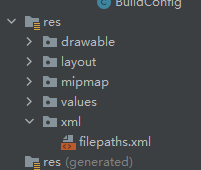
filepaths.xml文件内容如下
<?xml version="1.0" encoding="utf-8"?>
<paths xmlns:android="http://schemas.android.com/apk/res/android">
    <external-path
        name="external"
        path=""/>

</paths>
path为空报错可以忽略
在paths节点内部支持以下几个子节点,分别为:
- <root-path/> 代表设备的根目录new File("/");
- <files-path/> 代表context.getFilesDir()
- <cache-path/> 代表context.getCacheDir()
- <external-path/> 代表Environment.getExternalStorageDirectory()
- <external-files-path>代表context.getExternalFilesDirs()
- <external-cache-path>代表getExternalCacheDirs()
path代表目录下的子目录,如:
<cache-path
    name = "cache"
    path = "path
/>
表context.getChcheDir()/path目录,如果path为空,代表直接使用该根目录。
既然要使用content://URI替代file://URI,那么我们需要一个虚拟路径对真实文件路径进行映射。通过编写xml文件,其中path路径确定了可访问的文件目录,name属性映射了真实文件路径。
代码使用:
       val sendIntent = Intent()
            val uri: Uri
            val file = File(it.path!!)
            uri = if (Build.VERSION.SDK_INT >= 24) {
//"com.mxy.filemanger.fileprovider"是AndroidManifest刚刚设置的authorities
                FileProvider.getUriForFile(applicationContext, "com.mxy.filemanger.fileprovider", file);
            } else {
                Uri.fromFile(file)
            }
            sendIntent.action = Intent.ACTION_SEND
            sendIntent.flags = Intent.FLAG_ACTIVITY_NEW_TASK
            sendIntent.putExtra(Intent.EXTRA_STREAM, uri)
//可以使用setClassName单独分享到某个软件,如果不使用setClassName则调用系统所有能分享的软件
//sendIntent.setClassName("com.tencent.mm", "com.tencent.mm.ui.tools.ShareImgUI");//微信朋友
//sendIntent.setClassName("com.tencent.mobileqq", "cooperation.qqfav.widget.QfavJumpActivity");//保存到QQ收藏
            //"*/*代表所有类型的文件
            /**
             * 注意如果不设定特定的类型,比如在分享jpg图片到微信会显示一个字符串文件不是显示图片,要设置为image/jpeg,但是用分享到qq则可以正常显示,这里要特别注意一下,建议每个文件都匹配正确的类型
             * 比如sendIntent.type="image/jpeg"
             */
            sendIntent.type="=*/*"
            startActivity(sendIntent)
这里有网上找到的一些类型:
   {".3gp", "video/3gpp"},
            {".apk", "application/vnd.android.package-archive"},
            {".asf", "video/x-ms-asf"},
            {".avi", "video/x-msvideo"},
            {".bin", "application/octet-stream"},
            {".bmp", "image/bmp"},
            {".c", "text/plain"},
            {".class", "application/octet-stream"},
            {".conf", "text/plain"},
            {".cpp", "text/plain"},
            {".doc", "application/msword"},
            {".exe", "application/octet-stream"},
            {".gif", "image/gif"},
            {".gtar", "application/x-gtar"},
            {".gz", "application/x-gzip"},
            {".h", "text/plain"},
            {".htm", "text/html"},
            {".html", "text/html"},
            {".jar", "application/java-archive"},
            {".java", "text/plain"},
            {".jpeg", "image/jpeg"},
            {".jpg", "image/jpeg"},
            {".js", "application/x-javascript"},
            {".log", "text/plain"},
            {".m3u", "audio/x-mpegurl"},
            {".m4a", "audio/mp4a-latm"},
            {".m4b", "audio/mp4a-latm"},
            {".m4p", "audio/mp4a-latm"},
            {".m4u", "video/vnd.mpegurl"},
            {".m4v", "video/x-m4v"},
            {".mov", "video/quicktime"},
            {".mp2", "audio/x-mpeg"},
            {".mp3", "audio/x-mpeg"},
            {".mp4", "video/mp4"},
            {".mpc", "application/vnd.mpohun.certificate"},
            {".mpe", "video/mpeg"},
            {".mpeg", "video/mpeg"},
            {".mpg", "video/mpeg"},
            {".mpg4", "video/mp4"},
            {".mpga", "audio/mpeg"},
            {".msg", "application/vnd.ms-outlook"},
            {".ogg", "audio/ogg"},
            {".pdf", "application/pdf"},
            {".png", "image/png"},
            {".pps", "application/vnd.ms-powerpoint"},
            {".ppt", "application/vnd.ms-powerpoint"},
            {".prop", "text/plain"},
            {".rar", "application/x-rar-compressed"},
            {".rc", "text/plain"},
            {".rmvb", "audio/x-pn-realaudio"},
            {".rtf", "application/rtf"},
            {".sh", "text/plain"},
            {".tar", "application/x-tar"},
            {".tgz", "application/x-compressed"},
            {".txt", "text/plain"},
            {".wav", "audio/x-wav"},
            {".wma", "audio/x-ms-wma"},
            {".wmv", "audio/x-ms-wmv"},
            {".wps", "application/vnd.ms-works"},
            {".xml", "text/plain"},
            {".z", "application/x-compress"},
            {".zip", "application/zip"},
            {"", "*/*"}
下面是一个查询文件类型的方法:
   private fun getMimeType(filePath:String): String? {
        val mmr = MediaMetadataRetriever()
        var mime: String? = "text/plain"
        mime = try {
            mmr.setDataSource(filePath)
            mmr.extractMetadata(MediaMetadataRetriever.METADATA_KEY_MIMETYPE)
        } catch (e: IllegalStateException) {
            return mime
        } catch (e: IllegalArgumentException) {
            return mime
        } catch (e: RuntimeException) {
            return mime
        }
        return mime
    }
配合上面的方法和自身增加一些判断条件可以改为(判断条件自行发挥)
         val sendIntent = Intent()
            val uri: Uri
            val file = File(it.path!!)
            uri = if (Build.VERSION.SDK_INT >= 24) {
                FileProvider.getUriForFile(applicationContext, "com.mxy.filemanger.fileprovider", file);
            } else {
                Uri.fromFile(file)
            }
            sendIntent.action = Intent.ACTION_SEND
            sendIntent.flags = Intent.FLAG_ACTIVITY_NEW_TASK
            sendIntent.putExtra(Intent.EXTRA_STREAM, uri)
            val mimeType = getMimeType(file.absolutePath)
            if (mimeType.isNullOrEmpty()&&FormatsUtils.endWithPhoto(file.absolutePath)) {
                sendIntent.type = "image/jpeg"
            }else{
                sendIntent.type = mimeType
            }
            startActivity(sendIntent)

 浙公网安备 33010602011771号