
《Android》CoordinatorLayout+Appbarlayout实现滑动隐藏顶部
首先:xml布局
<?xml version="1.0" encoding="utf-8"?>
<LinearLayout xmlns:android="http://schemas.android.com/apk/res/android"
    xmlns:app="http://schemas.android.com/apk/res-auto"
    xmlns:tools="http://schemas.android.com/tools"
    android:layout_width="match_parent"
    android:layout_height="match_parent"
    android:orientation="vertical"
    tools:context=".MainActivity">

    <LinearLayout
        android:layout_width="match_parent"
        android:layout_height="match_parent"
        android:orientation="vertical">


        <androidx.coordinatorlayout.widget.CoordinatorLayout
            android:layout_width="match_parent"
            android:layout_height="match_parent">


            <com.google.android.material.appbar.AppBarLayout
                android:layout_width="match_parent"
                android:layout_height="wrap_content">

                <LinearLayout
                    android:layout_width="match_parent"
                    android:layout_height="wrap_content"
                    android:orientation="vertical"
                    app:layout_scrollFlags="scroll|enterAlways">

                    <Button
                        android:layout_width="wrap_content"
                        android:layout_height="wrap_content"
                        android:text="我是一个按钮" />


                </LinearLayout>

            </com.google.android.material.appbar.AppBarLayout>

            <FrameLayout
                android:layout_width="match_parent"
                android:layout_height="match_parent">

                <androidx.recyclerview.widget.RecyclerView
                    android:id="@+id/audio_list_rv"
                    android:layout_width="match_parent"
                    android:layout_height="match_parent"
                    app:layout_behavior="@string/appbar_scrolling_view_behavior" />
            </FrameLayout>

        </androidx.coordinatorlayout.widget.CoordinatorLayout>


    </LinearLayout>
</LinearLayout>
一.外面用一层Coordinatorlayout包裹,然后Appbarlayout包裹滑动要隐藏的View或者Viewgroup
注意:Appbarlayout里的View拥有属性app:layout_scrollFlags="scroll|enterAlways",意思就是这个顶部View在recyclerView滑动的时候隐藏,而且拥有这个属性的顶部view一定要在Appbarlayout里的最上面,而且下面也不能放其他view或者viewgroup,这里app:layout_scrollFlags="scroll|enterAlways"是放在Appbarlayout里的Linearyout,Linearyout上下都没有其他view或者viewgroup。
二.app:layout_behavior="@string/appbar_scrolling_view_behavior" 这个属性放在你要滑动的布局里,就是布局里要有能滑动属性的view,这里使用了recyclerView,
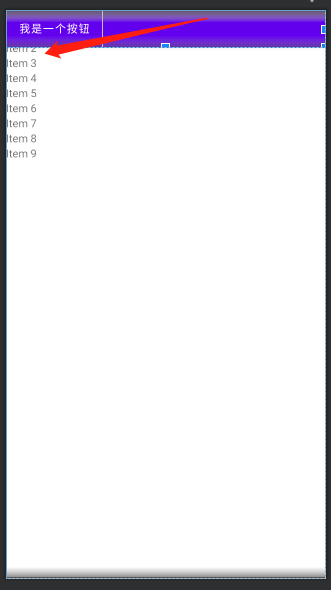
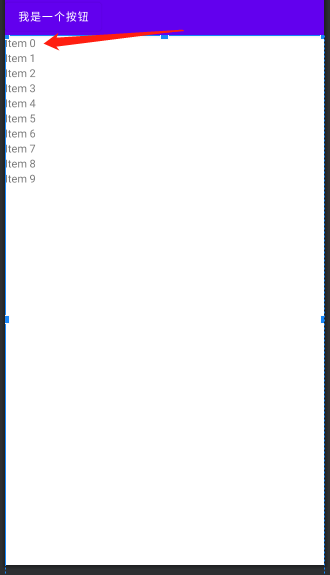
注意:app:layout_behavior="@string/appbar_scrolling_view_behavior" 这个属性会把view放在Appbarlayout底部,这里recyclerView拥有这个属性,所有recyclerView会在Appbarlayout底部,
而fragment布局有一部分会在Appbarlayout覆盖住,下面是放在Fragment和recyclerView的测试图:
放在recyclerView里:
放在Fragment里:
app:layout_scrollFlags的值有下面五种可选:
- scroll
注意事项
- 这个标志位是其它四个标志位生效的前提
- 带有scroll标志位的子View必须放在AppBarLayout中的最前面
- exitUntilCollapsed
- enterAlways
- enterAlwaysCollapsed
- snap
这五个标志位在子view中的组合及效果有:
- app:layout_scrollFlags="scroll"
效果:
设置了scroll的子View可以在滚动后收起,而没有设置的则不可以。
在手指向上移动的时候,优先收起AppBarLayout中的可收起View,当它处于收起状态时,下面的列表内容才开始向尾部滚动。
在手指往下移动的时候,优先让下面的列表内容向顶部滚动,当列表滚动到顶端时,AppBarLayout的可收起View才展开。
- app:layout_scrollFlags="scroll|exitUntilCollapsed"
另外设置一下android:minHeight="50dp"
效果:
手指向上移动的时候,会优先收起AppBarLayout中的子View,而收起的最小高度为0,如果想收起时仍然保留部分可见,那么就需要使用exitUntilCollapsed + minHeight属性,minHeight就决定了收起时的最小高度是多少
- app:layout_scrollFlags="scroll|enterAlways"
效果:
enterAlways则决定了手指向下移动时的行为。默认情况下,在手指向下移动时,会优先让列表滚动到顶部,而如果设置了enterAlways,那么会优先让AppBarLayout中的子View滚动到展开。
- app:layout_scrollFlags="scroll|enterAlways|enterAlwaysCollapsed"
效果:
优先滚动AppBarLayout中的子View,但是并不是滚动到全部展开,而是只滚动到minHeight
AppBarLayout中的子View滚动到minHeight之后,开始滚动列表,直到列表滚动到头部
列表滚动到头部之后,开始滚动AppBarLayout中的子View,直到它完全展开
- app:layout_scrollFlags="scroll|snap"
效果:
默认情况下,在手指从屏幕上抬起之后,AppBarLayout中子View的状态就不会变化了,而如果我们设置了snap标志位,那么在手指抬起之后,会根据子View当前的偏移量,决定是让它变为收起还是展开状态

 浙公网安备 33010602011771号