


Solr突出显示示例
本文英文版地址:https://examples.javacodegeeks.com/enterprise-java/apache-solr/solr-highlighting-example/
在这个Solr突出显示示例中,我们将向您展示如何使用Solr突出显示功能。 在这个例子中,我们将使用jQuery以及Solr突出显示功能。
我们对这个例子的首选环境是solr-5.0.0,Eclipse Luna,JDK 8u25和Tomcat 8应用服务器。话虽如此,我们也测试了JDK 1.7和Tomcat 7的代码。
在开始Solr安装之前,请确保已安装JDK并已正确设置Java_Home。
1.安装Apache Solr
首先,从以下位置下载最新版本的Apache Solr。
http://lucene.apache.org/solr/downloads.html
Apache Solr已经经历了从4.xx到5.0.0的各种更改,因此如果您有不同版本的Solr,则需要下载5.xx版本以遵循此示例。
下载Solr zip文件后,将其解压缩到文件夹中。 提取的文件夹将如下所示。
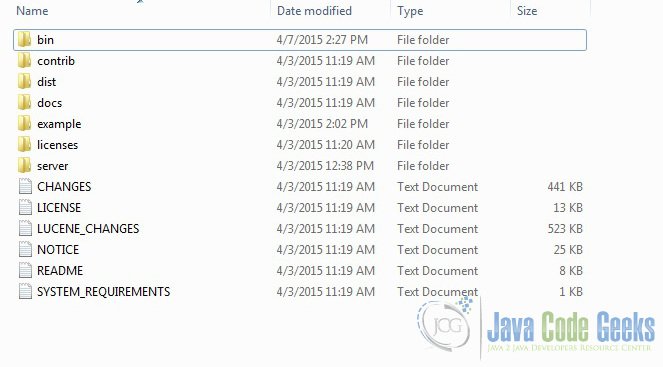
Solr文件夹
bin文件夹包含用于启动和停止服务器的脚本。 example文件夹包含几个示例文件。 我们将使用其中一个来演示Solr如何对数据进行索引。server文件夹包含用于写入所有Solr日志的logs文件夹。在索引期间检查日志中的任何错误将有所帮助。 服务器下的solr文件夹包含不同的集合或核心。 每个核/集合的配置和数据存储在相应的核/集合文件夹中。
Apache Solr附带了一个内置的Jetty服务器。 但在我们启动solr实例之前,我们必须验证JAVA_HOME是否在机器上设置。
我们可以使用命令行脚本启动服务器。 让我们从命令提示符转到bin目录并发出以下命令
solr start
这将在默认端口8983下启动Solr服务器。
我们现在可以在浏览器中打开以下URL,并验证我们的Solr实例正在运行。 solr管理工具的具体细节超出了示例的范围。
http://localhost:8983/solr/
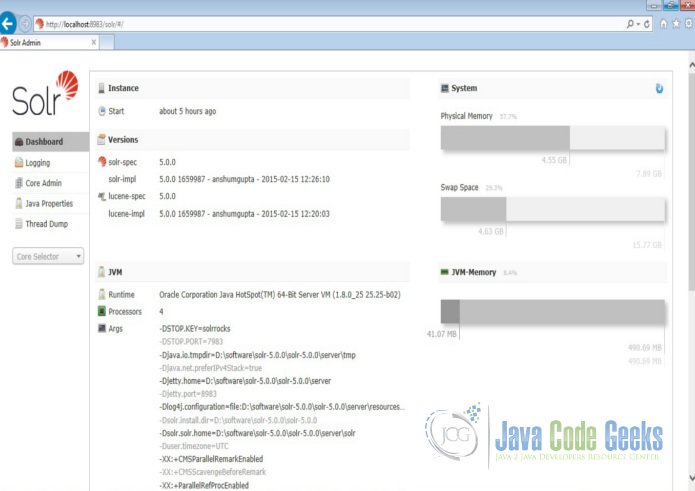
Solr管理控制台
2.配置Apache Solr
在本节中,我们将向您展示如何配置solr实例的核心/集合以及如何定义字段。 Apache Solr附带一个名为Schemaless模式的选项。 此选项允许用户构建有效的模式,而无需手动编辑模式文件。但是对于这个例子,我们将使用Schema配置来理解Solr的内部。
2.1创建核心
当Solr服务器在独立模式下启动时,配置称为核心,当它在SolrCloud模式下启动时,配置称为集合。在这个例子中,我们将讨论独立的服务器和核心。 我们将暂停SolrCloud讨论以供日后使用。
首先,我们需要创建一个用于索引数据的Core。 Solr create命令有以下选项:
- -c <name> - 要创建的核心或集合的名称(必需)。
- -d <confdir> - 配置目录,在SolrCloud模式下有用。
- -n <configName> - 配置名称。 此默认值与核心或集合的名称相同。
- -p <port> - 要向其发送create命令的本地Solr实例的端口;默认情况下,脚本尝试通过查找正在运行的Solr实例来检测端口。
- -s <shards> - 将集合拆分为的分片数,默认值为1。
- -rf <replicas> - 集合中每个文档的副本数。默认值为1。
在本例中,我们将使用-c参数作为核心名称,使用-d参数作为配置目录。 对于所有其他参数,我们使用默认设置。
现在在命令窗口中导航solr-5.0.0\bin文件夹,并发出以下命令。
solr create -c jcg -d sample_techproducts_configs
我们可以在命令窗口中看到以下输出。
1 | <span class="notranslate"onmouseover="_tipon(this)"onmouseout="_tipoff()"><span class="google-src-text"style="direction: ltr; text-align: left">Creating new core'jcg' using command:</span>使用命令创建新核心'jcg':</span> |
2 | <span class="notranslate"onmouseover="_tipon(this)"onmouseout="_tipoff()"><span class="google-src-text"style="direction: ltr; text-align: left">http://localhost:8983/solr/admin/cores?action=CREATE&name=jcg&instanceDir=jcg{</span> http:// localhost:8983 / solr / admin / cores?action = CREATE&name = jcg&instanceDir = jcg {</span> |
3 | <span class="notranslate"onmouseover="_tipon(this)"onmouseout="_tipoff()"><span class="google-src-text"style="direction: ltr; text-align: left">"responseHeader":{</span> “responseHeader”:{</span> |
4 | <span class="notranslate"onmouseover="_tipon(this)"onmouseout="_tipoff()"><span class="google-src-text"style="direction: ltr; text-align: left">"status":0,</span> “status”:0,</span> |
5 | <span class="notranslate"onmouseover="_tipon(this)"onmouseout="_tipoff()"><span class="google-src-text"style="direction: ltr; text-align: left">"QTime":1377},</span> “QTime”:1377},</span> |
6 | <span class="notranslate"onmouseover="_tipon(this)"onmouseout="_tipoff()"><span class="google-src-text"style="direction: ltr; text-align: left">"core":"jcg"}</span> “core”:“jcg”}</span> |
现在我们导航到以下URL,我们可以看到jcg core被填充在核心选择器中。 您还可以查看核心的统计信息。
http://localhost:8983/solr
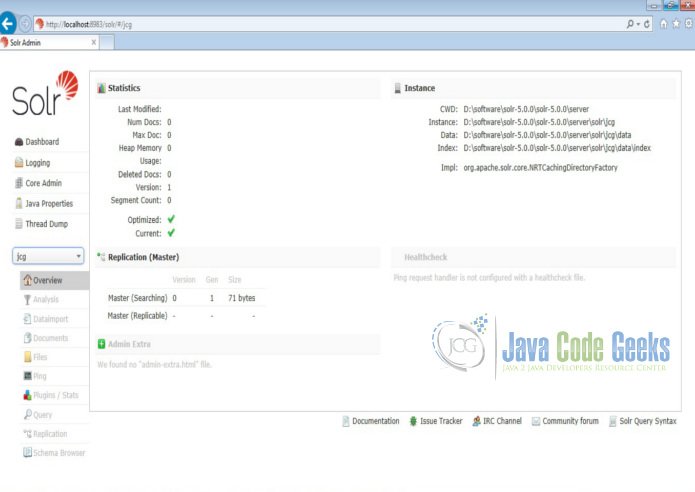
Solr jcg core
2.2突出显示配置
打开文件夹server\solr\jcg\conf下的文件server\solr\jcg\conf以了解突出显示的配置。在文件搜索solr.HighlightComponent 。 本节有各种各样的默认fragmenter和formatter配置。
由于我们使用引用配置sample_techproducts_configs创建了我们的核心,所有默认配置都继承到我们的核心。我们还可以创建基本核心,并包括参考solr文档的突出显示配置参数。
3.索引数据
Apache Solr附带一个名为SimplePostTool的独立Java程序。 该程序打包到JAR中,安装在example\exampledocs文件夹下。
现在,我们导航到命令提示符中的example\exampledocs文件夹,并键入以下命令。您将看到一堆使用该工具的选项。
java -jar post.jar -h
使用格式一般如下
Usage: java [SystemProperties] -jar post.jar [-h|-] [<file|folder|url|arg>
 [<file|folder|url|arg>...]]
正如我们前面所说,我们将索引solr安装附带的“books.csv”文件中的数据。 我们将在命令提示符中导航到solr-5.0.0\example\exampledocs并发出以下命令。
java -Dtype=text/csv -Durl=http://localhost:8983/solr/jcg/update -jar post.jar books.csv
这里使用的SystemProperties是:
- -Dtype - 数据文件的类型。
- -Durl - jcg核心的URL。
文件“books.csv”现在将被索引,并且命令提示符将显示以下输出。
1 | <span class="notranslate"onmouseover="_tipon(this)"onmouseout="_tipoff()"><span class="google-src-text"style="direction: ltr; text-align: left">SimplePostTool version 5.0.0</span> SimplePostTool版本5.0.0</span> |
2 | <span class="notranslate"onmouseover="_tipon(this)"onmouseout="_tipoff()"><span class="google-src-text"style="direction: ltr; text-align: left">Posting files to [base] urlhttp://localhost:8983/solr/jcg/update using content-typetext/csv...</span>将文件发布到[base] url http:// localhost:8983 / solr / jcg / update使用content-typetext / csv ...</span> |
3 | <span class="notranslate"onmouseover="_tipon(this)"onmouseout="_tipoff()"><span class="google-src-text"style="direction: ltr; text-align: left">POSTingfile books.csv to [base]</span>将文件books.csv发布到[base]</span> |
4 | <span class="notranslate"onmouseover="_tipon(this)"onmouseout="_tipoff()"><span class="google-src-text"style="direction: ltr; text-align: left">1 files indexed.</span> 1个文件已索引。</span> |
5 | <span class="notranslate"onmouseover="_tipon(this)"onmouseout="_tipoff()"><span class="google-src-text"style="direction: ltr; text-align: left">COMMITting Solr index changes tohttp://localhost:8983/solr/jcg/update...</span>提交Solr索引更改为http:// localhost:8983 / solr / jcg / update ...</span> |
6 | <span class="notranslate"onmouseover="_tipon(this)"onmouseout="_tipoff()"><span class="google-src-text"style="direction: ltr; text-align: left">Time spent: 0:00:00.604</span>所用时间:0:00:00.604</span> |
4.设置Web项目
我们将使用jQuery Ajax来消费来自Solr的数据。 首先,我们将为一个简单的Web应用程序设置maven项目。
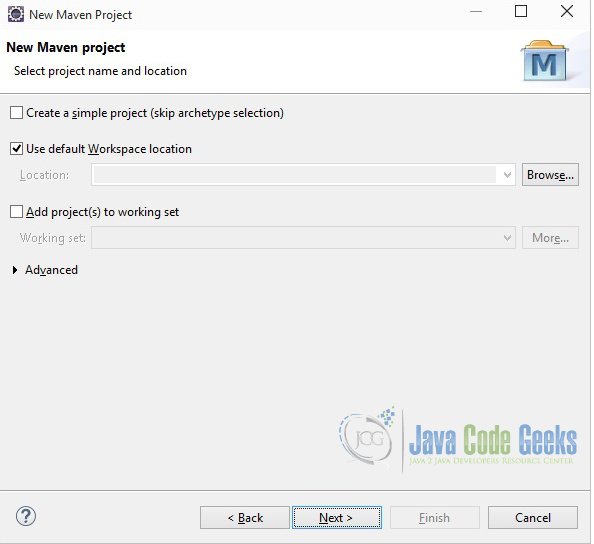
在eclipse去文件 - >新建 - >其他 - > Maven项目。
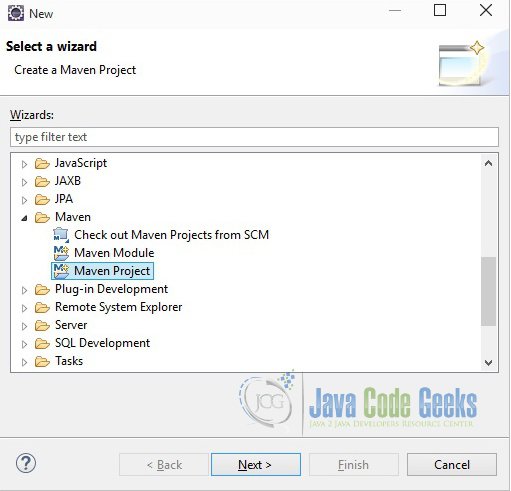
Maven - 步骤1
在向导的“选择项目名称和位置”页面中,确保未选中“创建简单项目(跳过原型选择)”选项,单击“下一步”继续使用默认值。
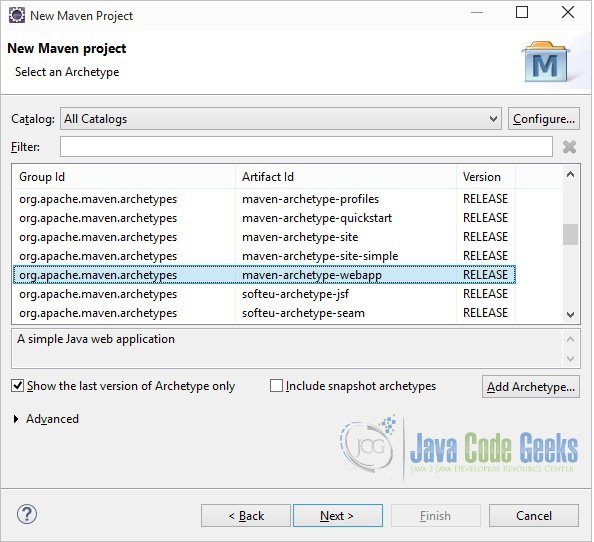
Maven - 步骤2
在这里选择“maven-archetype-webapp”,然后单击下一步。
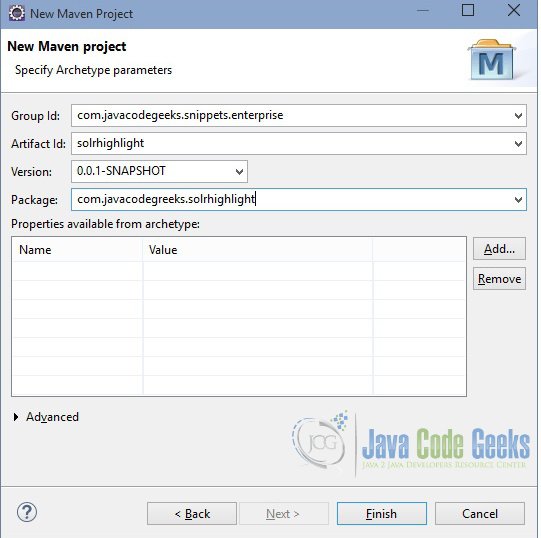
Maven - 步骤3
在向导的“输入工件ID”页面中,您可以定义项目的名称和主包。 将“Group Id”变量设置为"com.javacodegeeks.snippets.enterprise" ,将“Artifact Id”变量设置为"solrhighlight" 。对于包,输入"com.javacodegreeks.solrhighlight" ,然后单击“完成”退出向导并创建项目。
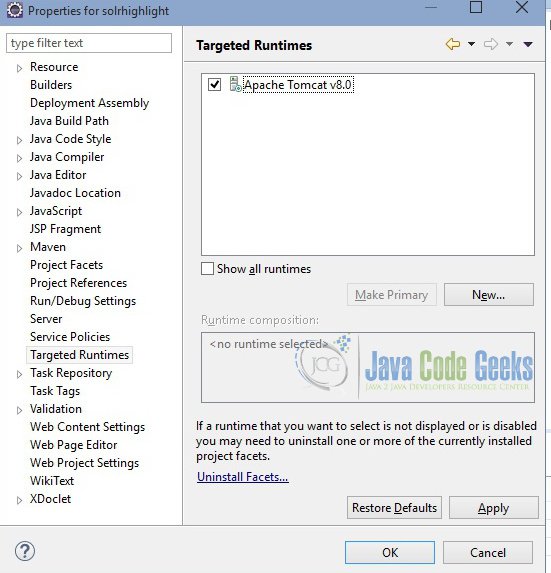
Maven - 步骤4
如果在index.jsp中看到任何错误,请为项目设置目标运行时。
Maven - 步骤5
现在在webapp文件夹中创建一个名为highlight.html的文件。我们使用托管在云上的jQuery。 我们将使用jQuery AJAX从Solr获取数据,并将突出显示的响应绑定到结果div。
highlight.html
01 | <spanclass="notranslate"onmouseover="_tipon(this)"onmouseout="_tipoff()"><spanclass="google-src-text"style="direction: ltr; text-align: left"><!DOCTYPE html></span> <!DOCTYPE html></span> |
02 | <spanclass="notranslate"onmouseover="_tipon(this)"onmouseout="_tipoff()"><spanclass="google-src-text"style="direction: ltr; text-align: left"><html></span> <html></span> |
03 | <spanclass="notranslate"onmouseover="_tipon(this)"onmouseout="_tipoff()"><spanclass="google-src-text"style="direction: ltr; text-align: left"><head></span> <head></span> |
04 | <spanclass="notranslate"onmouseover="_tipon(this)"onmouseout="_tipoff()"><spanclass="google-src-text"style="direction: ltr; text-align: left"><metacharset="ISO-8859-1"></span> <metacharset =“ISO-8859-1”></span> |
05 | <spanclass="notranslate"onmouseover="_tipon(this)"onmouseout="_tipoff()"><spanclass="google-src-text"style="direction: ltr; text-align: left"><title>Solr highlight</title></span> <title> Solr高亮显示</ title></span> |
06 | <spanclass="notranslate"onmouseover="_tipon(this)"onmouseout="_tipoff()"><spanclass="google-src-text"style="direction: ltr; text-align: left"><link</span> <link</span> |
07 | <spanclass="notranslate"onmouseover="_tipon(this)"onmouseout="_tipoff()"><spanclass="google-src-text"style="direction: ltr; text-align: left">href="http://code.jquery.com/ui/1.10.4/themes/ui-lightness/jquery-ui.css"</span> href =“http://code.jquery.com/ui/1.10.4/themes/ui-lightness/jquery-ui.css”</span> |
08 | <spanclass="notranslate"onmouseover="_tipon(this)"onmouseout="_tipoff()"><spanclass="google-src-text"style="direction: ltr; text-align: left">rel="stylesheet"></link></span> rel =“stylesheet”> </ link></span> |
09 | <spanclass="notranslate"onmouseover="_tipon(this)"onmouseout="_tipoff()"><spanclass="google-src-text"style="direction: ltr; text-align: left"><scriptsrc="http://code.jquery.com/jquery-1.10.2.js"></script></span> <script src =“http://code.jquery.com/jquery-1.10.2.js”> </script></span> |
10 | <spanclass="notranslate"onmouseover="_tipon(this)"onmouseout="_tipoff()"><spanclass="google-src-text"style="direction: ltr; text-align: left"><scriptsrc="http://code.jquery.com/ui/1.10.4/jquery-ui.js"></script></span> <script src =“http://code.jquery.com/ui/1.10.4/jquery-ui.js”> </script></span> |
11 | <spanclass="notranslate"onmouseover="_tipon(this)"onmouseout="_tipoff()"><spanclass="google-src-text"style="direction: ltr; text-align: left"><script></span> <script></span> |
12 | <spanclass="notranslate"onmouseover="_tipon(this)"onmouseout="_tipoff()"><spanclass="google-src-text"style="direction: ltr; text-align: left">function search() {</span> function search(){</span> |
13 | <spanclass="notranslate"onmouseover="_tipon(this)"onmouseout="_tipoff()"><spanclass="google-src-text"style="direction: ltr; text-align: left">var URL_PREFIX = "http://localhost:8983/solr/jcg/select?q=cat:book&hl=true&hl.q=";</span> var URL_PREFIX =“http:// localhost:8983 / solr / jcg / select?q = cat:book&hl = true&hl.q =”;</span> |
14 | <spanclass="notranslate"onmouseover="_tipon(this)"onmouseout="_tipoff()"><spanclass="google-src-text"style="direction: ltr; text-align: left">var URL_SUFFIX = "&hl.fl=*&hl.simple.pre=<strong>&hl.simple.post=</strong>&wt=json";</span> var URL_SUFFIX =“&hl.fl = *&hl.simple.pre = <strong>&hl.simple.post = </strong>&wt = json”;</span> |
15 | <spanclass="notranslate"onmouseover="_tipon(this)"onmouseout="_tipoff()"><spanclass="google-src-text"style="direction: ltr; text-align: left">var URL = URL_PREFIX + $("#searchBox").val() + URL_SUFFIX;</span> var URL = URL_PREFIX + $(“#searchBox”)。val()+ URL_SUFFIX;</span> |
16 | <spanclass="notranslate"onmouseover="_tipon(this)"onmouseout="_tipoff()"><spanclass="google-src-text"style="direction: ltr; text-align: left">$.ajax({</span> $ .ajax({</span> |
17 | <spanclass="notranslate"onmouseover="_tipon(this)"onmouseout="_tipoff()"><spanclass="google-src-text"style="direction: ltr; text-align: left">url : URL,</span> url:URL,</span> |
18 | <spanclass="notranslate"onmouseover="_tipon(this)"onmouseout="_tipoff()"><spanclass="google-src-text"style="direction: ltr; text-align: left">success : function(data) {</span> success:function(data){</span> |
19 | <spanclass="notranslate"onmouseover="_tipon(this)"onmouseout="_tipoff()"><spanclass="google-src-text"style="direction: ltr; text-align: left">var docs = JSON.stringify(data.highlighting);</span> var docs = JSON.stringify(data.highlighting);</span> |
20 | <spanclass="notranslate"onmouseover="_tipon(this)"onmouseout="_tipoff()"><spanclass="google-src-text"style="direction: ltr; text-align: left">var jsonData = JSON.parse(docs);</span> var jsonData = JSON.parse(docs);</span> |
21 | <spanclass="notranslate"onmouseover="_tipon(this)"onmouseout="_tipoff()"><spanclass="google-src-text"style="direction: ltr; text-align: left">$("#result").html("");</span> $(“#result”)。html(“”);</span> |
22 | <spanclass="notranslate"onmouseover="_tipon(this)"onmouseout="_tipoff()"><spanclass="google-src-text"style="direction: ltr; text-align: left">$.map(jsonData, function(value, key) {</span> $ .map(jsonData,function(value,key){</span> |
23 | <spanclass="notranslate"onmouseover="_tipon(this)"onmouseout="_tipoff()"><spanclass="google-src-text"style="direction: ltr; text-align: left">if (value.name === undefined) {</span> if(value.name === undefined){</span> |
24 | <spanclass="notranslate"onmouseover="_tipon(this)"onmouseout="_tipoff()"><spanclass="google-src-text"style="direction: ltr; text-align: left">//do nothing</span> //没做什么</span> |
25 | <spanclass="notranslate"onmouseover="_tipon(this)"onmouseout="_tipoff()"><spanclass="google-src-text"style="direction: ltr; text-align: left">} else {</span> } else {</span> |
26 | <spanclass="notranslate"onmouseover="_tipon(this)"onmouseout="_tipoff()"><spanclass="google-src-text"style="direction: ltr; text-align: left">var content = $("#result").html();</span> var content = $(“#result”)。html();</span> |
27 | <spanclass="notranslate"onmouseover="_tipon(this)"onmouseout="_tipoff()"><spanclass="google-src-text"style="direction: ltr; text-align: left">$("#result").html(</span> $(“#result”)。html(</span> |
28 | <spanclass="notranslate"onmouseover="_tipon(this)"onmouseout="_tipoff()"><spanclass="google-src-text"style="direction: ltr; text-align: left">content + "<p>" + value.name[0] + "</p>");</span> content +“<p>”+ value.name [0] +“</p>”);</span> |
29 | <spanclass="notranslate"onmouseover="_tipon(this)"onmouseout="_tipoff()"><spanclass="google-src-text"style="direction: ltr; text-align: left">}</span> }}</span> |
30 | <spanclass="notranslate"onmouseover="_tipon(this)"onmouseout="_tipoff()"><spanclass="google-src-text"style="direction: ltr; text-align: left">});</span> });</span> |
31 | <spanclass="notranslate"onmouseover="_tipon(this)"onmouseout="_tipoff()"><spanclass="google-src-text"style="direction: ltr; text-align: left">},</span> },</span> |
32 | <spanclass="notranslate"onmouseover="_tipon(this)"onmouseout="_tipoff()"><spanclass="google-src-text"style="direction: ltr; text-align: left">dataType : 'jsonp',</span> dataType:'jsonp',</span> |
33 | <spanclass="notranslate"onmouseover="_tipon(this)"onmouseout="_tipoff()"><spanclass="google-src-text"style="direction: ltr; text-align: left">jsonp : 'json.wrf'</span> jsonp:'json.wrf'</span> |
34 | <spanclass="notranslate"onmouseover="_tipon(this)"onmouseout="_tipoff()"><spanclass="google-src-text"style="direction: ltr; text-align: left">});</span> });</span> |
35 | <spanclass="notranslate"onmouseover="_tipon(this)"onmouseout="_tipoff()"><spanclass="google-src-text"style="direction: ltr; text-align: left">}</span> }}</span> |
36 | <spanclass="notranslate"onmouseover="_tipon(this)"onmouseout="_tipoff()"><spanclass="google-src-text"style="direction: ltr; text-align: left"></script></span> </ script></span> |
37 | <spanclass="notranslate"onmouseover="_tipon(this)"onmouseout="_tipoff()"><spanclass="google-src-text"style="direction: ltr; text-align: left"></head></span> </ head></span> |
38 | <spanclass="notranslate"onmouseover="_tipon(this)"onmouseout="_tipoff()"><spanclass="google-src-text"style="direction: ltr; text-align: left"><body></span> <body></span> |
39 | <spanclass="notranslate"onmouseover="_tipon(this)"onmouseout="_tipoff()"><spanclass="google-src-text"style="direction: ltr; text-align: left"><div></span> <div></span> |
40 | <spanclass="notranslate"onmouseover="_tipon(this)"onmouseout="_tipoff()"><spanclass="google-src-text"style="direction: ltr; text-align: left"><p>Type The or Game or A or of and click on Search</p></span> <p>键入或游戏或A或of,然后单击搜索</ p></span> |
41 | <spanclass="notranslate"onmouseover="_tipon(this)"onmouseout="_tipoff()"><spanclass="google-src-text"style="direction: ltr; text-align: left"><labelfor="searchBox">Tags: </label> <inputid="searchBox"></input> <input</span> <labelfor =“searchBox”>标签:</ label> <inputid =“searchBox”> </ input> <input</span> |
42 | <spanclass="notranslate"onmouseover="_tipon(this)"onmouseout="_tipoff()"><spanclass="google-src-text"style="direction: ltr; text-align: left">type="button" value="Search" onclick="search();"></input></span> type =“button”value =“Search”onclick =“search();”> </ input></span> |
43 | <spanclass="notranslate"onmouseover="_tipon(this)"onmouseout="_tipoff()"><spanclass="google-src-text"style="direction: ltr; text-align: left"></div></span> </ div></span> |
44 | <spanclass="notranslate"onmouseover="_tipon(this)"onmouseout="_tipoff()"><spanclass="google-src-text"style="direction: ltr; text-align: left"><divid="result"></div></span> <divid =“result”> </ div></span> |
45 | <spanclass="notranslate"onmouseover="_tipon(this)"onmouseout="_tipoff()"><spanclass="google-src-text"style="direction: ltr; text-align: left"></body></span> </ body></span> |
46 | <spanclass="notranslate"onmouseover="_tipon(this)"onmouseout="_tipoff()"><spanclass="google-src-text"style="direction: ltr; text-align: left"></html></span> </ html></span> |
由于Solr在不同的端口上运行,请求(网页)从另一个端口启动,因此我们可能会遇到跨域问题。为了克服这个问题,我们必须使用jsonp 。
看看在html的Solr查询中使用的参数。
- hl - 设置为true时,将在查询响应中生成突出显示的代码段。
- hl.q - 指定用于突出显示的覆盖查询项。
- hl.fl - 指定要突出显示的字段列表。
- hl.simple.pre - 指定应在突出显示的术语之前出现的文本。
- hl.simple.post - 指定应在突出显示的术语后出现的文本。
有关参数选项的完整列表,请参阅Solr文档。
现在我们可以使用Run as - > Maven clean然后Run as - > Maven install来创建部署包。这将在目标文件夹中创建一个war文件。 生成的war文件必须放在tomcat的webapps文件夹中。现在我们可以启动服务器了。
打开以下URL并键入“game”。 这将带来书籍有标题游戏的结果,并突出显示。
http://localhost:8080/solrhighlight/highlight.html
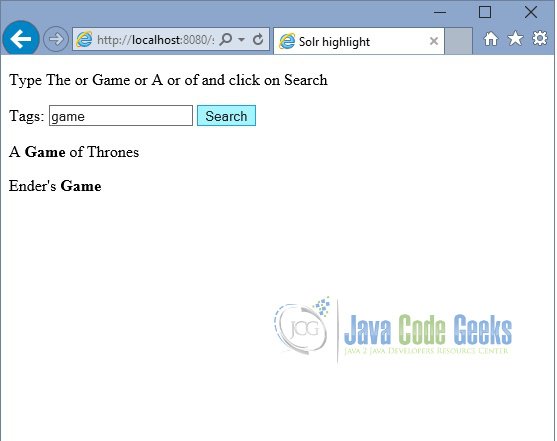
突出显示 - 输出
5.下载Eclipse项目
这是Solr的一个例子。

 浙公网安备 33010602011771号