


Ubuntu 20.04 重置 root 密码
original website: https://linuxconfig.org/ubuntu-20-04-reset-root-password
The objective of this tutorial is to reset a lost root or user password on Ubuntu 20.04 Focal Fossa Linux.
In this tutorial you will learn:
- How to gain root shell without password
- How to mount root (/) directory read/write
- How to reset root password
- How to reset user password
Ubuntu 20.04 reset root password
Software Requirements and Conventions Used
| Category | Requirements, Conventions or Software Version Used |
|---|---|
| System | Installed Ubuntu 20.04 or upgraded Ubuntu 20.04 Focal Fossa |
| Software | N/A |
| Other | Privileged access to your Linux system as root or via the sudo command. |
| Conventions | # – requires given linux commands to be executed with root privileges either directly as a root user or by use of sudo command$ – requires given linux commands to be executed as a regular non-privileged user |
Ubuntu 20.04 reset root password step by step instructions
-
步骤一

The first step is to reboot into the GRUB menu. If Ubuntu 20.04 is the only operating system installed you need to keep pressing
SHIFTfor the GRUB menu to show up. Next, while yourUbuntuboot menu is highlighted presseto edit the Grub’s boot prompt. -
步骤二

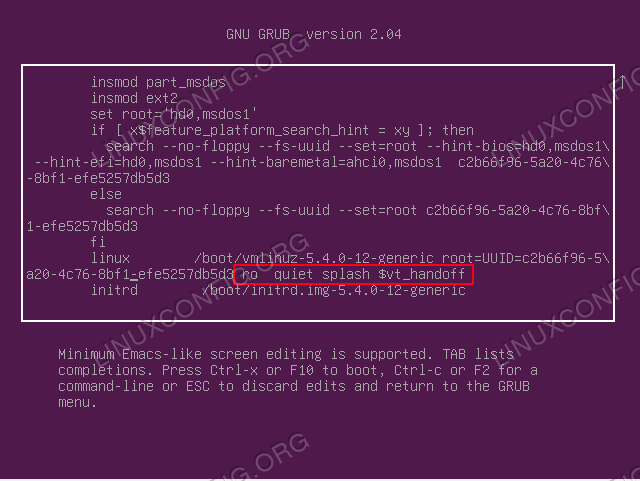
Using your navigational arrows locate the line containing the following string
ro quiet splash $vt_handoff -
步骤三

Replace the string
ro quiet splash $vt_handoffwith the following textrw init=/bin/bash. Once you have made the change pressF10to initiate the regular boot sequence. -
步骤四

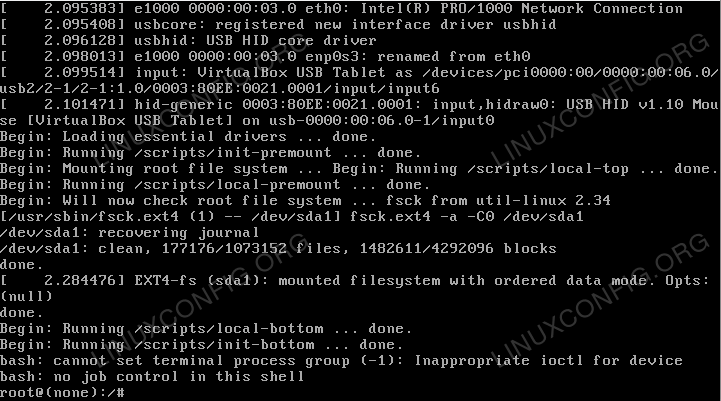
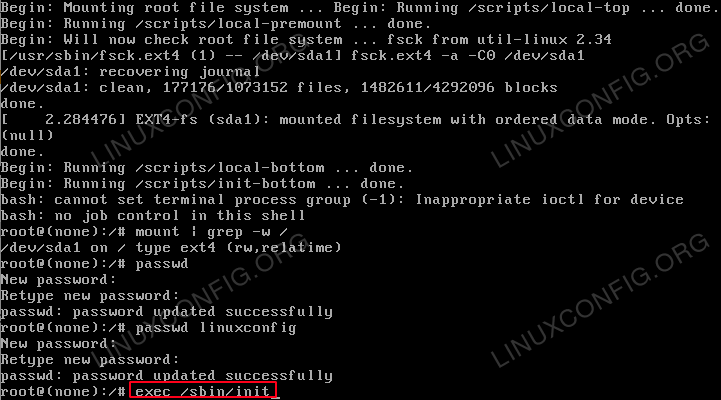
After the successful boot you should be welcomed with a root’s shell without a need to enter the root password
-
步骤五

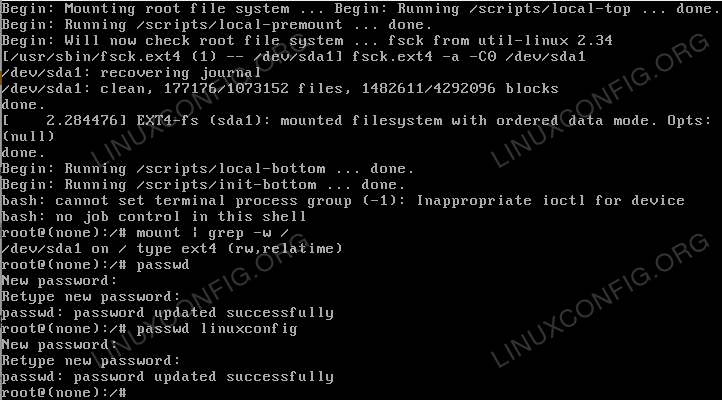
Confirm that the root (/) partition is mounted as
rw. To do so execute themount | grep -w /command. -
步骤六

At this point we are ready to reset the root password. To do so simply execute the
passwdcommand and follow the instructions. In case you need to reset your user password, simply execute thepasswdfollowed by your username. -
步骤七

All done. Your root password should be now recovered. All what remains is to reboot your Ubuntu 20.04 system. To do so execute the
exec /sbin/init



Troubleshooting
Enter new UNIX password:
Retype new UNIX password:
passwd: Authentication token manipulation error
passwd: password unchanged
Your root partition is mounted read-only. Try:
# mount -o remount,rw /
to resolve this issue.
[ end Kernel panic - not syncing: Attempted to kill init! exit code=0x0007f00
Make sure that you removed the splash boot option when editing the grub’s menu item.
When trying to reboot with the reboot command I get:
Failed to connect to bus: No such file or directory
Failed to talk to init daemon.
Ignore, and reboot with:
# exec /sbin/init
Related Linux Tutorials:
- Things to install on Ubuntu 20.04
- Things to do after installing Ubuntu 20.04 Focal Fossa Linux
- How to mount ISO image on Linux
- Ubuntu 20.04 Tricks and Things you Might not Know
- Ubuntu 20.04 Guide
- Configure systems to mount file systems at boot by…
- RHEL 8 / CentOS 8 recover root password
- Open terminal as root on Ubuntu 20.04 Focal Fossa
- How to install Gnome Shell Extensions on Ubuntu…
- How to open ISO files on Ubuntu Linux
Categories Ubuntu Tags administration, security, ubuntu, ubuntu 20.04
Post navigation

 浙公网安备 33010602011771号