
统计学习方法——svm
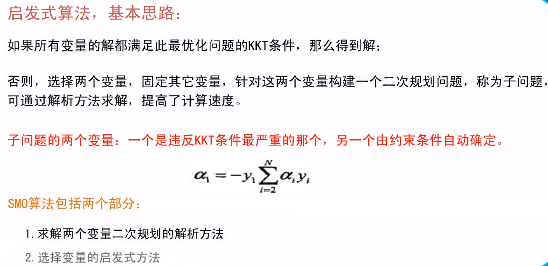
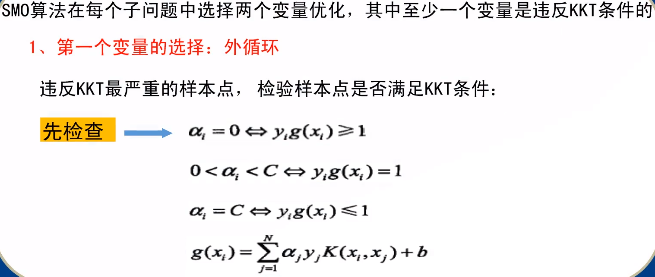
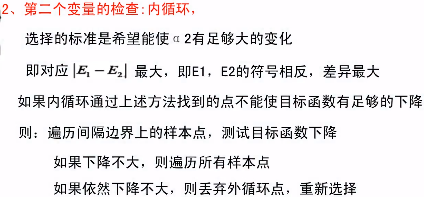
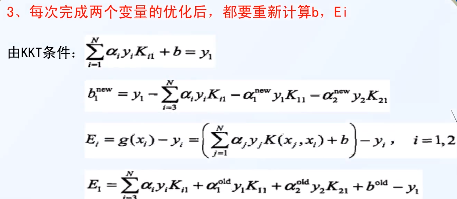
效率???
SMO参考链接:
http://svmlight.joachims.org/
https://www.csie.ntu.edu.tw/~cjlin/libsvm/#download
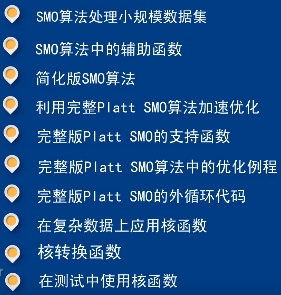
包含的内容如下:
启发式搜索算法 优化算法参考链接:
https://blog.csdn.net/u011835903/category_10226833_2.html 智能优化算法网址
https://blog.csdn.net/u011835903/article/details/110523352 基于麻雀搜索算法优化的SVM数据分类预测
https://blog.csdn.net/u011835903/article/details/107716390智能优化算法:灰狼优化算法原理——附代码
https://blog.csdn.net/u011835903/article/details/107535864智能优化算法:海鸥优化算法原理——附代码
https://blog.csdn.net/u011835903/article/details/107559167智能优化算法:鲸鱼优化算法原理——附代码
#!/usr/bin/env python3
# -*- coding: utf-8 -*-

' 统计学习方法 —— 支持向量机 (support vector machines——SVM) '
'svm 对应的凸二次规划问题的最优化算法有很多,以下是其中之一实现:' \
' 序列最小最优化算法(sequential minimal optimization——SMO) '
' 初始参数输入:  ' \
'   1. 惩罚参数C  (C > 0)   :C值大时对误差分类的惩罚增大, C值小时对误差分类的惩罚减小,在间隔尽量大(欠拟合)和 误分类点数尽量少(过拟合) 之间做调和' \
'   2. 核函数kernelFunc : 常用核函数  线性svm;    "polynomial":   多项式;    "gaussian": 高斯;' \

__author__ = 'qfr'

import matplotlib
import matplotlib.pyplot as plt
import numpy as np
from numpy import *;#导入numpy的库函数
import sys
import random
import copy
import datetime

# SMO算法实现
class SVM_Smo(object):
    def __init__(self, c = 100, kfunc = "polynomial", sigma = 1.0, p = 1.0):
        # 初始参数设置
        self.__c = c  # 惩罚参数
        self.__sigma = sigma        # 高斯核函数 标准差参数
        self.__p = p                # 多项式核函数的幂次方
        if kfunc == "polynomial":
            self.__kernelFunc = self.__CalcKPolynomial
        else:
            self.__kernelFunc = self.__CalcKGaussian
        self.__b = 0.0
        self.__pointId = []

    # 多项式核函数计算
    def __CalcKPolynomial(self, x1, x2):
        sum = 0;
        for i in range(x1.size):
            sum = sum + x1[i] * x2[i]
        return (sum + 1)**self.__p

    # 高斯核函数计算
    def __CalcKGaussian(self, x1, x2):
        sum = 0;
        for i in range(x1.size):
            tem = (x1[i] - x2[i]) ** 2
            sum = sum + tem
        tem = -1.0 * sum / 2.0 / (self.__sigma ** 2)
        return np.exp(tem)

    # 计算g(xi)
    def __CalcGxi(self, xi):
        sum = 0.0
        for i in range(self.__a.size):
            tem = self.__a[i] * self.__y[i] * self.__kernelFunc(xi, self.__x[i])
            sum = sum + tem
        return sum + self.__b

    # 选择第一个变量
    def __SelectA1(self, g):
        # 先遍历 在间隔边界上的支持向量点 0 < a[i] < C
        for i in range(self.__a.size):
            if self.__a[i] > 0 and self.__a[i] < self.__c:
                if not math.isclose(self.__y[i] * g[i], 1.0, abs_tol=1e-08):         # 违反KKT条件
                    return i

        # 其次, 遍历 大于间隔边界的样本  a[i] ==  0
        for i in range(self.__a.size):
            if math.isclose(self.__a[i], 0.0, abs_tol=1e-08):
                if self.__y[i] * g[i] < 1.0:         # 违反KKT条件
                    return i

        # 最后, 遍历间隔边界以里的边界点  a[i] ==  C (可能在间隔边界和分离超平面之前,可能在分离超平面另一侧,即误分类)
        for i in range(self.__a.size):
            if math.isclose(self.__a[i], self.__c, abs_tol=1e-08):
                if self.__y[i] * g[i] > 1.0:  # 违反KKT条件
                    return i
        return -1

    # 选择第二个变量
    def __SelectA2(self, e, idx1):
        # 1 选择|E1-E2|最大的 a2
        max = 0.0
        idx2 = -1
        for i in range(e.size):
            if idx1 == i:
                continue
            newA1, newA2 = self.__UpdateA12(e, idx1, i)
            tem = abs(newA2)   # abs(e[idx1] - e[i])
            if tem > max:
                max = tem
                idx2 = i

        # 2 如果选择的a2不能使目标函数有足够的下降,采用启发式规则继续选择a2, 直到目标函数有足够的下降

        # 2.1 先遍历间隔边界上的支持向量点

        # 2.2 其次遍历整个数据集

        # 2.3 最后放弃第一个a1, 通过外层循环寻求另一个a1
        return idx2

    def __UpdateEi(self, g, e):
        for i in range(self.__a.size):
            g[i] = self.__CalcGxi(self.__x[i])
            e[i] = g[i] - self.__y[i]

    def __UpdateA12(self, e, idx1, idx2):
        # 求上下边界
        l = zeros(2)
        h = zeros(2)
        if math.isclose(self.__y[idx1], self.__y[idx2], abs_tol=1e-08):
            l[0] = 0
            l[1] = self.__a[idx2] + self.__a[idx1] - self.__c
            h[0] = self.__c
            h[1] = self.__a[idx2] + self.__a[idx1]
        else:
            l[0] = 0
            l[1] = self.__a[idx2] - self.__a[idx1]
            h[0] = self.__c
            h[1] = self.__c + self.__a[idx2] - self.__a[idx1]
        hMin = h.min()
        lMax = l.max()

        # 更新a2
        k11 = self.__kernelFunc(self.__x[idx1], self.__x[idx1])
        k22= self.__kernelFunc(self.__x[idx2], self.__x[idx2])
        k12 = self.__kernelFunc(self.__x[idx1], self.__x[idx2])
        n = k11 + k22 - 2 * k12
        newA2 = self.__a[idx2] + self.__y[idx2] * (e[idx1] - e[idx2]) / n
        # 边界限制
        if newA2 > hMin:
            newA2 = hMin
        if newA2 < lMax:
            newA2 = lMax

        # 更新a1
        newA1 = self.__a[idx1] + self.__y[idx1] * self.__y[idx2] * (self.__a[idx2] - newA2)
        return newA1, newA2

    def __UpdateB(self, e, newA1, newA2, idx1, idx2):
        k11 = self.__kernelFunc(self.__x[idx1], self.__x[idx1])
        k22 = self.__kernelFunc(self.__x[idx2], self.__x[idx2])
        k12 = self.__kernelFunc(self.__x[idx1], self.__x[idx2])
        b1_new = self.__b - e[idx1] - self.__y[idx1] * k11 * (newA1 - self.__a[idx1]) - \
                 self.__y[idx2] * k12 * (newA2 - self.__a[idx2])
        b2_new = self.__b - e[idx2] - self.__y[idx2] * k22 * (newA2 - self.__a[idx2]) - \
                 self.__y[idx1] * k12 * (newA1 - self.__a[idx1])
        if newA1 > 0 and newA1 < self.__c:
            tem = b1_new
        elif newA2 > 0 and newA2 < self.__c:
            tem = b2_new
        else:
            tem = (b1_new + b2_new) / 2.0
        #print("b", tem - self.__b)
        self.__b = tem

            # smo迭代停止判断
    def __IsIterationStop(self, g):
        sum = 0.0
        for i in range(self.__a.size):
            sum = sum + self.__a[i] * self.__y[i]
            tem = self.__y[i] * g[i]
            if self.__a[i] > 0 and self.__a[i] < self.__c:
                if not math.isclose(tem, 1.0, abs_tol=1e-08):
                    #print("边界点不满足")
                    return False
            elif math.isclose(self.__a[i], 0.0, abs_tol=1e-08):
                if tem < 1.0:
                    #print("正确分类点不满足")
                    return False
            elif math.isclose(self.__a[i], self.__c, abs_tol=1e-08):
                if tem > 1.0:
                    #print("误分类点不满足")
                    return False
            else:
                print("异常情况不满足")
                return False
        if math.isclose(sum, 0.0, abs_tol=1e-08):
            print("训练完成 done!!!")
            return True
        return False

    # smo迭代优化
    def __SmoIteration(self):
        # 中间定义
        g = np.zeros(self.__y.size)
        e = np.zeros(self.__y.size)
        self.__UpdateEi(g, e)

        # 循环更新
        while True:
            # 选择a1 a2
            idx1 = self.__SelectA1(g)
            if idx1 < 0:
                break
            idx2 = self.__SelectA2(e, idx1)
            if idx2 < 0:
                continue

            # 更新a, b
            newA1, newA2 = self.__UpdateA12(e, idx1, idx2)
            #print("idx1:", idx1, "a:", newA1 - self.__a[idx1])
            #print("idx2:", idx2, "a:", newA2 - self.__a[idx2])

            self.__UpdateB(e, newA1, newA2, idx1, idx2)

            self.__a[idx1] = newA1
            self.__a[idx2] = newA2

            # 重新计算中间变量
            self.__UpdateEi(g, e)
            # 判断是否停止
            if self.__IsIterationStop(g):
                break

    # 数据输入,训练入口
    def Smo(self, dataT, dataY):
        # 初始内部参数保存
        self.__x = dataT
        self.__y = dataY
        self.__a = np.zeros(dataY.size)
        # 训练模型
        self.__SmoIteration()
        # 存储支持向量点Id
        for i in range(self.__a.size):
            if self.__a[i] > 0 and self.__a[i] < self.__c:
                self.__pointId.append(i)

    # 计算并返回支撑向量点
    def GetSvmPoint(self):
        svmX = []
        svmY = []
        for i in self.__pointId:
                svmX.append(self.__x[i][0])
                svmY.append(self.__x[i][1])
        return svmX, svmY

    # 计算并返回分离曲面
    def GetSvmSurface(self):
        pass

    # 预测新的数据分类
    def predict(self, x):
        y = []
        for i in x:
            tem = self.__CalcGxi(i)
            if tem >= 0:
                y.append(1)
            else:
                y.append(-1)
        return np.array(y)

    # 计算样本点到计算超平面的函数距离
    def decision_function(self, x):
        y = []
        for i in x:
            tem = self.__CalcGxi(i)
            if tem >= 0:
                y.append(tem)
            else:
                y.append(-1.0 * tem)
        return np.array(y)

def plot_dataset(X, y, axes):
    plt.plot( X[:,0][y==-1], X[:,1][y==-1], "bs" )
    plt.plot( X[:,0][y==1], X[:,1][y==1], "g^" )
    plt.axis( axes )
    plt.grid( True, which="both" )
    plt.xlabel(r"$x_l$")
    plt.ylabel(r"$x_2$")

# contour函数是画出轮廓,需要给出X和Y的网格,以及对应的Z,它会画出Z的边界(相当于边缘检测及可视化)
def plot_predict(s, axes):
    x0s = np.linspace(axes[0], axes[1], 200)
    x1s = np.linspace(axes[2], axes[3], 200)
    x0, x1 = np.meshgrid(x0s, x1s)

    X = np.c_[x0.ravel(), x1.ravel()]
    y_pred = s.predict(X).reshape(x0.shape)

    y_decision = s.decision_function(X).reshape(x0.shape)
    plt.contour(x0, x1, y_pred, cmap=plt.cm.winter, alpha=0.8)

    C = plt.contour( x0, x1, y_decision, cmap=plt.cm.winter, alpha=0.2 )
    plt.clabel(C, inline=True, fontsize=10)

if __name__=='__main__':
    start = datetime.datetime.now()
    fig1 = plt.figure()
    #  生成原始数据
    sigma = 3.0
    # 正类设置
    numP = 10
    xp0 = 30
    xp1 = 50
    # 负类设置
    numN = 10
    xn0 = 20
    xn1 = 58

    noise = sigma * np.random.randn(numP, 1)
    xp_1 = noise + xp0
    noise = sigma * np.random.randn(numP, 1)
    xp_2 = noise + xp1
    yp = np.ones(numP)

    sigma = 1
    noise = sigma * np.random.randn(numN, 1)
    xn_1 = noise + xn0
    noise = sigma * np.random.randn(numN, 1)
    xn_2 = noise + xn1
    yn = -1 * np.ones(numN)

    # 组成训练数据集
    Tp = np.insert(xp_1, [1], xp_2, axis=1)
    Tn = np.insert(xn_1, [1], xn_2, axis=1)
    T = np.vstack((Tp, Tn))     # 训练数据集
    Y = np.hstack((yp, yn))  # 标记结果

    # 对结果进行乱序
    for i in reversed(range(1, len(Y))):
        # pick an element in x[:i+1] with which to exchange x[i]
        j = np.random.randint(0, i + 1, 1)[0]
        Y[i], Y[j] = Y[j], Y[i]

        cc = copy.deepcopy(T[i])
        T[i] = copy.deepcopy(T[j])
        T[j] = copy.deepcopy(cc)

    end = datetime.datetime.now()
    start = end
    print("数据准备完成:", end - start)
    plot_dataset(T, Y, [15, 35, 45, 65]);

    s = SVM_Smo(c = 1)
    s.Smo(T, Y)

    end = datetime.datetime.now()
    print("数据训练done:", end - start)

    # 绘制分割线相关信息
    sx, sy = s.GetSvmPoint()
    plt.plot(sx, sy, 'r*')

    plot_predict(s, [15, 35, 45, 65])
    plt.show()
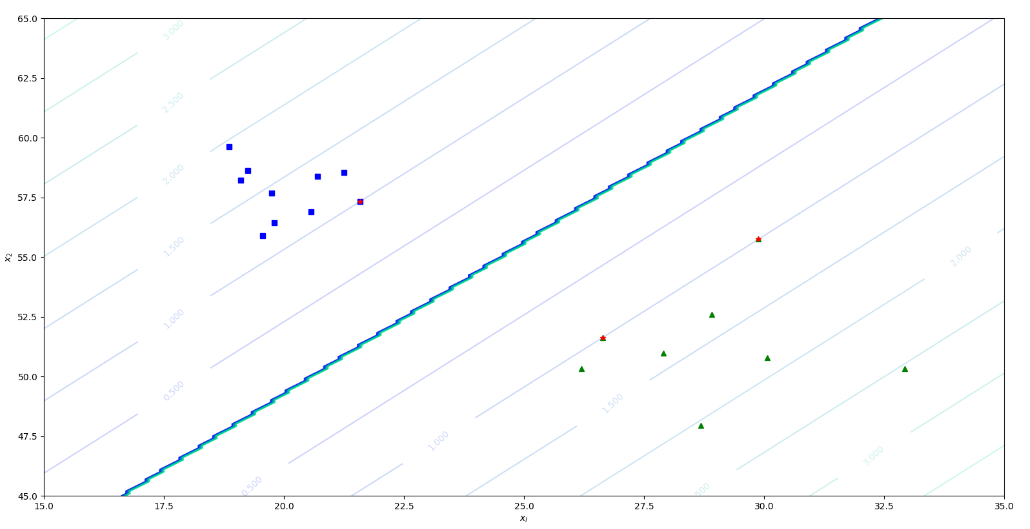
训练结果如下,示例:
记录每天生活的点点滴滴,呵呵呵呵呵呵

 浙公网安备 33010602011771号