

移动GIS中,通常将数据分为两大类:basemap layer和operational layer。前者是指漫游或导航时起参考作用的图层,这些图层内容通常不会变化,只起到视觉辅助作用,称为底图图层;后者是指存储GIS数据的图层,比如可通过这些图层来提供属性/空间查询操作,或者对其内容进行编辑,然后与服务器端进行同步,称为业务图层。
目前ArcGIS移动产品有5种,基于Windows Mobile平台的ArcPad和ArcGIS Mobile,这两个产品已经很成熟了,都有各自的离线缓存格式,其中ArcGIS Mobile从10版本开始,可以直接读取ArcGIS Server缓存地图服务的切片文件做为basemap layer,支持exploded和compact两种格式。
相对于以上两个老牌移动产品,三个刚出道的小弟ArcGIS for iOS,ArcGIS for Android和ArcGIS for Windows Phone就走了不同路线:依赖于ArcGIS Server的REST服务。因此几乎所有操作,包括显示地图,都需要用到ArcGIS Server发布的各种服务。这三个产品的离线功能将来肯定是会有的,但具体的时间表还无法确定。
针对ArcGIS for iOS/Android/Windows Phone,本文提出3种可行的离线底图(basemap layer)的解决方案,供各位参考。以ArcGIS for Windows Phone为例。
1、ArcGIS Server地图服务的Exploded格式缓存文件
ArcGIS API for Windows Phone中,提供了ArcGISTiledMapServiceLayer用来加载ArcGIS Server发布的缓存地图服务,它的原理是Map控件计算好需要加载的切片的row,col,level参数,利用ArcGISTiledMapServiceLayer里的GetTileUrl方法提供如何获得指定参数的切片文件,最后拼接成完整的地图。
因此我们可以通过继承ArcGISTiledMapServiceLayer的父类,TiledMapServiceLayer或TiledLayer,来实现自己的自定义图层,比如用它来加载Google Maps,天地图等各种地图。加载这些在线地图都是通过重写GetTileUrl()方法来实现的。
对于已经存放在硬盘上的缓存文件,该如何加载呢?这几个图层还有一个方法,GetTileSource。这个方法有一个onComplete action,可以传入ImageSource类型的参数,它比GetTileUrl来的更直接。其实GetTileSource方法中调用了GetTileUrl方法的结果(一个获得tile的url字符串),利用这个字符串向服务器端发送请求,请求回来的结果就是切片图片的二进制流,再将这个二进制流形成ImageSource,通过onComplete方法返回。
所以我们可以抛开GetTileUrl,直接重写GetTileSource方法,来根据row,col,level参数,读取地图服务的缓存文件。首先将Exploded格式的地图服务缓存文件拷贝到手机中:
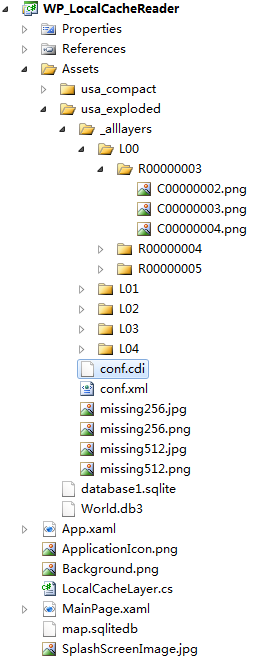
包含conf.cdi(ArcGIS Server 10版本中才有,记录了缓存的全图范围)和conf.xml文件的好处是,我们可以在代码中读取这两个文件来动态生成我们的Tiling Scheme,以完成图层初始化的工作。从配置文件中读取参数后,就可以重写GetTileSource方法了。部分代码如下:
1: protected override void GetTileSource(int level, int row, int col, Action<System.Windows.Media.ImageSource> onComplete)
2: {
3: string f = string.Empty;
4: if (_cacheTileFormat.ToLower().Contains("png"))
5: f = ".png";
6: else if (_cacheTileFormat.ToLower().Contains("jpeg") || _cacheTileFormat.ToLower().Contains("jpg"))
7: f = ".jpg";
8: else
9: throw new Exception("切片格式不明:" + _cacheTileFormat);
10: #region Exploded读取
11: if (_storageFormat == StorageFormat.esriMapCacheStorageModeExploded)
12: {
13: string baseUrl = _path;// "/WP_LocalCacheReader;component/Assets/usa_exploded/"
14: baseUrl += @"/_alllayers";
15: string l = "L";
16: l = level.ToString().PadLeft(2, '0');
17: string r = "R";
18: r = String.Format("{0:X}", row).PadLeft(8, '0');
19: string c = "C";
20: c = String.Format("{0:X}", col).PadLeft(8, '0');
21: string str = baseUrl
22: + @"/L" + l
23: + @"/R" + r
24: + @"/C" + c + f;
25: BitmapImage img = new BitmapImage(new Uri(str,UriKind.RelativeOrAbsolute))
26: {
27: CreateOptions = BitmapCreateOptions.DelayCreation
28: };
29: img.ImageFailed += (s, a) =>
30: {
31: string uri = _path + "/missing" + _tileRows.ToString() + f;
32: BitmapImage image = new BitmapImage(new Uri(uri, UriKind.RelativeOrAbsolute))
33: {
34: CreateOptions = BitmapCreateOptions.DelayCreation
35: };
36: onComplete(image);
37: return;
38: };
39: onComplete(img);
40: }
41: #endregion
42: }
当指定的切片文件不存在(也许还未创建)时,可以加载事先准备好的missing图片来替换。
2、ArcGIS Server地图服务的Compact格式缓存文件
这是ArcGIS Server 10推出的新的缓存格式,缓存图片都保存在.bundle文件中,一个bundle目前可存储128*128张切片。切片文件更少,主要目的是为了迁移方便。文档中并未给出读取这种格式文件的方法,不过牛魔王已经凭空推断出了这种格式的内容,这里就借鉴了他的方法。还是先将缓存文件拷贝到手机中: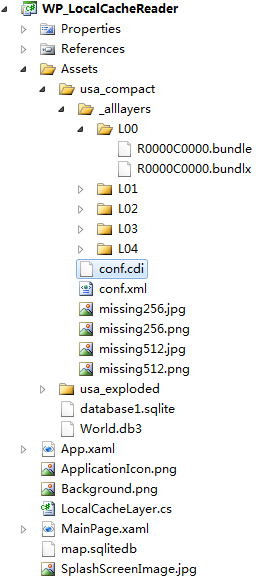
利用conf.cdi和conf.xml获得tiling scheme,之后重写GetTileSource方法。具体思路牛魔王文中已经给出,感兴趣的同学还是看原文,学习牛牛的思路比较好。
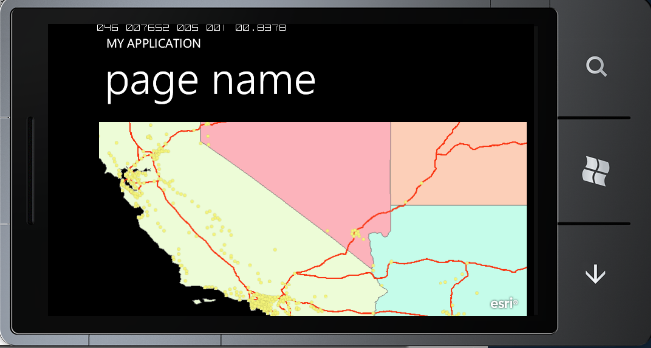
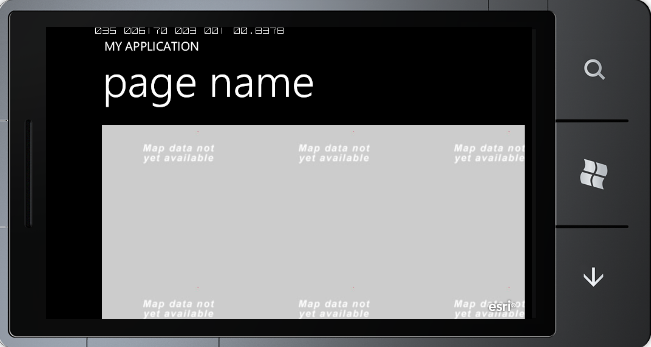
下面是读取两种缓存文件的效果: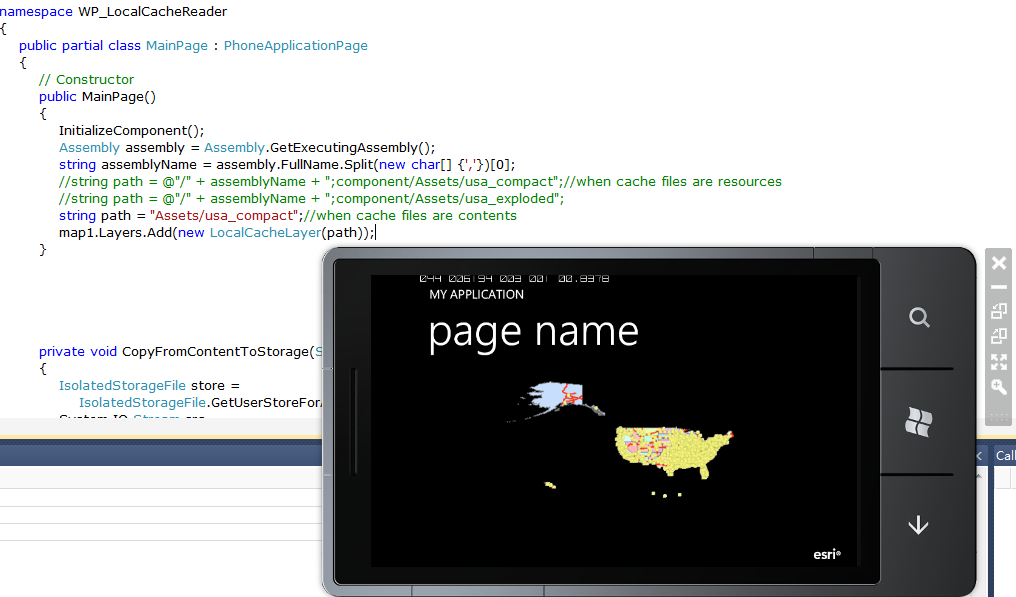
3、第三方离线地图文件
除了ArcGIS Server的缓存切片之外,我们还可以读取第三方的离线地图文件来做为我们的底图。比如以前面介绍过的Mobile Atlas Creator为例,我现在已经有了很多自己下载好的离线地图,如果能在ArcGIS移动客户端使用起步两全其美?其实在目前的离线导航软件中,很多都用sqlite数据库做为地图存储格式,因为它应用广泛,轻巧,紧凑,Android,iOS,Symbian等系统对它都有原生的支持。Mobile Atlas Creator中,RMaps和OruxMaps都用Sqlite保存离线地图。这里以应用较为广泛的RMaps格式为例,进行试验。
创建好的RMaps地图文件如下: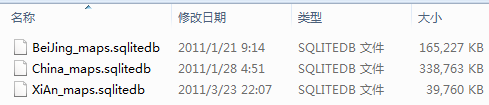
我们利用FireFox里的Sqlite Manager插件先来查看一下数据库的内容:
可以看出,我们所需的内容都保存在tiles这张表中,而x,y,z三个参数与我们所需的row,col,level很像。经过试验(保存一个全球范围的地图),很快验证出level=17-z。
参数有了,要如何读取切片呢?对于Sqlite,虽然目前Windows Phone还没有提供原生的支持,不过codeplex上已经有不少项目都提供了解决办法。我选择Sqlite Client for Windows Phone来读取RMaps的地图文件。下面是RMaps离线地图(Bing Maps)和ArcGIS Online上StreetMap叠加的效果: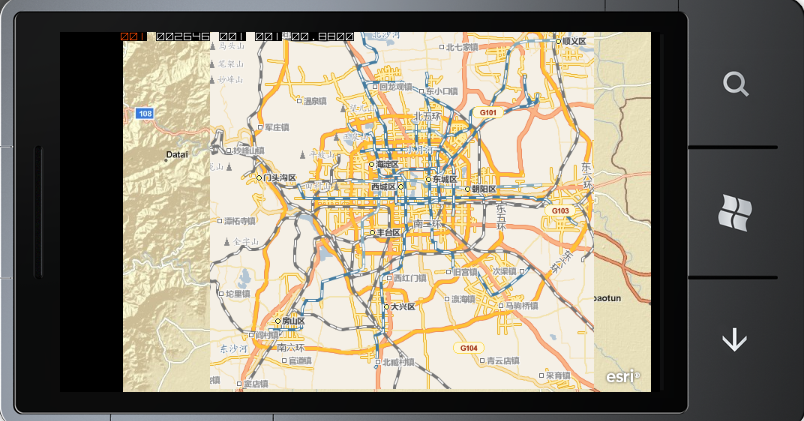
需要说明的是,不论是RMaps还是OruxMaps,都没有在数据库中保存tiling scheme的相关参数,所以我们不能为图层提供诸如FullExtent之类的参数。但这丝毫不影响我们的使用,我们可以为Map控件显示指定Extent,这样就可以直接显示我们的离线地图了。除了自己的地图数据之外,基本上所有数据源都使用一种空间参考,102100或者3857,你懂的。
这样即使我们没有ArcGIS Server软件,也能制作自己的底图了。这里有网友们已经下载好的各个城市的RMaps格式文件。
相对于RMaps之类的离线地图软件,ArcGIS的移动产品的优势除了不仅能够任意叠加地图数据,还有GraphicsLayer和服务器端强大的功能支持,在配合Windows Phone本身的SDK功能,你也可以做出一个功能全面的导航软件来。
关于离线地图文件的打包。1、在Silverlight程序中,Build Action的选择决定了文件最后的保存位置,比如你选择Resource,则会嵌入到工程的dll中,如果选择Content,则会保存在dll之外,xap文件之内。以上三种解决方案里,我们可以选择任意的Build Action,这样地图都会通过xap部署到手机里;如果有需要,我们还可以将文件拷贝到程序的IsolatedStorage中去。2、对于Exploded格式的缓存,WP的编程建议中提到,媒体文件Build Action设为Content效率会更高。3、对于Exploded格式的缓存,如果为了拷贝方便,我们也可以将其打包为.zip文件,部署到手机中,在程序加载的时候再将其解压缩来读取。
本文以ArcGIS for Windows Phone为例,讨论了3种离线底图的解决方案,文中所涉及的所有功能,ArcGIS for iOS和ArcGIS for Android同样适用。
-
-
-
-
龙剑


你好 能不能给一个重写GetTileSource的类的全部代码??
[Reply]
diligentpig

 Reply:
February 2nd, 2012 at 09:37一个完整的例子可以参考这个:
http://www.arcgis.com/home/item.html?id=d2b40d7f553947a2b575556b057f5dcf
或者用reflector看一下api里原来的代码。[Reply]
-
老王,啥时写一篇关于地图纠偏的文章?让我们拜读一下。
[Reply]
diligentpig

 Reply:
February 10th, 2012 at 10:58坐标偏移方面确实没什么研究,网上其他前辈应该写过不少,可以找找看。有心得肯定和大家分享:)
[Reply]
-
king.wang


能给我传一下例子中WP_LocalCacheReader的源码吗?谢谢
[Reply]
菩提老王

 Reply:
September 23rd, 2012 at 21:40供参考。
///
/// using for ArcGIS Server cache files
///public class LocalCacheLayer : TiledLayer
{
private Envelope _fullExtent;
private int _wkid;
private double _originX, _originY;
private int _tileCols, _tileRows, _dpi;
private TileInfo _tileInfo;
private string _cacheTileFormat;
private enum StorageFormat
{
esriMapCacheStorageModeExploded,
esriMapCacheStorageModeCompact
}
private StorageFormat _storageFormat;
private int _packetSize;
private string _path;///
/// using for WPF/WP
//////public LocalCacheLayer(string resourcePath)
{
_path = resourcePath;// “/WP_LocalCacheReader;component/Assets/usa_compact/”
Stream cdiStream = App.GetResourceStream(new Uri(resourcePath + “/conf.cdi”, UriKind.RelativeOrAbsolute)).Stream;
Stream xmlStream = App.GetResourceStream(new Uri(resourcePath + “/conf.xml”, UriKind.RelativeOrAbsolute)).Stream;
ReadTilingScheme(cdiStream, xmlStream);
}///
/// using for WPF/WP
/////////private void ReadTilingScheme(Stream cdiFile, Stream xmlFile)
{
//处理cdi文件,读取FullExtent
double xmin, xmax, ymin, ymax;
xmin = xmax = ymin = ymax = 0;
using (XmlReader reader = XmlReader.Create(cdiFile))
{
while (reader.Read())
{
switch (reader.NodeType)
{
case XmlNodeType.Element:
if (reader.Name == “XMin”)
xmin = reader.ReadElementContentAsDouble();
if (reader.Name == “YMin”)
ymin = reader.ReadElementContentAsDouble();
if (reader.Name == “XMax”)
xmax = reader.ReadElementContentAsDouble();
if (reader.Name == “YMax”)
ymax = reader.ReadElementContentAsDouble();
break;
case XmlNodeType.Text:break;
case XmlNodeType.XmlDeclaration:
case XmlNodeType.ProcessingInstruction:break;
case XmlNodeType.Comment:break;
case XmlNodeType.EndElement:break;
}
}
if (Math.Abs(xmin – 0) > 0.0001)
_fullExtent = new Envelope(xmin, ymin, xmax, ymax);
else
throw new Exception(“读取cdi文件的fullextent出错!”);
};
//处理xml文件,读取tiling shceme
using (XmlReader reader = XmlReader.Create(xmlFile))
{
while (reader.Read())
{
switch (reader.NodeType)
{
case XmlNodeType.Element:
if (reader.Name == “WKID”)
{
_wkid = reader.ReadElementContentAsInt();
_fullExtent.SpatialReference = new SpatialReference(_wkid);
}
if (reader.Name == “TileOrigin”)
{
//-400400
using (XmlReader r = reader.ReadSubtree())
{
while (r.Read())
{
if (r.Name == “X”)
_originX = r.ReadElementContentAsDouble();
if (r.Name == “Y”)
_originY = r.ReadElementContentAsDouble();
}
}
}
if (reader.Name == “TileCols”)
_tileCols = reader.ReadElementContentAsInt();
if (reader.Name == “TileRows”)
_tileRows = reader.ReadElementContentAsInt();
if (reader.Name == “DPI”)
_dpi = reader.ReadElementContentAsInt();
if (reader.Name == “LODInfos”)
{
//-080000000.019035688046642237…..
//ref:Reading number of elements of a XML using XMLReader http://forums.silverlight.net/forums/p/24245/86996.aspx
//先读取LODInfo个数
int count = 0;
using (XmlReader r = reader.ReadSubtree())
{
while (r.Read())
{
if (r.NodeType == XmlNodeType.Element && r.Name.Equals(“LODInfo”))
{
count++;
}
}
_tileInfo = new TileInfo()
{
Height = _tileRows,
Width = _tileCols,
Origin = new MapPoint(_originX, _originY) { SpatialReference = new ESRI.ArcGIS.Client.Geometry.SpatialReference(_wkid) },
Lods = new Lod[count]
};
}
}
break;
case XmlNodeType.Text:break;
case XmlNodeType.XmlDeclaration:
case XmlNodeType.ProcessingInstruction:break;
case XmlNodeType.Comment:break;
case XmlNodeType.EndElement:break;
}
}
if (Math.Abs(_tileCols – _tileRows) > 0.0001)
throw new Exception(“切片不是正方形”);
if (_dpi > 96)
throw new Exception(“DPI大于96,异常”);
};
//readsubtree后,需要让reader回到lodinfos再次使用,再处理LODInfos其中内容
xmlFile.Seek(0, SeekOrigin.Begin);
using (XmlReader reader = XmlReader.Create(xmlFile))
{
while (reader.Read())
{
if (reader.NodeType == XmlNodeType.Element && reader.Name.Equals(“LODInfos”))
{
using (XmlReader r = reader.ReadSubtree())
{
while (r.Read())
{
//-080000000.019035688046642237
if (r.NodeType == XmlNodeType.Element && r.Name.Equals(“LODInfo”))
{
int levelid = -1;
double res = -1;
using (XmlReader rr = r.ReadSubtree())
{
while (rr.Read())
{
if (rr.NodeType == XmlNodeType.Element && rr.Name.Equals(“LevelID”))
levelid = rr.ReadElementContentAsInt();
if (rr.NodeType == XmlNodeType.Element && rr.Name.Equals(“Resolution”))
res = rr.ReadElementContentAsDouble();
}
}
_tileInfo.Lods[levelid] = new Lod()
{
Resolution = res,
};
}
}
}
}
if (reader.NodeType == XmlNodeType.Element && reader.Name.Equals(“CacheTileFormat”))
_cacheTileFormat = reader.ReadElementContentAsString();
if (reader.NodeType == XmlNodeType.Element && reader.Name.Equals(“StorageFormat”))
_storageFormat = (StorageFormat)Enum.Parse(typeof(StorageFormat), reader.ReadElementContentAsString(),true);
if (reader.NodeType == XmlNodeType.Element && reader.Name.Equals(“PacketSize”))
_packetSize = reader.ReadElementContentAsInt();
}
}
}public override void Initialize()
{
this.FullExtent = _fullExtent;
// This layer’s spatial reference
this.SpatialReference = new SpatialReference(_wkid);
// Set up tile information. Each tile is 256x256px, 19 levels.
this.TileInfo = _tileInfo;
// Set the resolutions for each level. Each level is half the resolution of the previous one.
//already done in ReadTilingScheme()
// Call base initialize to raise the initialization event
base.Initialize();
}protected override void GetTileSource(int level, int row, int col, Action onComplete)
{
string f = string.Empty;
if (_cacheTileFormat.ToLower().Contains(“png”))
f = “.png”;
else if (_cacheTileFormat.ToLower().Contains(“jpeg”) || _cacheTileFormat.ToLower().Contains(“jpg”))
f = “.jpg”;
else
throw new Exception(“切片格式不明:” + _cacheTileFormat);
#region Exploded读取
if (_storageFormat == StorageFormat.esriMapCacheStorageModeExploded)
{
//string baseUrl = @”d:\arcgisserver\arcgiscache\inspur_shandong1\图层\_alllayers”;
string baseUrl = _path;//D:\\arcgisserver\\arcgiscache\\inspur_shandong1\\图层
baseUrl += @”/_alllayers”;
string l = “L”;
l = level.ToString().PadLeft(2, ’0′);
string r = “R”;
r = String.Format(“{0:X}”, row).PadLeft(8, ’0′);
string c = “C”;
c = String.Format(“{0:X}”, col).PadLeft(8, ’0′);
string str = baseUrl
+ @”/L” + l
+ @”/R” + r
+ @”/C” + c + f;
BitmapImage img = new BitmapImage(new Uri(str,UriKind.RelativeOrAbsolute))
{
CreateOptions = BitmapCreateOptions.DelayCreation
};
img.ImageFailed += (s, a) =>
{
string uri = _path + “/missing” + _tileRows.ToString() + f;
BitmapImage image = new BitmapImage(new Uri(uri, UriKind.RelativeOrAbsolute))
{
CreateOptions = BitmapCreateOptions.DelayCreation
};
onComplete(image);
return;
};
onComplete(img);
}
#endregion
#region Compact读取
else
{long num = (col / _packetSize) * _packetSize;
long num2 = (row / _packetSize) * _packetSize;
string str = “_alllayers”;
string str2 = level < 10 ? "L0" + level : "L" + level;
string str3 = "C" + Convert.ToInt32(num).ToString("x4");
string str4 = "R" + Convert.ToInt32(num2).ToString("x4");
string baseUrl = _path;
string bundlefilename = baseUrl + "/" + str + "/" + str2 + "/" + str4 + str3 + ".bundle";
string bundlxfilename = baseUrl + "/" + str + "/" + str2 + "/" + str4 + str3 + ".bundlx";
try
{
Stream fs1=App.GetResourceStream(new Uri(bundlefilename, UriKind.RelativeOrAbsolute)).Stream;
Stream fs2=App.GetResourceStream(new Uri(bundlxfilename, UriKind.RelativeOrAbsolute)).Stream;
}
catch
{
//throw new Exception("bundle或bundlx文件不存在:\n" + bundlefilename + "\n" + bundlxfilename);
string uri = _path + "/missing" + _tileRows.ToString() + f;
BitmapImage image = new BitmapImage(new Uri(uri, UriKind.RelativeOrAbsolute))
{
CreateOptions = BitmapCreateOptions.DelayCreation
};
onComplete(image);
return;
}
try
{long tilePosOffset;
using (Stream fs = App.GetResourceStream(new Uri(bundlxfilename, UriKind.RelativeOrAbsolute)).Stream)
{
int bundleRow = row / _packetSize;
int bundleCol = col / _packetSize;
int tileStartRow = _packetSize * bundleRow;
int tileStartCol = _packetSize * bundleCol;
int tileNumInBundle = (col - tileStartCol) * 128 + (row - tileStartRow);fs.Seek(16 + tileNumInBundle * 5, SeekOrigin.Begin);
byte[] bytes = new byte[5];
fs.Read(bytes, 0, 5);
tilePosOffset = GetLongFromBytes(bytes, true);
}
//在bundle文件中读取tile
byte[] imageBytes;
using (Stream fs = App.GetResourceStream(new Uri(bundlefilename, UriKind.RelativeOrAbsolute)).Stream)
{
fs.Seek(tilePosOffset, SeekOrigin.Begin);
byte[] tileLengthBytes = new byte[4];
fs.Read(tileLengthBytes, 0, 4);
long tileLength = GetLongFromBytes(tileLengthBytes, true);
imageBytes = new byte[tileLength];
fs.Read(imageBytes, 0, Convert.ToInt32(tileLength));
}
MemoryStream ms = new MemoryStream(imageBytes);
BitmapImage img = new BitmapImage()
{
//CreateOptions = BitmapCreateOptions.DelayCreation,
};
img.SetSource(ms);
ms.Close();
onComplete(img);
}
catch (Exception e)
{
MessageBox.Show(e.Message);
}
}
#endregion
}private long GetLongFromBytes(byte[] buf, bool asc)
{
if (buf == null)
{
throw new Exception("byte array is null!");
}
if (buf.Length > 8)
{
throw new Exception(“byte array size > 8 !”);
}
long r = 0;
if (asc)
for (int i = buf.Length – 1; i >= 0; i–)
{
r < <= 8;
r |= (buf[i] & (uint)0x00000000000000ff);
}
else
for (int i = 0; i < buf.Length; i++)
{
r <<= 8;
r |= (buf[i] & (uint)0x00000000000000ff);}
return r;
}
}[Reply]
-
甜


android中继承TiledServiceLayer ,实现protected byte[] getTile(int lev, int col, int row) 对谷歌地图的访问。这个我怎么也搞不出来。听楼主的意思应该特别简单的,我是新手楼主能否实现以下把代码贴出来。小弟万分感谢。
[Reply]
diligentpig

 Reply:
November 2nd, 2012 at 17:27我没做过android,但肯定同理可行。给你找了两个参考:
http://forums.arcgis.com/threads/51194-Offline-database-backed-tile-layerhttp://datamoil.blogspot.com/2011/06/offline-tiled-layer-with-arcgis-for.html
希望你在明白原理后去做,这样也好发现问题所在。[Reply]
-
甜


我的事例,但是感觉在胡闹,地图根本就不显示。
package com.esri.arcgis.android.samples.helloworld;import java.util.concurrent.RejectedExecutionException;
import android.util.Log;
import com.esri.android.map.TiledLayer;
import com.esri.android.map.TiledServiceLayer;
import com.esri.core.geometry.Envelope;
import com.esri.core.geometry.GeometryEngine;
import com.esri.core.geometry.Point;
import com.esri.core.geometry.SpatialReference;public class CustomTiledMapServiceLayer extends TiledServiceLayer{
/****/
private TileInfo _titlinfo;
private static final double c[] = {
4891.96981024998D, 2445.98490512499D, 1222.99245256249D, 611.49622628138D, 305.748113140558D, 152.874056570411D, 76.4370282850732D, 38.2185141425366D, 19.1092570712683D, 9.55462853563415D,
4.77731426794937D
};
//scale
private static final double d[] = {
18489297.737236D, 9244648.868618D, 4622324.434309D, 2311162.217155D, 1155581.108577D, 577790.554289D, 288895.277144D, 144447.638572D, 72223.819286D, 36111.909643D,
18055.954822D
};public CustomTiledMapServiceLayer() {
super(“”);
Log.v(“ddddddddddd”,”CustomTiledMapServiceLayer”);
try{
if (true) {
try {
getServiceExecutor().submit(new Runnable() {
final CustomTiledMapServiceLayer a;
public final void run() {
a.initLayer();
}
{
a = CustomTiledMapServiceLayer.this;
}
});
return;
}
catch (RejectedExecutionException _ex) { }
}
}catch(Exception e){
e.printStackTrace();
}
}protected byte[] getTile(int lev, int col, int row) throws Exception {
Log.v(“ddd”,”getTile”);
String url = “http://mt”+(col%4)+”.google.cn/vt/lyrs=t@128,r@174000000&hl=zh-CN&gl=cn&src=app&x=”+col+”&y=”+row+”&z=”+lev+”&s=”;
return url.getBytes();
}
@Override
protected void initLayer() {
Log.v(“dddddddddd”,”initLayer”);
try {
setTileInfo(new com.esri.android.map.TiledServiceLayer.TileInfo(new Point(-20037508.342787D, 20037508.342787D),
d, c, 11, 96, 256, 256));
Envelope envelope1 = (Envelope)GeometryEngine.project(getInitialExtent(), SpatialReference.create(102113), SpatialReference.create(102113));
setInitialExtent(envelope1);
Envelope envelope = (Envelope)GeometryEngine.project(getInitialExtent(), SpatialReference.create(102113), SpatialReference.create(102113));
setInitialExtent(envelope);
this.create();
super.initLayer();
return;
}
catch (Exception exception) {
exception.printStackTrace();
Log.v(“dddddd”,”Exception”);
}
}
/****/
@Override
public Envelope getFullExtent() {
Log.v(“dddd”,”getFullExtent”);
return new Envelope(-20037508.342787, -20037508.342787, 20037508.342787, 20037508.342787);
}
@Override
protected Envelope getInitialExtent() {
Log.v(“dddd”,”getInitialExtent”);
return new Envelope(11505945.4433426, 4033034.1810582, 11772432.8383941, 4320403.23966665);
}
@Override
public SpatialReference getSpatialReference() {
Log.v(“dddd”,”getSpatialReference”);
return SpatialReference.create(102113);
}}
[Reply]
-
孙小聪


老师您好,我是一个在校学生,对GIS很感兴趣。现在手机分辨率越来越高,我之前做的切图显示的时候,显示的时候,字都特别小,请问您知道用什么方法可以获取适合高分辨率手机的mbtiles地图数据么?谢谢了。
[Reply]
diligentpig

 Reply:
November 26th, 2012 at 10:041、现在获取mbtiles的地图推荐用这个工具:https://geopbs.codeplex.com/
2、关于字小问题产生的原因和解决办法见:http://resources.arcgis.com/en/help/windows-phone-sdk/concepts/011v/011v00000013000000.htm[Reply]

 - pingback on 2011/04/29 at 11:05
 龙剑
龙剑 


 king.wang

 Reply:
 张海
张海  甜
甜  孙小聪
孙小聪 
 浙公网安备 33010602011771号
18 Comments.