

实现起点无限轮播列表
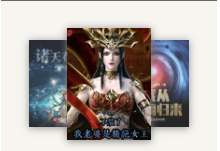
逛起点的时候看到这个效果,想着自己也写一下。
实现这个效果主要思路是在行内样式中添加所需的图片,给三个li定位。在初始化的时候获取每个li的样式,用setInterval无限循环,每次把样式数组第一项移至最后一项,渲染。
首先完成html
  <div class="container">
    <ul class="roundabout">
      <li class="left">
        <img src="https://bookcover.yuewen.com/qdbimg/349573/1031527480/90" alt="">
      </li>
      <li class="center">
        <img src="https://bookcover.yuewen.com/qdbimg/349573/1028491679/90" alt="">
      </li>
      <li class="right">
        <img src="https://bookcover.yuewen.com/qdbimg/349573/1016735308/90" alt="">
      </li>
    </ul>
  </div>
样式参考起点
<style>
    li, ol, ul {
      list-style: none outside none;
    }
    .container {
      position: relative;
      z-index: 1;
      height: 112px;
      margin-bottom: 10px;
      padding: 16px 0 0 48px;
    }
    .roundabout {
      position: relative;
      display: block;
      padding: 0px;
    }
    .roundabout li {
      cursor: pointer;
      box-shadow: 0 1px 8px #7f7f7f;
    }
    .roundabout li img {
      display: inline;
      width: 100%;
      height: 100%;
    }
    .left {
      position: absolute;
      left: -18px;
      top: 0px;
      width: 64.638px;
      height: 86.184px;
      opacity: 0.85;
      z-index: 142;
      font-size: 12.3px;
    }
    .center {
      position: absolute;
      left: 16px;
      top: -13px;
      width: 83.9916px;
      height: 111.989px;
      opacity: 1;
      z-index: 280;
      font-size: 16px;
    }
    .right {
      position: absolute;
      left: 75px;
      top: -1px;
      width: 65.5788px;
      height: 87.4384px;
      opacity: 0.85;
      z-index: 148;
      font-size: 12.5px;
    }
  </style>
完成后为

现在开始写js逻辑
<script>
  +function() {
    const allItems = document.querySelector('.roundabout').children,
        classNames = []
    // 初始化
    const init = () => {
      Array.from(allItems).map(item => classNames.push(item.className))
      console.log(classNames);
      autoRoundAbout()
    }
    // 设置无限循环
    const autoRoundAbout = () => {
      setInterval(setClassName, 3000)
    }
    // 将class列表向左移一位
    const setClassName = () => {
      classNames.unshift(classNames.pop())
      render()
    }
    // 重新渲染给li添加class
    const render = () => {
      for(let i = 0; i < allItems.length; i++) {
        allItems[i].className = classNames[i]
      }
    }

    init()
  }()
</script>
现在已经完成了自动循环,再给li上加个过渡效果,就完成了基本滚动。

然后在给ul添加事件委托,判断左右两侧添加点击事件。

 浙公网安备 33010602011771号