
Flume采集kafka数据到hive中
要实现flume采集到的数据直接落地到hive需要满足一些要求
1、需要开启hive的事务配置
<property>
<name>hive.support.concurrency</name>
<value>true</value>
</property>
<property>
<name>hive.enforce.bucketing</name>
<value>true</value>
</property>
<property>
<name>hive.exec.dynamic.partition.mode</name>
<value>nonstrict</value>
</property>
<property>
<name>hive.txn.manager</name>
<value>org.apache.hadoop.hive.ql.lockmgr.DbTxnManager</value>
</property>
<property>
<name>hive.compactor.initiator.on</name>
<value>true</value>
</property>
<property>
<name>hive.compactor.worker.threads</name>
<value>1</value>
</property>
2、对应hive中的表需要是分区分桶的表
set hive.enforce.bucketing=true;
set hive.enforce.bucketing=true;
create Table rating_table_p_b
(userid STRING,
rating STRING
)
partitioned by(datetime STRING)
#clustered by (userid) INTO 3 buckets 可以不进行分桶
row format delimited fields terminated by ','
lines terminated by '\n'
stored as orc TBLPROPERTIES ('transactional'='true');
3、配置flume的conf文件
a1.channels = c1
a1.sources = r1
a1.sinks = k1
#source
a1.sources.r1.type = org.apache.flume.source.kafka.KafkaSource
a1.sources.r1.zookeeperConnect = hadoop01:2181,hadoop02:2181,hadoop03:2181
a1.sources.r1.topic =dataTest
a1.sources.r1.groupId = test-consumer-group
a1.sources.r1.channels = c1
#channel
a1.channels.c1.type = memory
a1.channels.c1.capacity = 10000
a1.channels.c1.transactionCapacity = 10000
a1.channels.c1.byteCapacityBufferPercentage = 20
a1.channels.c1.byteCapacity = 800000
#sink
a1.sinks.k1.channel = c1
a1.sinks.k1.type=hive
a1.sinks.k1.hive.metastore = thrift://hadoop01:9083
a1.sinks.k1.hive.database = testbase
a1.sinks.k1.hive.table = rating_table_p_b
a1.sinks.k1.hive.partition = %Y,%m,%d
a1.sinks.k1.round = true
a1.sinks.k1.roundValue = 60
a1.sinks.k1.roundUnit = minute
a1.sinks.k1.serializer = DELIMITED
a1.sinks.k1.serializer.delimiter = ","
a1.sinks.k1.serializer.serdeSeparator = '\t'
a1.sinks.k1.serializer.fieldnames =userid,rating
a1.sinks.k1.batchSize=10
4、启动flume
bin/flume-ng agent --conf conf/ --name a1 --conf-file jobs/kafkahdfs.conf -Dflume.root.logger=INFO,console
5、启动kafka消费
bin/kafka-console-producer.sh --broker-list localhost:9092 --topic dataTest
# bin/kafka-console-producer.sh --broker-list localhost:9092 --topic dataTest
>1,0.2
2,0.3
3,0.4
4,0.5
5,0.2
6,0.3
7,0.4
8,0.5
9,0.2
10,0.3
11,0.4
12,0.5>>>>>>>>>>>
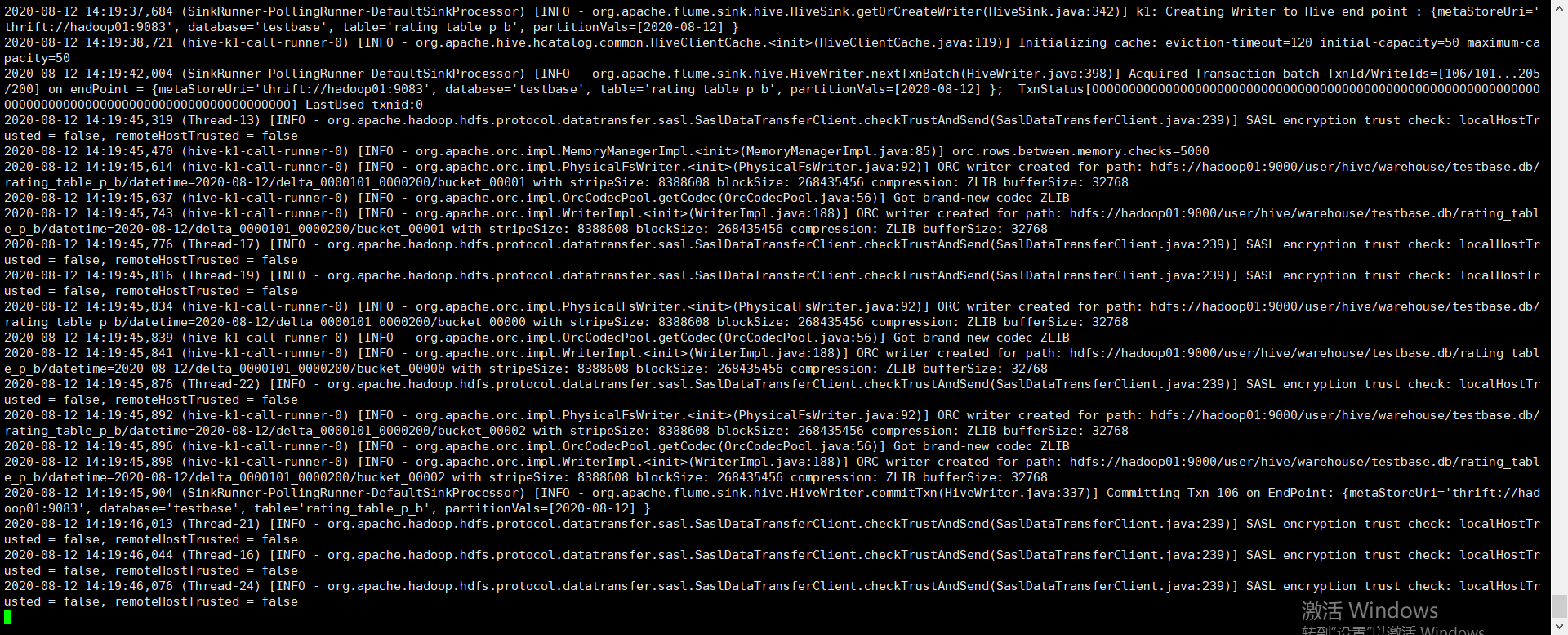
6、flume打印日志
7、查看hive中数据
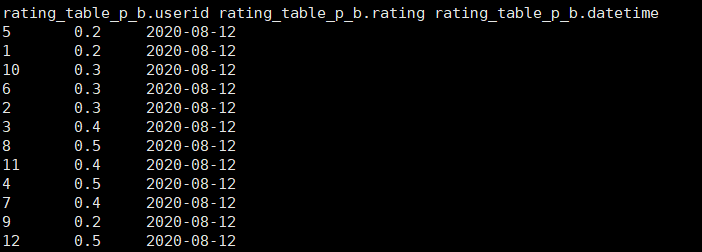
完成flume采集kafka数据到hive中的过程

 浙公网安备 33010602011771号