querydsl使用说明( jira插件里,查询数据的时候,可以使用jira内置的querydsl或者官方封装的工具包atlassian-pocketknife-querydsl来实现jira数据库表和插件表的联合查询)
概述
在jira插件开发过程中,数据库表的创建和数据的增删改查操作是使用ActiveObject模块完成的。但是,ao模块只能操作插件生成的表,无法和jira的内置表做关联查询操作。
然而作为jira的插件,很多时候,数据是需要和jira的数据进行关联查询的。
jira内置的api,其实提供了不同表之间关联查询的操作,使用的依赖是jira-core里引用的querydsl-sql。
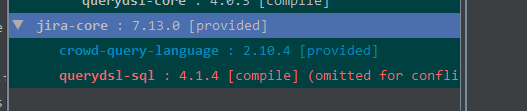
关于querydsl,其实是一个第三方的开源数据库框架,项目地址:https://github.com/querydsl/querydsl。
jira内部,也是有很多地方使用这种方式进行查询的,比如关于worklog的查询:
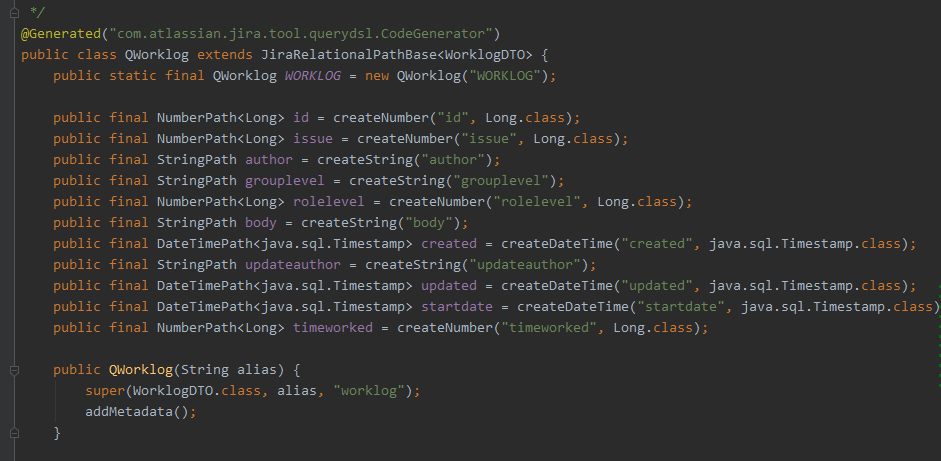
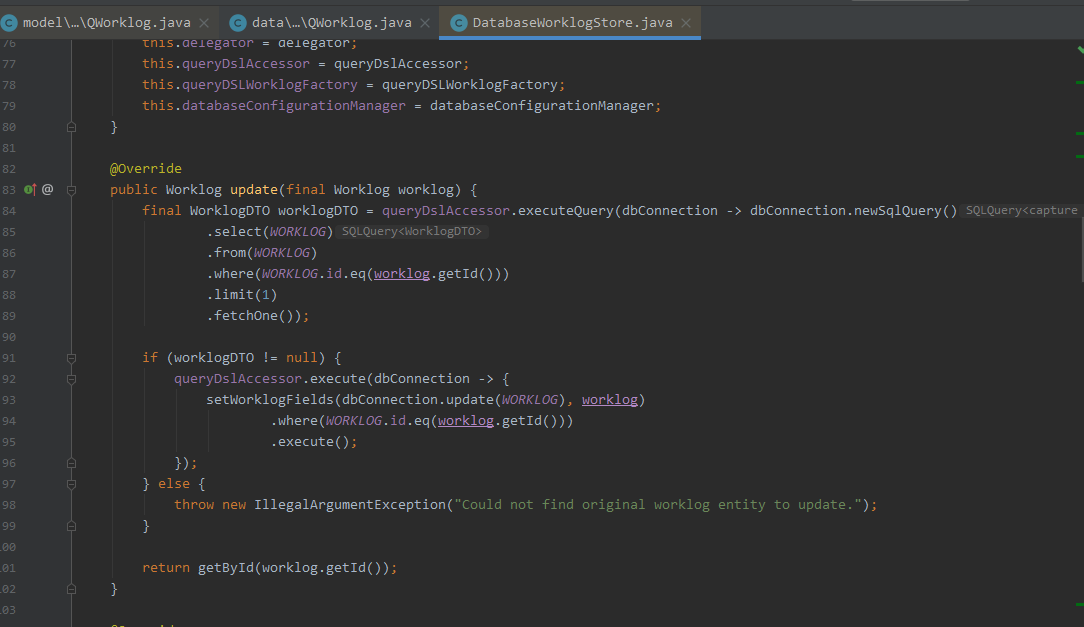
atlassian官方也在此基础上封装了方便开发者使用的工具包:atlassian-pocketknife-querydsl,项目地址:https://bitbucket.org/atlassian/atlassian-pocketknife-querydsl/src/master/。
使用
按道理来讲,使用jira内置的querydsl应该也是能完成jira表和插件表的联合查询的。但是在实际使用过程中,一直有报错。尝试许久还是无法解决(大家可以自行尝试,可能是我哪里没配置好),所以这里演示的是以atlassian-pocketknife-querydsl为例查询。
pom文件改动
使用atlassian-pocketknife-querydsl,首先需要在pom文件里引用这个依赖。由于jira7和8版本api的不同,atlassian-pocketknife-querydsl的引用版本也有所区别(主要是jira7里的com.atlassian.fugue.Option类路径改到了io.atlassian.fugue.Option )。
在jira7.*以前的环境里,需要引用的是atlassian-pocketknife-querydsl 4.*以前的版本;在Jira 8.*以后的版本,需要引用的是atlassian-pocketknife-querydsl 5.*以后的版本
下面说下,pom文件的改用内容:
在pom文件里加入依赖:
<dependency>
            <groupId>com.atlassian.pocketknife</groupId>
            <artifactId>atlassian-pocketknife-querydsl</artifactId>
            <version>4.0.0</version>
            <scope>compile</scope>
            <exclusions>
                <exclusion>
                    <groupId>org.slf4j</groupId>
                    <artifactId>slf4j-log4j12</artifactId>
                </exclusion>
                <exclusion>
                    <groupId>org.slf4j</groupId>
                    <artifactId>slf4j-api</artifactId>
                </exclusion>
                <exclusion>
                    <groupId>com.google.guava</groupId>
                    <artifactId>guava</artifactId>
                </exclusion>
                <exclusion>
                    <groupId>com.google.code.findbugs</groupId>
                    <artifactId>jsr305</artifactId>
                </exclusion>
                <exclusion>
                    <groupId>joda-time</groupId>
                    <artifactId>joda-time</artifactId>
                </exclusion>
            </exclusions>
        </dependency>
|
在plugin:atlassian-spring-scanner-maven-plugin里,加入对atlassian-pocketknife-querydsl包的扫描
 <plugin>
                <groupId>com.atlassian.plugin</groupId>
                <artifactId>atlassian-spring-scanner-maven-plugin</artifactId>
                <version>${atlassian.spring.scanner.version}</version>
                <executions>
                    <execution>
                        <goals>
                            <goal>atlassian-spring-scanner</goal>
                        </goals>
                        <phase>process-classes</phase>
                    </execution>
                </executions>
                <configuration>
                    <scannedDependencies>
                        <dependency>
                            <groupId>com.atlassian.plugin</groupId>
                            <artifactId>atlassian-spring-scanner-external-jar</artifactId>
                        </dependency>
                        <dependency>
                            <groupId>com.atlassian.pocketknife</groupId>
                            <artifactId>atlassian-pocketknife-querydsl</artifactId>
                        </dependency>
                    </scannedDependencies>
                    <verbose>false</verbose>
                </configuration>
            </plugin>
|
在build-》plugin-》jira-maven-plugin里排除掉队querydsl pocketknife的一些引用,
<plugin>
                <groupId>com.atlassian.maven.plugins</groupId>
                <artifactId>jira-maven-plugin</artifactId>
                <version>${amps.version}</version>
                <extensions>true</extensions>
                <configuration>
                    <productVersion>${jira.version}</productVersion>
                    <productDataVersion>${jira.version}</productDataVersion>
                    <jvmArgs>-Xms1g -Xmx1500m -XX:MaxPermSize=1g -XX:-UseGCOverheadLimit -server  -Datlassian.mail.senddisabled=false</jvmArgs>
                    <enableQuickReload>true</enableQuickReload>
                    <allowGoogleTracking>false</allowGoogleTracking>
                    <skipRestDocGeneration>true</skipRestDocGeneration>
                    <instructions>
                        <Atlassian-Plugin-Key>${atlassian.plugin.key}</Atlassian-Plugin-Key>
                        <!-- Add package to export here -->
                        <Export-Package> com.shdsd.plugin.organizationPro.api;version="${project.version}",</Export-Package>
                        <!-- Add package import here -->
                        <Atlassian-Scan-Folders>META-INF/plugin-descriptors</Atlassian-Scan-Folders>
                        <Import-Package>
                            <!-- imports -->
                            org.springframework.osgi.*;resolution:="optional",
                            org.eclipse.gemini.blueprint.*;resolution:="optional",
                            <!-- spring imports -->
                            org.springframework.aop,
                            org.springframework.core,
                            <!-- jira stuff -->
                            com.atlassian.jira.plugin.webfragment.conditions,
                            com.atlassian.jira.issue.customfields.searchers,
                            com.atlassian.jira.jql.operand,
                            <!-- required for spring lifecycle annotations -->
                            <!--javax.annotation,-->
                            <!-- exclude stuff for querydsl pocketknife 主要是下面两行-->
                            !net.sf.cglib.proxy,
                            !org.jvnet.hudson.annotation_indexer,
                            <!-- everything else -->
                            *;resolution:=optional
                        </Import-Package>
                        <Require-Bundle>org.apache.felix.framework</Require-Bundle>
                        <!-- Ensure plugin is spring powered -->
                        <Spring-Context>*</Spring-Context>
                    </instructions>

                </configuration>
            </plugin>
|
代码里使用
关于querysql的使用,可以先去网上查找相关资料;
querysql的使用,需要建一些继承com.querydsl.sql.RelationalPathBase的类。jira的api里已经定义了对jira系统表的一些类,比如com.atlassian.jira.model.querydsl.QWorklog,其他类,在此类的同级包下。
插件里的类,也需要这样定义一下,比如组织机构里的雇员类,需要定义一个 QEmployee类,
import com.atlassian.pocketknife.spi.querydsl.EnhancedRelationalPathBase;
import com.querydsl.core.types.dsl.BooleanPath;
import com.querydsl.core.types.dsl.NumberPath;
import com.querydsl.core.types.dsl.StringPath;

/**
 * 2021/2/3 16:56
 * Created by chenq
 */
public class QEmployee extends EnhancedRelationalPathBase<QEmployee> {
    public static final QEmployee EMPLOYEE = new QEmployee();

    public final NumberPath<Integer> ID = createIntegerCol("ID").asPrimaryKey().build();
    public final StringPath JIRA_USER_KEY = createStringCol("JIRA_USER_KEY").build();
    public final BooleanPath DELETED = createBooleanCol("DELETED").build();
    public final NumberPath<Integer> DEPT_ID = createIntegerCol("DEPT_ID").build();

    public QEmployee() {
        super(QEmployee.class, "AO_67ABB4_EMPLOYEE");
    }
}
|
在实际操作中,直接使用jira内置定义好的QWorklog会有问题,所以,我们再重新定义一下QWorklog这个类;
import com.atlassian.jira.model.querydsl.WorklogDTO;
import com.atlassian.pocketknife.spi.querydsl.EnhancedRelationalPathBase;
import com.querydsl.core.types.dsl.DateTimePath;
import com.querydsl.core.types.dsl.NumberPath;
import com.querydsl.core.types.dsl.StringPath;

import java.sql.Timestamp;

/**
 * 2021/2/5 10:58
 * Created by chenq
 */
public class QWorklog extends EnhancedRelationalPathBase<WorklogDTO> {
    public static final QWorklog WORKLOG = new QWorklog();

    public final NumberPath<Long> id = createNumber("id", Long.class);
    public final NumberPath<Long> issue = createNumber("issueid", Long.class);
    public final StringPath author = createString("author");
    public final StringPath grouplevel = createString("grouplevel");
    public final NumberPath<Long> rolelevel = createNumber("rolelevel", Long.class);
    public final StringPath body = createString("worklogbody");
    public final DateTimePath<Timestamp> created = createDateTime("created", java.sql.Timestamp.class);
    public final StringPath updateauthor = createString("updateauthor");
    public final DateTimePath<java.sql.Timestamp> updated = createDateTime("updated", java.sql.Timestamp.class);
    public final DateTimePath<java.sql.Timestamp> startdate = createDateTime("startdate", java.sql.Timestamp.class);
    public final NumberPath<Long> timeworked = createNumber("timeworked", Long.class);

    public QWorklog() {
        super(WorklogDTO.class, "worklog");
    }
}
|
查询(以worklog关联雇员表查询数据操作实例)
    List<WorklogDTO> worklogDTOList = databaseAccessor.run(con -> {
            SQLQuery<WorklogDTO> worklogDTOSQLQuery = con.query().select(QWorklog.WORKLOG).from(QWorklog.WORKLOG).join(QEmployee.EMPLOYEE)
                     .on(QWorklog.WORKLOG.author.eq(QEmployee.EMPLOYEE.JIRA_USER_KEY)).where(QWorklog.WORKLOG.author.eq("admin"));
            return worklogDTOSQLQuery.fetch();
        });
|
使用querydsl,可以实现原生sql的查询功能,更多功能可以查找querydsl的使用方法。
posted on 2021-02-09 18:39 Sunshine-jcy 阅读(1380) 评论(0) 收藏 举报


 浙公网安备 33010602011771号