作业①
from bs4 import BeautifulSoup
from bs4 import UnicodeDammit
import urllib.request
import sqlite3
class WeatherDB:
    def openDB(self):
        self.con = sqlite3.connect("weathers.db") #创建数据库/打开数据库:
        self.cursor = self.con.cursor() #创建一个游标
        try:
            #执行sql语句
            self.cursor.execute(
                "create table weathers (wCity varchar(16),wDate varchar(16),wWeather varchar(64),wTemp varchar(32),constraint pk_weather primary key (wCity,wDate))")
        except:
            self.cursor.execute("delete from weathers")

    def closeDB(self):
        self.con.commit() #事务提交
        self.con.close() #关闭一个数据库连接

    def insert(self, city, date, weather, temp):
        try:
            self.cursor.execute("insert into weathers (wCity,wDate,wWeather,wTemp) values(?,?,?,?)",
                                (city, date, weather, temp))
        except Exception as err:
            print(err)
    def show(self):
        self.cursor.execute("select * from weathers")
        rows = self.cursor.fetchall() #返回多个元组,即返回多条记录(rows)
        print("%-16s%-16s%-32s%-16s" % ("city", "data", "weather", "temp"))
        for row in rows:
            print("%-16s%-16s%-32s%-16s" % (row[0], row[1], row[2], row[3]))

class WeatherForecast:
    def __init__(self):
        self.headers = {
            "User-Agent": "Mozilla/5.0 (Windows; U; Windows NT 6.0 x64; en-US; rv:1.9pre) Gecko/2008072421 Minefield/3.0.2pre"}
        self.cityCode = {"北京": "101010100", "大理": "101290201", "重庆": "101040100", "福州": "101230101"}

    def forecastCity(self, city):
        if city not in self.cityCode.keys():
            print(city + " code can't be found")
            return
        url = "http://www.weather.com.cn/weather/" + self.cityCode[city] + ".shtml"
        try:
            req = urllib.request.Request(url, headers=self.headers)
            data = urllib.request.urlopen(req)
            data = data.read()
            dammit = UnicodeDammit(data, ["utf-8", "gbk"])
            data = dammit.unicode_markup
            soup = BeautifulSoup(data, "html.parser")
            lis = soup.select("ul[class='t clearfix'] li")
            for li in lis:
                try:
                    date = li.select('h1')[0].text
                    weather = li.select('p[class="wea"]')[0].text
                    temp = li.select('p[class="tem"] span')[0].text + "/" + li.select('p[class="tem"] i')[0].text
                    print(city, date, weather, temp)
                    self.db.insert(city, date, weather, temp)
                except Exception as err:
                    print(err)
        except Exception as err:
            print(err)

    def process(self,cities):
        self.db = WeatherDB()
        self.db.openDB()
        for city in cities:
            self.forecastCity(city)

        self.db.show()
        self.db.closeDB()

ws = WeatherForecast()
ws.process(["北京", "大理", "重庆", "福州"])
输出信息
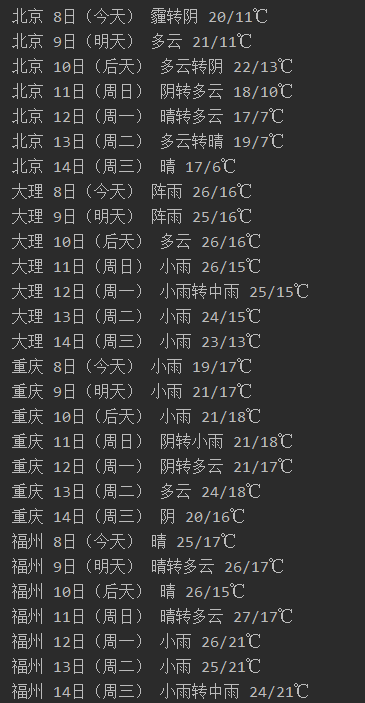
(2)、心得体会:这是根据书上的代码改编的,爬取天气预报数据比较简单,但是不知道怎么写入数据库,在查阅了资料以后有所收获。
作业②
(1)、要求:用requests和BeautifulSoup库方法定向爬取股票相关信息
爬取的代码
import requests
import json
import csv

with open('gu.csv', 'a', encoding='utf-8', newline='')as file:
    writer = csv.writer(file)
    writer.writerow(["代码", "名称", "最新价格", "涨跌额", "涨跌幅", "成交量", "成交额", "振幅", "最高", "最低", "今开", "昨收"])
    for i in range(1, 3):
        url = 'http://55.push2.eastmoney.com/api/qt/clist/get?cb=jQuery1124024741272050600793_1602137582248&pn=' + str(
            i) + '&pz=20&po=1&np=1&ut=bd1d9ddb04089700cf9c27f6f7426281&fltt=2&invt=2&fid=f3&fs=m:0+t:6,m:0+t:13,m:0+t:80,m:1+t:2,m:1+t:23' \
                 '&fields=f1,f2,f3,f4,f5,f6,f7,f8,f9,f10,f12,f13,f14,f15,f16,f17,f18,f20,f21,f23,f24,f25,f22,f11,f62,f128,f136,f115,f152&_=1602137582249'
        headers = {
            'User-Agent': 'Mozilla/5.0 (Windows NT 10.0; WOW64) AppleWebKit/537.36 (KHTML, like Gecko) Chrome/75.0.3770.100 Safari/537.36'}
        response = requests.get(url, headers=headers)
        data = json.loads(response.text.lstrip('jQuery1124024741272050600793_1602137582248(').rstrip(');'))#去除头部json杂质
        '''
        得到了我们想要的json
        data: {total: 4189,
            diff: [
               {f1: 2
                f2: 28.47
                f3: 62.22
                f4: 10.92
                f5: 261362
                f6: 760131008
                f7: 22.34
                f8: 66.82
                f9: 83.63
                f10: "-"
                f11: 0.32
                f12: "688093"
                f13: 1
                f14: "N世华"
                f15: 32
                f16: 28.08
                f17: 30.2
                f18: 17.55
                ...}
                ]}
        '''
        #print(url)
            #寻找到json需要的模块 [‘data’][‘diff’]列一个循环
        for i in data['data']['diff']:
            daima = i['f12']  # 代码
            name = i['f14']  # 名称
            new = i['f2']  # 最新价
            zengfu = i['f3']  # 涨跌幅
            e = i['f4']  # 涨跌额
            chengjiao = i['f5']  # 成交量
            jiaoe = i['f6']  # 成交额
            zhenfu = i['f7']  # 振幅
            max_top = i['f15']  # 最高
            min_low = i['f16']  # 最低
            today = i['f17']  # 今开
            ye = i['f18']  # 作收

            item = [daima, name, new, zengfu, e, chengjiao, jiaoe, zhenfu, max_top, min_low, today, ye]
            writer.writerow(item) #最终再将爬取到的数据存放到CSV
输出信息
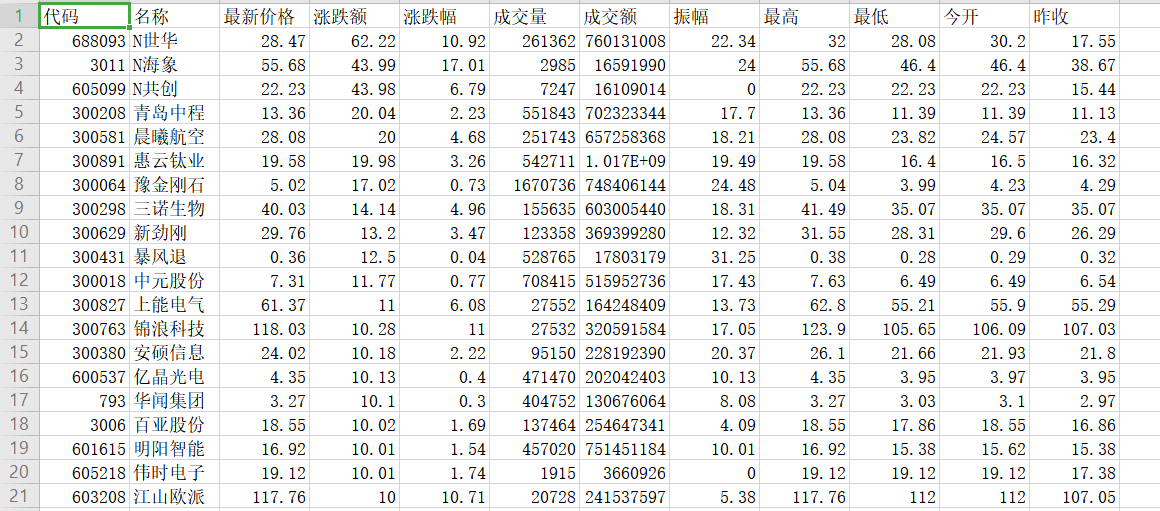
(2)、心得体会:仔细对比分析url会发现各个参数的意义,然后得到我们想要的jason就可以循环读取每支股票的参数,再把结果写入csv文件。这次作业学习使我学习到了抓包的方法,对html知识的了解也更深了。
作业③
(1)、要求:根据自选3位数+学号后3位选取股票,获取印股票信息。抓包方法同作②。
import requests
import json
import csv
import re

with open('gu2.csv', 'a', encoding='utf-8', newline='')as file:
    writer = csv.writer(file)
    writer.writerow(["代码", "名称", "最新价格", "涨跌额", "涨跌幅", "成交量", "成交额", "振幅", "最高", "最低", "今开", "昨收"])
    for i in range(1, 100):
        url = 'http://55.push2.eastmoney.com/api/qt/clist/get?cb=jQuery1124024741272050600793_1602137582248&pn=' + str(
            i) + '&pz=20&po=1&np=1&ut=bd1d9ddb04089700cf9c27f6f7426281&fltt=2&invt=2&fid=f3&fs=m:0+t:6,m:0+t:13,m:0+t:80,m:1+t:2,m:1+t:23' \
                 '&fields=f1,f2,f3,f4,f5,f6,f7,f8,f9,f10,f12,f13,f14,f15,f16,f17,f18,f20,f21,f23,f24,f25,f22,f11,f62,f128,f136,f115,f152&_=1602137582249'
        headers = {
            'User-Agent': 'Mozilla/5.0 (Windows NT 10.0; WOW64) AppleWebKit/537.36 (KHTML, like Gecko) Chrome/75.0.3770.100 Safari/537.36'}
        response = requests.get(url, headers=headers)
        data = json.loads(response.text.lstrip('jQuery1124024741272050600793_1602137582248(').rstrip(');'))#去除头部json杂质

        #print(url)

            #寻找到json需要的模块 [‘data’][‘diff’]列一个循环
        for i in data['data']['diff']:
            daima = i['f12']
            reg=r"(102)$"  #用正则表达式爬出以102结尾的字符
            m = re.search(reg,daima)
            if(m): #若不为空
                name = i['f14']  # 名称
                new = i['f2']  # 最新价
                zengfu = i['f3']  # 涨跌幅
                e = i['f4']  # 涨跌额
                chengjiao = i['f5']  # 成交量
                jiaoe = i['f6']  # 成交额
                zhenfu = i['f7']  # 振幅
                max_top = i['f15']  # 最高
                min_low = i['f16']  # 最低
                today = i['f17']  # 今开
                ye = i['f18']  # 作收

                item = [daima, name, new, zengfu, e, chengjiao, jiaoe, zhenfu, max_top, min_low, today, ye]
                writer.writerow(item) #最终再将爬取到的数据存放到CSV
输出信息

(2)、心得体会
在实验二的基础上加了判断的内容,用了正则表达式爬取了100页,共得到了两条符合要求的数据。


 浙公网安备 33010602011771号