
学习threejs,达成粒子化交互文字
⚕️ 主页: gis分享者
⚕️ 感谢各位大佬 点赞 收藏⭐ 留言 加关注✅!
⚕️ 收录于专栏:threejsgis工程师
文章目录
一、前言
本文详细介绍如何基于threejs在三维场景中实现粒子化交互文字,亲测可用。希望能帮助到您。一起学习,加油!加油!
1.1 ☘️THREE.IcosahedronGeometry 二十面体
THREE.IcosahedronGeometry一个用于生成二十面体的类。
1.1.1 ☘️构造函数
IcosahedronGeometry(radius : Float, detail : Integer)
radius — 二十面体的半径,默认为1。
detail — 默认值为0。将这个值设为一个大于0的数将会为它增加一些顶点,使其不再是一个二十面体。当这个值大于1的时候,实际上它将变成一个球体。
1.1.2 ☘️属性
共有属性请参见其基类PolyhedronGeometry。
.parameters : Object
一个包含着构造函数中每个参数的对象。在对象实例化之后,对该属性的任何修改都不会改变这个几何体。
1.1.3 ☘️方法
共有方法请参见其基类PolyhedronGeometry。
1.2 ☘️THREE.ShaderMaterial
THREE.ShaderMaterial使用自定义shader渲染的材质。 shader是一个用GLSL编写的小程序 ,在GPU上运行。
1.2.1 ☘️注意事项
- ShaderMaterial 只有使用 WebGLRenderer 才可以绘制正常, 因为 vertexShader 和
fragmentShader 属性中GLSL代码必须使用WebGL来编译并运行在GPU中。 - 从 THREE r72开始,不再支持在ShaderMaterial中直接分配属性。 必须使用
BufferGeometry实例,使用BufferAttribute实例来定义自定义属性。 - 从 THREE r77开始,WebGLRenderTarget 或 WebGLCubeRenderTarget
实例不再被用作uniforms。 必须使用它们的texture 属性。 - 内置attributes和uniforms与代码一起传递到shaders。
如果您不希望WebGLProgram向shader代码添加任何内容,则可以使用RawShaderMaterial而不是此类。 - 您可以使用指令#pragma unroll_loop_start,#pragma unroll_loop_end
以便通过shader预处理器在GLSL中展开for循环。 该指令必须放在循环的正上方。循环格式必须与定义的标准相对应。 - 循环必须标准化normalized。
- 循环变量必须是i。
- 对于给定的迭代,值 UNROLLED_LOOP_INDEX 将替换为 i 的显式值,并且可以在预处理器语句中使用。
#pragma unroll_loop_start
for ( int i = 0; i < 10; i ++ ) {
// ...
}
#pragma unroll_loop_end
代码示例
const material = new THREE.ShaderMaterial( {
uniforms: {
time: { value: 1.0 },
resolution: { value: new THREE.Vector2() }
},
vertexShader: document.getElementById( 'vertexShader' ).textContent,
fragmentShader: document.getElementById( 'fragmentShader' ).textContent
} );
1.2.2 ☘️构造函数
ShaderMaterial( parameters : Object )
parameters - (可选)用于定义材质外观的对象,具有一个或多个属性。 材质的任何属性都可以从此处传入(包括从Material继承的任何属性)。
1.2.3 ☘️属性
共有属性请参见其基类Material。
.clipping : Boolean
定义此材质是否支持剪裁; 如果渲染器传递clippingPlanes uniform,则为true。默认值为false。
.defaultAttributeValues : Object
当渲染的几何体不包含这些属性但材质包含这些属性时,这些默认值将传递给shaders。这可以避免在缓冲区数据丢失时出错。
this.defaultAttributeValues = {
'color': [ 1, 1, 1 ],
'uv': [ 0, 0 ],
'uv2': [ 0, 0 ]
};
.defines : Object
使用 #define 指令在GLSL代码为顶点着色器和片段着色器定义自定义常量;每个键/值对产生一行定义语句:
defines: {
FOO: 15,
BAR: true
}
这将在GLSL代码中产生如下定义语句:
#define FOO 15
#define BAR true
.extensions : Object
一个有如下属性的对象:
this.extensions = {
derivatives: false, // set to use derivatives
fragDepth: false, // set to use fragment depth values
drawBuffers: false, // set to use draw buffers
shaderTextureLOD: false // set to use shader texture LOD
};
.fog : Boolean
定义材质颜色是否受全局雾设置的影响; 如果将fog uniforms传递给shader,则为true。默认值为false。
.fragmentShader : String
片元着色器的GLSL代码。这是shader程序的实际代码。在上面的例子中, vertexShader 和 fragmentShader 代码是从DOM(HTML文档)中获取的; 它也可以作为一个字符串直接传递或者通过AJAX加载。
.glslVersion : String
定义自定义着色器代码的 GLSL 版本。仅与 WebGL 2 相关,以便定义是否指定 GLSL 3.0。有效值为 THREE.GLSL1 或 THREE.GLSL3。默认为空。
.index0AttributeName : String
如果设置,则调用gl.bindAttribLocation 将通用顶点索引绑定到属性变量。默认值未定义。
.isShaderMaterial : Boolean
只读标志,用于检查给定对象是否属于 ShaderMaterial 类型。
.lights : Boolean
材质是否受到光照的影响。默认值为 false。如果传递与光照相关的uniform数据到这个材质,则为true。默认是false。
.linewidth : Float
控制线框宽度。默认值为1。
由于OpenGL Core Profile与大多数平台上WebGL渲染器的限制,无论如何设置该值,线宽始终为1。
.flatShading : Boolean
定义材质是否使用平面着色进行渲染。默认值为false。
.uniforms : Object
如下形式的对象:
{ "uniform1": { value: 1.0 }, "uniform2": { value: 2 } }指定要传递给shader代码的uniforms;键为uniform的名称,值(value)是如下形式:
{ value: 1.0 }这里 value 是uniform的值。名称必须匹配 uniform 的name,和GLSL代码中的定义一样。 注意,uniforms逐帧被刷新,所以更新uniform值将立即更新GLSL代码中的相应值。
.uniformsNeedUpdate : Boolean
可用于在 Object3D.onBeforeRender() 中更改制服时强制进行制服更新。默认为假。
.vertexColors : Boolean
定义是否使用顶点着色。默认为假。
.vertexShader : String
顶点着色器的GLSL代码。这是shader程序的实际代码。 在上面的例子中,vertexShader 和 fragmentShader 代码是从DOM(HTML文档)中获取的; 它也可以作为一个字符串直接传递或者通过AJAX加载。
.wireframe : Boolean
将几何体渲染为线框(通过GL_LINES而不是GL_TRIANGLES)。默认值为false(即渲染为平面多边形)。
.wireframeLinewidth : Float
控制线框宽度。默认值为1。
由于OpenGL Core Profile与大多数平台上WebGL渲染器的限制,无论如何设置该值,线宽始终为1。
1.2.4 ☘️方法
共有方法请参见其基类Material。
.clone () : ShaderMaterial this : ShaderMaterial
创建该材质的一个浅拷贝。需要注意的是,vertexShader和fragmentShader使用引用拷贝; attributes的定义也是如此; 这意味着,克隆的材质将共享相同的编译WebGLProgram; 但是,uniforms 是 值拷贝,这样对不同的材质我们可以有不同的uniforms变量。
二、实现粒子化交互文字
1. ☘️实现思路
本例子使用IcosahedronGeometry二十面体、ShaderMaterial自定义着色器材质,实现粒子化交互文字。具体代码参考下面代码样例。
2. ☘️代码样例
<!DOCTYPE html>
<html lang="zh-CN">
<head>
<meta charset="UTF-8" />
<meta name="viewport" content="width=device-width, initial-scale=1.0" />
<title>文字特效</title>
<style>
html, body {
padding: 0;
margin: 0;
}
.container {
position: fixed;
top: 0;
left: 0;
background-color: #A372B7;
}
#text-input {
position: fixed;
top: 0;
left: 0;
opacity: 0;
pointer-events: none;
}
.links {
position: fixed;
bottom: 20px;
right: 20px;
font-size: 18px;
font-family: sans-serif;
}
.links a {
text-decoration: none;
color: black;
margin-left: 1em;
}
.links a:hover {
text-decoration: underline;
}
.links a img.icon {
display: inline-block;
height: 1em;
margin: 0 0 -0.1em 0.3em;
}
</style>
</head>
<body>
<header>
</header>
<div id="text-input" contenteditable="true">
</div>
<div class="container"></div>
<div class="links">
<a href="https://tympanus.net/codrops/2022/11/08/3d-typing-effects-with-three-js/" target="_blank">tutorial<img class="icon" src="https://ksenia-k.com/img/icons/link.svg"></a>
</div>
<script type="x-shader/x-fragment" id="fragmentShader">
varying vec3 vNormal;
varying float vWhiteness;
varying float vReflectionFactor;
void main() {
vec3 colored = mix(vNormal, vec3(1.), .75);
gl_FragColor = vec4(vec3(colored), vReflectionFactor);
}
</script>
<script type="x-shader/x-vertex" id="vertexShader">
varying vec3 vNormal;
varying vec3 vCamera;
varying float vReflectionFactor;
float rand(vec2 co) {
return fract(sin(dot(co, vec2(12.9898, 78.233))) * 43758.5453);
}
void main() {
vNormal = normal;
vNormal *= rand(instanceMatrix[3].xz);
vec4 worldPosition = modelMatrix * instanceMatrix * vec4(position + vec3(0., .3, 0.), 1.);
vReflectionFactor = .2 + 2. * pow(1. + dot(normalize(worldPosition.xyz - cameraPosition - vec3(1., 2., 0.)), normal), 3.);
gl_Position = projectionMatrix * viewMatrix * worldPosition;
}
</script>
<script type="module">
import * as THREE from "https://cdn.skypack.dev/three@0.133.1/build/three.module";
import { OrbitControls } from "https://cdn.skypack.dev/three@0.133.1/examples/jsm/controls/OrbitControls";
// DOM selectors
const containerEl = document.querySelector(".container");
const textInputEl = document.querySelector("#text-input");
// Settings
const fontName = "Verdana";
const textureFontSize = 80;
const fontScaleFactor = 0.06;
// We need to keep the style of editable <div> (hidden inout field) and canvas
textInputEl.style.fontSize = textureFontSize + "px";
textInputEl.style.font = "100 " + textureFontSize + "px " + fontName;
textInputEl.style.lineHeight = 1.1 * textureFontSize + "px";
// 3D scene related globals
let scene,
camera,
renderer,
textCanvas,
textCtx,
particleGeometry,
particleMaterial,
instancedMesh,
dummy,
clock,
cursorMesh;
// String to show
let string = "Bubble<div>typer</div>";
// Coordinates data per 2D canvas and 3D scene
let textureCoordinates = [];
// 1d-array of data objects to store and change params of each instance
let particles = [];
// Parameters of whole string per 2D canvas and 3D scene
let stringBox = {
wTexture: 0,
wScene: 0,
hTexture: 0,
hScene: 0,
caretPosScene: []
};
// ---------------------------------------------------------------
textInputEl.innerHTML = string;
textInputEl.focus();
init();
createEvents();
setCaretToEndOfInput();
handleInput();
refreshText();
render();
// ---------------------------------------------------------------
function init() {
camera = new THREE.PerspectiveCamera(
45,
window.innerWidth / window.innerHeight,
0.1,
1000
);
camera.position.z = 18;
scene = new THREE.Scene();
renderer = new THREE.WebGLRenderer({
alpha: true
});
renderer.setPixelRatio(window.devicePixelRatio);
renderer.setSize(window.innerWidth, window.innerHeight);
containerEl.appendChild(renderer.domElement);
const orbit = new OrbitControls(camera, renderer.domElement);
orbit.enablePan = false;
textCanvas = document.createElement("canvas");
textCanvas.width = textCanvas.height = 0;
textCtx = textCanvas.getContext("2d");
particleGeometry = new THREE.IcosahedronGeometry(0.2, 3);
particleMaterial = new THREE.ShaderMaterial({
vertexShader: document.getElementById("vertexShader").textContent,
fragmentShader: document.getElementById("fragmentShader").textContent,
transparent: true
});
dummy = new THREE.Object3D();
clock = new THREE.Clock();
const cursorGeometry = new THREE.BoxGeometry(0.05, 4.5, 0.03);
cursorGeometry.translate(0.2, -2.5, 0);
const cursorMaterial = new THREE.MeshBasicMaterial({
color: 0xffffff,
transparent: true
});
cursorMesh = new THREE.Mesh(cursorGeometry, cursorMaterial);
scene.add(cursorMesh);
}
// ---------------------------------------------------------------
function createEvents() {
document.addEventListener("keyup", () => {
handleInput();
refreshText();
});
document.addEventListener("click", () => {
textInputEl.focus();
setCaretToEndOfInput();
});
textInputEl.addEventListener("focus", () => {
clock.elapsedTime = 0;
});
window.addEventListener("resize", () => {
camera.aspect = window.innerWidth / window.innerHeight;
camera.updateProjectionMatrix();
renderer.setSize(window.innerWidth, window.innerHeight);
});
}
function setCaretToEndOfInput() {
document.execCommand("selectAll", false, null);
document.getSelection().collapseToEnd();
}
function handleInput() {
if (isNewLine(textInputEl.firstChild)) {
textInputEl.firstChild.remove();
}
if (isNewLine(textInputEl.lastChild)) {
if (isNewLine(textInputEl.lastChild.previousSibling)) {
textInputEl.lastChild.remove();
}
}
string = textInputEl.innerHTML
.replaceAll("<p>", "\n")
.replaceAll("</p>", "")
.replaceAll("<div>", "\n")
.replaceAll("</div>", "")
.replaceAll("<br>", "")
.replaceAll("<br/>", "")
.replaceAll(" ", " ");
stringBox.wTexture = textInputEl.clientWidth;
stringBox.wScene = stringBox.wTexture * fontScaleFactor;
stringBox.hTexture = textInputEl.clientHeight;
stringBox.hScene = stringBox.hTexture * fontScaleFactor;
stringBox.caretPosScene = getCaretCoordinates().map(
(c) => c * fontScaleFactor
);
function isNewLine(el) {
if (el) {
if (el.tagName) {
if (
el.tagName.toUpperCase() === "DIV" ||
el.tagName.toUpperCase() === "P"
) {
if (el.innerHTML === "<br>" || el.innerHTML === "</br>") {
return true;
}
}
}
}
return false;
}
function getCaretCoordinates() {
const range = window.getSelection().getRangeAt(0);
const needsToWorkAroundNewlineBug =
range.startContainer.nodeName.toLowerCase() === "div" &&
range.startOffset === 0;
if (needsToWorkAroundNewlineBug) {
return [range.startContainer.offsetLeft, range.startContainer.offsetTop];
} else {
const rects = range.getClientRects();
if (rects[0]) {
return [rects[0].left, rects[0].top];
} else {
document.execCommand("selectAll", false, null);
return [0, 0];
}
}
}
}
// ---------------------------------------------------------------
function render() {
requestAnimationFrame(render);
updateParticlesMatrices();
updateCursorOpacity();
renderer.render(scene, camera);
}
// ---------------------------------------------------------------
function refreshText() {
sampleCoordinates();
particles = textureCoordinates.map((c, cIdx) => {
const x = c.x * fontScaleFactor;
const y = c.y * fontScaleFactor;
let p = c.old && particles[cIdx] ? particles[cIdx] : new Particle([x, y]);
if (c.toDelete) {
p.toDelete = true;
}
return p;
});
recreateInstancedMesh();
makeTextFitScreen();
updateCursorPosition();
}
// ---------------------------------------------------------------
// Input string to textureCoordinates
function sampleCoordinates() {
// Draw text
const lines = string.split(`\n`);
const linesNumber = lines.length;
textCanvas.width = stringBox.wTexture;
textCanvas.height = stringBox.hTexture;
textCtx.font = "100 " + textureFontSize + "px " + fontName;
textCtx.fillStyle = "#2a9d8f";
textCtx.clearRect(0, 0, textCanvas.width, textCanvas.height);
for (let i = 0; i < linesNumber; i++) {
textCtx.fillText(lines[i], 0, ((i + 0.8) * stringBox.hTexture) / linesNumber);
}
// Sample coordinates
if (stringBox.wTexture > 0) {
// Image data to 2d array
const imageData = textCtx.getImageData(
0,
0,
textCanvas.width,
textCanvas.height
);
const imageMask = Array.from(
Array(textCanvas.height),
() => new Array(textCanvas.width)
);
for (let i = 0; i < textCanvas.height; i++) {
for (let j = 0; j < textCanvas.width; j++) {
imageMask[i][j] = imageData.data[(j + i * textCanvas.width) * 4] > 0;
}
}
if (textureCoordinates.length !== 0) {
// Clean up: delete coordinates and particles which disappeared on the prev step
// We need to keep same indexes for coordinates and particles to reuse old particles properly
textureCoordinates = textureCoordinates.filter((c) => !c.toDelete);
particles = particles.filter((c) => !c.toDelete);
// Go through existing coordinates (old to keep, toDelete for fade-out animation)
textureCoordinates.forEach((c) => {
if (imageMask[c.y]) {
if (imageMask[c.y][c.x]) {
c.old = true;
if (!c.toDelete) {
imageMask[c.y][c.x] = false;
}
} else {
c.toDelete = true;
}
} else {
c.toDelete = true;
}
});
}
// Add new coordinates
for (let i = 0; i < textCanvas.height; i++) {
for (let j = 0; j < textCanvas.width; j++) {
if (imageMask[i][j]) {
textureCoordinates.push({
x: j,
y: i,
old: false,
toDelete: false
});
}
}
}
} else {
textureCoordinates = [];
}
}
// ---------------------------------------------------------------
// Handling params of each particle
function Particle([x, y]) {
this.x = x + 0.2 * (Math.random() - 0.5);
this.y = y + 0.2 * (Math.random() - 0.5);
this.z = 0;
this.scale = 0.1 * Math.random();
this.maxScale = Math.pow(Math.random(), 3);
this.deltaScale = 0.02 * Math.random();
this.toDelete = false;
this.isFlying = Math.random() < 0.06;
this.grow = function () {
this.scale += this.deltaScale;
if (this.scale >= this.maxScale) {
this.scale = 0;
} else if (this.toDelete) {
this.deltaScale += 0.5;
}
if (this.isFlying) {
this.y -= 7 * this.deltaScale;
}
};
}
// ---------------------------------------------------------------
// Handle instances
function recreateInstancedMesh() {
scene.remove(instancedMesh);
instancedMesh = new THREE.InstancedMesh(
particleGeometry,
particleMaterial,
particles.length
);
scene.add(instancedMesh);
instancedMesh.position.x = -0.5 * stringBox.wScene;
instancedMesh.position.y = -0.5 * stringBox.hScene;
}
function updateParticlesMatrices() {
let idx = 0;
particles.forEach((p) => {
p.grow();
dummy.scale.set(p.scale, p.scale, p.scale);
dummy.position.set(p.x, stringBox.hScene - p.y, p.z);
dummy.updateMatrix();
instancedMesh.setMatrixAt(idx, dummy.matrix);
idx++;
});
instancedMesh.instanceMatrix.needsUpdate = true;
}
// ---------------------------------------------------------------
// Move camera so the text is always visible
function makeTextFitScreen() {
const fov = camera.fov * (Math.PI / 180);
const fovH = 2 * Math.atan(Math.tan(fov / 2) * camera.aspect);
const dx = Math.abs((0.7 * stringBox.wScene) / Math.tan(0.5 * fovH));
const dy = Math.abs((0.6 * stringBox.hScene) / Math.tan(0.5 * fov));
const factor = Math.max(dx, dy) / camera.position.length();
if (factor > 1) {
camera.position.x *= factor;
camera.position.y *= factor;
camera.position.z *= factor;
}
}
// ---------------------------------------------------------------
// Cursor related
function updateCursorPosition() {
cursorMesh.position.x = -0.5 * stringBox.wScene + stringBox.caretPosScene[0];
cursorMesh.position.y = 0.5 * stringBox.hScene - stringBox.caretPosScene[1];
}
function updateCursorOpacity() {
let roundPulse = (t) =>
Math.sign(Math.sin(t * Math.PI)) * Math.pow(Math.sin((t % 1) * 3.14), 0.2);
if (document.hasFocus() && document.activeElement === textInputEl) {
cursorMesh.material.opacity = 0.6 * roundPulse(2 * clock.getElapsedTime());
} else {
cursorMesh.material.opacity = 0;
}
}
</script>
</body>
</html>效果如下: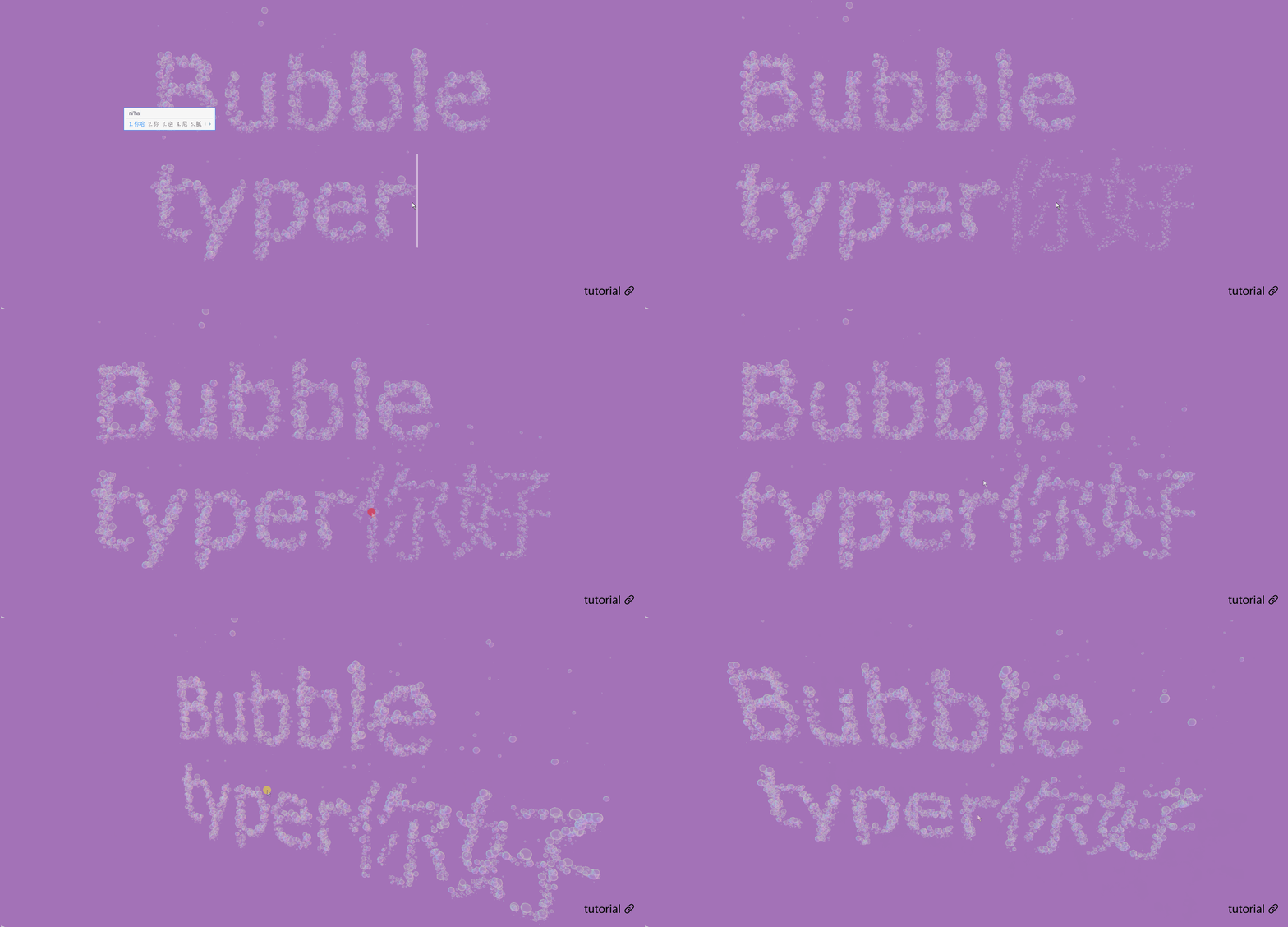
源码

 浙公网安备 33010602011771号