
DOM_Learning
DOM
1. the introduction of DOM
DOM(Document Object Model):JS operate HTML document through DOM, so if we can understand DOM, we can operate WEB page easily.
Document
Document show the whole HTML web page.
Object
Object convert every parts to an object.
Model
It use model to show the relationship between object, so we can get the object simply.
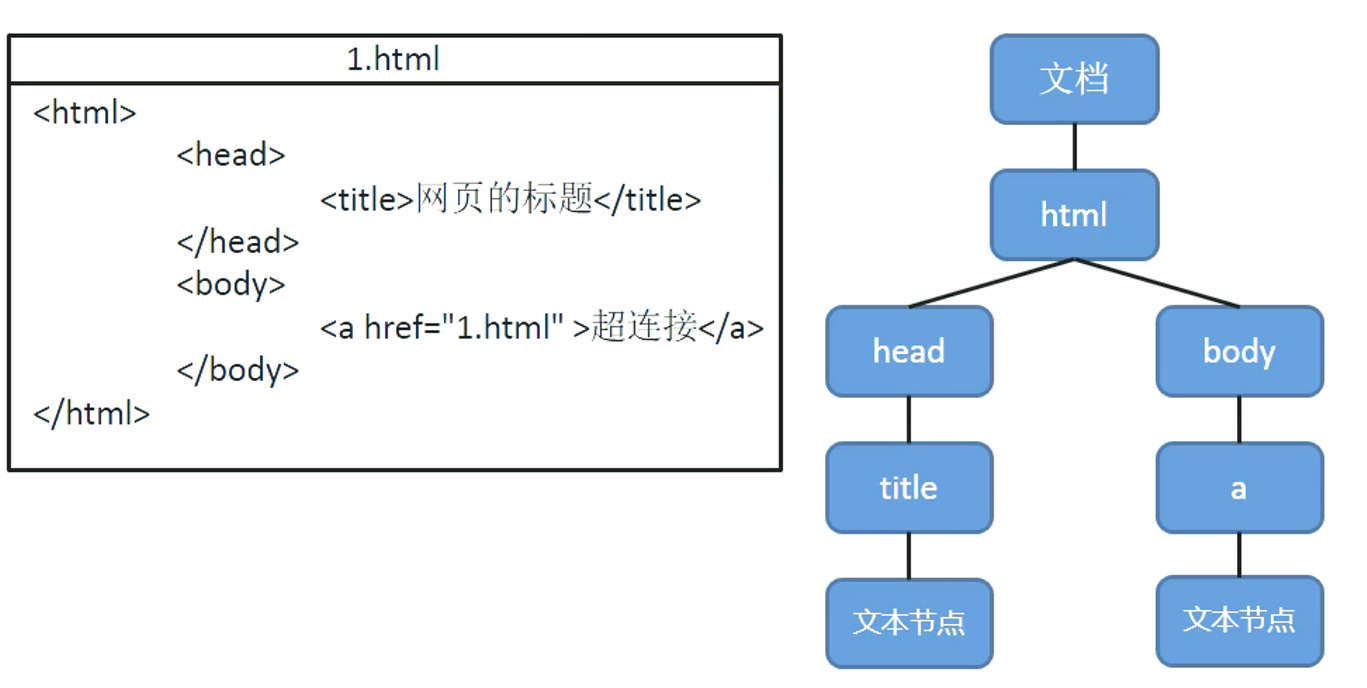
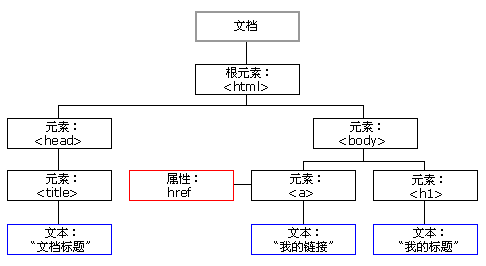
2.Node
Node is the base part to constitute webpage, every part in webpage can be a node
For example: HTML label, property, document, annotation, the whole document.
- HTML label -> element node
- property-> Attribute node
- text -> text node
- document -> document node
Different node type have different properties and methods.
Node type
- document node : all the HTML document
- element node: the HTML label of the HTML document
- Attribute node: the property of the elements
- text node: the text content in the HTML label
Node property
| nodeName | nodeType | nodeValue | |
|---|---|---|---|
| document node | #document | 9 | null |
| element node | label name | 1 | null |
| Attribute node | attribute name | 2 | attribute value |
| text node | #text | 3 | text content |
Document node
window object has the attribute of document object, so we can use it directly.
we can use document to find node object of all the document, and we can create all kinds of node objects through this object.
Element node
All the labels in the HTML are elements node, and we often use it.
The browser will make all the labels into elements node , we can get elements nodes through document's method.
Such as:
document.getElementById()
We can get an element node object through id attribute.
Text node
It says the text contents except the HTML label, and it's the text node.
When we get text node, we get element nodes firstly in common, and then get text node through elements node.
For example,
element node.firstChild;
the first child node is text node in general.
Attribute node
We can get the specified attribute node by element node.
For example:element node.getAttributeNode("attribute name");
We can use it to get element node object.
// get button object
var btn = document.getElementById("btn");
console.log(btn)//<button type="button" id="btn">Button</button>
// modify btn text node's content
btn.innerHTML = "I am a button";
3.Event
Javascript interact with HTML through event.

For example, we can set some Javascript codes in the event , and when the event was triggered, these codes will run.
// click event
btn.onclick = function(){
    alert("Don't touch me.")
}
Like this function that bind events, we call it click response function.
4. document load
When we set <script> label into head, We can met error: UncaughtTypeError: Cannot set property 'innerHTML' of null, so we must set it into</body></html> or <body></body>, if u don't want do that, u can use onload events to bind window object.
window.onload = function(){
    // get button object
	var btn = document.getElementById("btn");
    // bind a click event
    btn.onclick = function(){
    	alert("Don't touch me.")
	}
}
So we can sure the code run after all the DOM finish loading.
5. DOM query
get elements node
getElementById()// get an element node object through id attribute.getElementByTagName()// get a group of element node objects through tag name.getElementByName()// get a group of element node objects through name attribute.
For convenience, we define an universal function, to bind onclick function.
// parameters
// idstr the id value of the object that need to bind onclick() function
// fun the function that need to be called.
funtion myClick(idStr, fun){
    var btn = document.getElementById(idStr);
    btn.onclick = fun;
}
-
getElementById()myClick("btn01",function(){ //innerHTML can get the HTML code inside the element alert(document.getElementById("bj").innerHTML); // Beijing }); -
getElementByTagName()myClick("btn02", function () { // return an Array object that all queried elements are packaged in the object. // even if only one is found, it will be packaged in th Array. var li_list = document.getElementsByTagName("li"); alert(li_list.length); // 14 var arr = []; for(var i=0;i<li_list.length;i++){ arr.push(li_list[i].innerHTML); } alert(arr); // }); -
getElementByName()myClick("btn03", function () { var inputs = document.getElementsByName("gender"); alert(inputs.length); // 2 var arr = []; for(var i=0;i<inputs.length;i++){ // innerHTML to get inner elements's HTML code //if need read elements node attribute, use:element.name // For example,element.id element.name element.value arr.push(inputs[i].value); // Tips:When u need to read class attribute, u need to use element.className arr.push(inputs[i].className); } alert(arr); // male,hello,female,hello});Practice: Photo switch
HTML code
<!DOCTYPE html>
<html lang="en">
<head>
    <meta charset="UTF-8">
    <meta http-equiv="X-UA-Compatible" content="IE=edge">
    <meta name="viewport" content="width=device-width, initial-scale=1.0">
    <title>Picture transform</title>
    <link rel="stylesheet" href="../../css/reset.css">
    <link rel="stylesheet" href="../../css/normalize.css">
    <link rel="stylesheet" href="img.css">
    <script defer src="img.js"></script>
</head>
<body>
    <div class="outer">
        <p id="info">1/5</p>
        <img src="../img/qin.jpeg" alt="琴">
        <button type="button" id="pre">PREV</button>
        <button type="button" id="next">NEXT</button>
    </div>
</body>
</html>
CSS code
.outer {
    width:900px;
    margin:0 auto;
    padding: 0 30px;
    background-color: #bfa;
    text-align: center;
}
js code
// pre
var pre = document.getElementById("pre");
// next
var next = document.getElementById("next");
// image
var img = document.getElementsByTagName("img")[0];
// information
var info = document.getElementById("info");
// image array
var img_arr = ["../img/qin.jpeg","../img/wanye.png","../img/wendi.jpeg","../img/xiao.jpeg","../img/zaoyou.jpeg"]
var index = 0;
var len = img_arr.length;
// pre photo onclick
pre.onclick = function(){
    if(index ==0)
        index = len - 1;
    else
        index--;
    info.innerHTML = (index+1) + "/5";
    img.src = img_arr[index];
}

next.onclick = function(){
    if(index == len-1)
        index = 0;
    else
        index++;
    info.innerHTML = (index+1) + "/5";
    img.src = img_arr[index];
}

Get element node's child nodes
getElementsByTagName(), method, return the child node of the specified name of the current nodechildNodes, attribute, all child node of the current node.firstChild, attribute, the first child node of the current node.lastChild, attribute, the last child node of the current node.
Get parent node and sibling nodes
parentNode, attribute, parent node of the current node.previousSibling, attribute, the previous sibling of the current node.nextSibling, attribute, the next sibling of the current node.
6. Select all practice
HTML code
<!DOCTYPE html>
<html lang="en">
<head>
    <meta charset="UTF-8">
    <meta http-equiv="X-UA-Compatible" content="IE=edge">
    <meta name="viewport" content="width=device-width, initial-scale=1.0">
    <title>Document</title>
    <link rel="stylesheet" href="../../css/reset.css">
    <link rel="stylesheet" href="../../css/normalize.css">
    <link rel="stylesheet" href="p2.css">
    <script defer src="p2.js"></script>
</head>
<body>
    <form name="select" action="">
        What's your favorite sport?<input type="checkbox" id="checkAllBox">全选/全不选
        <br>
        <input type="checkbox" name="items" value="football">football
        <input type="checkbox" name="items" value="basketball">basketball
        <input type="checkbox" name="items" value="badminton">badminton
        <input type="checkbox" name="items" value="table tennis">table tennis
        <br>
        <input type="button" id="checkAllBtn" value="全  选">
        <input type="button" id="checkNoBtn" value="全不选">
        <input type="button" id="checkRevBtn" value="反  选">
        <input type="button" id="sendBtn" value="提  交">
    </form>
</body>
</html>
CSS code
* {
    text-align: center;
    line-height: 150%;
}
js code
var flag;
var items = document.getElementsByName("items");
var len = items.length;
for(var i = 0; i < len;i++){
    items[i].onclick = function(){
        flag = true;
        for(var j=0;j<items.length;j++){
            if(!items[j].checked){
                flag = false;
                break;
            }
        }
        document.getElementById("checkAllBox").checked = flag;
    }
}

document.getElementById("checkAllBox").onclick = function(){

    for(var i = 0; i < len; i++){
        items[i].checked = this.checked;
    }
}

document.getElementById("checkAllBtn").onclick = function(){

    for(var i = 0; i < len; i++){
        items[i].checked = true;
    }

    document.getElementById("checkAllBox").checked = true;
}

document.getElementById("checkNoBtn").onclick = function(){

    for(var i = 0; i < len; i++){
        items[i].checked = false;
    }

    document.getElementById("checkAllBox").checked = false;
}

document.getElementById("checkRevBtn").onclick = function(){

    var flag = true;
    for(var i = 0; i < len; i++){
        items[i].checked = !items[i].checked;
        if(!items[i].checked){
            flag = false;
        }
    }

    document.getElementById("checkAllBox").checked = flag;
}

document.getElementById("sendBtn").onclick = function(){

    var arr = [];
    for(var i = 0; i < len; i++){
        if(items[i].checked){
            arr.push(items[i].value);
        }
    }
    alert("The sports u like are these:\n"+ arr);
}

7. the other query methods of DOM
document.body
var body = document.getElementsByTagName("body")[0];console.log(body);//<body><>body = document.body;console.log(body); //<body></body>console.log(typeof body); //object
document.documentElement
document.documentElement saves html root label.
var html = document.documentElement;console.log(html);
document.all
document.all:all the elements of the page.
document.getElementsByClassName()
query a group of node objects by class value.
IE8 can not use this method, but it can use querySelector().
document.querySelector()
query an element node object by a CSS selector.
IE8 can use it.
But it only return one object that meet conditions.
var div = document.querySelector(".box div");console.log(div.innerHTML);boxs = document.querySelector(".box");console.log(boxs);
document.querySelectorAll()
return an Array object that meet conditions.
boxs = document.querySelectorAll(".box");console.log(boxs); // NodeList(3) [div.box, div.box, div.box]console.log(boxs.length); //3
8. DOM's add/delete/update

document.createElement()
element node object = document.createElement("label name");
document.createTextNode()
text node object = document.createTextNode("text content");
appendChild()
parent node.appendChild(child node);
insertBefore()
parent node.insertBefore(new node, old node);
replaceChild()
parent node.replaceChild(new node, old node);
removeChild()
parent node.removeChild(child node);
child node.parentNode.removeChild(child node);
9. add and delete practice

HTML code
<!DOCTYPE html>
<html lang="en">
<head>
<meta charset="UTF-8">
<meta http-equiv="X-UA-Compatible" content="IE=edge">
<meta name="viewport" content="width=device-width, initial-scale=1.0">
<title>Document</title>
<link rel="stylesheet" href="../../css/reset.css">
<link rel="stylesheet" href="../../css/normalize.css">
<link rel="stylesheet" href="p3.css">
<script defer src="p3.js"></script>
</head>
<body>
<table id="employeeTable">
<tr>
<th>Name</th>
<th>Email</th>
<th>Salary</th>
<th> </th>
</tr>
<tr>
<td>Bleak </td>
<td>bleak@bleak.com </td>
<td>50000 </td>
<td><a href="deleteEmp?id=001">Delete</a></td>
</tr>
<tr>
<td>Chris </td>
<td>chris@chris.com </td>
<td>75000 </td>
<td><a href="deleteEmp?id=002">Delete</a></td>
</tr>
<tr>
<td>Tom </td>
<td>tom@tom.com </td>
<td>2000 </td>
<td><a href="deleteEmp?id=003">Delete</a></td>
</tr>
</table>
<div id="formDiv">
<h4 style="text-align: center;">add new employee</h4>
<table>
<tr>
<td class="work">name:</td>
<td class="inp">
<input type="text" name="empName" id="empName">
</td>
</tr>
<tr>
<td class="work">email:</td>
<td class="inp">
<input type="text" name="email" id="email">
</td>
</tr>
<tr>
<td class="work">salary</td>
<td class="inp">
<input type="text" name="salary" id="salary">
</td>
</tr>
<tr>
<td colspan="2" align="center">
<button id="addEmpButton">Submit</button>
</td>
</tr>
</table>
</div>
</body>
</html>
CSS code
table{
    width:50%;
    border:1px solid black;
    border-collapse: collapse;
    margin:0 auto;
    background-color: #bfa;
}

tr>td,tr>th{
    border:1px solid black;
    text-align: center;
}

input{
    background-color: #bfa;
}
JS code
// the function to bind delete emp click event
function delEmp(){
    // add confirm info
    grandParentNode = this.parentNode.parentNode;
    var name = grandParentNode.children[0].innerHTML;
    if(confirm("确认删除" + name + "吗?")){
        //delete grandParentNode
        grandParentNode.parentNode.removeChild(grandParentNode);
    }
    // when u click a hyperlink, the browser will skip page and it's the default action.
    // but we dont want to see this default action, so we can return false to cancel it.
    return false;
}

// when window finish loading
window.onload = function(){
    // 1. delete
    var aList = document.getElementsByTagName("a");
    for(var i = 0; i < aList.length; i++){
        aList[i].onclick = delEmp;
    }

    // 2.add
    document.getElementById("addEmpButton").onclick = function(){
        // to get the input employee name
        var empName = document.getElementById("empName").value;
        // to get the input email
        var email = document.getElementById("email").value;
        // to get the salary
        var salary = document.getElementById("salary").value;

        // empName,email and salary can't be null
        if(!empName || !email || !salary){
            alert("Some data are null,can not add!")
            return;
        }

        // use regular expression to test name whether legal or not
        var testName = /^[A-z]/;
        if(!testName.test(empName)){
            alert("Name must start with letter!");
            return;
        }

        // use regular expression to test email whether legal or not
        var testEmail = /^\w+\.?\w+@\w+\.[A-z]+$/;
        if(!testEmail.test(email)){
            alert("U must input right email address!");
            return;
        }


        // test salary whether legal or not
        if(isNaN(parseFloat(salary))){
            alert("U must input a number!");
            return;
        }

        // create tr element node
        var tr = document.createElement("tr");


        var empNameTd = "<td>" + empName + "</td>";
        var emailTd = "<td>" + email + "</td>";
        var salaryTd = "<td>" + parseFloat(salary) + "</td>";
        var dTd =  "<td><a href=\"javascript:;\">Delete</a></td>";
        tr.innerHTML = empNameTd + emailTd + salaryTd +dTd;

        // to bind the function to delete label
        tr.getElementsByTagName("a")[0].onclick = delEmp;


        var employeeTable = document.getElementById("employeeTable");
        // The browser-generated table structure has a tBody layer inside it
        var tbody = employeeTable.getElementsByTagName("tbody")[0];
        tbody.appendChild(tr);
    }
}

10. Operate inline style
update elements' inline style
element.style.style name = style value
box1.style.height = "200px";box1.style.width = "200px";
U can query the JS code of every style from w3school.
11. Other style related attributes.
element.offsetHeight return the height of the element.
element.offsetWidth return the width of the element.
element.offsetLeft return the horizontal offset position.
element.offsetParent return the offset container of the element.
element.offsetTop return the vertical offset position of the element.

 浙公网安备 33010602011771号