


102302114_比山布·努尔兰_作业2
作业1
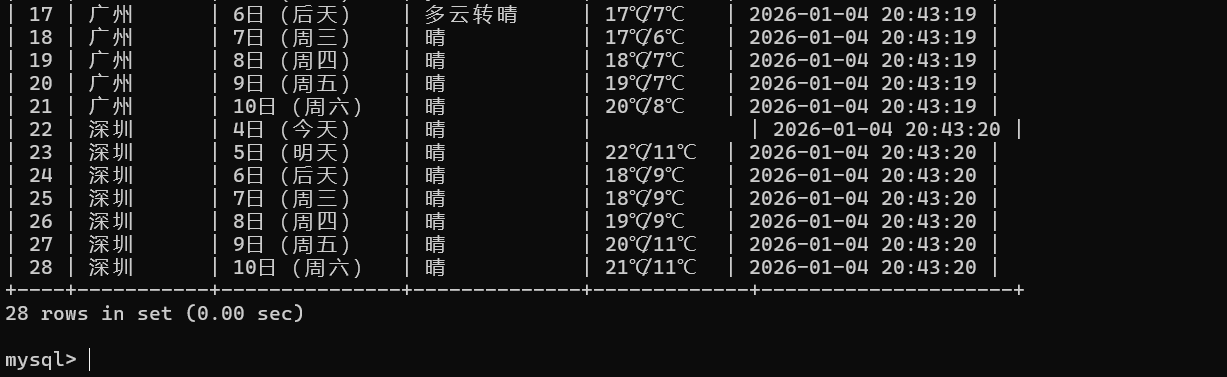
在中国气象网(http://www.weather.com.cn)给定城市集的7日天气预报,并保存在数据库。
作业代码
点击查看代码
import requests
import pymysql
from bs4 import BeautifulSoup
from datetime import datetime

# 数据库统一配置
DB_CONFIG = {
    "host": "localhost",
    "port": 3306,
    "user": "root",
    "password": "123456",
    "database": "spider_db",
    "charset": "utf8mb4"
}


class WeatherCrawler:
    # 初始化爬虫配置
    def __init__(self):
        self.headers = {
            "User-Agent": "Mozilla/5.0 (Windows NT 10.0; Win64; x64) AppleWebKit/537.36 (KHTML, like Gecko) Chrome/120.0.0.0 Safari/537.36"}
        self.city_code = {"北京": "101010100", "上海": "101020100", "广州": "101280101", "深圳": "101280601"}

    # 初始化天气数据表
    def init_weather_table(self):
        conn = pymysql.connect(**DB_CONFIG)
        cursor = conn.cursor()
        create_sql = '''
        CREATE TABLE IF NOT EXISTS weather_forecast (
            id INT AUTO_INCREMENT PRIMARY KEY COMMENT '主键',
            city_name VARCHAR(16) COMMENT '城市名称',
            forecast_date VARCHAR(16) COMMENT '预报日期',
            weather_info VARCHAR(64) COMMENT '天气状况',
            temperature VARCHAR(32) COMMENT '温度范围',
            crawl_time DATETIME DEFAULT CURRENT_TIMESTAMP COMMENT '爬取时间',
            UNIQUE KEY uk_city_date (city_name, forecast_date)
        ) ENGINE=InnoDB DEFAULT CHARSET=utf8mb4;
        '''
        cursor.execute(create_sql)
        conn.commit()
        cursor.close()
        conn.close()

    # 爬取单城市天气
    def crawl_city_weather(self, city):
        if city not in self.city_code:
            print(f"{city} 无对应编码,跳过")
            return
        url = f"http://www.weather.com.cn/weather/{self.city_code[city]}.shtml"
        try:
            resp = requests.get(url, headers=self.headers, timeout=15)
            resp.encoding = "utf-8"
            soup = BeautifulSoup(resp.text, "html.parser")
            # 定位7日预报列表
            weather_list = soup.select("ul.t.clearfix li")[:7]

            conn = pymysql.connect(**DB_CONFIG)
            cursor = conn.cursor()
            for item in weather_list:
                date = item.find("h1").text.strip() if item.find("h1") else ""
                weather = item.find("p", class_="wea").text.strip() if item.find("p", class_="wea") else ""
                # 兼容温度标签结构
                temp_span = item.find("p", class_="tem").find("span")
                temp_i = item.find("p", class_="tem").find("i")
                temp = f"{temp_span.text.strip()}/{temp_i.text.strip()}" if temp_span and temp_i else ""

                if date and weather:
                    insert_sql = '''
                    INSERT INTO weather_forecast (city_name, forecast_date, weather_info, temperature)
                    VALUES (%s, %s, %s, %s) ON DUPLICATE KEY UPDATE
                    weather_info=VALUES(weather_info), temperature=VALUES(temperature);
                    '''
                    cursor.execute(insert_sql, (city, date, weather, temp))
                    print(f"{city} {date}:{weather} {temp}")
            conn.commit()
            cursor.close()
            conn.close()
        except Exception as e:
            print(f"{city} 爬取失败:{e}")

    # 批量处理城市
    def batch_process(self, cities):
        self.init_weather_table()
        for city in cities:
            self.crawl_city_weather(city)
        # 验证数据
        conn = pymysql.connect(**DB_CONFIG)
        cursor = conn.cursor()
        cursor.execute("SELECT city_name, forecast_date, weather_info, temperature FROM weather_forecast LIMIT 10")
        print("\n爬取结果验证(前10条):")
        print("%-16s%-16s%-32s%-16s" % ("城市", "日期", "天气", "温度"))
        for row in cursor.fetchall():
            print("%-16s%-16s%-32s%-16s" % (row[0], row[1], row[2], row[3]))
        cursor.close()
        conn.close()


if __name__ == "__main__":
    crawler = WeatherCrawler()
    crawler.batch_process(["北京", "上海", "广州", "深圳"])
    print("\n天气数据爬取并入库完成")
运行结果
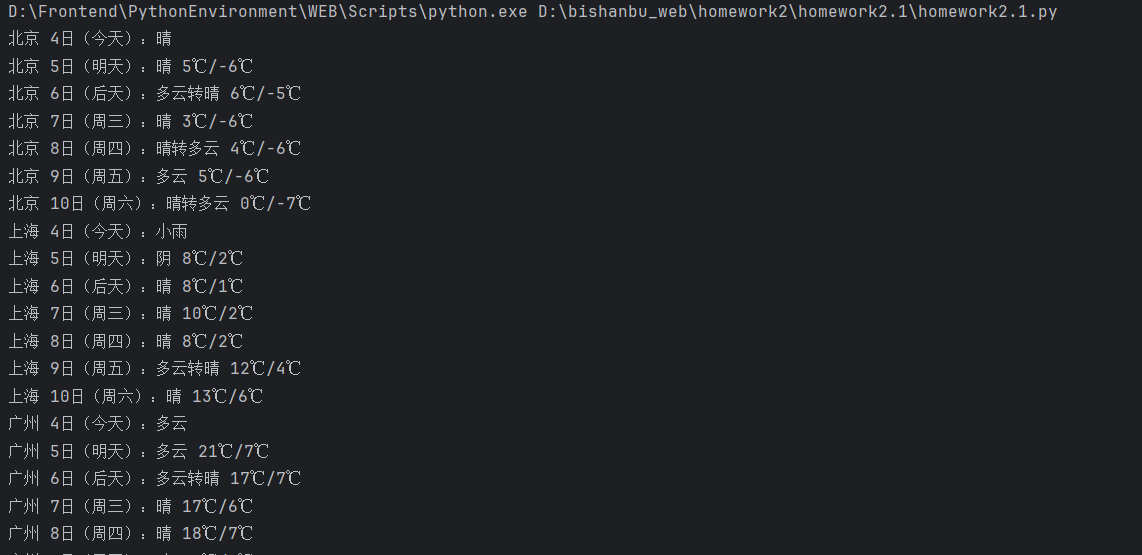
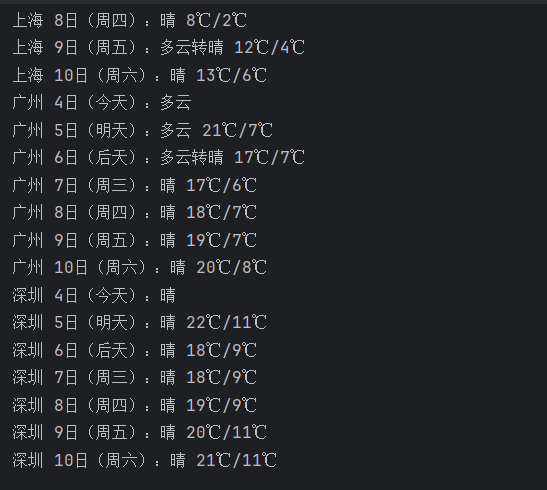
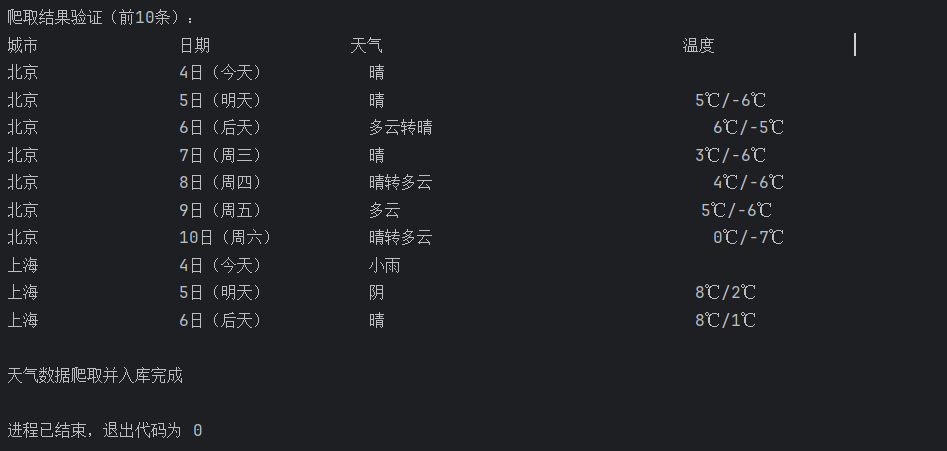
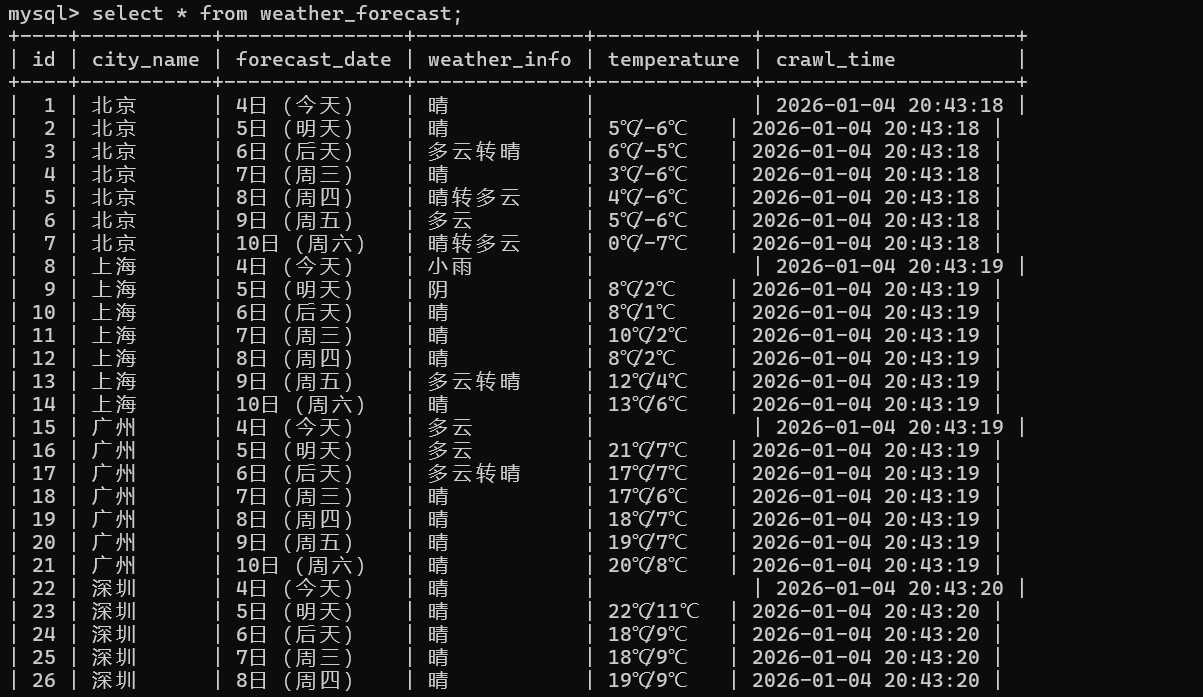
心得体会
通过这个实验,我学会了解析网页并把爬取到的数据存入本地 MySQL数据库中,也学会了处理多城市天气数据。
作业2
要求:
–用requests和BeautifulSoup库方法定向爬取股票相关信息,并存储在数据库中。
–候选网站:东方财富网:https://www.eastmoney.com/
新浪股票:http://finance.sina.com.cn/stock/
–技巧:在谷歌浏览器中进入F12调试模式进行抓包,查找股票列表加载使用的url,并分析api返回的值,并根据所要求的参数可适当更改api的请求参数。根据URL可观察请求的参数f1、f2可获取不同的数值,根据情况可删减请求的参数。
作业代码
点击查看代码
import requests
import pymysql
from datetime import datetime

# 数据库配置
DB_CONFIG = {
    "host": "localhost",
    "port": 3306,
    "user": "root",
    "password": "123456",
    "database": "homework2_2",
    "charset": "utf8mb4"
}

# 东方财富股票接口地址
STOCK_API_URL = "https://push2.eastmoney.com/api/qt/clist/get?np=1&fltt=1&invt=2&fs=m%3A0%2Bt%3A6%2Bf%3A!2%2Cm%3A0%2Bt%3A80%2Bf%3A!2%2Cm%3A1%2Bt%3A2%2Bf%3A!2%2Cm%3A1%2Bt%3A23%2Bf%3A!2%2Cm%3A0%2Bt%3A81%2Bs%3A262144%2Bf%3A!2&fields=f12,f14,f2,f3,f4,f5,f6,f7,f8,f10,f15,f16,f17,f18&fid=f3&pn=1&pz=50&po=1&ut=fa5fd1943c7b386f172d6893dbfba10b&_=1761721260894"


def init_stock_table():
    # 初始化股票数据表
    conn = pymysql.connect(**DB_CONFIG)
    cursor = conn.cursor()
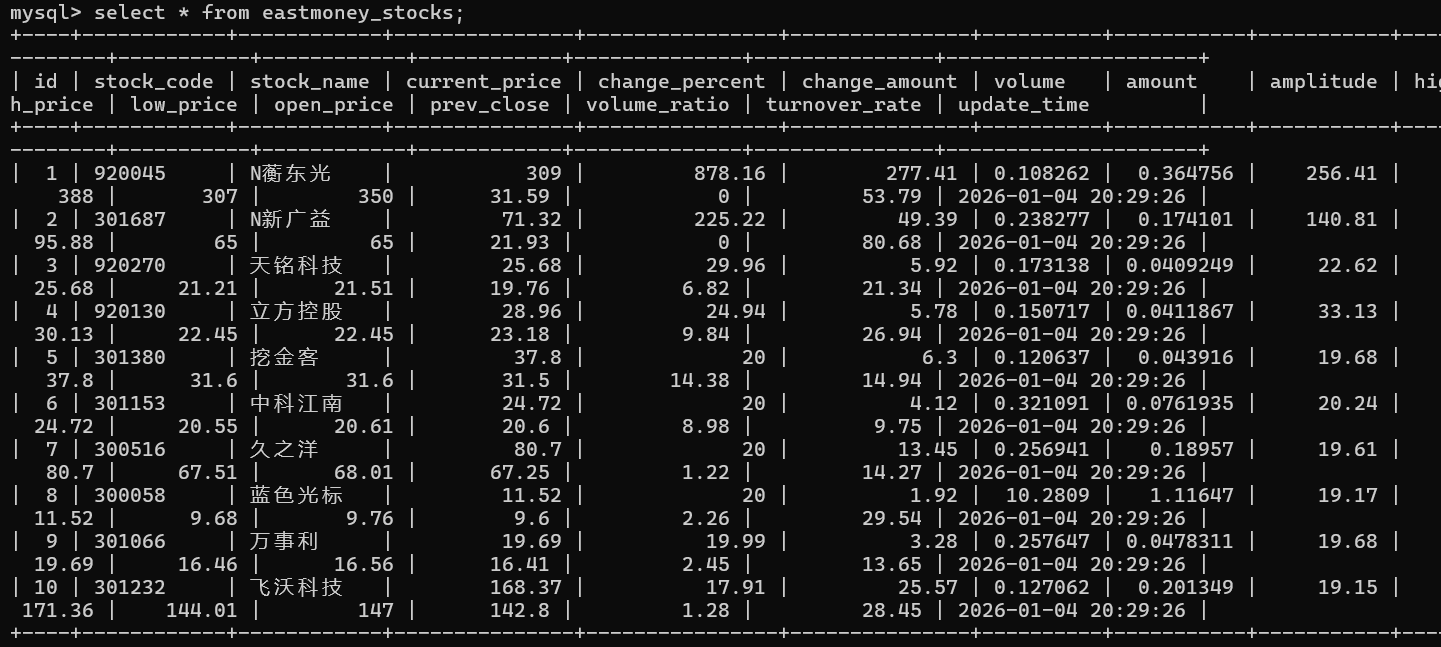
    create_sql = '''
    CREATE TABLE IF NOT EXISTS eastmoney_stocks (
        id INT AUTO_INCREMENT PRIMARY KEY COMMENT '主键',
        stock_code VARCHAR(20) COMMENT '股票代码',
        stock_name VARCHAR(50) COMMENT '股票名称',
        current_price FLOAT COMMENT '最新价',
        change_percent FLOAT COMMENT '涨跌幅(%)',
        change_amount FLOAT COMMENT '涨跌额',
        volume FLOAT COMMENT '成交量(万)',
        amount FLOAT COMMENT '成交额(亿)',
        amplitude FLOAT COMMENT '振幅(%)',
        high_price FLOAT COMMENT '最高价',
        low_price FLOAT COMMENT '最低价',
        open_price FLOAT COMMENT '开盘价',
        prev_close FLOAT COMMENT '昨收价',
        volume_ratio FLOAT COMMENT '量比',
        turnover_rate FLOAT COMMENT '换手率(%)',
        update_time DATETIME COMMENT '更新时间'
    ) ENGINE=InnoDB DEFAULT CHARSET=utf8mb4;
    '''
    cursor.execute(create_sql)
    conn.commit()
    cursor.close()
    conn.close()


# 格式化数值(处理空值/单位转换)
def format_value(val):
    try:
        return float(val) / 100 if val else 0.0
    except:
        return 0.0


if __name__ == "__main__":
    # 初始化数据表
    init_stock_table()
    conn = pymysql.connect(**DB_CONFIG)
    cursor = conn.cursor()

    try:
        # 爬取股票数据
        response = requests.get(STOCK_API_URL, timeout=15)
        data = response.json()
        stock_list = data['data']['diff'][:10]  # 取前10条数据

        # 批量插入数据库
        for stock in stock_list:
            insert_sql = '''
            INSERT INTO eastmoney_stocks (
                stock_code, stock_name, current_price, change_percent, change_amount,
                volume, amount, amplitude, high_price, low_price, open_price,
                prev_close, volume_ratio, turnover_rate, update_time
            ) VALUES (%s, %s, %s, %s, %s, %s, %s, %s, %s, %s, %s, %s, %s, %s, %s)
            '''
            # 构造插入参数
            params = (
                stock.get('f12', ''), stock.get('f14', ''),
                format_value(stock.get('f2')), format_value(stock.get('f3')),
                format_value(stock.get('f4')), format_value(stock.get('f5')) / 10000,
                format_value(stock.get('f6')) / 100000000, format_value(stock.get('f7')),
                format_value(stock.get('f15')), format_value(stock.get('f16')),
                format_value(stock.get('f17')), format_value(stock.get('f18')),
                format_value(stock.get('f10')), format_value(stock.get('f8')),
                datetime.now()
            )
            cursor.execute(insert_sql, params)

        conn.commit()
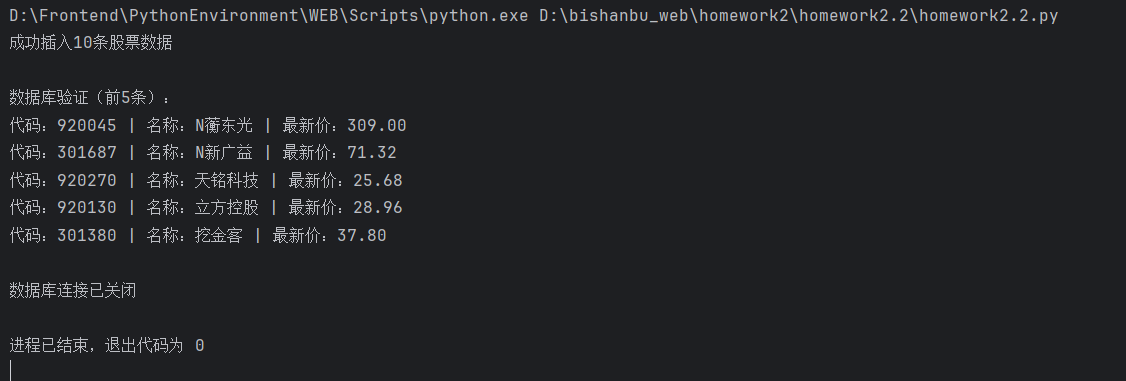
        print(f"成功插入{len(stock_list)}条股票数据")

        # 验证数据
        cursor.execute("SELECT stock_code, stock_name, current_price FROM eastmoney_stocks LIMIT 5")
        print("\n数据库验证(前5条):")
        for row in cursor.fetchall():
            print(f"代码:{row[0]} | 名称:{row[1]} | 最新价:{row[2]:.2f}")

    except Exception as e:
        print(f"执行错误:{e}")
        conn.rollback()
    finally:
        # 关闭数据库连接
        cursor.close()
        conn.close()
        print("\n数据库连接已关闭")
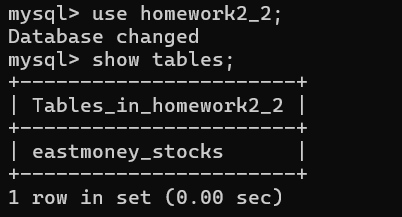
运行结果
心得体会
通过这个实验我学会了怎么爬取动态变化的网页数据。
作业3
要求:爬取中国大学2021主榜(https://www.shanghairanking.cn/rankings/bcur/2021)所有院校信息,并存储在数据库中,同时将浏览器F12调试分析的过程录制Gif加入至博客中。
技巧:分析该网站的发包情况,分析获取数据的api
作业代码
点击查看代码
import requests
import pymysql
from datetime import datetime

# 数据库统一配置
DB_CONFIG = {
    "host": "localhost",
    "port": 3306,
    "user": "root",
    "password": "123456",
    "database": "spider_db",
    "charset": "utf8mb4"
}

# 软科2021大学排名接口
UNIV_API_URL = "https://www.shanghairanking.cn/api/pub/v1/bcur?bcur_type=11&year=2021"


def init_univ_table():
    # 初始化大学排名表
    conn = pymysql.connect(**DB_CONFIG)
    cursor = conn.cursor()
    create_sql = '''
    CREATE TABLE IF NOT EXISTS shanghairanking_2021 (
        id INT AUTO_INCREMENT PRIMARY KEY COMMENT '主键',
        univ_rank INT COMMENT '院校排名',
        univ_name VARCHAR(100) COMMENT '院校名称',
        province VARCHAR(50) COMMENT '所属省市',
        univ_type VARCHAR(20) COMMENT '院校类型',
        total_score FLOAT COMMENT '院校总分',
        crawl_time DATETIME DEFAULT CURRENT_TIMESTAMP COMMENT '爬取时间'
    ) ENGINE=InnoDB DEFAULT CHARSET=utf8mb4;
    '''
    cursor.execute(create_sql)
    conn.commit()
    cursor.close()
    conn.close()


# 格式化排名/分数(处理空值)
def format_data(val):
    try:
        return int(val) if val.isdigit() else None if val == '未公布' else 0
    except:
        return None


if __name__ == "__main__":
    # 初始化数据表
    init_univ_table()
    conn = pymysql.connect(**DB_CONFIG)
    cursor = conn.cursor()

    try:
        # 请求大学排名数据
        headers = {"User-Agent": "Mozilla/5.0 (Windows NT 10.0; Win64; x64) AppleWebKit/537.36"}
        response = requests.get(UNIV_API_URL, headers=headers, timeout=15)
        data = response.json()
        univ_list = data['data']['rankings']

        # 批量插入数据库
        for univ in univ_list:
            insert_sql = '''
            INSERT INTO shanghairanking_2021 (
                univ_rank, univ_name, province, univ_type, total_score
            ) VALUES (%s, %s, %s, %s, %s)
            '''
            # 构造插入参数
            params = (
                format_data(univ.get('ranking', '')),
                univ.get('univNameCn', ''),
                univ.get('province', ''),
                univ.get('univCategory', ''),
                float(univ.get('score', 0)) if univ.get('score') else None
            )
            cursor.execute(insert_sql, params)

        conn.commit()
        print(f"成功插入{len(univ_list)}条大学排名数据")

        # 验证数据(输出前10条)
        cursor.execute(
            "SELECT univ_rank, univ_name, province, univ_type, total_score FROM shanghairanking_2021 ORDER BY univ_rank LIMIT 10")
        print("\n2021软科大学排名(前10条):")
        print("排名  学校名称        地区    类型    总分")
        print("-" * 50)
        for row in cursor.fetchall():
            rank, name, province, type_, score = row
            score = f"{score:.1f}" if score else "未公布"
            print(f"{rank:<4}  {name:<12}  {province:<6}  {type_:<6}  {score}")

    except Exception as e:
        print(f"执行错误:{e}")
        conn.rollback()
    finally:
        # 关闭数据库连接
        cursor.close()
        conn.close()
        print("\n数据库连接已关闭")
运行结果
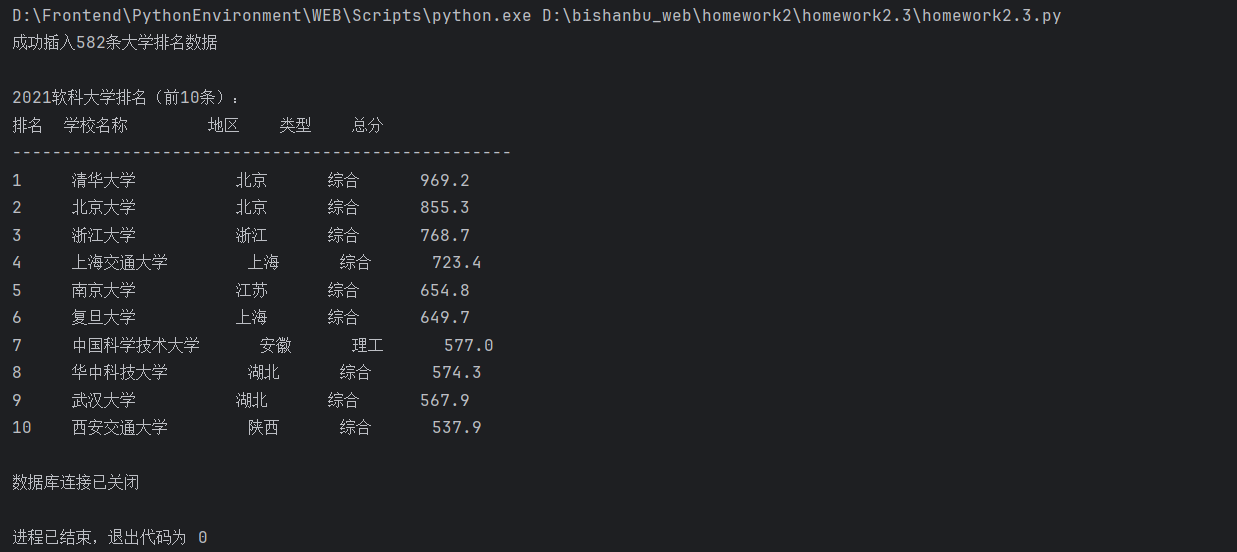
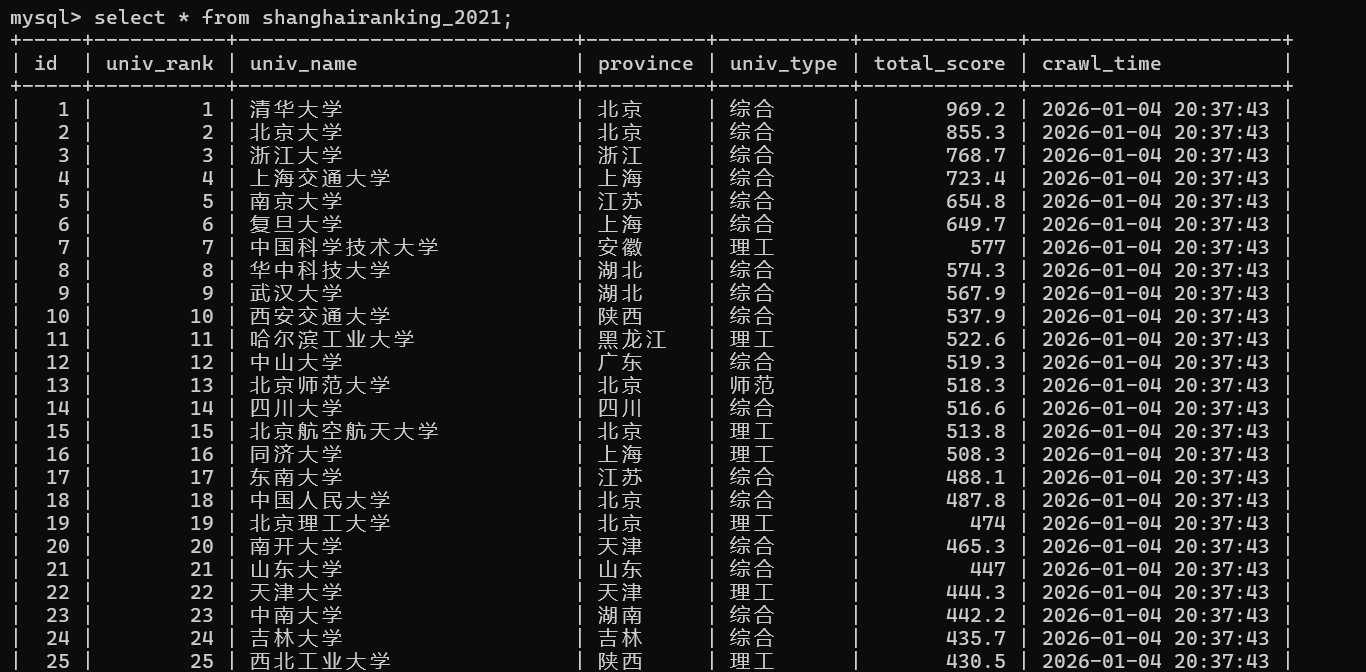
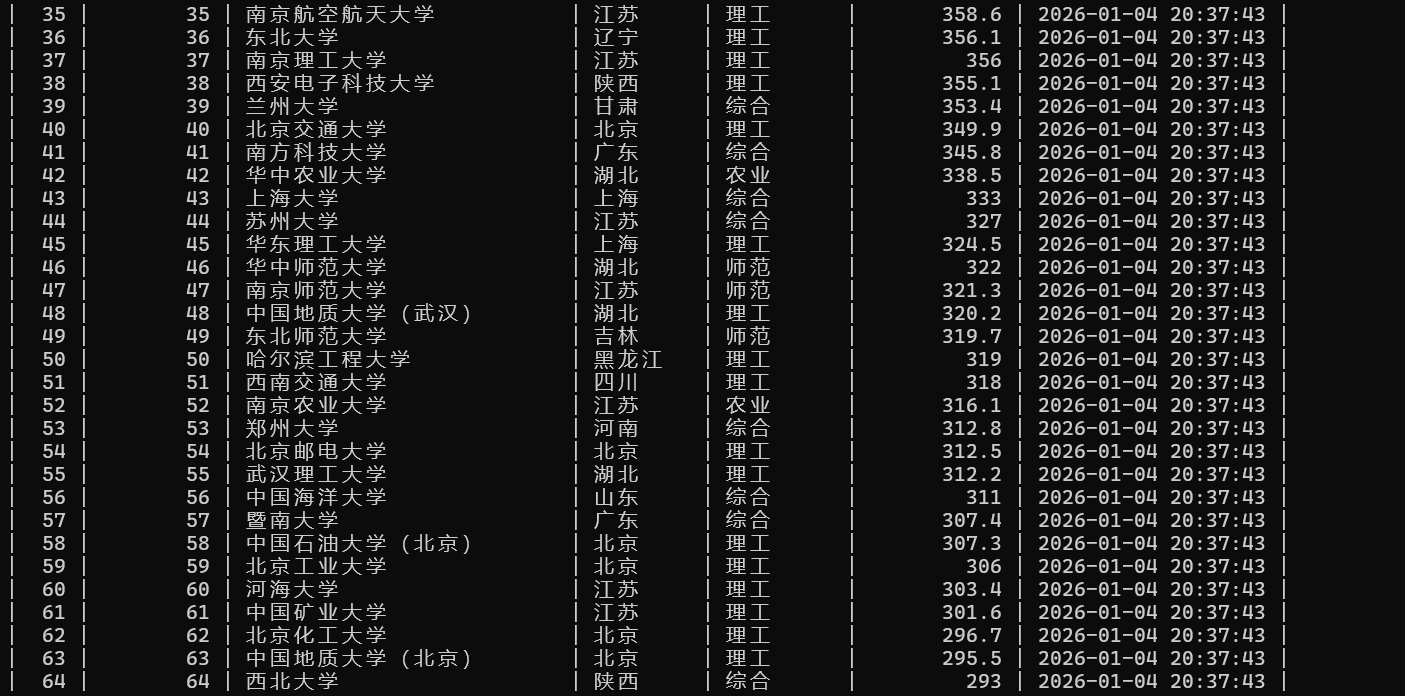
心得体会
通过这个实验,我学会了怎么用浏览器F12调试分析网页信息。

 浙公网安备 33010602011771号